Proscend Manuals & User Guides
Based in Taiwan since 1999, Proscend specializes in mission-critical industrial networking, IoT connectivity solutions, and intelligent network management systems.
About Proscend manuals on Manuals.plus
Společnost Proscend Communications Inc., established in 1999 and headquartered in Taiwan, is a leading provider of industrial-grade networking and connectivity solutions. The company focuses on mission-critical communications for the Internet of Things (IoT) and Industrial IoT (IIoT) sectors. Proscend's product portfolio includes industrial cellular routers, Long Reach Power over Ethernet (PoE) extenders, managed Ethernet switches, and SHDSL modems designed to withstand harsh environments.
With over two decades of experience, Proscend delivers reliable and secure data transmission solutions for diverse applications, including electric vehicle charging networks, transportation, surveillance, and utility infrastructure. Their solutions are often paired with intelligent cloud-based network management platforms to ensure seamless remote monitoring and control. The company provides global support to ensure robust connectivity for deployments of any scale.
Proscend manuals
Nejnovější manuály od manuals+ vytvořeno pro tuto značku.
Průvodce instalací řízeného přepínače PROSCEND 850X-28,850X-28I
Instalační příručka pro průmyslový 850portový GbE řízený přepínač Proscend 12G-12I
PROSCEND M331-IG Průmyslová 4G LTE IoT brána Průmyslový 5G mobilní router Instalační příručka
Průvodce instalací průmyslového celulárního routeru PROSCEND M357-5G
Průvodce instalací průmyslového ethernetového přepínače PROSCEND 850G-10PI
Průmyslový 850portový GbE řízený přepínač PoE PROSCEND 6G-6PI Průvodce instalací průmyslového mobilního směrovače 5G
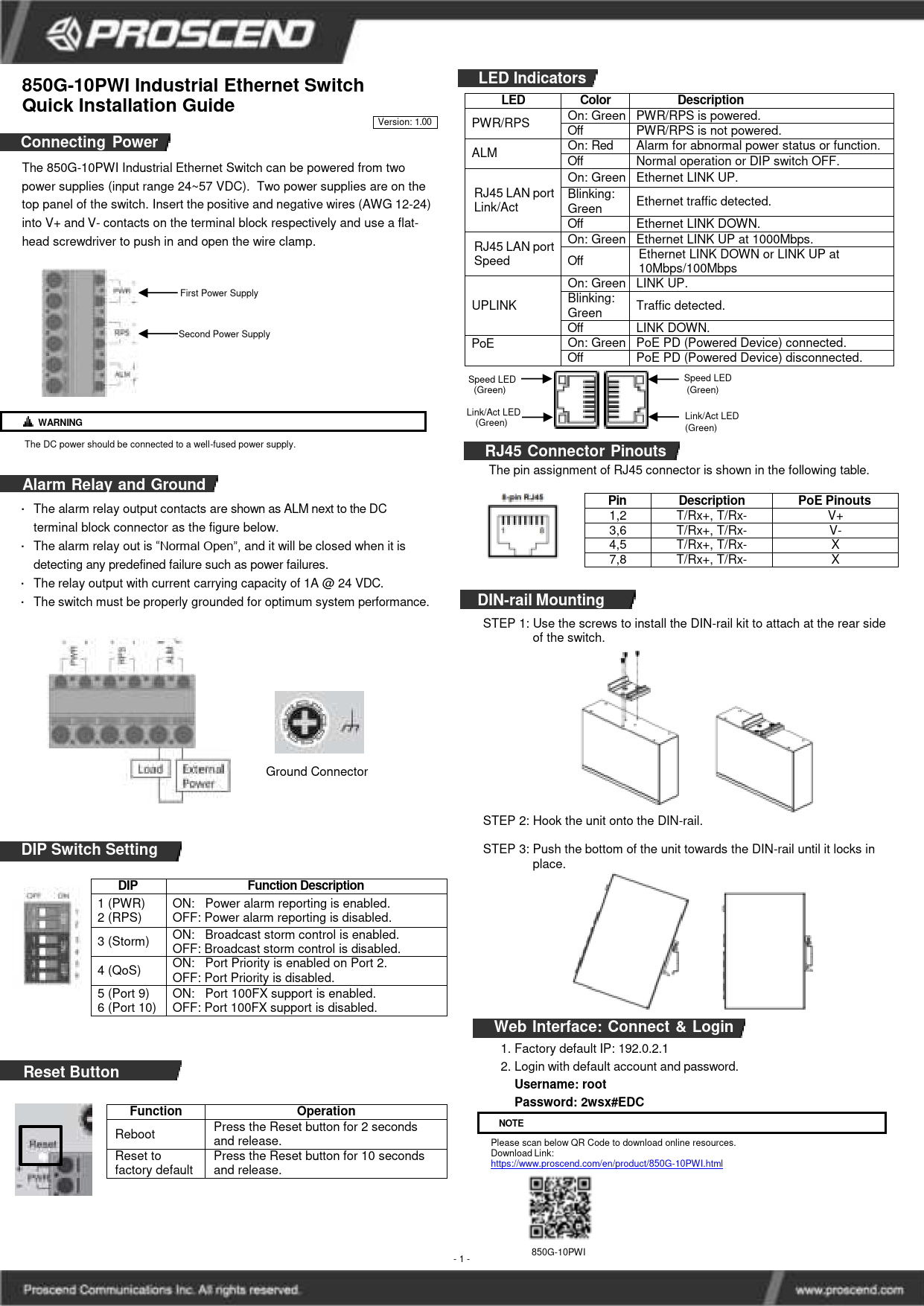
Průvodce instalací průmyslového ethernetového přepínače PROSCEND 850G-10PWI
Průvodce instalací průmyslového ethernetového přepínače PROSCEND 850G-10I
Průvodce instalací průmyslových ethernetových přepínačů PROSCEND 850G-12PI
Proscend 211P/221P Gigabit PoE Injector Quick Installation Guide
PROSCEND M331 Industrial Cellular Router Quick Installation Guide
Průvodce rychlou instalací průmyslového mobilního routeru PROSCEND M351-5G
Průvodce rychlou instalací průmyslových ethernetových přepínačů PROSCEND řady 850G
Stručný návod k instalaci řízených přepínačů PROSCEND 850X-28 a 850X-28I
Průvodce rychlou instalací průmyslového ethernetového přepínače PROSCEND 850G-10PWI
Průvodce rychlou instalací průmyslového ethernetového přepínače PROSCEND 850G-6PI
Průvodce rychlou instalací průmyslového ethernetového přepínače PROSCEND 850G-10I
Stručný návod k instalaci průmyslového mobilního routeru Proscend řady M330
Stručný návod k instalaci ethernetových extenderů Proscend 701EPI/101EPI a 701CPI/101CPI
Stručný návod k instalaci průmyslového mobilního routeru Proscend M331
Proscend support FAQ
Časté dotazy ohledně manuálů, registrace a podpory této značky.
-
What are the default login credentials for Proscend devices?
For many Proscend devices like the M351 router or 850G switch series, the default username is 'root' and the default password is '2wsx#EDC'. Always refer to your specific model's manual to confirm.
-
How do I reset my Proscend router to factory defaults?
Typically, you can reset the device by pressing and holding the Reset button for more than 5 seconds (sometimes up to 10 seconds depending on the model) until the system resets.
-
What does the ALM LED indicate on Proscend switches?
A red ALM (Alarm) LED usually indicates a system failure, such as overheating or an abnormal voltage input. On some models with dual power inputs, it may signal that one of the power supplies is down.
-
How do I insert the SIM card into a Proscend industrial router?
Ensure the power is off. Remove the metal protective cover with a screwdriver. Insert the SIM card into the designated slot with the cut-off edge facing the correct direction (refer to the slot diagram), then push lightly until it locks into place.