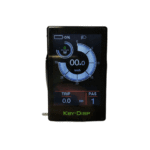
Manuály a uživatelské příručky k displejům Key-Disp
Key-Disp manufactures intelligent LCD and TFT display systems and motor controllers for electric bicycles and scooters.
O manuálech Key-Disp na Manuals.plus
Key-Disp, also known as Key-Display, is a specialized manufacturer based in Tianjin, China, focusing on electronic components for light electric vehicles. The company primarily produces intelligent display meters (LCD and TFT) and motor controllers used by various electric bicycle brands as original equipment (OEM). Key-Disp displays serve as the control hub for e-bikes, providing riders with real-time analytics such as speed, battery life, trip distance, and error diagnostics.
Popular models like the KD986, KD718, and KD21C offer customizable interface settings, allowing users to adjust pedal assist levels, wheel size configurations, and speed limits. These robust, weather-resistant units are designed to integrate seamlessly with standard e-bike motor systems, ensuring a reliable riding experience.
Manuály k Key-Disp
Nejnovější manuály od manuals+ vytvořeno pro tuto značku.
Key-DISP KD986 Inteligentní TFT displej pro E-bike Uživatelská příručka
Key-Disp KD718 Inteligentní barevný LCD displej pro E-bike Uživatelská příručka
Key-Disp KD986 Displej pro elektrické kolo Uživatelská příručka
Key-DISP KD51C Uživatelská příručka displeje Ebike
Key-Disp KD986 eBike Display s USB portem Ebike Screen Uživatelská příručka
Key-Disp KD21C Displej pro elektrické kolo Uživatelská příručka
Key-Disp KD218 Displej pro elektrické kolo Uživatelská příručka
Key-Disp KD218 E-bike Intelligent LCD Display User Manual
KEY-DISP KD126 E-bike Display User Manual
Key-DiSP KD926 E-Bike Intelligent LCD Display User Manual
Uživatelská příručka k displeji pro elektrokolo KD59E - Key-Disp
Key-DiSP KD386 eBike Display User Manual
Uživatelská příručka k inteligentnímu TFT displeji pro elektrokolo Key-Disp KD986
Uživatelská příručka k displeji Key-Disp KD21C pro elektrokolo
Uživatelská příručka k displeji pro elektrokolo KD21C - KEY-DISP
Uživatelská příručka k displeji Key-Disp KD21C pro elektrokolo
Uživatelská příručka k inteligentnímu LCD displeji Key-Disp KD21C pro elektrokolo
Uživatelská příručka displeje pro elektrokolo KEY-DISP KD21C - Průvodce obsluhou a nastavením
Uživatelská příručka k displeji pro elektrokolo KEY-DISP KD21C
Manuály k Key-Disp od online prodejců
KEY-DISP LSW06-75L2AFSB-U Ebike Brushless Motor Controller User Manual
KEY DISP KD21C/KD21P LCD Display Electric Bike Instrument Monitor User Manual
Uživatelská příručka sady pro konverzi elektrokola KD986 s LCD displejem
KD986 E-Bike Computer LCD Display User Manual
KEY DISP KD21C LCD Display User Manual
KEY-DISP KD218/KD286 E-Bike LED Display User Manual
APT 500S Electric Bicycle LCD Display User Manual
KEY DISP KD386 LCD TFT Display Electric Bike Monitor User Manual
KEY-DISP KD58C Electric Bike LCD Display User Manual
KEY DISP KD21C LCD Display User Manual
KD58C Electric Bike LCD Display User Manual
KD26E EBike LED Display User Manual
Manuály ke klíčovým displejům sdílené komunitou
Have a user manual for a Key-Disp display or controller? Share it here to support fellow e-bike riders.
Videonávody Key-Disp
Podívejte se na videa o nastavení, instalaci a řešení problémů pro tuto značku.
KEY-DISP 986 Intelligent Color TFT E-Bike Display with Navigation & Tracking
KEY-DISP 986 Intelligent TFT E-Bike Display: Bluetooth Connectivity & Navigation
KEY-DISP X813-AA26E-12Z9M Bezkartáčový regulátor motoru s kabelovým svazkem
KEY DISP KD26E Elektrické kolo Inteligentní přístrojový displej Vizuální displejview
Key-Disp DP KD986 E-Bike Smart Display | Waterproof Bicycle Computer with App Connectivity
Key-Disp 986 Intelligent E-Bike Display: Bluetooth, Navigation & Find My Tracking
Key-Disp support FAQ
Časté dotazy ohledně manuálů, registrace a podpory této značky.
-
How do I enter the settings menu on my Key-Disp display?
On most Key-Disp models (such as the KD986 or KD718), you can enter the settings menu by holding the '+' and '-' buttons simultaneously for about 2 seconds while the display is powered on.
-
What do the error codes on my Key-Disp screen mean?
Error codes indicate specific system faults. Common codes include 21 (Current Abnormality), 23 (Motor Phase Abnormality), and 30 (Communication Abnormality). Refer to your specific model's manual for a full definition list, as codes can vary.
-
How do I reset the trip distance?
To reset the Trip distance, enter the display settings menu and navigate to 'Trip Reset'. Select 'Yes' to clear the current trip data. Some models may require a specific button combination found in the user manual.
-
Can I charge my phone with the computer display?
Certain Key-Disp models, such as the KD986, are equipped with a USB port that allows you to charge external devices like smartphones while the e-bike system is powered on.
-
How do I switch between Kilometers and Miles?
Enter the settings menu by holding the '+' and '-' buttons, then navigate to the 'Unit' or 'Toggle Unit' option. From there, you can select 'Metric' (km) or 'Imperial' (mile).