1. Úvod
This manual provides comprehensive instructions for the setup, operation, and maintenance of your GOBOULT Mustang Racer Smart Watch. Please read this manual thoroughly before using the device to ensure proper functionality and to maximize your user experience. Keep this manual for future reference.
2. Co je v krabici
Ověřte, zda jsou v balení přítomny všechny položky:
- GOBOULT Mustang Racer Smart Watch
- Nabíjecí kabel
- Uživatelská příručka (tento dokument)
- Záruční list
3. Konec produktuview
Familiarize yourself with the key components of your GOBOULT Mustang Racer Smart Watch.
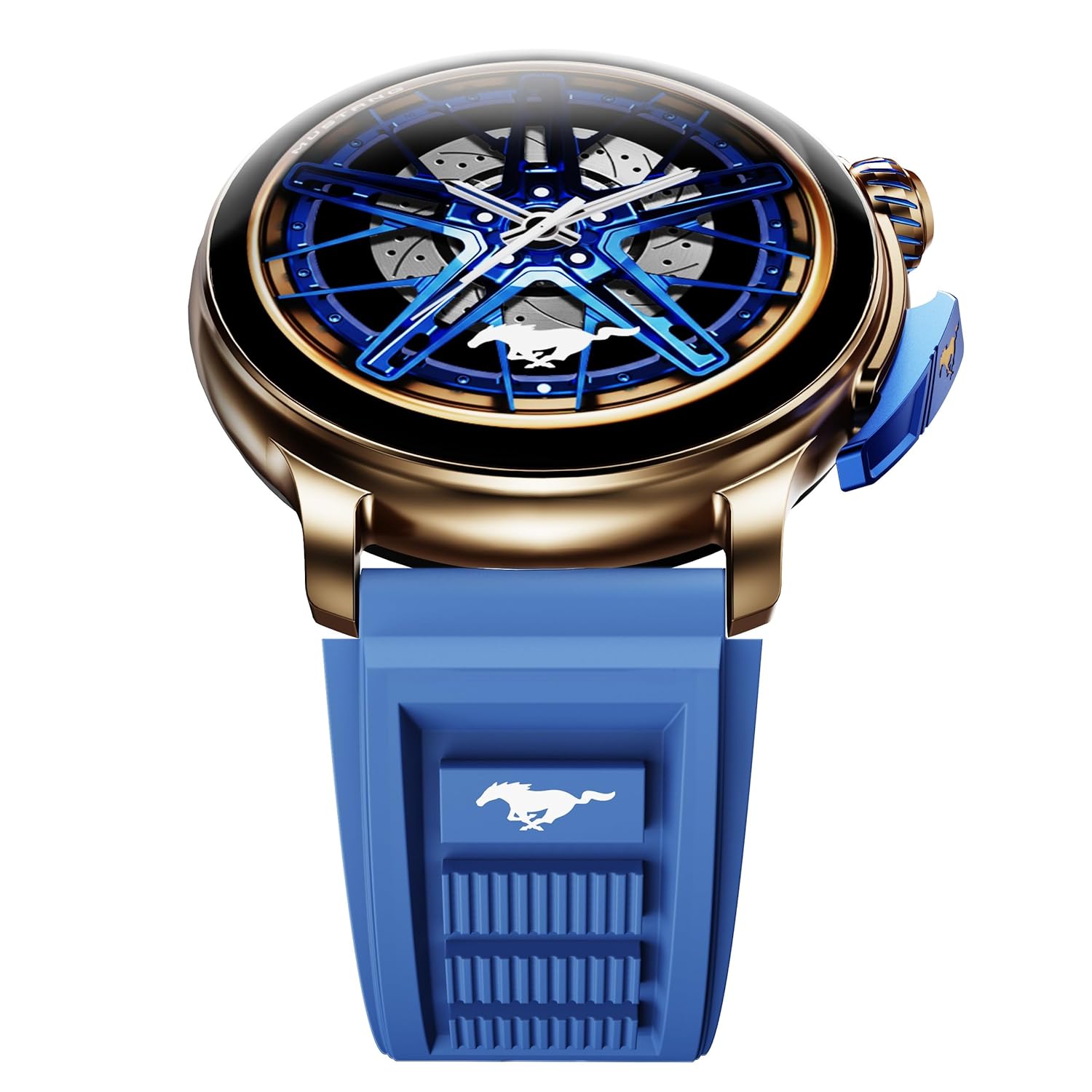
Image: The GOBOULT Mustang Racer Smart Watch, showcasing its 1.43-inch AMOLED display and overall design.
Display and Bezel
The watch features a 1.43-inch AMOLED display with 500 Nits brightness for clear visibility. The functional rotating bezel allows for intuitive navigation through menus and features.

Obrázek: Podrobný view of the smartwatch's 1.43-inch AMOLED display and the rotating bezel, highlighting its design and brightness.
Buttons and Crown
The watch includes a rotating tyre-tread crown for navigation and selection, along with a functional paddle shifter button for quick access to features.

Image: The smartwatch featuring its functional paddle shifter and rotating crown, designed for enhanced control.
4. Nastavení
4.1. Nabíjení chytrých hodinek
Before initial use, fully charge your smartwatch. Connect the magnetic charging cable to the charging pins on the back of the watch and plug the USB end into a compatible power adapter (not included) or a computer's USB port. The watch will display a charging indicator. A full charge takes approximately 120 minutes.
4.2. Zapnutí/vypnutí
- Zapnutí: Press and hold the main power button (crown) for a few seconds until the GOBOULT logo appears.
- Vypnout: From the watch face, swipe down to access quick settings, or navigate to the settings menu. Select "Power Off" and confirm. Alternatively, press and hold the main power button until the power-off option appears.
4.3. Párování s vaším smartphonem
To unlock all features, pair your GOBOULT Mustang Racer Smart Watch with the companion app on your smartphone via Bluetooth.
- Download the official GOBOULT app from your smartphone's app store (iOS App Store or Google Play Store).
- Ujistěte se, že je na vašem smartphonu povoleno Bluetooth.
- Open the GOBOULT app and follow the on-screen instructions to create an account or log in.
- In the app, select "Add Device" or similar option.
- Select "GOBOULT Mustang Racer" from the list of available devices.
- Potvrďte požadavek na párování na smartphonu i na chytrých hodinkách.
Once paired, the watch will synchronize data with your phone, and you can customize settings through the app.

Image: The smartwatch highlighting its Bluetooth V5.3 connectivity for quick syncing and IP67 water resistance.
5. Návod k obsluze
5.1. Navigace
- Přejetí prstem nahoru/dolů/doleva/doprava: Navigate through menus, notifications, and quick access panels.
- Klepněte na: Vyberte položku nebo potvrďte akci.
- Rotating Bezel/Crown: Rotate to scroll through lists or adjust settings. Press to select or return to the home screen.
- Paddle Shifter Button: Customizable shortcut for frequently used functions (e.g., sports modes).
5.2. Volání přes Bluetooth
With integrated speaker and microphone, you can make and receive calls directly from your wrist after pairing with your smartphone.
- Ujistěte se, že jsou hodinky připojeny k telefonu přes Bluetooth.
- Uskutečnění hovoru: Otevřete seznam číselníku nebo kontaktů na hodinkách.
- To receive a call: An incoming call notification will appear on your watch. Tap to answer or decline.
5.3. Watch Faces
Customize your watch's appearance with over 150 watch faces, including exclusive Mustang designs. Long-press the watch face to change it, or use the companion app for more options.

Obrázek: Přehlídka chytrých hodinekasing multiple watch face options, including exclusive Mustang designs.
5.4. Sportovní režimy
The watch supports over 120 sports modes to track your physical activities. Access sports modes from the main menu or via the paddle shifter shortcut (if configured).
- Select your desired sport.
- Start the activity. The watch will record metrics such as duration, calories burned, and heart rate.
- End the activity to save data. Review your performance in the app.

Image: The smartwatch displaying a sports tracking interface, indicating its capability to monitor various physical activities.
5.5. Monitorování zdraví
The GOBOULT Mustang Racer Smart Watch provides comprehensive health tracking features:
- 24x7 Heart Rate Monitor: Neustále sleduje vaši tepovou frekvenci.
- SpO2 Blood Oxygen Saturation Monitor: Měří hladinu kyslíku v krvi.
- Monitorování spánku: Analyzes sleep patterns (deep sleep, light sleep, awake time).
- Monitor stresu: Poskytuje vhled do vaší úrovně stresu.
- Krevní tlak: (Note: Smartwatch blood pressure measurements are for reference only and should not be used for medical diagnosis.)
Access these features from the watch's health menu or view podrobné zprávy v doprovodné aplikaci.

Obrázek: Interní view of the smartwatch highlighting its health tracking sensors, with text indicating features like heart rate, SpO2, sleep, and stress monitoring.
5.6. Hlasový asistent s umělou inteligencí
Activate the AI Voice Assistant on your watch to perform tasks, set reminders, or get information using voice commands. Ensure your watch is connected to your phone for this feature to function.
5.7. Chytrá oznámení
Receive notifications for calls, messages, and app alerts directly on your watch. Manage notification settings through the GOBOULT app.
5.8. Always On Display
The Always On Display feature allows the time and essential information to remain visible on the screen without needing to raise your wrist or press a button. This feature can be enabled or disabled in the watch settings to manage battery consumption.

Image: The smartwatch displaying the time and a car image, illustrating the Always On Display functionality.
6. Vlastnosti a specifikace
Klíčové vlastnosti:
- 1.43" AMOLED Display with 500 Nits Brightness
- Bluetooth Calling (BT V5.3)
- Rotating Bezel for intuitive control
- 150+ Watch Faces, including exclusive Mustang designs
- Hlasový asistent AI
- Health Monitoring: SpO2, Heart Rate, Sleep, Stress, Blood Pressure
- 120+ sportovních režimů
- IP67 Voděodolný
- Up to 7-day battery runtime with fast charging
Technické specifikace:
| Značka | GOBOULT |
| Číslo modelu | GOBOULT Mustang Racer |
| Velikost displeje | 1.43 palce |
| Bezdrátový typ | Bluetooth V5.3 |
| Doba nabíjení baterie | 120 minut |
| Energetický obsah baterie | 1.11 W hodin |
| Voděodolnost | IP67 |
| Hmotnost položky | 55 g |
| Země původu | Čína |
7. Údržba
7.1. Čištění chytrých hodinek
Pravidelné čištění pomáhá udržovat vzhled a funkčnost hodinek:
- Otřete obrazovku a tělo měkkým hadříkem, který nepouští vlákna.
- Na odolné šmouhy lehce otřeteamphadřík vodou. Nepoužívejte agresivní chemikálie ani abrazivní materiály.
- Pro zajištění správného nabíjení pravidelně čistěte nabíjecí kontakty suchým hadříkem.
7.2. Voděodolnost (IP67)
The GOBOULT Mustang Racer Smart Watch is IP67 water resistant, meaning it can withstand immersion in up to 1 meter of fresh water for up to 30 minutes. It is suitable for daily use and light splashes. However, it is not recommended for swimming, showering with hot water, or diving. Avoid exposure to saltwater or chemicals, as this may damage the device.
7.3. Péče o baterie
- Vyhněte se častému úplnému vybíjení baterie.
- Pokud hodinky delší dobu nepoužíváte, skladujte je na chladném a suchém místě.
- Používejte pouze dodaný nabíjecí kabel.
8. Řešení problémů
| Problém | Možné řešení |
|---|---|
| Hodinky se nezapínají. | Ujistěte se, že jsou hodinky plně nabité. Připojte je k nabíječce alespoň na 30 minut. |
| Nelze spárovat se smartphonem. |
|
| Nepřesné zdravotní údaje. |
|
| Krátká výdrž baterie. |
|
9. Záruka a podpora
Your GOBOULT Mustang Racer Smart Watch comes with a warranty as specified on the included Warranty Card. Please refer to the card for details regarding warranty period, coverage, and terms and conditions.
For technical support, product inquiries, or warranty claims, please contact GOBOULT customer service through the contact information provided on your Warranty Card or visit the official GOBOULT webmísto.
Zahrnuté komponenty: Charging Cable, Mustang Racer Apex Blue Smart watch, User Manual, Warranty Card


