Zavedení
This manual provides detailed instructions for the ALFAJR Classic Digital Watch WJ-44SS. Please read this manual carefully before using your watch to ensure proper operation and to fully utilize its features, including prayer times, Qibla compass, and dual calendar system.
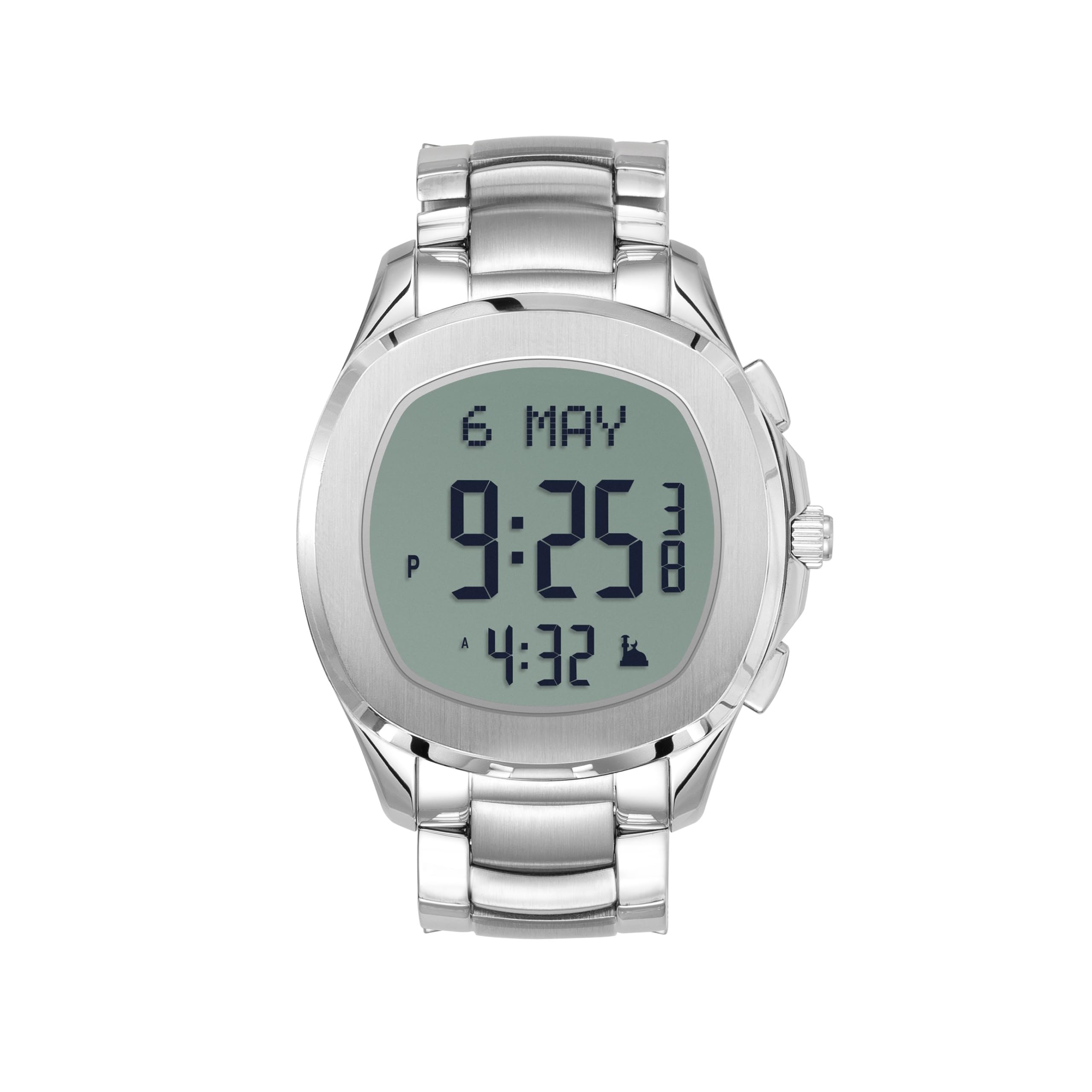
Obrázek 1: Přední strana view of the ALFAJR Classic Digital Watch WJ-44SS. This image shows the watch face displaying time, date, and prayer indicators.
Nastavení
1. Initial Power On and Time Setting
Upon first use or after a battery replacement, the watch will require initial setup. Press and hold the MODE button (usually bottom left) for 3 seconds to enter the setting mode. Use the UPRAVIT button (usually top right) to cycle through settings and the SOUBOR button (usually bottom right) to confirm selections.
2. Setting Date and Language
In setting mode, navigate to the date setting. Adjust the year, month, and day using the UPRAVIT button. Proceed to language selection (Arabic/English) and confirm. The watch supports both Hijri and Gregorian calendars; ensure the correct calendar system is selected.
3. Prayer Time Configuration
The watch features worldwide prayer times. To set this up:
- Enter prayer time setting mode.
- Select your current city or a major city nearby from the pre-programmed list.
- Confirm the selected city. The watch will automatically calculate prayer times based on your location.
- Adjust prayer time calculation methods if necessary, according to your local religious authority.

Obrázek 2: Zpět view of the ALFAJR Classic Digital Watch WJ-44SS. This image displays the engraved details on the stainless steel case back, including model number and water resistance information.
Operace
1. Režimy zobrazení
Stiskněte tlačítko MODE button to cycle through different display modes: Time, Date, Prayer Times, Stopwatch, Alarm, and Qibla Compass.
2. Prayer Time Display and Alarms
In the Prayer Time mode, the watch displays the current prayer time and the next upcoming prayer time. Daily alarms and prayer-specific alarms can be set and activated through the alarm settings. An audible alert will sound at the designated prayer times.
3. Qibla Compass
To use the Qibla compass:
- Enter Qibla Compass mode.
- Hold the watch flat and rotate it slowly until the Qibla indicator points towards the correct direction.
- Ensure you are away from strong magnetic fields that could interfere with the compass accuracy.
4. Dual Calendar (Hijri and Gregorian)
The watch automatically displays both Hijri and Gregorian dates. You can switch between these displays or view both simultaneously depending on the selected display format in the settings.

Obrázek 3: Strana view of the ALFAJR Classic Digital Watch WJ-44SS, showing the crown and control buttons.
Údržba
1. Čištění
Pouzdro hodinek a řemínek otřete měkkým, suchým hadříkem. V případě odolných nečistot použijte lehceamp cloth can be used, followed by immediate drying. Avoid using chemical cleaners, solvents, or abrasive materials.
2. Voděodolnost
The ALFAJR WJ-44SS is water-resistant. This means it can withstand splashes, rain, and brief immersion in water. However, it is not suitable for swimming, diving, or hot water activities (e.g., showers, saunas) as steam and temperature changes can compromise the seals. Do not operate buttons while the watch is wet.
3. Výměna baterie
When the battery is low, the display may dim or certain functions may cease. Battery replacement should be performed by a qualified watch technician to ensure water resistance is maintained. Refer to the specifications for battery type.
4. Skladování
Store the watch in a cool, dry place away from direct sunlight, extreme temperatures, and strong magnetic fields when not in use for extended periods.
Odstraňování problémů
| Problém | Možná příčina | Řešení |
|---|---|---|
| Displej je prázdný nebo tmavý. | Slabá baterie. | Vyměňte baterii. |
| Prayer times are incorrect. | Incorrect city/location setting or calculation method. | Re-enter your city and verify the prayer time calculation method in the settings. |
| Qibla compass is inaccurate. | Interference from magnetic fields; watch not held flat. | Move away from electronic devices or metal objects. Hold the watch flat and recalibrate if necessary. |
| Tlačítka nereagují. | Watch may be in a locked mode or experiencing a temporary software glitch. | Try pressing all buttons to unlock. If unresponsive, a soft reset (refer to advanced manual or contact support) may be required. |
Specifikace
- Model: WJ-44SS
- Materiál pouzdra: Nerez
- Materiál pásku: Nerez
- Rozměry pouzdra: 42 mm (width) x 42 mm (length) x 11.2 mm (thickness)
- Šířka pásma: 22 mm
- Typ displeje: FSTN LCD
- Typ pohybu: Digitální
- Voděodolnost: Yes (suitable for splashes/rain, not swimming/diving)
- Vlastnosti: Worldwide Prayer Times, Digital Qibla Compass, Daily Alarms, Prayer-Specific Alarms, Dual Calendar (Hijri & Gregorian), Bilingual Interface (Arabic/English)
- Hmotnost: 125 g
- Výrobce: ALFAJR TRADING Company
- Země původu: Saúdská Arábie

Figure 4: The ALFAJR Classic Digital Watch WJ-44SS displayed on a wrist, showcasing its size and fit.
Záruka a podpora
Informace o záruce
The ALFAJR Classic Digital Watch WJ-44SS comes with a Omezená záruka. Please retain your proof of purchase for warranty claims. The warranty covers manufacturing defects under normal use. It does not cover damage resulting from misuse, accidents, unauthorized repairs, or normal wear and tear. For specific warranty terms and conditions, please refer to the warranty card included with your product or visit the official ALFAJR webmísto.
Zákaznická podpora
For technical assistance, troubleshooting beyond this manual, or warranty service, please contact ALFAJR customer support. Contact details can typically be found on the official ALFAJR webna místě nebo na obalových materiálech.
Dovozce/Balicí firma: ALFAJR INDIA, 4/617, CHANNANKARA PO, KADINAMKULAM, THIRUVANANTHAPURAM. PIN 695301


