1. Úvod
This manual provides essential instructions for the safe and efficient operation of your TMY 4K Support Outdoor Smart Projector. Please read this manual thoroughly before using the projector and retain it for future reference. The projector offers native 1080P Full HD resolution, supporting 4K input, and features built-in Android TV for direct access to various applications. Its 270° rotatable design, electric focus, and auto keystone correction ensure flexible placement and optimal image quality.
2. Bezpečnostní informace
- Nedívejte se přímo do objektivu projektoru, když je zapnutýamp svítí. Intenzivní světlo může způsobit poškození očí.
- Zajistěte dostatečné větrání kolem projektoru. Neblokujte větrací otvory.
- Keep the projector away from water or other liquids to prevent electric shock.
- Používejte pouze napájecí adaptér dodaný s projektorem.
- Neumisťujte projektor na nestabilní povrchy.
- Nepokoušejte se projektor otevírat ani opravovat sami. Veškerý servis svěřte kvalifikovanému personálu.
- Udržujte projektor mimo dosah zdrojů tepla, jako jsou radiátory, topná tělesa, kamna nebo jiná zařízení produkující teplo.
3. Obsah balení
Ověřte, zda jsou v balení přítomny všechny položky:
- TMY 4K Support Outdoor Smart Projector
- Napájecí adaptér
- Dálkové ovládání
- Uživatelská příručka
4. Konec produktuview
The TMY 4K Support Outdoor Smart Projector is a versatile device designed for various entertainment and presentation needs. It features a compact, rotatable body and delivers native 1080P Full HD visuals with support for 4K input, ensuring vibrant colors and sharp details.

Obraz: Přední úhel view of the TMY Smart Projector, showcasing its compact, modern design in white with a prominent dark lens. The image highlights the device's aesthetic and its rotating base.
Familiarize yourself with the projector's components and connection ports.
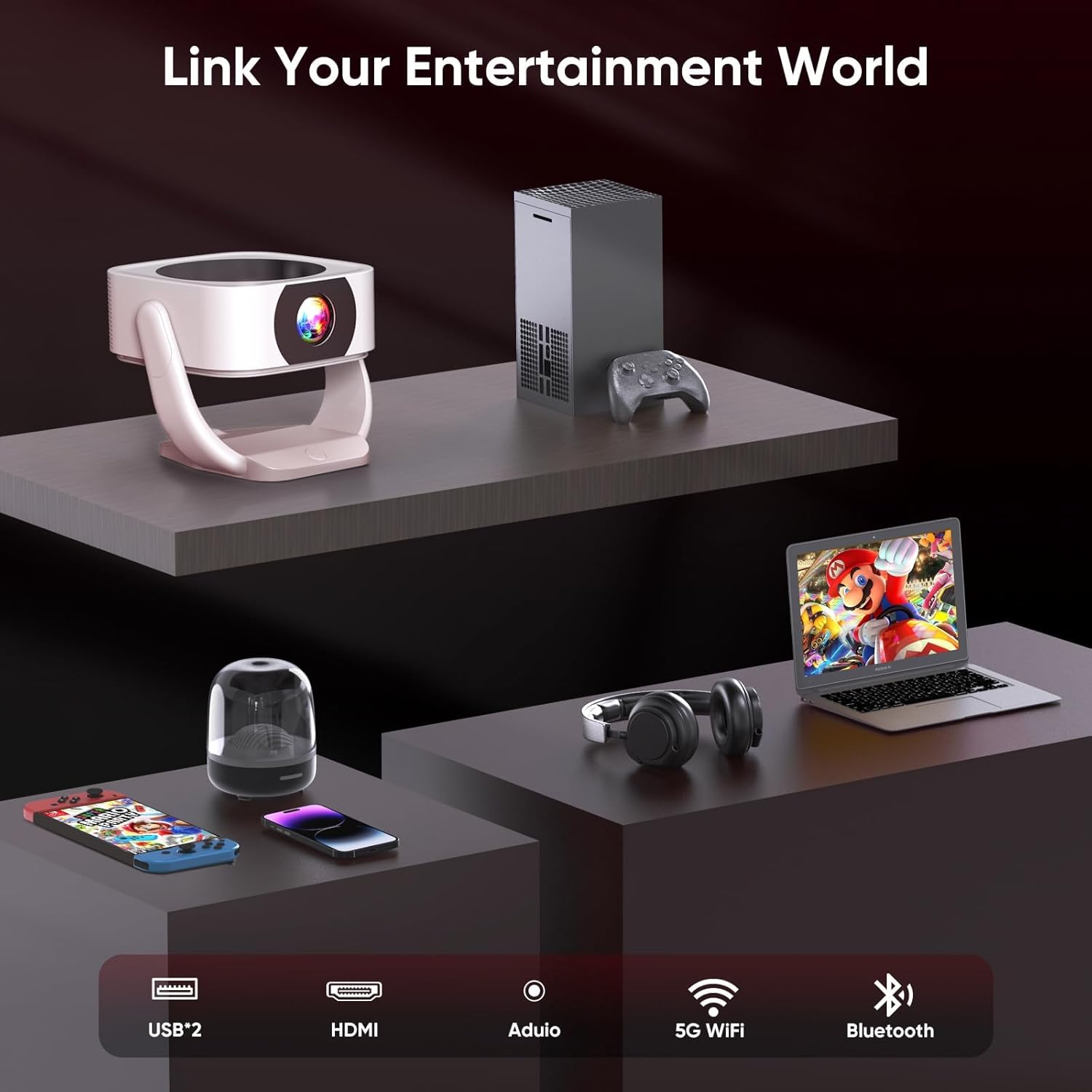
Obraz: Zadní view of the TMY Smart Projector showing its connectivity options. These include USB ports, an HDMI input, an audio output, and indicators for 5G WiFi and Bluetooth connectivity. This allows for a wide range of external device connections.

Obraz: A visual comparison demonstrating the projector's superior color reproduction. One side, labeled 'Ours', displays vibrant and rich colors, while the other side, labeled 'Others', shows muted and less dynamic hues, highlighting the projector's ability to 'Bring Colors to Life'.
5. Nastavení
5.1 Umístění
The TMY Smart Projector's 270° rotatable design and adjustable stand allow for flexible placement. You can project onto walls, ceilings, or even outdoors. Position the projector at a distance between 1 meter (minimum) and 9.98 meters (maximum) from your desired projection surface to achieve the optimal screen size.

Obraz: Two TMY Smart Projectors demonstrating multi-angle projection. One projects onto a wall screen, and the other projects onto the ceiling, illustrating the device's flexibility for various viewnastavení.

Obraz: A TMY Smart Projector shown with its rotating base, highlighting its 270-degree rotatable design for versatile projection angles.
5.2 Připojení napájení
Connect the provided power adapter to the projector's power input port, then plug the adapter into a standard electrical outlet.
5.3 Počáteční zapnutí
Press the power button on the projector or the remote control to turn on the device. The projector will boot up and display the home screen.
5.4 Zaostření a korekce lichoběžníkového zkreslení
The projector features remote electric focus and automatic keystone correction.
- Elektrické ostření: Use the remote control to adjust the focus until the image appears sharp and clear.
- Automatická korekce lichoběžníkového zkreslení: The projector will automatically correct distorted images (trapezoidal effect) to ensure a rectangular projection. Manual adjustments may be available in the settings menu if needed.

Obraz: A family enjoying a movie projected by the TMY Smart Projector. This image highlights the ease of achieving a brilliant image with E-focus and Auto Keystone correction, even when projecting from a casual position.
6. Návod k obsluze
6.1 Chytré funkce a navigace
Your TMY Smart Projector comes with built-in Android TV, providing access to hundreds of applications directly from the device.
- Use the remote control's directional buttons to navigate through the Android TV interface.
- Select applications like YouTube, Netflix, Prime Video, etc., from the home screen to start streaming content.
- Access the app store to download and install additional applications.
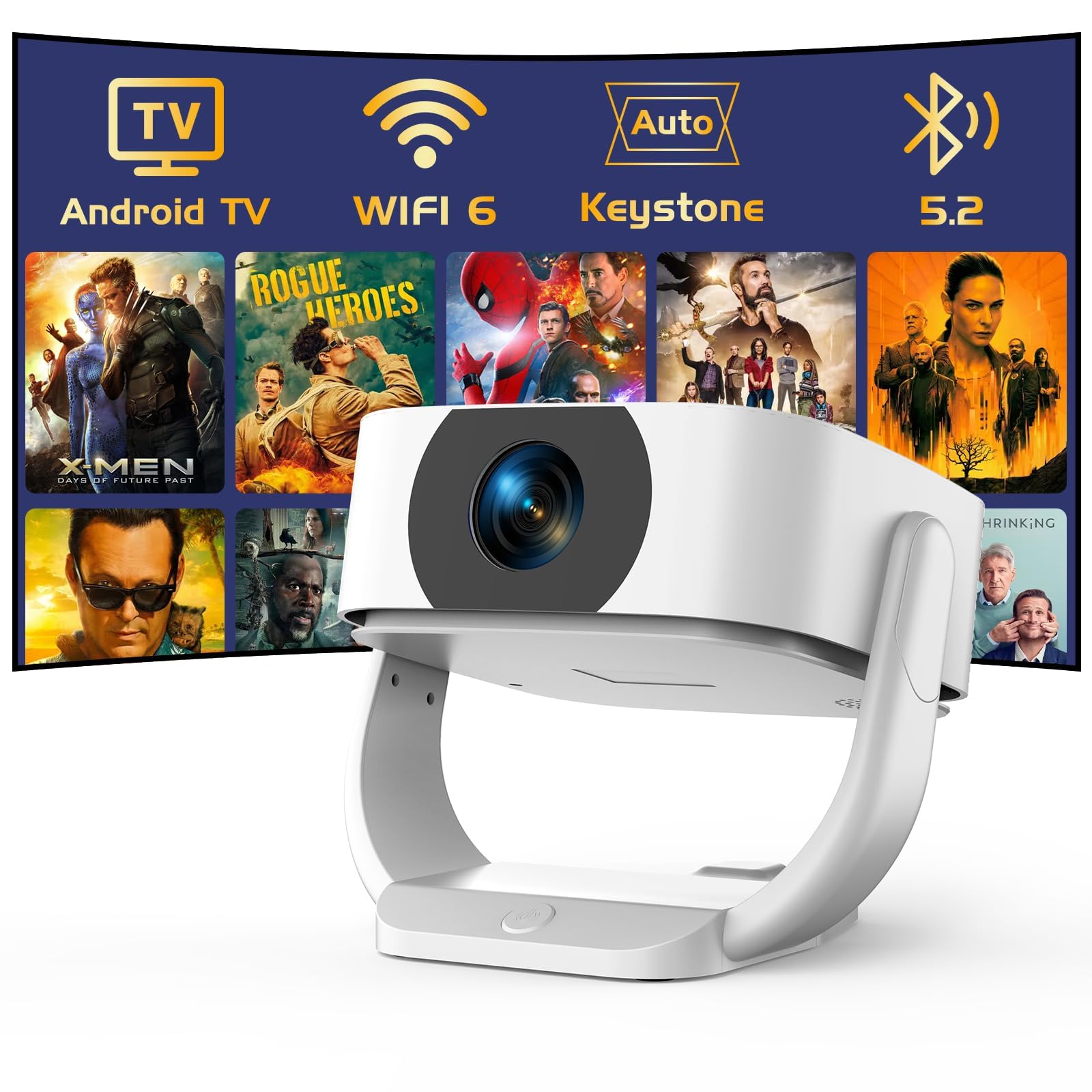
Obraz: The TMY Smart Projector's interface showing a wide array of built-in streaming applications, including HBO Max, YouTube, Netflix, and Prime Video, demonstrating its capability to provide endless entertainment without external devices.
6.2 Připojení k Wi-Fi
Connect your projector to a wireless network for internet access and streaming.
- Go to the "Settings" menu on the home screen.
- Select "Network & Internet" or "WiFi Settings".
- Turn on WiFi and select your desired network from the list.
- Zadejte heslo, pokud se zobrazí výzva, a připojte se.
6.3 Připojení Bluetooth
The projector supports two-way Bluetooth 5.2, allowing it to connect to external Bluetooth speakers or headphones, or function as a standalone Bluetooth speaker.
- Connecting to External Speakers:
- Přejděte do „Nastavení“ > „Bluetooth“.
- Povolte Bluetooth a vyhledejte zařízení.
- Vyberte ze seznamu Bluetooth reproduktor/sluchátka, které chcete spárovat.
- Using as a Standalone Bluetooth Speaker:
Refer to the specific instructions in the projector's settings or a dedicated mode for activating its Bluetooth speaker function. This allows you to play audio from your smartphone or other devices through the projector's speakers.

Obraz: A visual representation of the projector's two-way Bluetooth 5.2 capabilities. It shows the projector connecting wirelessly to an external Bluetooth speaker and also receiving audio from a smartphone, demonstrating its versatility as both a source and a receiver for audio.
6.4 Zrcadlení obrazovky
Mirror your smartphone (iOS/Android) screen to the projector wirelessly.
- Ensure both your smartphone and the projector are connected to the same WiFi network.
- Na projektoru vyberte aplikaci „Zrcadlení obrazovky“ nebo „Přenos“.
- On your smartphone, activate the screen mirroring feature (e.g., "Smart View" on Android, "Screen Mirroring" on iOS Control Center).
- Select the projector from the list of available devices on your phone.
6.5 Připojení externích zařízení (HDMI, USB)
Connect devices such as laptops, gaming consoles, or USB drives.
- HDMI: Connect an HDMI cable from your external device to the HDMI port on the projector. Select the HDMI input source from the projector's input menu.
- USB: Insert a USB flash drive or external hard drive into the USB port. The projector's media player will typically detect the device, allowing you to browse and play media files.
6.6 Electric Zoom
Adjust the screen size without moving the projector using the electric zoom function, which allows for 50%-100% scaling.
- Access the "Picture Settings" or "Projection Settings" menu.
- Locate the "Zoom" or "Scaling" option.
- Upravte procentatage to reduce or enlarge the projected image as desired.

Obraz: A visual comparison demonstrating the TMY Smart Projector's ability to create a large 300-inch screen, significantly larger than a 75-inch TV. It also illustrates the 50% and 100% electric zoom capabilities, allowing users to adjust the screen size without physically moving the projector.
7. Údržba
- Čištění objektivu: Gently wipe the projector lens with a soft, lint-free cloth. For stubborn smudges, use a lens cleaning solution designed for optical surfaces.
- Čištění Casing: Use a soft, dry cloth to clean the projector's exterior. Do not use abrasive cleaners or solvents.
- Větrání: Pravidelně kontrolujte a čistěte větrací otvory, abyste zajistili správné proudění vzduchu a zabránili přehřátí.
- Skladování: Pokud projektor delší dobu nepoužíváte, skladujte jej na chladném a suchém místě, chráněném před prachem a přímým slunečním zářením.
8. Řešení problémů
| Problém | Možná příčina | Řešení |
|---|---|---|
| Není zobrazen žádný obrázek | Power cable disconnected; Incorrect input source; Projector in standby mode. | Check power connection; Select correct input source (HDMI, USB, etc.); Press power button to wake up. |
| Obraz je rozmazaný | Není nastavené zaostření; Projektor je příliš blízko/daleko od promítací plochy. | Use remote control for electric focus adjustment; Adjust projector distance. |
| Obraz je zkreslený (lichoběžník) | Projektor není kolmý k promítací ploše. | Auto keystone correction should activate; Check manual keystone settings if available. |
| Žádný zvuk | Příliš nízká hlasitost; Ztlumeno; Externí zvukové zařízení není připojeno/vybráno. | Increase volume; Unmute; Check Bluetooth connection or external audio cable. |
| Dálkové ovládání nefunguje | Batteries depleted; Obstruction between remote and projector. | Vyměňte baterie; Odstraňte překážky; Zajistěte přímý výhled. |
9. Specifikace
- Značka: TMY
- Model: B0G63V4R3R
- Nativní rozlišení: 1080P Full HD (4K Support)
- Speciální vlastnosti: Built-In Wi-Fi 6, Built-in Android TV, Electric Focus, Auto Keystone Correction, 270° Rotatable Design, Two-way Bluetooth 5.2
- Poměr stran: 16:9
- Obnovovací frekvence: 120 Hz
- Minimální vrhací vzdálenost: 1 metrů
- Maximální vrhací vzdálenost: 9.98 metrů
- Konektivita: HDMI, USB, Audio Out, WiFi 6, Bluetooth 5.2
- Moc: AC 100-240V, 50/60Hz (via power adapter)
- Rozměry (balík): 24.7 x 22.4 x 18.7 cm
- Hmotnost (balíku): 1.61 kg
- Země původu: Čína
10. Záruka a podpora
For warranty information and technical support, please refer to the warranty card included with your product or visit the official TMY webmísto.
Kontaktní informace pro podporu jsou obvykle k dispozici na webových stránkách výrobce. webmístě nebo na obalu produktu.


