1. Úvod
This manual provides essential information for setting up, operating, and maintaining your NiPoGi P2-3300U Mini PC. Please read it thoroughly before using the device to ensure optimal performance and longevity.
Konecview video showcasing the compact design, AMD Ryzen 3300U processor, memory and storage expansion, multiple display output, various ports, efficient cooling, and diverse usage scenarios of the NiPoGi P2-3300U Mini PC.
Klíčové vlastnosti:
- Procesor: AMD Ryzen 3 3300U (up to 3.5GHz, 4 Cores/4 Threads)
- Operační systém: Windows 11 Pro
- Paměť: 16 GB DDR4 (rozšiřitelná až na 32 GB)
- Skladování: 512GB M.2 2280 SSD (expandable up to 4TB)
- Grafika: Integrated Graphics with 4K@60Hz support
- Výstup displeje: Supports up to 3 screens simultaneously (HDMI 2.0, DisplayPort 1.4, USB 3.2 Gen1 Type-C)
- Konektivita: USB 3.2 x6, USB 3.2 Gen1 Type-C x1, 1000Mbps Wired LAN, Wi-Fi 5GHz, Bluetooth 4.2
- Chlazení: Efficient and silent cooling fan system
- Zabezpečení: TPM 2.0 chip for enhanced data protection
- Design: Ultra-compact and lightweight (approx. 128.2×128.2×44mm), VESA mount compatible

Diagram showing the compact size and key features like 4K output, Windows 11 Pro, 512GB SSD, 16GB DDR4, LAN, Bluetooth 4.2, and WiFi 5.
2. Obsah balení
Než budete pokračovat v instalaci, ověřte si prosím, zda balení obsahuje všechny níže uvedené položky:
- NiPoGi P2-3300U Mini PC
- Napájecí adaptér
- HDMI kabel
- VESA Mount
- Šrouby pro držák VESA
- Uživatelská příručka

Image showing the package contents, including the mini PC, power adapter, HDMI cable, VESA mount, and user manual.
3. Průvodce nastavením
3.1 Připojení periferních zařízení
Identify the various ports on your Mini PC to connect your display, keyboard, mouse, and other devices.

Detailní view of the mini PC's ports, including USB, HDMI, DP, LAN, and Type-C.
- Moc: Připojte napájecí adaptér k portu stejnosměrného proudu na Mini PC a poté do elektrické zásuvky.
- Zobrazit: Connect your monitor(s) using the HDMI 2.0, DisplayPort 1.4, or USB 3.2 Gen1 Type-C ports. The Mini PC supports up to three displays simultaneously.
- Klávesnice a myš: Connect your USB keyboard and mouse to any of the available USB 3.2 ports.
- Síť: For a wired connection, connect an Ethernet cable to the RJ45 LAN port. For wireless, the device supports Wi-Fi 5GHz.
- Zvuk: Připojte sluchátka nebo reproduktory k 3.5mm audio konektoru.
3.2 Instalace držáku VESA
The Mini PC can be mounted on the back of a VESA-compatible monitor to save desk space.
- Attach the VESA mount bracket to the back of your monitor using the provided screws.
- Slide the Mini PC onto the mounted bracket until it clicks securely into place.

Mini PC mounted on the back of a monitor using a VESA mount.
3.3 Počáteční spuštění a nastavení systému Windows 11 Pro
After connecting all necessary peripherals and power, press the power button to turn on the Mini PC. Follow the on-screen instructions to complete the initial setup of Windows 11 Pro.
4. Návod k obsluze
4.1 Základní obsluha
The NiPoGi P2-3300U Mini PC is designed for smooth performance across various daily tasks:
- Web Procházení: Enjoy fast and stable internet access with Wi-Fi 5GHz or wired LAN.
- Document Creation: Efficiently work on office applications for documents, spreadsheets, and presentations.
- Online schůzky: Participate in video conferences with reliable connectivity.
- Přehrávání videa: Stream 4K content smoothly.

Various usage scenarios: video conferencing, light gaming, data analysis, and movie watching.
4.2 Multitasking and Multi-Display
The AMD Ryzen 3 3300U processor ensures efficient multitasking, allowing you to run multiple applications simultaneously without significant slowdowns.

Multiple application windows open on a screen, illustrating the mini PC's multitasking capabilities.
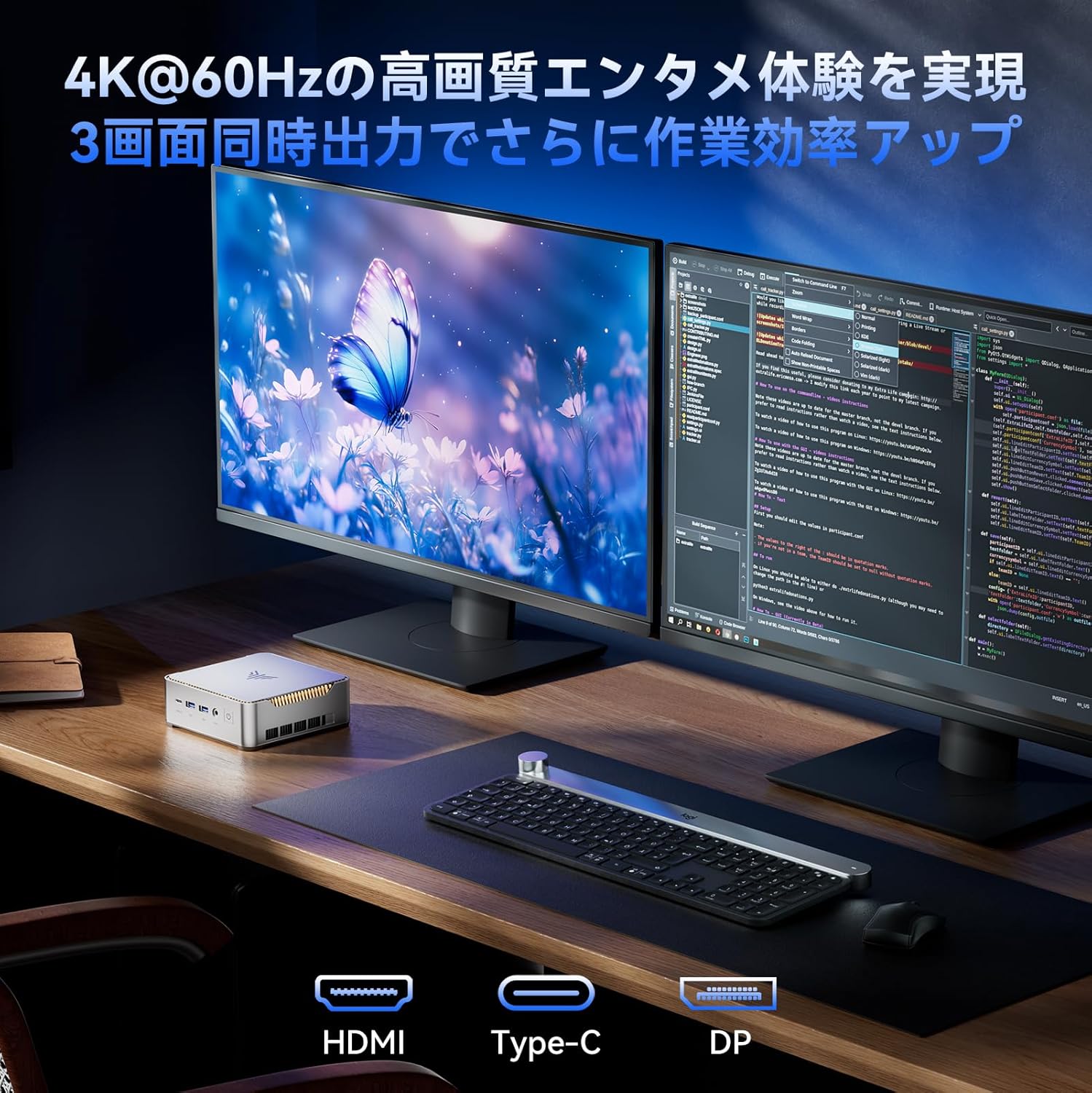
With support for up to three 4K@60Hz displays, you can expand your workspace for enhanced productivity.

Mini PC connected to multiple monitors, demonstrating multi-display capability.
4.3 Pokročilá nastavení systému BIOS
The unlocked BIOS provides access to advanced settings, including:
- Auto-boot: Configure the system to automatically power on when connected to power.
- Probuzení v reálném čase: Schedule the PC to wake up at a specific time.
- Wake on LAN: Power on the PC remotely over a network connection.
5. Údržba a modernizace
5.1 Efficient Cooling System
The Mini PC features an efficient and silent cooling fan system to prevent overheating and maintain stable performance even during extended use. The design ensures heat is effectively dissipated from the interior.
Vnitřní view of the mini PC highlighting the cooling fan and heat dissipation system.

Image depicting a user working on the mini PC at night while a child sleeps, emphasizing silent operation.
5.2 Rozšíření úložiště a paměti
The Mini PC comes with 16GB DDR4 RAM and a 512GB M.2 2280 SSD. Both can be upgraded:
- Paměť: Expandable up to 32GB DDR4 SO-DIMM.
- Skladování: The M.2 2280 SSD can be replaced with a larger capacity drive, up to 4TB.
For detailed instructions on how to access and upgrade these components, please refer to the technical support section or contact customer service.

Diagram illustrating the internal memory (DDR4) and storage (M.2 2280 SSD) expansion capabilities.
6. Řešení problémů
If you encounter any issues with your NiPoGi P2-3300U Mini PC, please try the following general troubleshooting steps:
- Bez napájení: Ujistěte se, že je napájecí adaptér bezpečně připojen k Mini PC i k funkční zásuvce. V případě potřeby zkuste jinou zásuvku.
- Bez displeje: Verify that the monitor is powered on and the display cable (HDMI, DP, or Type-C) is firmly connected to both the Mini PC and the monitor. Try a different cable or port.
- Periferní zařízení nebylo detekováno: Ensure USB devices are properly plugged into the correct ports. Try connecting them to different USB ports.
- Pomalý výkon: Close unnecessary applications. Check for available Windows updates. Ensure the cooling vents are not obstructed.
- Problémy se sítí: For wired connections, check the Ethernet cable and router. For Wi-Fi, ensure you are connected to the correct network and the signal is strong.
Pokud problém přetrvává, podívejte se prosím do části Záruka a podpora, kde vám pomohou.
7. Specifikace
| Funkce | Detail |
|---|---|
| Značka | NiPoGi |
| Číslo modelu | P2-3300U-16+512-NEW |
| Rozměry produktu | 128.2 x 128.2 x 44 mm |
| Hmotnost položky | 1.11 kg |
| Značka CPU | AMD |
| Typ CPU | Ryzen 3 3300U |
| Rychlost CPU | 2.1 GHz (up to 3.5 GHz Max Turbo) |
| Počet procesorů | 4 |
| RAM Memory Type | DDR4 SDRAM |
| Velikost nainstalované paměti RAM | 16 GB |
| Maximální podporovaná paměť | 32 GB |
| Velikost pevného disku | 512 GB |
| Typ pevného disku | SSD (M.2 2280) |
| Rozhraní pevného disku | eSATA (Note: M.2 is NVMe/SATA, eSATA is an external interface, likely a translation error in source data) |
| Grafický akcelerátor | Integrovaná grafika |
| Popis grafické karty | Integrovaný |
| VRAM Type | DDR4 SDRAM |
| Rozhraní grafické karty | Integrovaný |
| Rezoluce | 3840 x 2160 (4K) |
| Porty USB 3.0 | 6 |
| HDMI porty | 1 |
| Typ optické mechaniky | Žádný |
| Operační systém | Windows 11 Pro |
| Konektivita | Wi-Fi 5, Bluetooth 4.2, 1000Mbps LAN |
| Speciální funkce | VESA Support, TPM 2.0 |
8. Záruka a podpora
Your NiPoGi P2-3300U Mini PC comes with an Záruka 18 měsíců from the date of purchase. This warranty covers manufacturing defects and malfunctions under normal use. In the event of a defect or malfunction, NiPoGi offers free replacement or return services.
For technical support, warranty claims, or any questions regarding your product, please contact NiPoGi customer service through the official channels provided at the time of purchase or on the NiPoGi webweb. Před kontaktováním podpory si prosím připravte model produktu a informace o nákupu.


