1. Úvod
The OTTOCAST P3 Pro OttoAibox is a smart AI car box designed to enhance your in-car entertainment and connectivity. It integrates Wireless CarPlay and Android Auto, features an Android 13 system, HDMI output for external displays, 5G WiFi, Bluetooth 6, Cloud SIM capabilities, and split-screen functionality. This manual provides detailed instructions for setup, operation, and maintenance to ensure optimal performance of your device.
2. Pokyny k nastavení
Follow these steps to set up your OTTOCAST P3 Pro OttoAibox:
- Připojte zařízení: Plug the OTTOCAST P3 Pro into your car's USB port. Ensure your car supports wired CarPlay or Android Auto for initial connection.
- Connect to Car's Wi-Fi or Hotspot: Once the device boots up, navigate to the network settings on your car's display and connect the OttoAibox to your car's Wi-Fi or a mobile hotspot. This provides internet access for apps and services.
- Začněte řídit: After the initial setup, the device will auto-connect when you start your car, providing a seamless experience for daily use.

Image: Visual guide for the three-step setup process: plugging the device into the car, connecting to the car's Wi-Fi or a hotspot, and beginning to drive.
3. Návod k obsluze
3.1. Hlasové ovládání
The integrated AI voice assistant allows for hands-free control of various functions. Use voice commands to navigate, play music, make calls, and check information without diverting your attention from the road.
- Aktivace: Typically activated by a specific voice command (e.g., "Hey Otto") or a button on your steering wheel/car display.
- příkazy: Examples include "Find a coffee shop nearby," "Play my driving playlist," or "Call [Contact Name]."

Image: A driver interacting with the AI voice assistant for navigation and music, demonstrating hands-free operation.
3.2. Bezdrátové CarPlay a Android Auto
The OttoAibox supports seamless switching between Wireless CarPlay and Android Auto. Use the physical switch on the device to select your preferred mode for compatibility with your smartphone.
- Přepínací režimy: Locate the CP/AA switch on the side of the OttoAibox to toggle between CarPlay and Android Auto compatibility.
- Automatické připojení: After initial pairing, your phone will automatically connect wirelessly to the selected mode when you start your car.

Image: The OTTOCAST P3 Pro device highlighting the physical switch for toggling between CarPlay and Android Auto modes.
3.3. Full Android System & App Access
The device runs on Android 13, providing access to a wide range of applications. You can download and use apps like YouTube, Netflix, Spotify, and more directly on your car's infotainment screen.
- Instalace aplikace: Access the app store (e.g., Google Play Store) through the device's interface to download and install desired applications.
- Streamování: Enjoy video and music streaming services directly on your car's display.

Image: A car's infotainment screen displaying various popular applications like YouTube, Netflix, and Spotify, indicating full Android app access.
3.4. Funkce rozdělené obrazovky
Utilize the split-screen feature to run two applications simultaneously on your car's display. This allows for navigation on one side and entertainment on the other, or any other combination.
- Aktivace: Access the split-screen option from the device's interface.
- Rozvržení: Adjust the screen ratio (e.g., 5:5, 7:3, 3:7) to suit your preference.

Image: A car's display showing split-screen mode with navigation on one side and a music player on the other, illustrating different ratio options.
3.5. Výstup HDMI
The HDMI output allows you to mirror the device's screen to an external display, such as a rear-seat entertainment system. This is ideal for entertaining passengers during long trips.
- Spojení: Connect an HDMI cable from the OttoAibox to your external display.
- Používání: The front screen can be used for navigation while the rear screen streams video content.
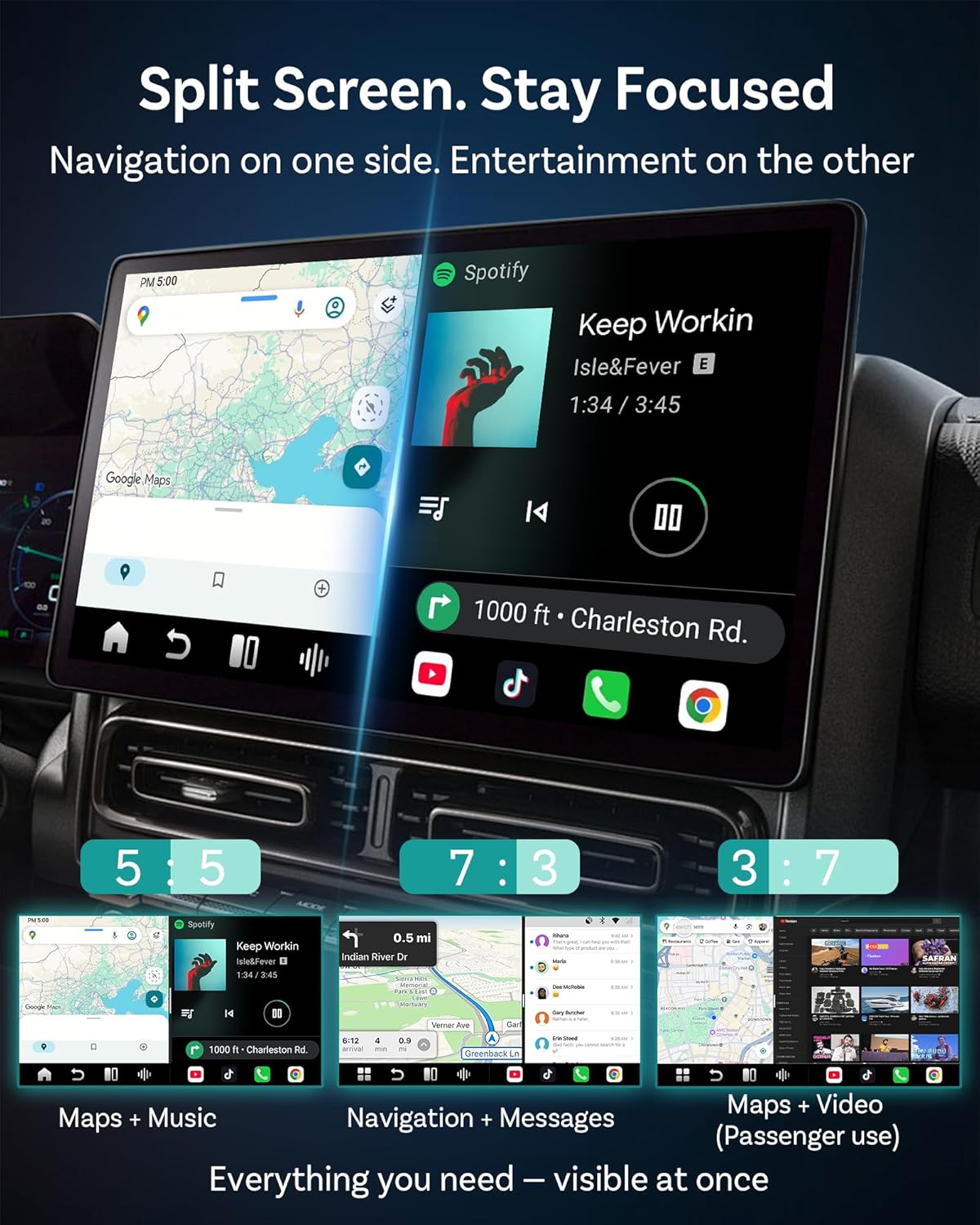
Image: A car interior showing a child watching a video on a rear-seat screen connected via the OttoAibox's HDMI output.
3.6. AiControl App
If your car's touchscreen is not available or preferred, you can control the OttoAibox interface using the AiControl app on your smartphone.
- Stáhnout: Scan the QR code provided or search for "AiControl" in your phone's app store. Download AiControl App
- Řízení: Use your phone as a remote to navigate the OttoAibox interface.

Image: A QR code for downloading the AiControl app, demonstrating how to control the car display from a smartphone.
4. Klíčové vlastnosti
4.1. OttoDrive 3.0 OS
The P3 Pro features the OttoDrive 3.0 operating system, offering a faster, cleaner, and more intuitive user experience. It is optimized for smooth performance and includes day and night driving comfort modes.

Obrázek: Vícenásobný views of the OttoDrive 3.0 OS interface, showcasing its modern design and various functionalities.
4.2. Cloud SIM 3.0
Stay connected without a physical SIM card or hotspot. The built-in Cloud SIM 3.0 technology provides constant internet access, ideal for travelers and daily commuters.
4.3. Dual-Band WiFi 6 & Bluetooth 5.1
Experience ultra-fast wireless connectivity for CarPlay/Android Auto, quick app loading, and lag-free media playback with Dual-Band WiFi 6 and Bluetooth 5.1.
4.4. Smart Auto-Fit Display
The OttoAibox P3 Pro adapts to various car screen shapes, including horizontal, vertical, floating, or built-in displays, ensuring compatibility with most car models.

Obrázek: Přamples of the OttoAibox interface adapting to different car screen orientations and sizes.
4.5. TF Card and SIM Card Support
The device supports TF cards up to 512GB for storing videos and media. It also works with physical SIM cards, hotspots, and car Wi-Fi for flexible connectivity.

Image: A close-up of the OTTOCAST P3 Pro device showing slots for TF (MicroSD) and SIM cards.
4.6. QZSS for GPS Accuracy
Equipped with Quasi-Zenith Satellite System (QZSS) for higher GPS accuracy, ensuring precise navigation for city driving, long trips, and real-time rerouting.

Image: A car navigating with a map displayed on the infotainment screen, highlighting enhanced GPS accuracy with QZSS.
4.7. Qualcomm 6225 Chip
The device is powered by the Qualcomm 6225 chip, providing blazing-fast speed and rock-solid stability for smoother navigation, streaming, and multitasking.

Image: A visual representation of the Qualcomm 6225 chip, emphasizing its role in providing high performance and stability.
5. Údržba
5.1. Aktualizace online
The OTTOCAST P3 Pro supports Over-The-Air (OTA) updates. Regularly check for and install updates to ensure your device has the latest features, performance enhancements, and security patches.
- Kontrola aktualizací: Navigate to the system settings on your OttoAibox interface to find the update section.
- Instalace: Follow on-screen prompts to download and install updates. Ensure a stable internet connection during the update process.
5.2. Trvanlivost a péče
The device is designed for durability and reliability. It has undergone extensive testing, including aging tests, power cycle tests, and road tests.
- Čištění: K čištění zařízení používejte měkký, suchý hadřík. Vyhněte se agresivním chemikáliím nebo abrazivním materiálům.
- Teplota: Operate the device within recommended temperature ranges. Slight warmth during use is normal.

Image: The OTTOCAST P3 Pro device surrounded by various testing metrics, illustrating its robust design and reliability.
6. Řešení problémů
This section addresses common issues you might encounter with your OTTOCAST P3 Pro OttoAibox.
- Device Not Connecting to Phone via Bluetooth:
Ensure the OttoAibox is set to the correct CarPlay or Android Auto mode using the physical switch. Check your phone's Bluetooth settings to see if the device is discoverable and attempt to pair manually. Restart both the OttoAibox and your phone. - Device Hard Crash or Unresponsive:
If the device becomes unresponsive, try disconnecting it from the USB port and reconnecting. If the issue persists, perform a factory reset through the device's settings menu. Note that a factory reset will erase all user data and settings. - Car Touchscreen Not Working with Android Settings:
Some car systems may require specific settings or updates. Ensure the OttoAibox firmware is up to date. If the issue occurs after an update, try reverting to a previous stable version if possible, or contact customer support. - Hulu or Other Apps Not Downloading/Working:
App compatibility can vary. Ensure the device has a stable internet connection. Some apps may have regional restrictions or specific Android version requirements. Verify if the app is officially supported on Android 13 for car infotainment systems. - Lagged or Lower Resolution Android Auto/CarPlay:
Check the USB cable connection; ensure it is secure and a high-quality data cable. A weak Wi-Fi signal can also cause performance issues. Ensure your car's infotainment system is compatible and updated. - No Multitouch Functionality:
Multitouch support can depend on the specific car's infotainment system and the mode (CarPlay/Android Auto) the OttoAibox is operating in. Verify if your car's native system supports multitouch. - Microphone/Hands-Free Function Not Working:
Ensure the OttoAibox is correctly configured for audio input in its settings. If using Android Auto mode, check if microphone permissions are granted to the necessary apps. Test the microphone with different applications. - General Compatibility Issues (e.g., with specific car models):
The device is compatible with vehicles from 2016 onward, but some specific models (e.g., BMW/Tesla) are not supported. Refer to the product specifications for known compatibility limitations.
7. Specifikace
| Funkce | Detail |
|---|---|
| Značka | OTTOCAST |
| Název modelu | P3 Pro OttoAibox |
| Operační systém | OttoDrive 3.0 (based on Android 13) |
| BERAN | 8 GB |
| ROM (úložiště) | 128 GB |
| Bezdrátové připojení | Bezdrátové CarPlay, Bezdrátové Android Auto |
| Wi-Fi | Dvoupásmová WiFi 6 |
| Bluetooth | Bluetooth 5.1 |
| Procesor | Qualcomm 6225 Chip |
| Speciální funkce | AI Voice Assistant, Hands-Free Calls, Split-Screen, HDMI Output, Cloud SIM 3.0, QZSS GPS |
| Podporované internetové služby | Netflix, YouTube, Spotify, etc. |
| Rezoluce | 1080p |
| Typ konektoru | USB A, USB C |
| Podpora TF karet | Až 512 GB |
| Kompatibilní zařízení | Android 11+, Apple iPhone iOS 10+, Vehicles from 2016 onward (Not for BMW/Tesla) |
| Hmotnost položky | 4 unce |
| Rozměry produktu | 3.35 x 0.81 x 3.35 palce |
| Barva | Černý |
8. Záruka a podpora
8.1. Informace o záruce
The OTTOCAST P3 Pro OttoAibox comes with a 2-letá záruka. This warranty covers manufacturing defects and ensures peace of mind regarding the product's reliability. Please retain your proof of purchase for warranty claims.
8.2. Zákaznická podpora
For any setup or usage questions, OTTOCAST provides 24/7 AI customer support. You can access support through the device's interface or the official OTTOCAST webmísto.
- Online zdroje: Visit the OTTOCAST official webweb s nejčastějšími dotazy, průvodci řešením problémů a softwarem ke stažení.
- Kontaktujte podporu: If you require further assistance, contact OTTOCAST customer service directly through their provided channels.

Image: A visual representation of 24/7 AI customer support, indicating assistance is readily available for users.


