Zavedení
This manual provides detailed instructions for the use and maintenance of your GOBOULT Raven True Wireless Stereo (TWS) Earbuds. Please read this manual thoroughly before using the product to ensure proper operation and to maximize your listening experience.

Obrázek: Overview of GOBOULT Raven TWS Earbuds showcasing main features like 70 hours playtime, app support, dual device pairing, 10mm drivers, quad mic environmental noise cancellation, and available color options.
Co je v krabici
Your GOBOULT Raven TWS Earbuds package includes the following items:
- GOBOULT Raven TWS Earbuds (Left and Right)
- Nabíjecí pouzdro
- USB nabíjecí kabel
- Různé velikosti náušníků
- Uživatelská příručka (tento dokument)
- Záruční list
Konec produktuview
The GOBOULT Raven TWS Earbuds are designed for comfort and high-quality audio. Familiarize yourself with the components:
- Sluchátka: Left (L) and Right (R) earbuds with touch control areas and microphones.
- Nabíjecí pouzdro: Stores and charges the earbuds. Features a USB Type-C charging port.
- LED indikátory: On both earbuds and the charging case, indicating battery status, charging, and pairing mode.
- Mikrofony: Quad microphones for Environmental Noise Cancellation (ENC) during calls.

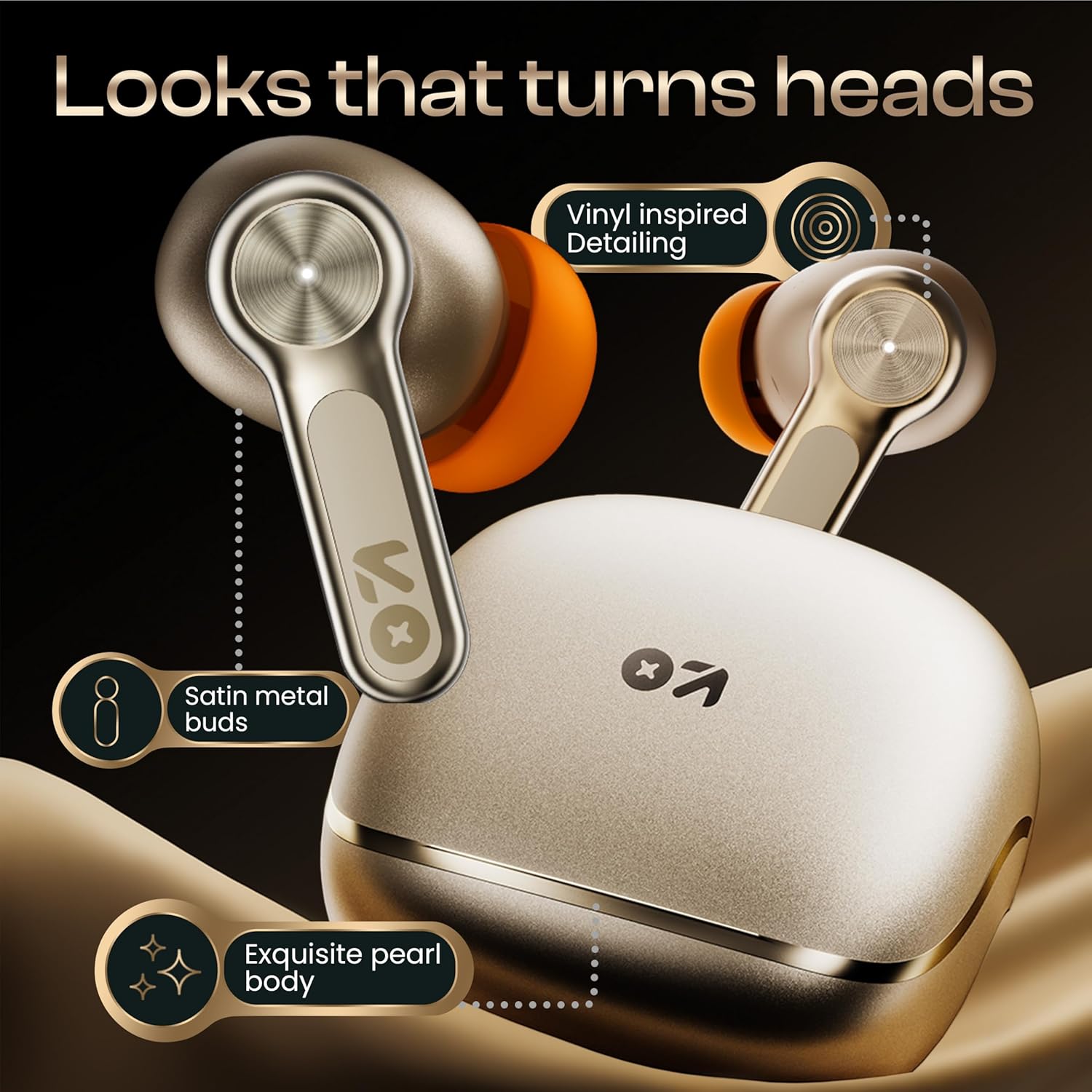
Obrázek: Podrobný view of the GOBOULT Raven earbuds and their charging case, showcasing the satin metal finish and exquisite pearl body design.
Nastavení
1. Počáteční nabíjení
Před prvním použitím sluchátka a nabíjecí pouzdro plně nabijte.
- Vložte obě sluchátka do nabíjecího pouzdra.
- Připojte nabíjecí kabel USB typu C k nabíjecímu portu na pouzdře a ke zdroji napájení.
- LED indikátor na pouzdře bude zobrazovat stav nabíjení. Po plném nabití se indikátor změní nebo zhasne.
A 10-minute charge provides approximately 120 minutes of playtime.

Image: The GOBOULT Raven earbuds being charged in their case, highlighting the impressive 70-hour total battery life and the quick charge capability (10 mins charge for 120 mins playtime).
2. Spárování se zařízením
The earbuds use Bluetooth 5.4 for stable and quick connections.
- Otevřete nabíjecí pouzdro. Sluchátka se automaticky přepnou do režimu párování (LED indikátory budou blikat).
- Na svém zařízení (chytrý telefon, tablet, notebook) povolte Bluetooth.
- Hledat "GOBOULT Raven" in the list of available Bluetooth devices and select it to connect.
- Po připojení přestanou LED indikátory na sluchátkách blikat.
The earbuds feature Blink&Pair™ technology for instant pairing after the initial setup.

Image: The GOBOULT Raven earbuds and case, emphasizing the upgraded Bluetooth v5.4 for instant pairing and reliable connection, along with support for SBC and AAC audio codecs.
3. GOBOULT App Installation
For enhanced customization and control, download the GOBOULT App from your device's app store.
- Hledat "GOBOULT" in the App Store (iOS) or Google Play Store (Android).
- Install the app and follow the on-screen instructions to connect your Raven earbuds.
- The app allows you to customize sound profiles (EQ modes), control features, and manage touch controls.

Image: A smartphone screen displaying the GOBOULT Amp APP, illustrating features like equalizer customization, custom touch controls, gaming mode activation, and widget support for a personalized audio experience.
Návod k obsluze
Dotykové ovládání
The GOBOULT Raven earbuds feature intuitive touch controls on each earbud. The specific functions can often be customized via the GOBOULT App.
| Akce | Funkce |
|---|---|
| Jednoduché klepnutí (L/R) | Přehrát/Pozastavit hudbu, Přijmout/Ukončit hovor |
| Dvojité klepnutí (L) | Předchozí stopa |
| Dvojité klepnutí (R) | Další stopa |
| Trojité klepnutí (L/R) | Aktivujte hlasového asistenta |
| Dlouhé stisknutí (L/P) | Reject Call, Toggle Gaming Mode (customizable) |
Note: These are typical touch control functions. Refer to the GOBOULT App for exact and customizable controls.
Obrázek: Podrobný view of the GOBOULT Raven earbud's touch-sensitive surface, indicating areas for music playback control and call management.
Párování dvou zařízení
The earbuds can connect to two devices simultaneously, allowing seamless switching between them.
- Pair the earbuds with your first device (e.g., smartphone) as described in the "Pairing with a Device" section.
- Disconnect Bluetooth on the first device or put the earbuds back in the case and close it, then open it again to re-enter pairing mode.
- Pair the earbuds with your second device (e.g., laptop).
- Reconnect the earbuds to the first device via its Bluetooth settings. The earbuds should now be connected to both.
Zvuk se automaticky přepne na zařízení, které přehrává obsah nebo přijímá hovor.

Image: The GOBOULT Raven earbuds and their case positioned between a smartphone and a laptop, demonstrating the dual device pairing feature for seamless switching between audio sources.
Herní režim (ultra nízká latence)
Activate Gaming Mode for a 50ms ultra-low latency experience, ideal for gaming and video playback.
- Gaming Mode can typically be activated via a specific touch control gesture (refer to your GOBOULT App settings or the table above).
- You can also enable/disable Gaming Mode through the GOBOULT App.

Image: The GOBOULT Raven earbuds and their charging case next to a gaming controller, emphasizing the Combat™ Gaming Mode with 50ms ultra-low latency for an optimized gaming experience.
Hlasový asistent
Access your device's voice assistant (Google Assistant, Siri) directly from the earbuds.
- Perform the designated touch control gesture (e.g., triple tap) to activate the voice assistant.
- Speak your command after the prompt.

Image: A composite image illustrating the Smart AI Voice Assistance feature, showing integration with "Ok Google" and "Hey Siri", alongside the IPX5 water-resistant rating of the earbuds.
Údržba
Čištění
- Pravidelně čistěte sluchátka a nabíjecí pouzdro měkkým, suchým hadříkem, který nepouští vlákna.
- Sejměte ušní nástavce a pomocí malého kartáčku nebo vatového tamponu očistěte trysky sluchátek od ušního mazu nebo nečistot.
- Ujistěte se, že nabíjecí kontakty na sluchátkách i pouzdře jsou čisté a suché.
Voděodolnost (IPX5)
The GOBOULT Raven earbuds are IPX5 water-resistant, meaning they can withstand sweat and light rain. They are not designed for submersion in water.
- Do not expose the earbuds to running water or submerge them.
- Pokud navlhnou, důkladně je otřete dosucha, než je vložíte zpět do nabíjecího pouzdra.
Skladování
Když sluchátka nepoužíváte, uložte je do jejich nabíjecího pouzdra, abyste je ochránili a udrželi nabitá.
- Vyhněte se skladování při extrémních teplotách nebo vysoké vlhkosti.
Odstraňování problémů
| Problém | Možné řešení |
|---|---|
| Sluchátka se nespárují |
|
| Funkční pouze jedno sluchátko |
|
| Špatná kvalita zvuku |
|
| Problémy s nabíjením |
|
Specifikace
| Funkce | Detail |
|---|---|
| Název modelu | Raven (Airbass Earbuds) |
| Konektivita | Bluetooth v5.4 |
| Bezdrátové Dosah | Až 10 metrů |
| Ovladače zvuku | 10mm dynamické ovladače |
| Prázdno | Až 70 hodin (s nabíjecím pouzdrem) |
| Doba nabíjení | Approx. 20 minutes (for quick charge) |
| Zvuková latence | 50ms (Gaming Mode) / 45ms (as per spec) |
| Mikrofony | Čtyři mikrofon s potlačením okolního hluku (ENC) |
| Voděodolnost | IPX5 |
| Kontrolní metoda | Dotyk, Hlas |
| Speciální funkce | Dual Device Pairing, GOBOULT App Support, Smart AI Voice Assistance |
| Frekvenční odezva | 20 Hz (dolní hranice) |
| Citlivost | 115 dB |
| Hardwarové rozhraní | USB typ C |
| Rozměry produktu | 5 x 4.5 x 5.4 cm |
| Hmotnost položky | 600 g (hmotnost balení) |
Poznámka: Specifikace se mohou změnit bez předchozího upozornění.
Záruka a podpora
Informace o záruce
Your GOBOULT Raven TWS Earbuds come with a 1letá záruka výrobce from the date of purchase. This warranty covers manufacturing defects and ensures trusted performance and premium build quality.
- Please retain your purchase receipt and the warranty card for warranty claims.
- Záruka se nevztahuje na škody způsobené nesprávným použitím, nehodami, neoprávněnými úpravami nebo běžným opotřebením.
Zákaznická podpora
For any queries, technical assistance, or warranty claims, please contact GOBOULT customer support. Refer to the contact information provided on your warranty card or visit the official GOBOULT webstránky pro podrobnosti o podpoře.
Výrobce: GOBOULT, B-67 Wazirpur Industrial Area, New Delhi 110052, India