Zavedení
This manual provides detailed instructions for setting up, operating, maintaining, and troubleshooting your GEEKOM GeekBook X14 Pro laptop. Please read this manual thoroughly before using your device to ensure proper functionality and longevity. Keep this manual for future reference.
Co je v krabici
Upon unboxing your GEEKOM GeekBook X14 Pro, verify that all the following items are included:
- GEEKOM GeekBook X14 Pro Laptop
- GEEKOM GeekBook X14 Pro Premium Packaging
- 65W PD GaN Fast Charger
- Kabel USB-C na USB-C
- Dokovací stanice
- Uživatelská příručka

Konec produktuview
The GEEKOM GeekBook X14 Pro is an ultra-light and thin laptop designed for professionals. It features a magnesium alloy unibody chassis, weighing only 999g and tapering to 6mm at its thinnest point.

Klíčové vlastnosti:
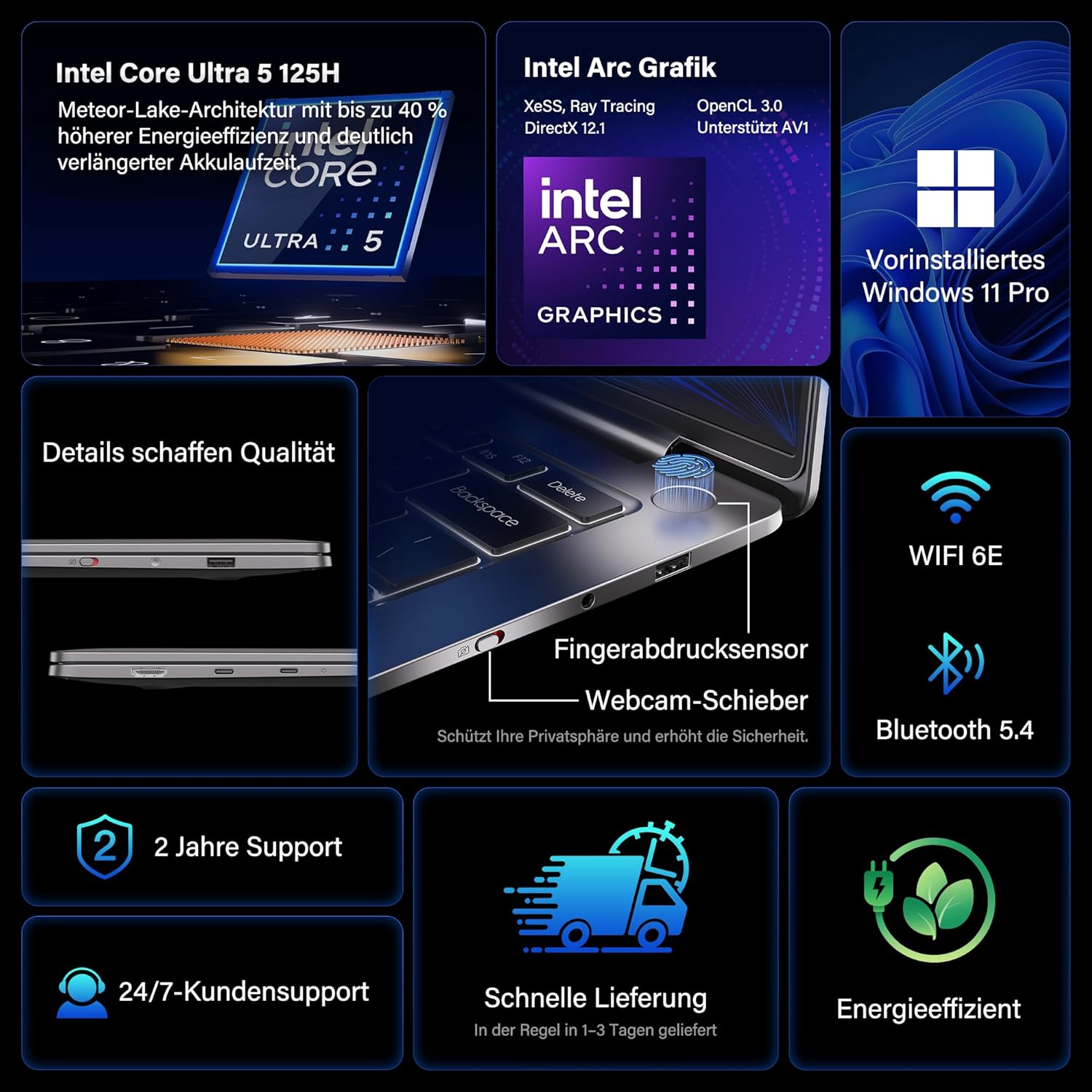
- Procesor: Intel Core Ultra 5 125H (14 cores, 18 threads, up to 4.5 GHz)
- Grafika: Intel Arc Graphics with Xe-LPG architecture
- Zobrazit: 14-inch 2.8K OLED (2880 x 1800) with 120Hz refresh rate, 100% DCI-P3, up to 450 nits brightness
- Paměť: 32GB LPDDR5x RAM (7500 MT/s)
- Skladování: 1TB PCIe 4.0 NVMe SSD
- Operační systém: Předinstalovaný systém Windows 11 Pro
- Konektivita: 2x USB4 (40 Gbps), 1x USB 3.2 Gen 1 Type-A (5 Gbps), HDMI 2.0, Wi-Fi 6E, Bluetooth 5.4
- Zabezpečení: Fingerprint sensor in power button, physical webcam slider
- Zvuk: DTS:X Ultra Audio
- Baterie: 72 Wh, up to 16 hours battery life, 65W USB-C fast charging
- Chlazení: GEEKOM IceBlade 2.0 cooling system with adjustable fan profiles

Porty a konektory:
- 2x USB4 (40 Gbps)
- 1x USB 3.2 Gen 1 Type-A (5 Gbps)
- 1x HDMI 2.0
- 1x 3.5mm audio jack
- Power Input (via USB-C)

Nastavení
1. První zapnutí a nabíjení
- Connect the 65W PD GaN Fast Charger to a power outlet and then to one of the USB-C ports on your laptop.
- Před prvním použitím nechte notebook nabíjet alespoň 30 minut nebo dokud indikátor baterie neukazuje dostatečné nabití.
- Press the power button (integrated with the fingerprint sensor) to turn on the laptop.
2. Nastavení systému Windows 11 Pro
Follow the on-screen prompts to complete the initial Windows 11 Pro setup. This includes:
- Výběr regionu a rozložení klávesnice.
- Připojování k síti Wi-Fi.
- Přihlášení pomocí účtu Microsoft nebo vytvoření místního účtu.
- Nastavení soukromí.
3. Nastavení snímače otisků prstů
For enhanced security and quick login, set up the fingerprint sensor:
- Přejít na Nastavení > Účty > Možnosti přihlášení.
- Under "Ways to sign in," select Rozpoznávání otisků prstů (Windows Hello) a postupujte podle pokynů k registraci otisků prstů.
Návod k obsluze
Funkce displeje
The 14-inch 2.8K OLED display offers vibrant colors and sharp details. With a 120Hz refresh rate, scrolling and animations are smooth. The display covers 100% DCI-P3 color gamut and reaches up to 450 nits brightness, ensuring clear visibility in various lighting conditions.

Výkon
Equipped with an Intel Core Ultra 5 125H processor, 32GB LPDDR5x RAM, and a 1TB PCIe 4.0 NVMe SSD, the GeekBook X14 Pro delivers efficient performance for demanding tasks, quick application launches, and seamless multitasking.

Konektivita
The laptop supports Wi-Fi 6E for fast and stable wireless internet connections and Bluetooth 5.4 for connecting peripherals. The two USB4 ports offer high-speed data transfer (40 Gbps) and support up to three 4K external displays simultaneously via the included mini docking station or direct connection.
Zvuk
Experience clear and spatial audio with DTS:X Ultra technology, enhancing your video calls, movies, and music playback.
Cooling System (GEEKOM IceBlade 2.0)
The GEEKOM IceBlade 2.0 cooling system ensures optimal performance even under sustained load. It features a quiet fan and a dual-heatpipe design to efficiently dissipate heat. You can switch between three intelligent fan profiles (Silent, Standard, Performance) by pressing Fn + P to balance noise and cooling efficiency.

Baterie a nabíjení
The 72 Wh battery provides up to 16 hours of usage. The included 65W USB-C PD GaN fast charger can charge the battery up to 80% in approximately one hour, allowing for quick power-ups on the go.

Webcam Privacy Slider
For enhanced privacy, the laptop includes a physical slider to cover the webvačka, když se nepoužívá.
Údržba
Čištění
- K čištění obrazovky a šasi použijte měkký hadřík, který nepouští vlákna.
- Na odolné šmouhy lehceamphadřík vodou nebo čisticím roztokem vhodným pro obrazovky.
- Vyhněte se používání agresivních chemikálií, abrazivních materiálů nebo nadměrné vlhkosti.
- Před čištěním se ujistěte, že je notebook vypnutý a odpojený od sítě.
Aktualizace softwaru
Regularly check for and install Windows updates and driver updates to ensure optimal performance, security, and compatibility. You can check for Windows updates via Nastavení > Windows Update.
Odstraňování problémů
Notebook se nezapne
- Ujistěte se, že je nabíječka bezpečně připojena k notebooku i k funkční zásuvce.
- Allow the laptop to charge for at least 30 minutes.
- Try a different power outlet or USB-C port if available.
Problémy se zobrazením
- If the screen is black, ensure the laptop is powered on and not in sleep mode. Press any key or the power button briefly.
- Check display settings in Windows if external monitors are not detected or showing incorrect resolution.
Pomalý výkon
- Zavřete nepotřebné aplikace běžící na pozadí.
- Ujistěte se, že systém Windows a ovladače jsou aktuální.
- Zkontrolujte, zda je na SSD disku dostatek volného místa.
- Monitor CPU/RAM usage in Task Manager to identify resource-intensive processes.
Problémy s připojením
- Wi-Fi: Restart your router and the laptop. Ensure Wi-Fi is enabled in Windows settings.
- Bluetooth: Ensure Bluetooth is enabled and devices are in pairing mode. Remove and re-pair devices if issues persist.
- USB/HDMI: Ensure cables are securely connected. Test with different cables or ports if possible.
Další pomoc naleznete v části Záruka a podpora.
Specifikace
| Funkce | Detail |
|---|---|
| Značka | GEEKOM |
| Název modelu | GeekBook X14 Pro |
| Číslo modelu | NX14CM |
| Barva | Titanově šedá |
| Form Factor | Ultra-portable and Ultra-light Notebook |
| Velikost obrazovky | 14 palce |
| Rozlišení obrazovky | 2.8K (2880 x 1800 pixels, 16:10) |
| Typ procesoru | Intel Core Ultra 5 125H |
| Rychlost procesoru | Až 4.5 GHz |
| Velikost RAM | 32 GB |
| Technologie RAM | LPDDR5x |
| Rychlost paměti | 7500 MHz |
| Velikost pevného disku | 1 TB |
| Typ pevného disku | SSD (PCIe x4) |
| Grafický koprocesor | Grafika Intel Arc |
| Bezdrátový typ | 802.11ax (Wi-Fi 6E), Bluetooth 5.4 |
| USB porty | 2x USB4, 1x USB 3.2 Gen 1 Type-A |
| HDMI porty | 1 2.0 (HDMI XNUMX) |
| Operační systém | Windows 11 Pro |
| Průměrná životnost baterie | Up to 16 Hours (72 Wh) |
| Hmotnost položky | 999g (Laptop only) |
| Speciální funkce | Fingerprint sensor, Webcam privacy slider, DTS:X Ultra Audio, GEEKOM IceBlade 2.0 cooling, Mini docking station included |
Záruka a podpora
The GEEKOM GeekBook X14 Pro comes with a 2-letá záruka. GEEKOM provides Zákaznická podpora 24/7 for any technical assistance or inquiries you may have.
For support, please visit the official GEEKOM webwebu nebo se obraťte přímo na jejich zákaznický servis. Při kontaktování podpory mějte po ruce účtenku o koupi a sériové číslo produktu.
The product undergoes extensive reliability testing, including thermal shock, vibration, humidity, and impact tests, to ensure durability and high quality.