1. Úvod
This manual provides detailed instructions for the VENTION 15-in-1 USB-C Docking Station. It covers product features, setup procedures, operational guidelines, and troubleshooting tips to ensure optimal performance and user experience. Please read this manual thoroughly before using the device.
2. Konec produktuview
The VENTION 15-in-1 USB-C Docking Station is designed to expand the connectivity of your laptop, transforming a single USB-C port into multiple ports for various peripherals, external displays, and network connections. It features a robust aluminum alloy shell for optimal heat dissipation and a 360° rotatable, detachable base for flexible placement.
2.1. Rozložení portů
The docking station offers a comprehensive array of ports to meet diverse connectivity needs:
- 2 x 4K@60Hz HDMI Ports
- 1 x 4K@60Hz DisplayPort (DP)
- 1 x 10Gbps USB-C Port (Data)
- 2 x 10Gbps USB-A Ports (USB 3.2 Gen 2)
- 1 x USB 3.0 Port (5Gbps)
- 2 x USB 2.0 Ports (480Mbps)
- 1 x 100W Power Delivery (PD) Port (Input)
- 1 x PC Host Port (USB-C connection to laptop)
- 1 x 3.5mm Audio Port (Microphone/Audio Jack)
- 1 x čtečka SD karet
- 1 x čtečka TF karet
- 1 x RJ45 Gigabit Ethernet Port

2.2. Designové prvky
- Optimální odvod tepla: Constructed with an aluminum alloy shell to efficiently dissipate heat, ensuring stable performance during extended use.
- Protiskluzové podložky: Equipped with anti-slip pads for stability on various surfaces.
- Detachable and Rotatable U-shaped Stand: The docking station features a versatile stand that allows for 360° rotation for optimal viewing angles and can be detached for minimalist use or portability.

3. Průvodce nastavením
Follow these steps to set up your VENTION 15-in-1 USB-C Docking Station:
- Ověřte kompatibilitu notebooku: Ensure your laptop's USB-C port supports DisplayPort Alternate Mode (Alt Mode) for video output and Power Delivery for charging. Laptops with Thunderbolt 3/4 ports are also compatible.
- Connect to Power (Optional but Recommended): For optimal performance and laptop charging, connect a 100W Power Delivery (PD) charger (not included) to the PD input port on the docking station.
- Připojení k notebooku: Use the included USB-C 4.0 cable to connect the docking station's "PC HOST" port to your laptop's USB-C or Thunderbolt port.
- Připojení externích displejů: Connect your monitors to the HDMI and/or DisplayPort (DP) outputs on the docking station using appropriate cables (not included). Refer to Section 4.1 for display configuration details.
- Připojení periferií: Plug in your USB devices (keyboard, mouse, external drives), Ethernet cable, audio devices, and SD/TF cards as needed.


4. Návod k obsluze
4.1. Display Configuration (Dual/Triple Monitors)
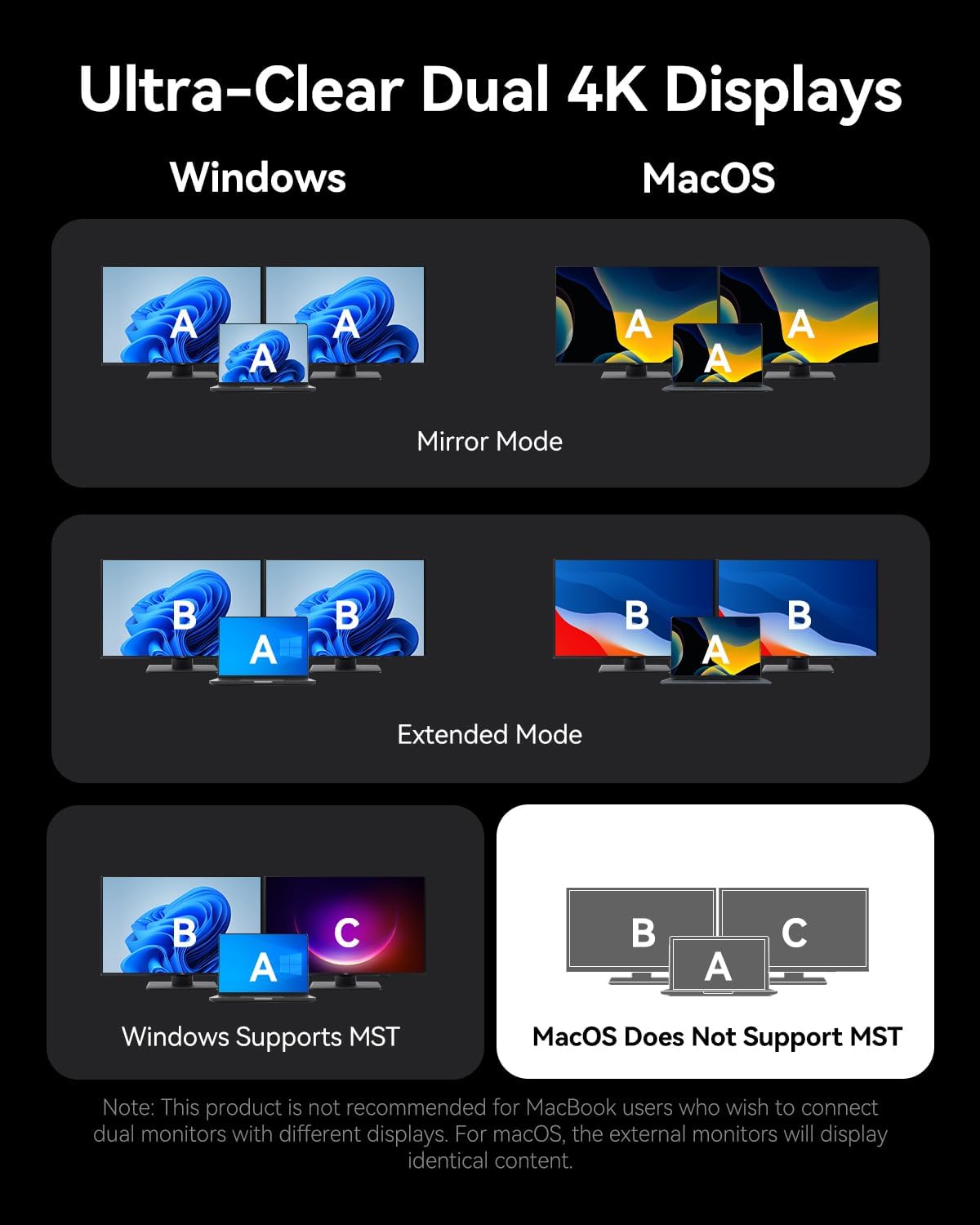
The docking station supports connecting up to three external monitors via its two HDMI ports and one DisplayPort. The display behavior varies depending on your operating system:
Pro systémy Windows:
- Dual Monitors: Supports up to 4K@30Hz.
- Triple Monitors: Supports up to 1080P@60Hz.
- Windows systems support Multi-Stream Transport (MST) mode, allowing for extended displays where each monitor shows different content (A-B-C or A-B-B).
Pro systémy macOS:
- Single, Dual, or Triple Monitors: Supports up to 4K@60Hz for each display.
- macOS systems only support Single-Stream Transport (SST) mode. This means all external monitors will mirror the content of your laptop's display (A-A-A) or mirror each other while extending from the laptop (A-B-B). Extended displays with different content on each external monitor are not supported.
Note: For screen mirroring or extending, please use your own HDMI/DP cables. The included USB-C cable is for charging and data transfer, not video output.

4.2. Přenos dat
Dokovací stanice nabízí vysokorychlostní přenos dat:
- USB 3.2 Gen 2 Ports (USB-A & USB-C): Offers speeds up to 10Gbps for rapid file přenosy s kompatibilními zařízeními.
- Port USB 3.0: Provides speeds up to 5Gbps.
- USB porty: 2.0 Suitable for connecting peripherals like keyboards and mice with speeds up to 480Mbps.
- Sloty pro SD/TF karty: Supports simultaneous reading and writing of SD and TF cards, ideal for photographers and content creators.

4.3. Power Delivery (PD) Charging
The dedicated 100W PD input port allows you to charge your laptop while using the docking station. Connect a compatible 100W USB-C power adapter to this port. The docking station will pass through up to 85W to your laptop, reserving power for its own operation.
4.4. Gigabitový Ethernet
Connect an Ethernet cable to the RJ45 port for a stable and high-speed wired network connection, supporting speeds of 10Mbps, 100Mbps, and 1000Mbps (1 Gigabit).
4.5. Připojení zvuku
The 3.5mm audio port supports both microphone input and audio output, allowing you to connect headphones, speakers, or a headset for communication and multimedia.
5. Kompatibilita
The VENTION 15-in-1 USB-C Docking Station is compatible with a wide range of devices that feature a full-featured USB-C port or Thunderbolt 3/4 port. This includes, but is not limited to:
- MacBook Pro (2016–2021)
- MacBook Air (2018–2021)
- MacBook (2015–2021)
- Dell XPS 13/15
- HP Laptops
- Lenovo Laptops
- Surface Book 2 / Surface Go
- iPad Pro / iPad Air (with USB-C)
- Other laptops with full-featured USB-C or Thunderbolt 3/4 ports.
Important: Ensure your laptop's USB-C port supports DisplayPort Alternate Mode for video output and Power Delivery for charging functionality.

6. Řešení problémů
Pokud narazíte na problémy s dokovací stanicí, podívejte se na následující běžná řešení:
- Žádný výstup na displej:
- Ujistěte se, že port USB-C vašeho notebooku podporuje alternativní režim DisplayPort.
- Check all video cables (HDMI/DP) are securely connected and functional.
- Verify your monitor input source is correctly selected.
- Try connecting one monitor at a time to isolate the issue.
- Restartujte notebook a znovu připojte dokovací stanici.
- Notebook se nenabíjí:
- Ensure a compatible 100W PD power adapter is connected to the docking station's PD input port.
- Verify your laptop's USB-C port supports Power Delivery.
- Check the USB-C cable connecting the docking station to your laptop is securely plugged in.
- USB zařízení nerozpoznána:
- Ujistěte se, že je dokovací stanice správně připojena k notebooku.
- Zkuste připojit zařízení USB k jinému portu na dokovací stanici.
- Připojte zařízení USB přímo k notebooku, abyste se ujistili, že je funkční.
- Problémy s ethernetovým připojením:
- Zkontrolujte připojení ethernetového kabelu k dokovací stanici i k routeru/modemu.
- Ověřte nastavení sítě na notebooku.
- Pokud je to možné, otestujte ethernetový kabel s jiným zařízením.
If problems persist, please contact VENTION customer support for further assistance.
7. Specifikace
| Funkce | Specifikace |
|---|---|
| Model | B0FX459ZTN |
| Porty | 2x HDMI (4K@60Hz), 1x DP (4K@60Hz), 1x USB-C (10Gbps), 2x USB-A (10Gbps), 1x USB 3.0 (5Gbps), 2x USB 2.0 (480Mbps), 1x PD (100W), 1x PC Host, 1x 3.5mm Audio, 1x SD, 1x TF, 1x RJ45 Gigabit Ethernet |
| Dodávka energie | 100W Input, up to 85W Output to Laptop |
| Rychlost přenosu dat | USB 3.2 Gen 2: 10 Gb/s, USB 3.0: 5 Gb/s, USB 2.0: 480 Mb/s |
| Rychlost Ethernetu | 10/100/1000 Mbps |
| Materiál | Hliníková slitina |
| Rozměry | 7.91 x 6.81 x 2.44 palce |
| Hmotnost | 1.78 libry |
| Barva | Černý |
8. Údržba
To ensure the longevity and optimal performance of your VENTION 15-in-1 USB-C Docking Station, follow these maintenance guidelines:
- Čištění: Use a soft, dry, lint-free cloth to clean the exterior of the docking station. Avoid using liquid cleaners, aerosols, or solvents.
- Skladování: Dokovací stanici skladujte na chladném a suchém místě mimo dosah přímého slunečního záření a extrémních teplot.
- Zacházení: Zabraňte pádu zařízení na zem nebo jeho vystavování silným nárazům. Nepokoušejte se dokovací stanici rozebírat, jinak by došlo ke ztrátě záruky.
- Správa kabelů: Organize cables to prevent tangling and strain on the ports.
9. Záruka a podpora
The VENTION 15-in-1 USB-C Docking Station comes with a Záruka 12 měsíců od data nákupu. Tato záruka se vztahuje na výrobní vady a poruchy při běžném používání.
Balíček obsahuje:
- 1 x USB-C Docking Station (15-in-1)
- 1 x 360-Degree Rotatable Base
- 1 x USB-C 4.0 kabel
- 1 x Uživatelská příručka

For any questions, technical support, or warranty claims, please contact VENTION customer service. Refer to the contact information provided on the product packaging or the official VENTION webmísto.
10. Oficiální video produktu
Watch the official product video for a visual guide on the VENTION 15-in-1 USB-C Docking Station's features and usage:


