1. Úvod
This manual provides detailed instructions for the use and maintenance of your Samsung Galaxy Watch 8 (SM-L335). Please read this manual carefully to ensure proper operation and to maximize the lifespan of your device.
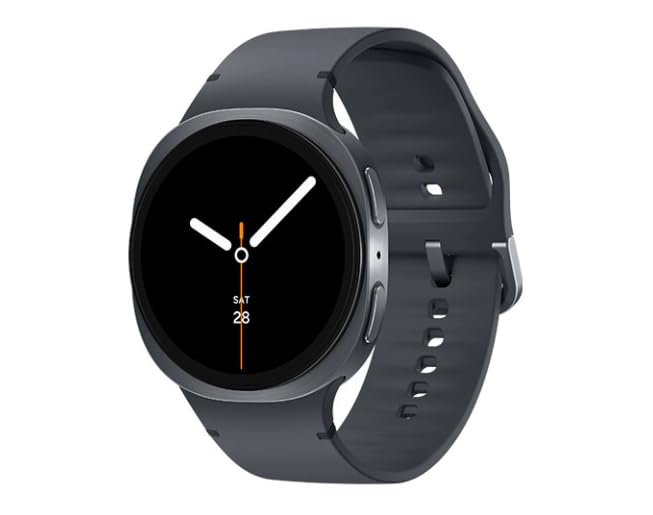
Image 1.1: Samsung Galaxy Watch 8 44mm in Graphite. This image shows the smartwatch from a slight angle, highlighting its round display and the graphite band.
Co je v krabici
- Samsung Galaxy Watch 8 (SM-L335)
- Pásek hodinek
- Watch charging cord
- Quick Start Guide (may vary)
2. Nastavení
2.1 Nabíjení zařízení
Before initial use, fully charge your Galaxy Watch 8. Connect the charging cord to the watch and a compatible power adapter. The watch display will indicate charging status.
2.2 Zapnutí/vypnutí
- Zapnutí: Stiskněte a podržte tlačítko Domů (spodní tlačítko), dokud se nezobrazí logo Samsung.
- Vypnutí: Stiskněte a podržte tlačítko Domů a poté na obrazovce klepněte na „Vypnout“.
2.3 Párování s chytrým telefonem
- Ensure your smartphone is running Android and has Bluetooth enabled.
- Stáhněte a nainstalujte Galaxy Wearable aplikace z obchodu Google Play.
- Otevřete aplikaci Galaxy Wearable na svém smartphonu.
- Follow the on-screen prompts to connect your Galaxy Watch 8.
- Confirm the passkey displayed on both devices.
2.4 Carrier Activation (LTE + Wi-Fi Models)
For LTE connectivity, your Galaxy Watch 8 must be activated with a compatible carrier plan. This process is typically managed through the Galaxy Wearable app after initial pairing. Contact your mobile carrier for specific activation steps and plan details.
3. Ovládání hodinek Galaxy Watch 8
3.1 Navigace
- Dotyková obrazovka: Swipe left/right to navigate tiles, swipe up/down for notifications/quick panel. Tap to select.
- Tlačítko Domů (dolní tlačítko): Press to go to the Watch face or App screen. Double-press for a customizable shortcut. Press and hold for Power options or Bixby.
- Tlačítko Zpět (horní tlačítko): Stisknutím se vrátíte na předchozí obrazovku.
3.2 Klíčové vlastnosti
- Sledování zdraví: Monitor heart rate, track steps, sleep patterns, and various workouts. Access data via Samsung Health app.
- Oznámení: Receive alerts from your paired smartphone directly on your watch.
- Hlasový hovor: Make and receive calls directly from your watch using its built-in speaker and microphone (requires LTE activation or Bluetooth connection to phone).
- GPS: Utilize built-in GPS for accurate location tracking during outdoor activities.
3.3 Přizpůsobení ciferníků
To change your watch face, press and hold the current watch face on the screen. Swipe left or right to browse available faces, then tap to select. More options are available in the Galaxy Wearable app.
3.4 Používání aplikací
Access your installed applications by pressing the Home key from the watch face. Swipe through the app list and tap an icon to open. New apps can be downloaded via the Galaxy Wearable app.
Video 3.1: Konecview of Samsung Galaxy Watch 8 features. This video demonstrates various functionalities of the smartwatch, including navigation, health tracking, and notification management.
4. Údržba
4.1 Čištění hodinek
Wipe the watch and band with a soft, lint-free cloth. For stubborn dirt, slightly dampen the cloth with water. Avoid using harsh chemicals or abrasive materials. Ensure the watch is dry before charging.
4.2 Péče o baterii
- Vyhněte se extrémním teplotám, které mohou snížit životnost baterie.
- Nenechávejte hodinky delší dobu zcela vybité.
- Use only the provided charging cord.
4.3 Aktualizace softwaru
Regularly check for and install software updates via the Galaxy Wearable app. Updates provide new features, performance improvements, and security enhancements.
5. Řešení problémů
| Problém | Řešení |
|---|---|
| Hodinky se nezapínají | Ujistěte se, že jsou hodinky plně nabité. Stiskněte a podržte tlačítko Domů po dobu alespoň 10 sekund pro vynucení restartu. |
| Nelze spárovat se smartphonem | Check if Bluetooth is enabled on your phone. Ensure the Galaxy Wearable app is installed and updated. Restart both devices. |
| LTE connectivity issues | Verify carrier activation. Check signal strength. Contact your mobile carrier for assistance. |
| Apps are slow or unresponsive | Close background apps. Restart the watch. Ensure software is up to date. |
5.1 Resetování zařízení
If issues persist, you may need to reset your watch. Go to Nastavení > Obecné > Obnovit on your watch. This will erase all data and restore factory settings. Back up important data before proceeding.
6. Specifikace
| Funkce | Detail |
|---|---|
| Název modelu | Galaxy Watch 8 44mm |
| Číslo modelu | SM-L335 |
| Značka | Samsung |
| Velikost obrazovky | 44 milimetrů |
| Operační systém | Wear OS |
| Technologie připojení | Cellular (LTE), Wi-Fi |
| Kapacita baterie | 435 miliamp hodiny |
| Složení článků baterie | Lithium Ion |
| Speciální funkce | Voice Call, Built-in GPS |
| Hmotnost položky | 8.1 unce |
| Rozměry balení | 7.05 x 2.72 x 2.13 palce |
7. Záruka a podpora
7.1 Stav produktu a záruka
This Samsung Galaxy Watch 8 is a renewed product. Renewed devices are retested to ensure 100% functionality and come in great cosmetic condition. Please refer to your purchase documentation for specific warranty details provided by the seller. Standard manufacturer warranties may not apply to renewed products.
7.2 Zákaznická podpora
For technical assistance, troubleshooting, or further information, please visit the official Samsung support website or contact your product retailer. You can find detailed support resources, FAQs, and contact options on their respective platforms.
- Podpora Samsungu: www.samsung.com/us/support/
- Podpora prodejců: Refer to your purchase invoice or retailer's webstránky pro kontaktní informace.


