Důležité bezpečnostní informace
Please read all safety instructions carefully before using your new television. Keep this manual for future reference. Always follow basic safety precautions to reduce the risk of fire, electric shock, and injury.
- Nevystavujte televizor dešti ani vlhkosti.
- Neotevírejte dvířka televizoruasing; veškerý servis svěřte kvalifikovanému personálu.
- Zajistěte řádné větrání kolem televizoru.
- Chraňte napájecí kabel před pošlapáním nebo přiskřípnutím.
- Během bouřek nebo pokud televizor delší dobu nepoužíváte, odpojte jej ze zásuvky.
1. Nastavení
1.1 Vybalení a počáteční kontrola
Carefully remove the television and all accessories from the packaging. Check for any damage. The package should include:
- THOMSON 24HT2S15 Smart TV
- Dálkové ovládání
- Napájecí adaptér
- Uživatelská příručka (tento dokument)
- Záruční list
- TV Stands (2 pieces) and screws
1.2 Instalace televizních stojanů
Place the TV face down on a soft, flat surface to prevent screen damage. Attach the two stand feet to the designated slots on the bottom of the TV using the provided screws. Ensure they are securely fastened. The adjustable feet allow for two positions (60 cm or 30 cm apart) to fit your furniture.


1.3 Připojení externích zařízení
Refer to the diagram below for available ports and connect your devices accordingly.
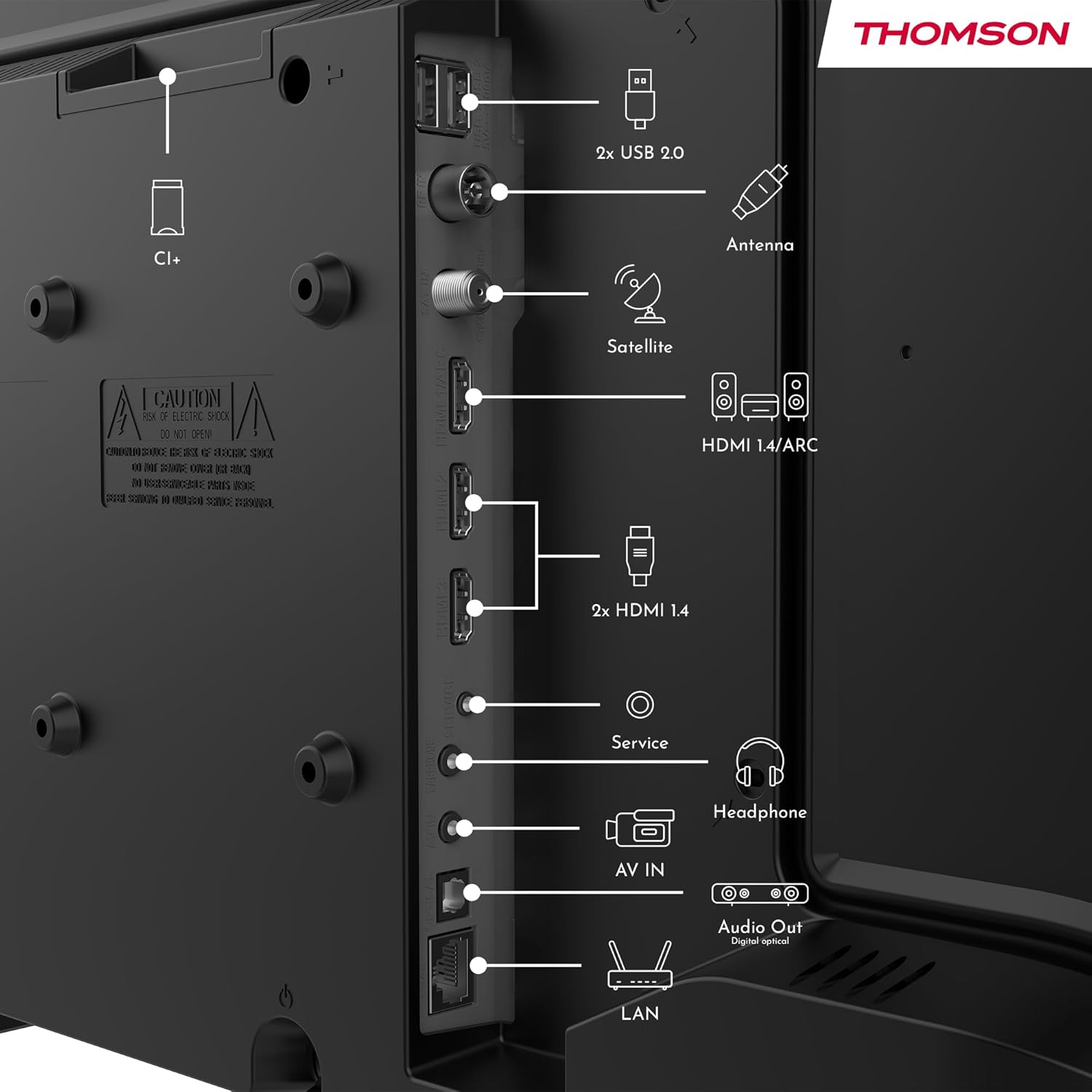
- Moc: Connect the power adapter to the TV and then to a power outlet.
- Anténa/Satelit: Connect your terrestrial antenna or satellite dish cable to the respective inputs.
- HDMI: Pro připojení zařízení, jako jsou přehrávače Blu-ray, herní konzole nebo set-top boxy, použijte kabely HDMI. HDMI 1.4/ARC podporuje technologii Audio Return Channel.
- USB: Vložte USB disky pro přehrávání médií nebo aktualizace softwaru.
- LAN (Ethernet): Připojte ethernetový kabel pro kabelové připojení k internetu.
- sluchátka: Připojte sluchátka pro soukromý poslech.
- Digitální optický audio výstup: Připojte se k externímu zvukovému systému pro vysoce kvalitní zvuk.
- AV IN: Pro starší zařízení používající kompozitní video a stereo audio kabely.
- Slot CI+: Insert a Conditional Access Module (CAM) for encrypted digital channels.
2. Návod k obsluze
2.1 First-Time Setup and TiVo System
Upon first power-on, the TV will guide you through the initial setup process. This includes language selection, network connection (Wi-Fi or Ethernet), and channel scanning. The integrated TiVo system provides a user-friendly interface that combines live TV and streaming applications, offering personalized recommendations.

2.2 Funkce dálkového ovládání
The included remote control is backlit for easy use in low light and features direct access buttons for popular streaming services.

- Vypínač: Zapíná nebo vypíná televizor.
- Tlačítko hlasového ovládání: Activates the voice assistant for commands like searching for content or adjusting settings.
- Navigační tlačítko (nahoru/dolů/vlevo/vpravo/OK): Prochází menu a vybírá možnosti.
- Zvýšení/Snížení hlasitosti: Upravuje úroveň zvuku.
- Kanál nahoru/dolů: Mění televizní kanály.
- Tlačítka pro přímý přístup: One-touch access to Netflix, YouTube, Prime Video, Disney+, and Canal+.
- Zpět/Výstup: Návrat na předchozí obrazovku nebo opuštění aktuální nabídky.

2.3 Bezdrátový displej (zrcadlení obrazovky)
The Wireless Display function allows you to project the screen of your smartphone, tablet, or computer onto the TV. This feature is convenient for sharing photos, videos, or presentations.

2.4 Nastavení zvuku a obrazu
Your TV supports Dolby Audio for rich and precise sound, enhancing dialogues and immersion. HDR10 technology provides more natural images with balanced contrast and faithful colors for a realistic viewzkušenosti.


Access the TV's settings menu to adjust picture modes (e.g., Standard, Dynamic, Movie), sound modes (e.g., Standard, Music, Movie), and other advanced options to customize your viewzkušenosti.
3. Údržba
3.1 Čištění televizní obrazovky
Jemně otřete obrazovku měkkým hadříkem, který nepouští vlákna. V případě odolných skvrn lehceampOtřete hadřík vodou nebo specializovaným čističem obrazovek. Nikdy nestříkejte tekutinu přímo na obrazovku.
3.2 Čištění televizoru Casing
K otření televizoru použijte měkký, suchý hadřík.asing. Nepoužívejte abrazivní čisticí prostředky, vosky nebo rozpouštědla, protože by mohly poškodit povrchovou úpravu.
3.3 Péče o dálkové ovládání
Keep the remote control dry and clean. Replace batteries when necessary, ensuring correct polarity. If the remote will not be used for an extended period, remove the batteries to prevent leakage.
4. Řešení problémů
Pokud narazíte na problémy s televizorem, před kontaktováním podpory si přečtěte následující běžné problémy a jejich řešení.
4.1 Bez napájení
- Ujistěte se, že je napájecí kabel bezpečně připojen k televizoru i k elektrické zásuvce.
- Zkontrolujte, zda zásuvka funguje připojením jiného zařízení.
- Stiskněte tlačítko napájení na samotném televizoru, nejen na dálkovém ovladači.
4.2 Žádný obraz, ale zvuk je přítomen
- Check the input source. Press the "Source" button on your remote and select the correct input (e.g., HDMI 1, Antenna).
- Ujistěte se, že jsou všechny kabely (HDMI, anténa) bezpečně připojeny.
- Zkuste restartovat televizor a všechna připojená zařízení.
4.3 Žádný zvuk, ale obraz je přítomen
- Zkontrolujte úroveň hlasitosti a ujistěte se, že televizor není ztlumený.
- Zkontrolujte nastavení zvuku v nabídce televizoru.
- Pokud používáte externí reproduktory, ujistěte se, že jsou správně připojeny a zapnuté.
4.4 Dálkové ovládání nefunguje
- Vyměňte baterie za nové, přičemž dbejte na správnou polaritu.
- Ujistěte se, že mezi dálkovým ovladačem a infračerveným senzorem televizoru nejsou žádné překážky.
- Namiřte dálkový ovladač přímo na televizor.
4.5 Problémy s připojením k Wi-Fi
- Ujistěte se, že je váš Wi-Fi router zapnutý a funguje správně.
- Restartujte router a televizor.
- Check the Wi-Fi password in the TV's network settings.
- Pokud je to možné, přesuňte televizor blíže k routeru nebo použijte kabelové ethernetové připojení.
5. Specifikace
| Číslo modelu | 24HT2S15 |
| Velikost obrazovky | 24 palců (60 cm) |
| Technologie displeje | LED |
| Rezoluce | 768p (HD) |
| Obnovovací frekvence | 60 Hz |
| Poměr stran | 16:9 |
| Speciální funkce | TiVo System with Voice Control, Dolby Audio, HDR10, Wireless Display, Backlit Remote with Direct Access Buttons |
| Konektivita | Wi-Fi, Ethernet, HDMI (x3, one with ARC), USB (x2), Antenna, Satellite, AV In, Digital Optical Audio Out, Headphone Out, CI+ |
| Rozměry (Š x V x H) | 53 x 37 x 8 cm (bez podstavce) |
| Hmotnost | 3.33 kg |
| Zahrnuté komponenty | Power Adapter, Remote Control, User Manual, Warranty Card |
| Výrobce | Proudview GmbH |
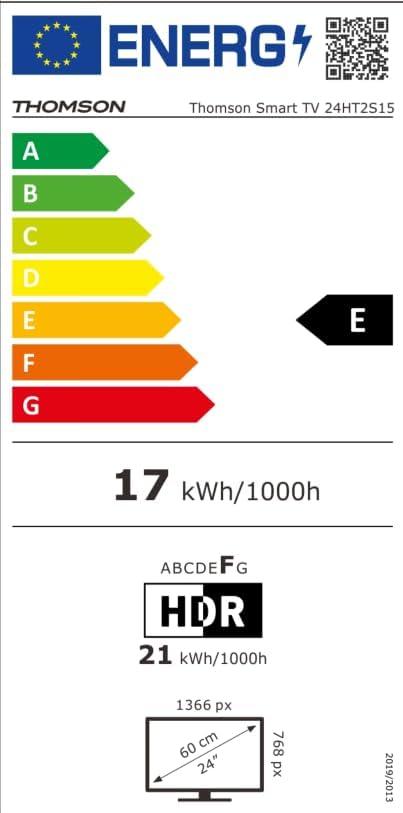
| Třída energetické účinnosti | E |

6. Záruka a podpora
Your THOMSON 24HT2S15 Smart TV comes with a warranty card included in the box. Please refer to this card for specific warranty terms and conditions applicable in your region.
For technical support, service, or warranty claims, please contact the manufacturer, Streamview GmbH, or your local authorized service center. Contact information can typically be found on the warranty card or the manufacturer's official webmísto.
Výrobce: Streamview GmbH
Webmísto: www.streamview.com


