1. Konec produktuview
The KLIM Cassette Player Boombox is a versatile audio device combining classic cassette playback with modern features like AM/FM radio, Bluetooth connectivity, and USB playback/recording. Its portable design allows for use at home or on the go.
Klíčové vlastnosti:
- Kazetový přehrávač a rekordér
- AM/FM rádiový tuner
- Bluetooth Connectivity for wireless streaming
- USB Port for MP3 playback and recording
- Integrated Microphone for direct recording
- Headphone Jack for private listening
- Dual Power: AC power cord or 4 x C-type batteries (not included)
- Portable design with a carrying handle
Co je v krabici:
- KLIM Cassette Player Boombox
- AC napájecí kabel
- Uživatelská příručka

Obrázek 1: Přední strana view of the KLIM Cassette Player Boombox, showcasing its controls and cassette compartment.
2. Nastavení
Napájení zařízení:
The KLIM Cassette Player Boombox can be powered in two ways:
- Napájení střídavým proudem: Connect the included AC power cord to the device's power input and then to a standard wall outlet.
- Napájení baterie: For portable use, insert 4 x C-type batteries (not included) into the battery compartment located on the underside of the device. Ensure correct polarity.

Obrázek 2: Spodní strana view showing the battery compartment for portable power.
3. Návod k obsluze
3.1. Cassette Player/Recorder
- Slide the function selector to 'TAPE'.
- Press the 'OPEN' button to open the cassette compartment.
- Insert a cassette tape with the open side facing up.
- Zavřete přihrádku na kazetu.
- Use the 'PLAY', 'STOP/EJECT', 'FFWD' (Fast Forward), and 'REW' (Rewind) buttons to control playback.
- To record, ensure a blank tape is inserted. Press the 'REC' button to start recording from the built-in microphone, radio, or USB.

Obrázek 3: Nahoře view of the boombox with a cassette tape inserted into the compartment.
3.2. AM/FM rádio
- Slide the function selector to 'RADIO'.
- Pro optimální příjem vysuňte teleskopickou anténu.
- Use the 'BAND' switch to select between AM and FM frequencies.
- Rotate the 'TUNING' knob to find your desired radio station.
3.3. Připojení Bluetooth
- Slide the function selector to 'BT' (Bluetooth).
- The device will enter pairing mode, indicated by a flashing light or audible prompt.
- Na svém smartphonu nebo tabletu povolte Bluetooth a vyhledejte dostupná zařízení.
- Select 'KLIM Cassette Player' (or similar name) from the list to pair.
- Po spárování můžete bezdrátově streamovat zvuk ze svého zařízení.
3.4. Přehrávání a nahrávání z USB
- Slide the function selector to 'USB'.
- Vložte USB flash disk s audio soubory ve formátu MP3 filedo portu USB.
- The device will automatically begin playing the audio files. Use the playback controls (play/pause, skip) to navigate.
- To record to USB, ensure a USB drive is inserted. Press the 'REC' button while in radio or cassette mode to record the audio source directly to the USB drive.
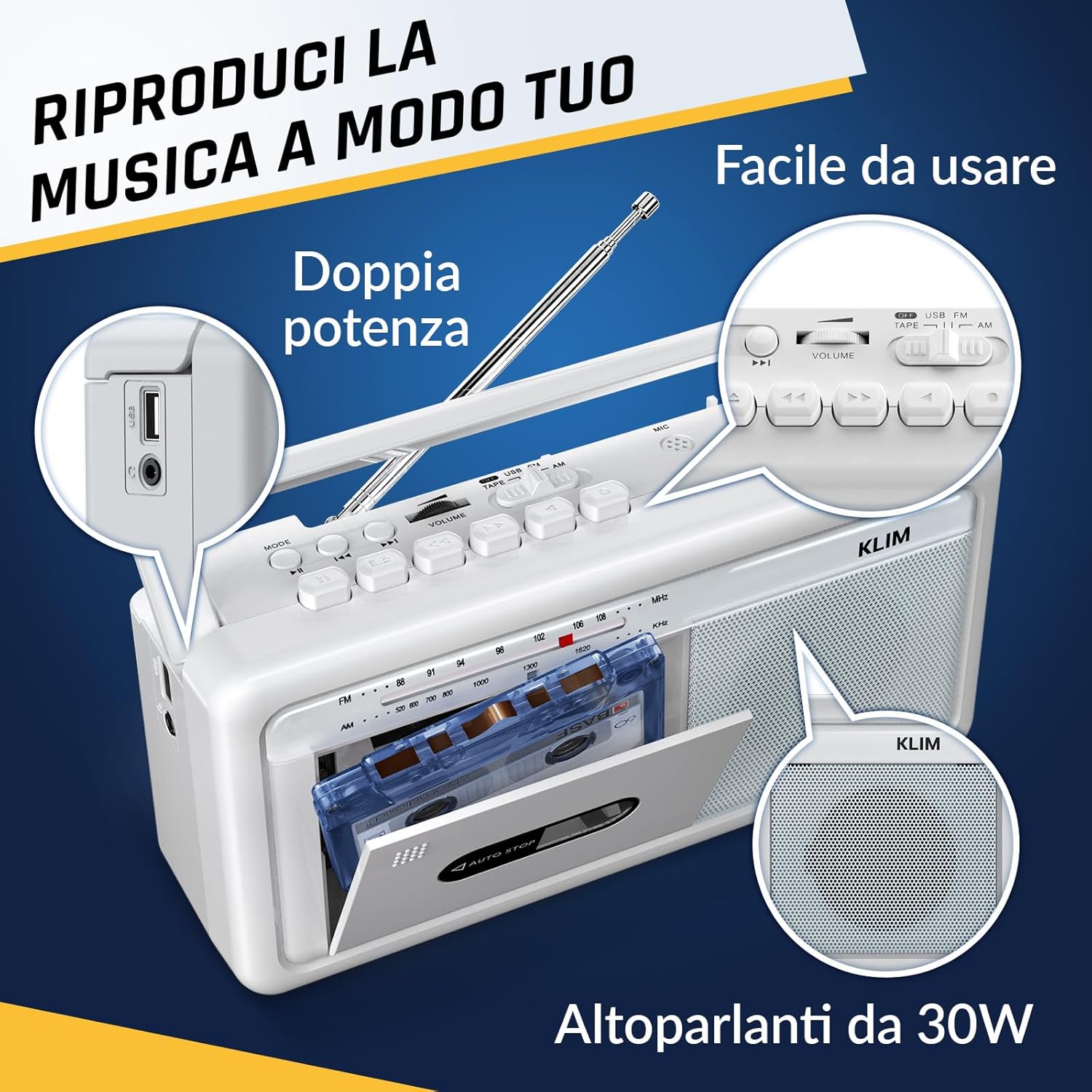
Obrázek 4: Strana view highlighting the USB port for media playback and recording.
3.5. Použití sluchátek
Connect standard 3.5mm headphones to the headphone jack for private listening. The internal speakers will automatically mute when headphones are connected.
Video 1: Instructions on how to record a tape to USB using the WTB-795 model. This video demonstrates the USB recording functionality.
Video 2: Konecview of a retro cassette player with USB, Bluetooth, and AM/FM radio features, similar to the KLIM Cassette Player Boombox.
4. Údržba
- Udržujte zařízení čisté otíráním měkkým, suchým hadříkem. Nepoužívejte tekuté čisticí prostředky ani rozpouštědla.
- Regularly clean the cassette head and pinch rollers with a cotton swab lightly dampošetřeno isopropylalkoholem, aby byla zajištěna optimální kvalita zvuku a zabránilo se poškození pásky.
- Keep the device away from direct sunlight, heat sources, and excessive dust or moisture.
- Pokud se přístroj delší dobu nepoužívá, vyjměte baterie, abyste zabránili jejich vytečení.
5. Řešení problémů
| Problém | Možné řešení |
|---|---|
| Žádná síla | Check if the AC power cord is securely connected. If using batteries, ensure they are inserted correctly and are not depleted. |
| Žádný zvuk z reproduktorů | Increase the volume. Ensure headphones are not connected. Check the function selector is in the correct mode (TAPE, RADIO, BT, USB). |
| Špatný příjem rádia | Extend the telescopic antenna fully. Adjust the antenna direction. Try moving the unit to a different location. |
| Kazeta se nepřehrává/nenahrává | Ensure the tape is inserted correctly. Check if the tape is damaged. Clean the cassette head and pinch rollers. |
| Bluetooth se nepřipojuje | Ensure the unit is in Bluetooth mode. Make sure your device's Bluetooth is enabled and within range. Try unpairing and re-pairing the device. |
| Problémy s přehráváním z USB | Ujistěte se, že je USB disk správně naformátován (FAT32) a obsahuje kompatibilní audio soubory. files (MP3, WAV, WMA, AAC, FLAC). Try a different USB drive. |
6. Specifikace
- Značka: KLIM
- Model: Kazetový přehrávač
- Rozměry produktu: 25 x 13.1 x 7.6 cm
- Hmotnost položky: 1 kg
- Kompatibilní zařízení: MP3 přehrávač, chytrý telefon, tablet
- Režim výstupu zvuku: Stereo
- Podporované zvukové formáty: Cassette, Analog Radio, MP3, WAV, WMA, AAC, FLAC, Bluetooth
- Zdroj napájení: Corded Electric (AC) / 4 x C-type Batteries (not included)
- Technologie připojení: USB, Bluetooth
- Barva: Mrazivá bílá
- Číslo položky: KLSIN4825
7. Záruka a podpora
The KLIM Cassette Player Boombox comes with a 5-letá záruka. For any questions, technical assistance, or warranty claims, please contact KLIM customer support. Our team is available 24/7 to assist you.
Please refer to the contact information provided in your product packaging or visit the official KLIM webstránky pro další podrobnosti.