1. Úvod
Thank you for choosing the Elevon Universal Tabletop TV Stand. This manual provides detailed instructions for the safe and correct assembly, operation, and maintenance of your TV stand. Please read this manual thoroughly before installation and retain it for future reference.
This stand is designed to support televisions ranging from 26 to 80 inches with VESA mounting patterns from 100x100 mm to 400x400 mm, and a maximum weight of 88 lbs (40 kg).
2. Bezpečnostní informace
- Nosnost: Nepřekračujte maximální nosnost 40 kg. Překročení tohoto limitu může vést k vážnému zranění nebo poškození majetku.
- Velikost televizoru: Ensure your TV's screen size is within the recommended range of 26-80 inches.
- Kompatibilita VESA: Verify your TV's VESA mounting pattern is compatible (100x100 mm to 400x400 mm).
- Shromáždění: Assemble the stand exactly as instructed. Incorrect assembly can lead to instability.
- Umístění: Place the TV stand on a stable, level surface. Avoid placing it on uneven or vibrating surfaces.
- Děti a domácí mazlíčci: Keep children and pets away from the assembly area. The stand features rounded glass edges for safety, but caution is always advised.
- Nástroje: Use appropriate tools for assembly. Do not overtighten screws.
3. Obsah balení
Please check to ensure all parts are present and undamaged before beginning assembly. If any parts are missing or damaged, contact Elevon customer support.

Image: All components of the Elevon Universal Tabletop TV Stand. This image displays the main stand structure, including the base, support column, and TV mounting bracket.
- TV Stand Base (Tempered Glass)
- Support Column (Steel)
- Držák na TV
- Držáky pro TV (2x)
- Hardware Kit (various screws, washers, spacers, and cable clips)
- Montážní nářadí (např. imbusový klíč, pokud je potřeba)
4. Montážní návod
The Elevon Tabletop TV Stand is designed for quick and easy assembly, typically within 10 minutes, with no drilling required.
Step 1: Attach the Support Column to the Base
- Carefully place the tempered glass base on a soft, clean surface to prevent scratches.
- Align the steel support column with the pre-drilled holes on the base.
- Secure the column to the base using the provided screws and an Allen wrench. Ensure it is tightened firmly for stability.
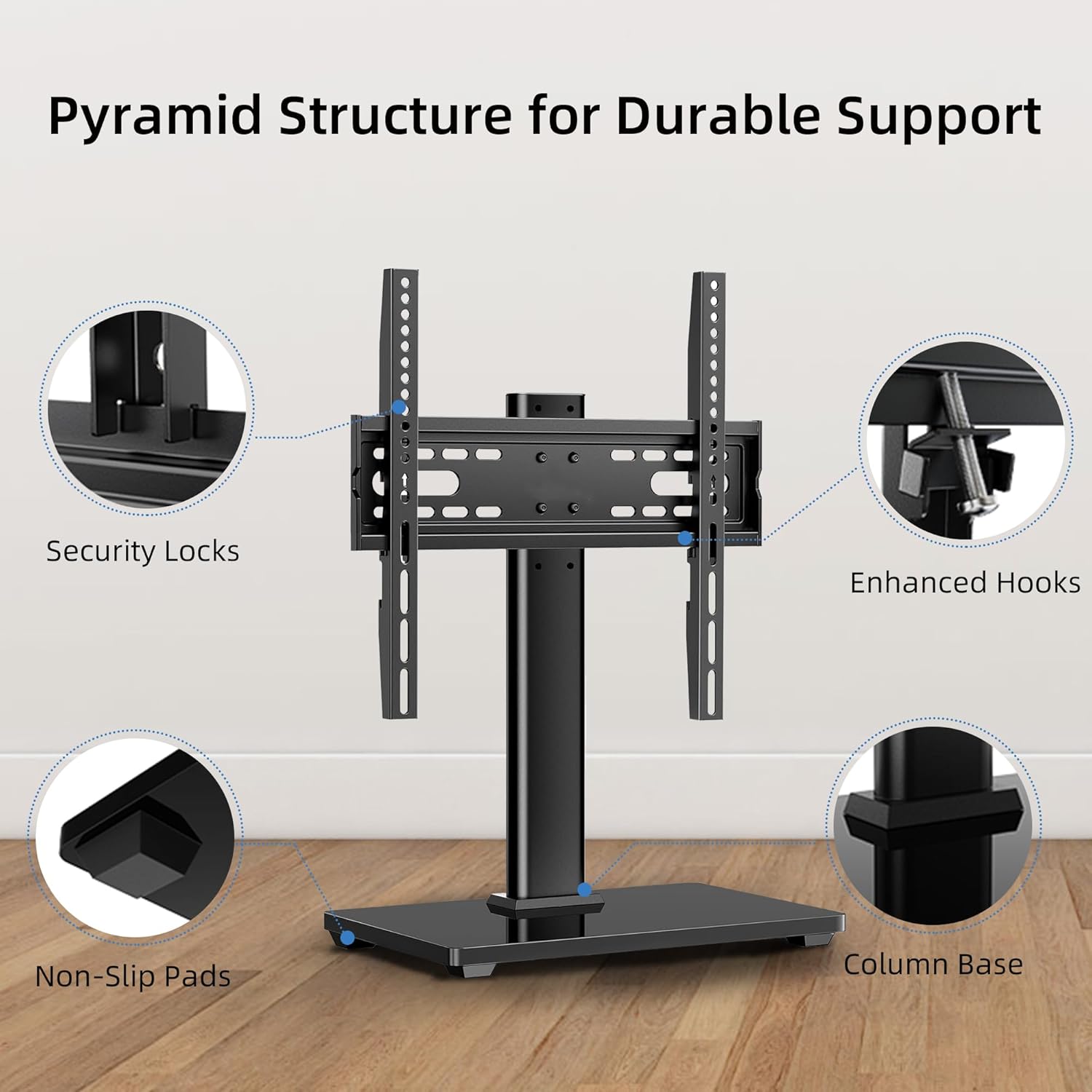
Obrázek: Podrobný view of the stand's structural components, highlighting security locks, enhanced hooks for TV mounting, non-slip pads on the base, and the secure connection of the column to the base.
Step 2: Attach the TV Mounting Bracket to the Support Column
- Align the TV mounting bracket with the desired height adjustment holes on the support column. The stand offers 6 levels of height adjustment.
- Secure the bracket to the column using the provided screws. Ensure all screws are tightened securely.
Step 3: Attach Mounting Arms to Your TV
- Lay your TV screen-down on a soft, clean surface.
- Identifikujte montážní otvory VESA na zadní straně televizoru.
- Select the appropriate screws, washers, and spacers from the hardware kit that fit your TV's VESA pattern.
- Attach the two TV mounting arms to the back of your TV, ensuring they are level and securely fastened. The arms should extend slightly above the top VESA holes.
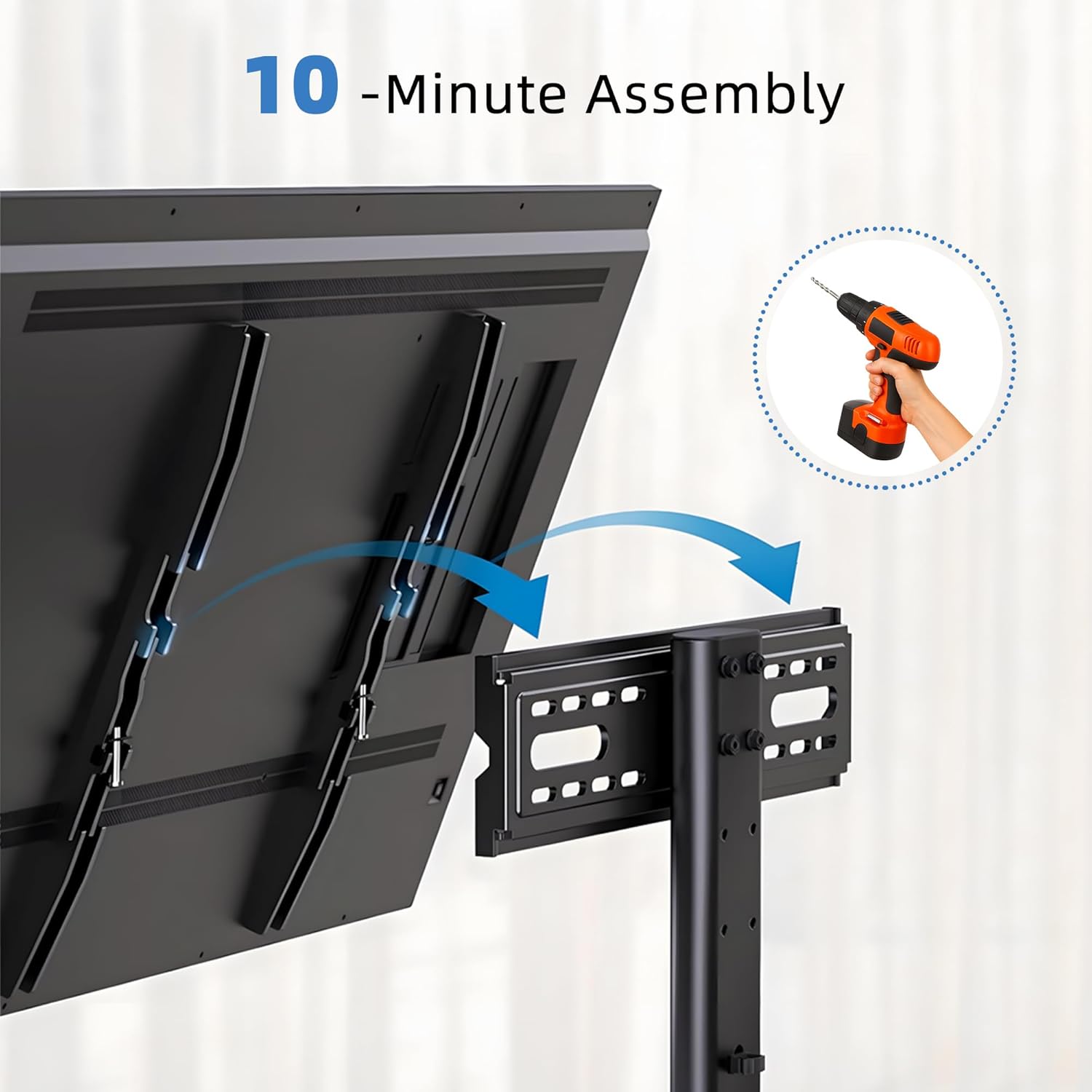
Image: A visual guide demonstrating how to attach the mounting arms to the rear of a television, indicating the quick 10-minute assembly process.
Step 4: Mount Your TV onto the Stand
- With assistance, carefully lift your TV and hook the mounting arms onto the TV mounting bracket attached to the stand.
- Ensure the TV is securely seated on the bracket. The enhanced hooks and security locks are designed to prevent accidental dislodgement.
- Tighten any safety screws or locking mechanisms on the mounting arms to secure the TV in place.
5. Návod k obsluze
Nastavení výšky televizoru
The Elevon TV stand offers 6 levels of height adjustment to optimize your viewing experience and accommodate soundbars or other media devices. This adjustment can be made during assembly by selecting different holes on the support column, or with 3-level height adjustment available post-installation on the TV mounting arms.

Image: An illustration detailing the 6-level height adjustment feature, showing the minimum (12.01 inches) and maximum (17.91 inches) heights from the base to the center of the TV. It also depicts the 3-level height adjustment possible after installation.
- To adjust height post-installation, carefully lift the TV slightly to disengage the locking mechanism on the mounting arms.
- Slide the TV up or down to the desired height level.
- Ensure the locking mechanism re-engages securely at the new height.
Správa kabelů
Integrated cable clips are provided to help organize and conceal TV cables, contributing to a clean and tidy setup.

Obrázek: Detailní záběr view demonstrating the effective use of integrated cable clips on the stand's central column to manage and hide television cables, promoting a neat appearance.
- Gather all TV and media device cables.
- Route the cables along the back of the support column.
- Use the provided cable clips to secure the cables neatly to the column, preventing tangles and improving aesthetics.
6. Údržba
- Čištění: Wipe the stand with a soft, dry cloth. For glass surfaces, a mild glass cleaner can be used. Avoid abrasive cleaners or harsh chemicals.
- Pravidelné kontroly: Pravidelně kontrolujte všechny šrouby a spoje, zda jsou pevně utažené a bezpečné. V případě potřeby je dotáhněte.
- Stabilita: Ensure the stand remains on a level surface. If moved, re-verify its stability before placing the TV back on it.
7. Řešení problémů
| Problém | Možná příčina | Řešení |
|---|---|---|
| Televizor se chvěje nebo je nestabilní. | Screws are not fully tightened; stand is on an uneven surface; TV weight exceeds capacity. | Ensure all assembly screws are securely tightened. Move the stand to a level surface. Verify TV weight is within 88 lbs (40 kg). |
| TV does not fit the mounting arms. | Nesprávný vzor VESA nebo velikost televizoru. | Confirm your TV's VESA pattern is between 100x100 mm and 400x400 mm. Ensure TV size is between 26-80 inches. |
| Obtížnost nastavení výšky. | Locking mechanism engaged or TV too heavy to lift alone. | Ensure the locking mechanism is disengaged. Seek assistance if the TV is heavy. |
8. Specifikace
| Funkce | Detail |
|---|---|
| Supported TV Sizes | 26 - 80 palce |
| Maximální nosnost | 88 lb (40 kg) |
| Kompatibilita VESA | 100x100 mm až 400x400 mm |
| Nastavení výšky | 6 levels (during assembly), 3 levels (post-installation) |
| Základní materiál | 8 mm Tempered Glass |
| Materiál sloupu | Heavy-gauge Steel |
| Hmotnost produktu | 8.8 lb (4 kg) |
| Rozměry balení | 20 x 11 x 4 palce |

Image: An illustration indicating the compatible TV screen sizes (32-55 inches shown, but product supports 26-80 inches) and various VESA mounting patterns supported by the stand, such as 100x100mm, 200x200mm, 400x400mm.
9. Záruka a zákaznická podpora
For warranty information or customer support regarding your Elevon Universal Tabletop TV Stand, please contact the manufacturer directly through their official website or the retailer where the product was purchased. Please have your purchase receipt and product model (ASIN: B0FT82Q7YY) available when contacting support.
Manufacturer: Elevon


