1. Úvod
This manual provides detailed instructions for the installation, operation, and maintenance of your Eonon UX7-PLUS Android 14 Double Din Car Stereo. Please read this manual thoroughly before using the product to ensure proper function and safety. The Eonon UX7-PLUS is an advanced car multimedia system designed to enhance your driving experience with smart features and robust performance.

Image 1.1: Eonon UX7-PLUS Car Stereo with included backup camera and a view of the screen connection.
2. Bezpečnostní informace
- Zařízení vždy používejte zodpovědně a v souladu s místními dopravními předpisy. Řízení bez rozptýlení může vést k nehodám.
- Do not attempt to disassemble or modify the unit. This may cause damage, electric shock, or fire, and will void the warranty.
- Ujistěte se, že je veškerá kabeláž správně zapojena, abyste zabránili zkratu nebo poškození elektrického systému vozidla.
- Pokud si nejste jisti některým krokem instalace, poraďte se s odborníkem.
- Chraňte jednotku před vodou a nadměrnou vlhkostí.
3. Obsah balení
Ověřte, zda jsou v balení přítomny všechny níže uvedené položky:
- Eonon UX7-PLUS Car Stereo Unit
- Couvací kamera (A0125)
- Audio Video Adapter Cable *1
- Audio Adapter Cable *1
- CarPlay & Android Auto USB Adapter Cable *1
- USB Adapter Cable *1
- Backup Camera Video Input Cable *1
- Napájecí kabel *1
- GPS Antenna *1
- External Microphone *1
- Šrouby *10
- Spare Fuse *1
- Návod k použití *1

Image 3.1: Visual representation of the Eonon UX7-PLUS package contents.
4. Instalace
4.1. Kontrola kompatibility
The Eonon UX7-PLUS is a double din car stereo designed to fit a car dashboard size of 178 mm * 100 mm. It is not compatible with vehicles that have a single din factory stereo. If your car's dashboard size is not 178mm * 100mm, an additional installation kit (not included) will be required.

Image 4.1: Dashboard compatibility guidelines for the Eonon UX7-PLUS.

Obrázek 4.2: Příkladample of an installation kit required for non-standard dashboard sizes.
4.2. Schéma zapojení
Refer to the wiring diagram for correct connections. Ensure all wires are securely connected to their corresponding ports. If your factory car radio does not have an ISO standard interface, you may need to purchase a compatible ISO wiring harness (not included).

Image 4.3: Eonon UX7-PLUS wiring diagram with labeled ports.
- Port ISO
- Illumination Wire
- SWC Wire 1
- Reverse Trigger Wire
- SWC Wire 2
- GND Wire
- AMP
- Audio Output FR
- Audio Output FL
- AUX Audio In R
- AUX Audio In L
- Externí mikrofon
- Video vstup
- Vstup pro přední kameru
- Výstup subwooferu
- Center Audio Out
- Audio Output RL
- Audio Output RR
- RX/TX Input
- USB Port for CarPlay
- USB port
- GND Wire
- Vstup pro záložní kameru
- Brake Shift Control
- GPS anténa
- MRAVENEC
- WiFi anténa
- Anténa Bluetooth
4.3. Screen Connection
The UX7-PLUS features a redesigned screen connection mechanism for easier and more reliable assembly. Ensure the screen is securely attached to the main unit.

Image 4.4: Details of the redesigned screen connection and unit construction.
5. Návod k obsluze
5.1. Uživatelské rozhraní a ovládací prvky
The UX7-PLUS features a 10.1-inch IPS display with 1280*720 resolution and a 2.5D capacitive touchscreen. It includes physical buttons and a volume knob for quick and precise control. You can also customize the boot logo, button color, and wallpaper to match your vehicle's interior.

Image 5.1: 10.1-inch IPS Display features.

Image 5.2: User-friendly physical controls.

Image 5.3: Customization options for the user interface.
5.2. CarPlay a Android Auto
The unit supports both wired and wireless Apple CarPlay and Android Auto. This allows seamless integration of your smartphone for navigation, calls, and music.
5.2.1. Bezdrátové připojení Apple CarPlay
- Klikněte na aplikaci Zlink5 na autorádiu.
- Zapněte na iPhonu Wi-Fi a Bluetooth.
- Find 'EONON' in your phone's Bluetooth device list and pair it. Once connected, tap 'Use CarPlay'.
- Počkejte několik sekund na dokončení připojení.

Image 5.4: Wireless Apple CarPlay connection steps.
5.2.2. Bezdrátové připojení Android Auto
- Klikněte na aplikaci Zlink5 na autorádiu.
- Zapněte Wi-Fi a Bluetooth na svém telefonu s Androidem.
- V seznamu zařízení Bluetooth v telefonu vyhledejte zařízení „EONON“ a spárujte ho.
- Počkejte několik sekund na dokončení připojení.

Image 5.5: Wireless Android Auto connection steps.
5.3. Screen Mirroring
Display your phone's screen directly on the car's display.
5.3.1. Zrcadlení obrazovky pro iOS
- Klikněte na autorádiu na aplikaci Zlink5. Nastavte autorádio do režimu bezdrátového zrcadlení obrazovky iPhonu.
- Zapněte hotspot iPhonu a připojte se k autorádiu.
- Zapněte funkci zrcadlení obrazovky iPhonu a vyberte „zj-airplay“.

Image 5.6: iOS Screen Mirroring instructions.
5.3.2. Zrcadlení obrazovky pro Android
- Klikněte na autorádiu s aplikací Zlink5. Nastavte autorádio do režimu bezdrátového zrcadlení obrazovky systému Android.
- V seznamu zařízení Bluetooth v telefonu vyhledejte zařízení „EONON“ a spárujte ho.
- Zapněte hotspot telefonu a připojte se k autorádiu.
- Nainstalujte si do telefonu aplikaci Zplus. Zapněte aplikaci a vyberte „bezdrátové připojení“.

Image 5.7: Android Screen Mirroring instructions.
5.4. Bluetooth 5.4
The independent Bluetooth module and extra Bluetooth antenna ensure quick, stable connections, noise reduction, crystal-clear call quality, and high-quality Bluetooth music streaming.

Image 5.8: Bluetooth 5.4 features.
5.5. Steering Wheel Controls (SWC)
The Eonon UX7-PLUS supports analog SWC signals, allowing you to control the unit while keeping your hands on the steering wheel. If your car uses a digital signal, a separate SWC adapter cable (not included) is required to convert the digital signal to analog.

Image 5.9: Steering Wheel Control functionality.
5.6. Split Screen Multitasking
Přístroj podporuje funkci rozdělené obrazovky, která vám umožňuje view and use two applications simultaneously on the 10.1-inch display.

Image 5.10: Split Screen Multitasking in action.
5.7. Nastavitelné Viewúhel
The screen offers an adjustable viewing angle for optimal visibility from various seating positions.

Image 5.11: Adjustable viewing angles for the display.
6. Vlastnosti
6.1. Výkon
The UX7-PLUS runs on Android 14 OS, powered by an RK3562 Quad-core ARM Cortex-A53 @ 2.0GHz CPU, 3GB RAM, and 32GB ROM. This configuration ensures smooth and responsive performance for various applications.

Image 6.1: Internal architecture and key components of the Eonon X7 Series.
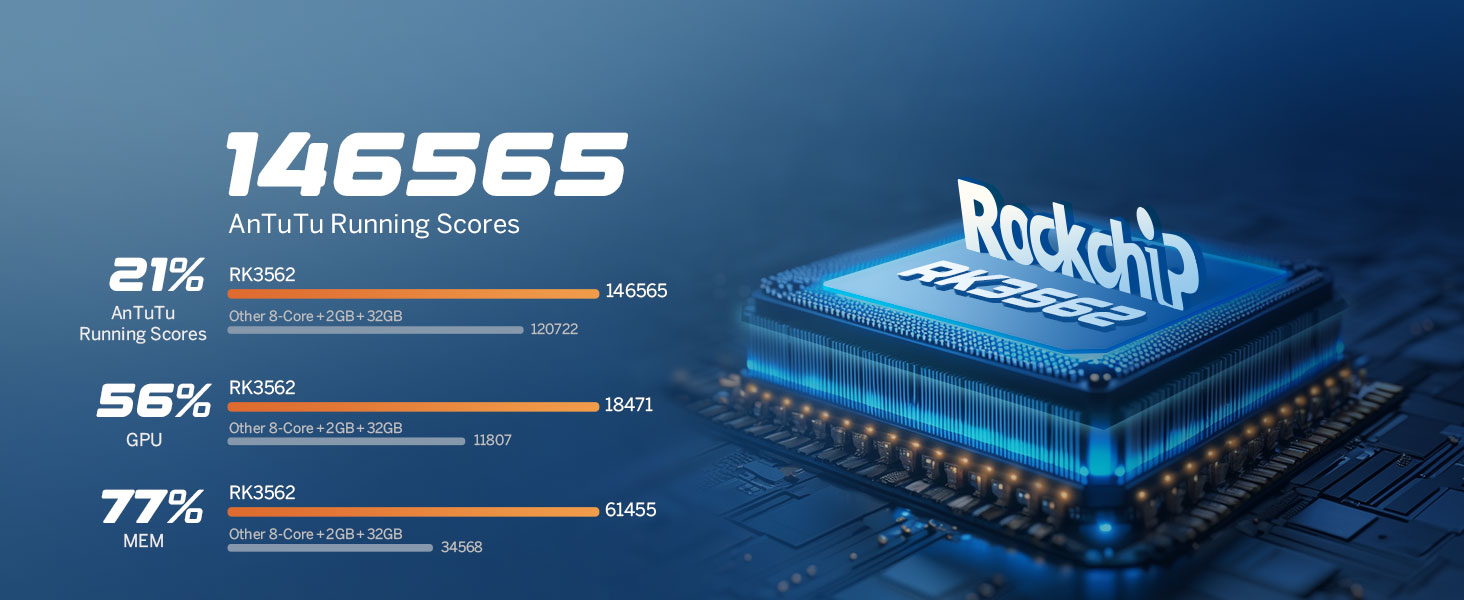
Image 6.2: Performance benchmarks for the RK3562 processor.
6.2. Zvukový zážitek
Equipped with a built-in DSP Audio Processor and a 48-band equalizer, the UX7-PLUS allows for precise sound customization. The ST TDA7388 Amplifier delivers 4x45W surround sound output. RCA Audio Outputs include 4-Channel FR/FL/RR/RL outputs + 1 Subwoofer output. EQ Modes include Custom, Standard, Popular, Rock, Classical, and Jazz.

Image 6.3: Digital Sound Processor (DSP) capabilities.
6.3. Aktualizace firmwaru
The unit supports Over-the-Air (OTA) firmware updates to fix software issues and enhance security. Note that Android system upgrades are not supported via OTA.
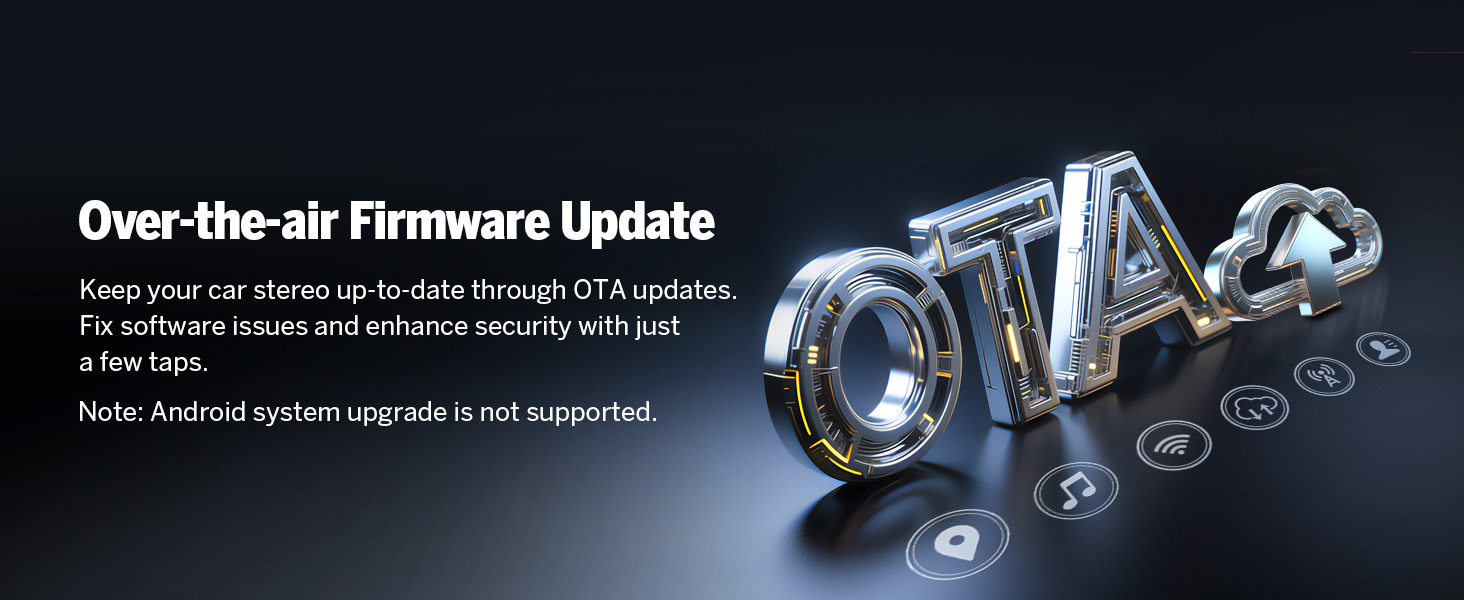
Image 6.4: Over-the-Air Firmware Update feature.
6.4. Accessory Compatibility
The Eonon UX7-PLUS is compatible with various Eonon accessories, including dash cams (e.g., A100 Dash Cam, not included) and OBD2 diagnostic tools (e.g., V0056 OBD2, not included).

Image 6.5: Backup camera features (included).

Image 6.6: Dash Cam compatibility (A100 Dash Cam, not included).
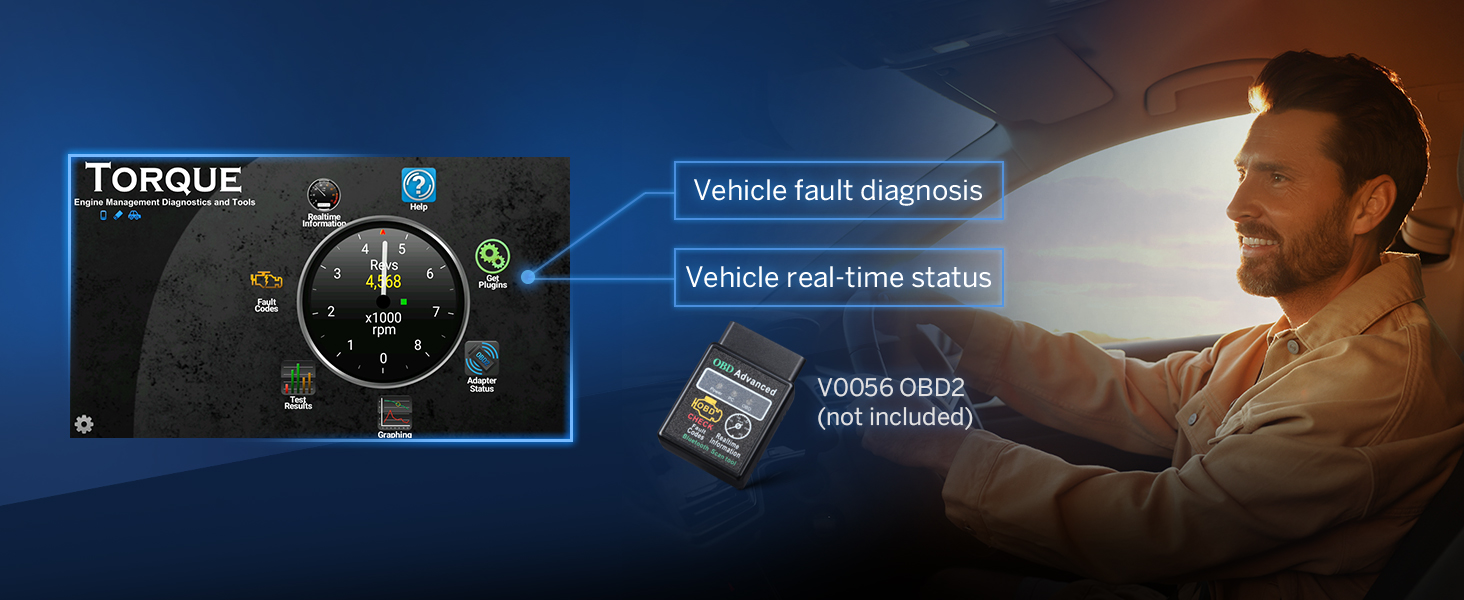
Image 6.7: OBD2 diagnostic tool compatibility (V0056 OBD2, not included).

Image 6.8: External DSP Amplifier compatibility (A303 DSP Amplifier, not included).
7. Údržba
- Čištění obrazovky: Use a soft, lint-free cloth to gently wipe the screen. Do not use abrasive cleaners or solvents.
- Obecná péče: Udržujte jednotku bez prachu a nečistot. Nevystavujte ji extrémním teplotám ani přímému slunečnímu záření po delší dobu.
- Aktualizace softwaru: Regularly check for firmware updates to ensure optimal performance and security.
8. Řešení problémů
- Bez napájení: Zkontrolujte všechna napájecí připojení a pojistky. Ujistěte se, že je zapnuté zapalování vozidla.
- Žádný zvuk: Verify speaker connections. Check volume levels and audio settings (EQ, balance, fader). Ensure the ampZáchranný filtr (pokud je externí) je zapnutý.
- Problémy s připojením Bluetooth: Ensure Bluetooth is enabled on both the stereo and your phone. Delete previous pairings and try reconnecting.
- CarPlay/Android Auto se nepřipojuje: Ensure the Zlink5 app is running. Check USB cable connection for wired connections. For wireless, verify Wi-Fi and Bluetooth are active and paired correctly.
- Obrazovka nereaguje: Zkuste restartovat zařízení. Pokud problém přetrvává, může být nutné provést obnovení továrního nastavení (poznámka: tímto se vymažou všechna uživatelská data).
9. Specifikace
| Funkce | Specifikace |
|---|---|
| Operační systém | Android 14 |
| CPU | RK3562 Quad-core ARM Cortex-A53 @ 2.0GHz |
| BERAN | 3 GB |
| ROM | 32 GB |
| Velikost displeje | 10.1 palce IPS |
| Rezoluce | 1280*720 |
| Dotyková obrazovka | 2.5D Capacitive |
| Verze Bluetooth | 5.4 |
| Ampdoživotní | ST TDA7388 (4x45W) |
| DSP | Built-in, 48-band equalizer |
| CarPlay / Android Auto | Kabelové a bezdrátové |
| Ovládání na volantu | Analog SWC Signal Support |
| Hmotnost položky | 5.28 libry |
| Rozměry balení | 11.81 x 8.66 x 7.87 palce |
| Číslo modelu | UX7-PLUS-U |
10. Záruka a podpora
The Eonon UX7-PLUS comes with a 2-letá záruka výrobce. For technical support, warranty claims, or further assistance, please contact Eonon customer service through their official website or the retailer where the product was purchased. Please have your model number (UX7-PLUS) and purchase details ready when contacting support.


