1. Úvod
This manual provides essential information for setting up, operating, maintaining, and troubleshooting your OSCAL Tiger 8 5G Android Phone. Please read through these instructions carefully to ensure optimal performance and longevity of your device.
2. Co je v krabici
Ověřte, zda jsou v balení produktu přítomny všechny položky:
- OSCAL Tiger 8 5G Android Phone
- Charger & USB-C Cable
- Pouzdro na telefon
- Ochrana obrazovky
- Karta Pin
- Uživatelská příručka
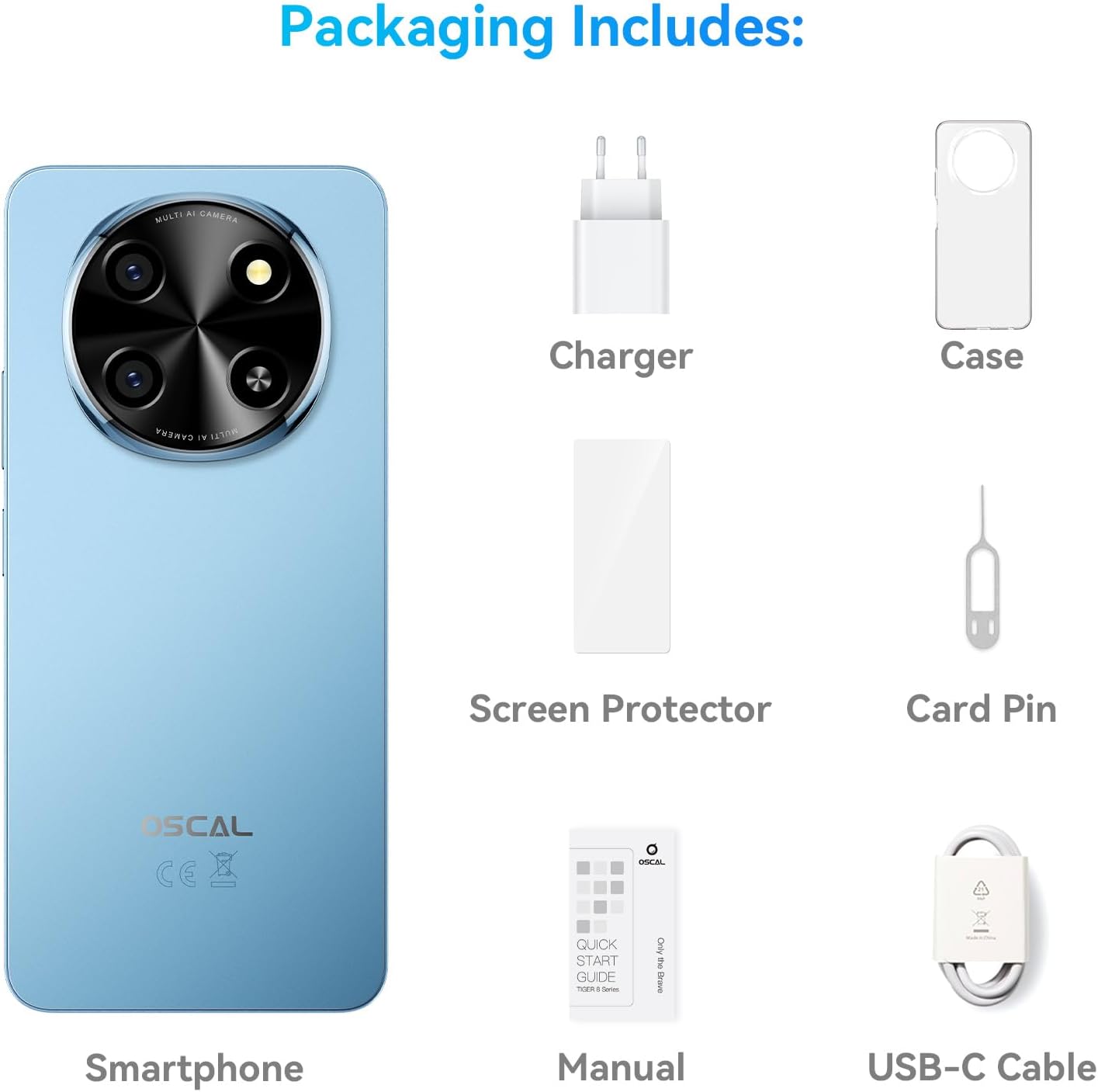
Image: Contents of the OSCAL Tiger 8 5G packaging, including the smartphone, charger, USB-C cable, phone case, screen protector, card pin, and user manual.
Video: An unboxing video for the OSCAL Tiger 8 5G, demonstrating the contents of the retail package and initial handling of the device.
3. Počáteční nastavení
- Vložte SIM kartu: Use the provided card pin to open the SIM tray. Insert your 5G-compatible SIM card(s) and/or a microSD card for expanded storage. Ensure the tray is securely closed.
- Zapnutí: Press and hold the power button located on the side of the device until the OSCAL logo appears.
- Počáteční konfigurace: Postupujte podle pokynů na obrazovce a vyberte jazyk, připojte se k Wi-Fi, nastavte si účet Google a nakonfigurujte bezpečnostní funkce, jako je odemknutí otiskem prstu nebo obličejem.
- Screen Protector & Case: Your device comes with a pre-installed screen protector and a protective case. Ensure they are properly applied for enhanced durability.
- Nabíjení baterie: For first use, it is recommended to fully charge the device using the provided charger and USB-C cable.
Video: An operation guide for OSCAL phones, demonstrating basic usage and setup steps to enhance user experience.
4. Návod k obsluze
4.1. Zobrazení a vizuální prvky
The OSCAL Tiger 8 features a 6.88-inch HD+ display with an AI-Adaptive 120Hz refresh rate for a smooth and clear visual experience. The display automatically adjusts its refresh rate based on content to optimize power efficiency.

Image: The 6.88-inch immersive waterdrop display of the OSCAL Tiger 8, highlighting its 120Hz AdaptiveSync refresh rate, 720*1640 resolution, 20.5:9 aspect ratio, HD+ IPS screen type, and 89.7% screen-to-housing ratio for an immersive viewzkušenosti.

Image: A visual breakdown of the Smart 120Hz AI Refresh Rate, showing how it adapts from 60Hz for everyday browsing, 90Hz for casual gaming, and 120Hz for intense gaming and high-res video streams, with AI adjusting on the fly to save power.
4.2. Výkon a úložiště
Equipped with a 5G Octa-Core Unisoc T8100 processor and up to 12GB expandable RAM, the Tiger 8 ensures smooth multitasking and fast app launches. The 128GB internal storage is expandable up to 2TB with a microSD card.

Image: Details of the 5G Octa-Core Unisoc T8100 processor, highlighting its 6nm EUV technology, LPDDR4X + UFS2.2, Arm Mali G57 GPU, and 451815 Antutu benchmark score, indicating AI-powered speed and performance.

Image: A graphic illustrating the 12GB RAM (4GB physical + 8GB virtual) and 128GB ROM with 2TB TF expansion, emphasizing faster app launch (15% faster) and the ability to run 16 apps concurrently in the background, suitable for working, video editing, and fluent gaming.
4.3. Funkce fotoaparátu
Capture sharp and vibrant photos with the 16MP main camera and stunning 4K Ultra Video. The 8MP AI front camera enhances selfies with adjusted lighting and skin tones. Various modes like HDR, Night Mode, and Portrait Mode are available.

Obrázek: Vizuální přehlídkaasing the 16MP AI Main Camera with AI Scene Recognition and Smile Shutter, and the 8MP AI-enhanced Selfie Camera with Face Fill Light and Face Unlock, both capable of 4K FHD+ Video Recording.
Image: A display of various camera modes available on the OSCAL Tiger 8, including Night mode for low light, Beauty mode for natural enhancements, Portrait mode for focused subjects, and HDR for vivid, true-to-life shots.
4.4. Životnost baterie a nabíjení
The 5000mAh battery, combined with AI Power Saving, offers extended usage. With 18W fast charging, your phone can reach 50% battery in approximately 43 minutes.

Image: A graphic detailing the 5000mAh battery, 18W fast charging (50% in 43 minutes), over 800 battery cycles with 80% capacity retained, AI Overnight Charging Protection, and AI Power Saving features, along with estimated usage times for standby, calling, music, browsing, video, and gaming.
4.5. AI and Software
Running on Android 15 with DokeOS 4.2, the Tiger 8 offers enhanced security, privacy, and user-friendly features. AI engines like DeepSeek, ChatGPT, and Gemini provide intelligent assistance for various tasks.

Image: An illustration of Doke AI features, including voice wake-up & voiceprint recognition, seamless voice interaction, Smart Q&A, and Smart Global Control, with examples of AI Smart Chat, Image Editing, Video Trimming, and Music Editing apps.

Image: A visual representation of the Android 15 operating system combined with DokeOS 4.2, showcasing a modern interface with various app icons and widgets, emphasizing security, privacy, and ease of use.
4.6. Připojení a zabezpečení
The device supports NFC for contactless payments, Dual 5G SIM for broad network coverage, and multiple navigation systems (GPS, Glonass, Beidou, Galileo). Secure access is provided through face unlock and fingerprint unlock.
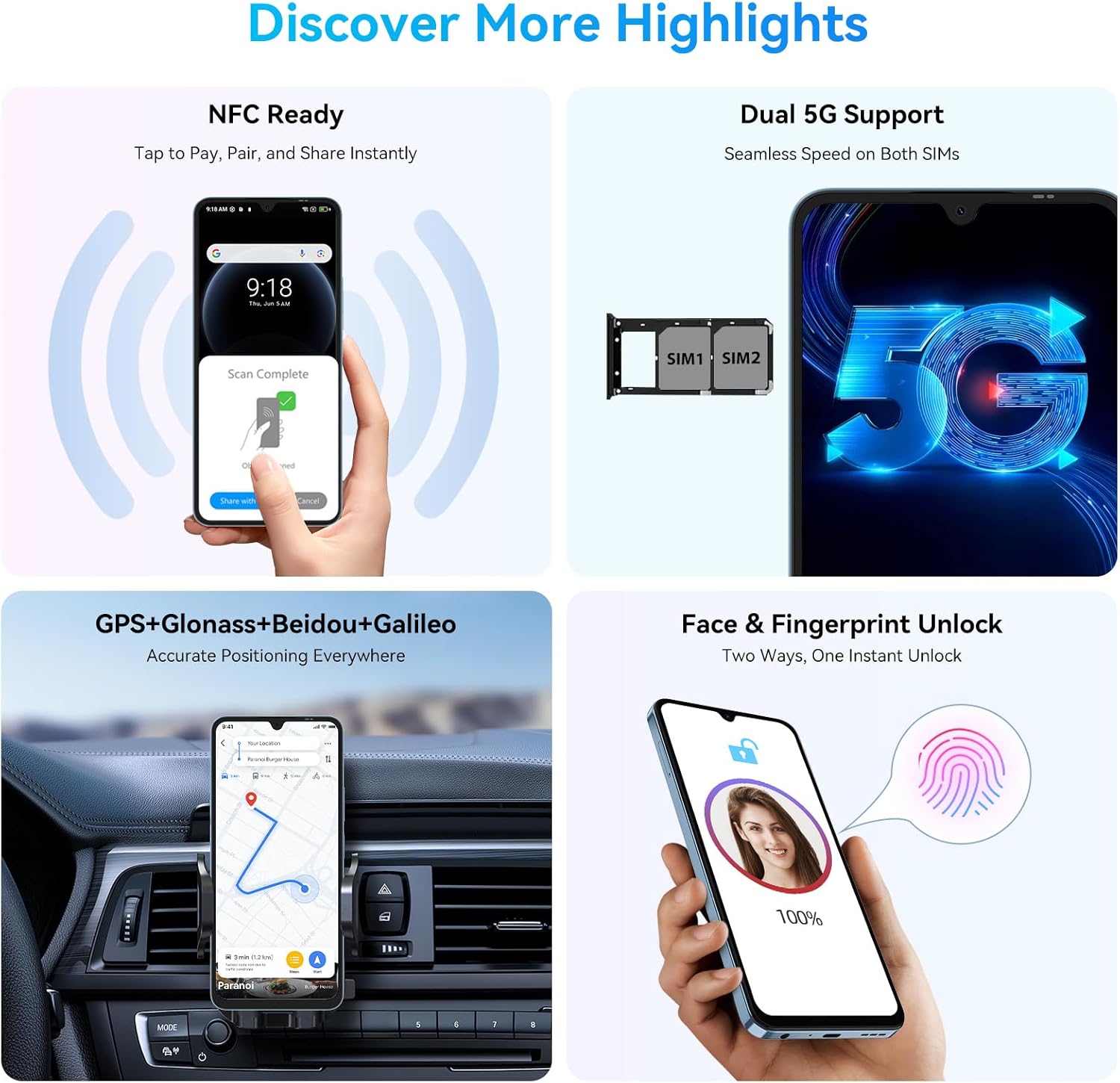
Image: A graphic highlighting key features such as NFC for contactless payments, Dual 5G SIM support for seamless speed, GPS+Glonass+Beidou+Galileo for accurate navigation, and Face & Fingerprint Unlock for instant secure access.
Video: Overview video showcasing the OSCAL Tiger 8 5G Android Phone's features, including its display, camera, performance, and design.
5. Údržba
- Aktualizace softwaru: Pravidelně kontrolujte a instalujte aktualizace systému, abyste zajistili, že vaše zařízení má nejnovější bezpečnostní záplaty a funkce. Přejděte na Nastavení> Systém> Aktualizace systému.
- Péče o baterie: To prolong battery life, avoid extreme temperatures and do not let the battery drain completely too often. Utilize AI Power Saving features.
- Čištění: K čištění obrazovky a těla telefonu používejte měkký hadřík, který nepouští vlákna. Vyhněte se agresivním chemikáliím.
- Správa úložiště: Pravidelně odstraňujte nepotřebné files and cache to maintain optimal performance. Use the built-in 'System Manager' for app management and auto-cleanup.
6. Řešení problémů
6.1. Zablokování nebo zpoždění zařízení
- Zavřít aplikace na pozadí: Swipe up from the bottom of the screen and clear all recent applications.
- Odinstalujte nepoužívané aplikace: Remove applications you no longer use to free up system resources.
- Restartovat zařízení: A simple restart can often resolve temporary performance issues. Press and hold the power button, then select 'Restart'.
- Expand RAM: If your device supports memory expansion, navigate to Settings > About phone > RAM and adjust the expansion size. A restart is required for changes to take effect.
6.2. Wi-Fi Not Connecting or Dropping
- Reset Wi-Fi Settings: Přejít na Settings > System > Reset options > Reset Bluetooth & Wi-Fi. This will reset all network settings.
- Restartujte router: Vypněte a znovu zapněte Wi-Fi router.
6.3. Camera Error: "Go to System Setting to Empower Permissions"
- Vymazat data aplikace Fotoaparát: Long-press the Camera app icon, tap 'App info', then go to Storage & cache > Clear storage. This will reset the app to its default state.
- Zkontrolujte oprávnění: Ensure the Camera app has all necessary permissions enabled under Settings > Apps & notifications > Camera > Permissions.
7. Technické specifikace
| Funkce | Specifikace |
|---|---|
| Název modelu | OSCAL Phone Tiger 8 |
| Operační systém | Android 15 (DokeOS 4.2) |
| Velikost obrazovky | 6.88 palce |
| Rezoluce | 720 × 1640 (HD+) |
| Obnovovací frekvence | 120 Hz (AdaptiveSync) |
| Model CPU | Osmijádrový Unisoc T8100 |
| Paměť RAM | 12 GB (rozšiřitelná) |
| Kapacita úložiště | 128 GB (rozšiřitelné až na 2 TB) |
| Hlavní fotoaparát | 16 MP |
| Přední kamera | 8 MP |
| Kapacita baterie | 5000 miliamp hodiny |
| Rychlé nabíjení | 18W |
| Konektivita | 5G, USB, Wi-Fi, Bluetooth, NFC |
| Navigace | GPS, Glonass, Beidou, Galileo |
| Zabezpečení | Odemknutí otiskem prstu, Odemknutí obličejem |
| Rozměry | 2 x 2 x 2.7 palce |
| Hmotnost položky | 1.1 libry |
8. Záruka a podpora
Every OSCAL device includes a 2-letá záruka from the date of purchase. This warranty covers manufacturing defects and ensures your unlocked Android phone stays secure, smooth, and up to date with ongoing OTA (Over-The-Air) updates.
For technical assistance, troubleshooting, or warranty claims, please contact OSCAL customer support through their official channels. Keep your purchase receipt and device's serial number handy.

Image: A graphic detailing OSCAL's customer service commitment, including 24/7 Customer Support, 30-Day Free Return & Exchange, and 3-Year After-Sales Support.


