1. Konec produktuview
The MCHOSE UT98 is a compact wireless mechanical keyboard designed for gaming and everyday use. It features a tri-mode connection, hot-swappable switches, a gasket structure for enhanced typing feel, and customizable RGB lighting.

Klíčové vlastnosti:
- Třírežimové připojení: Bluetooth 5.0, 2.4GHz Wireless, and USB-C Wired.
- Vyměnitelné za provozu: Kompatibilní s 3pinovými a 5pinovými mechanickými spínači.
- Struktura těsnění: Five layers of dampening material for a stable and quiet typing experience.
- Přizpůsobitelné RGB: 16 million colors with various effects via MCHOSE HUB.
- Integrovaný knoflík: For instant mute, precise volume control, and other functions.
- Dlouhá výdrž baterie: Vestavěná baterie s kapacitou 8000 mAh pro delší používání.
2. Obsah balení
Po vybalení se prosím ujistěte, že jsou přítomny všechny položky:
- MCHOSE UT98 Wireless Mechanical Keyboard
- Stahovák krytek a spínačů
- USB kabel (USB-A na USB-C)
- 2.4GHz Wireless Receiver (stored within the keyboard)
- 2 x Výměna spínačů
- Prachový kryt
- Uživatelská příručka (tento dokument)

3. Nastavení a připojení
3.1 Zapnutí/vypnutí
Locate the power switch on the side of the keyboard. Slide it to the 'ON' position to power on the keyboard. Slide it to 'OFF' to power off.
3.2 Třírežimové připojení
The UT98 supports three connection modes: 2.4GHz Wireless, Bluetooth 5.0, and USB-C Wired. A switch on the left side of the keyboard allows you to select the desired mode.

Bezdrátový režim 2.4 GHz:
- Locate the 2.4GHz wireless receiver. It is stored in a magnetic compartment on the side of the keyboard. Press the 'PRESS' button to release it.
- Zapojte 2.4GHz přijímač do volného USB portu na vašem počítači.
- Slide the mode switch on the keyboard to the 2.4GHz wireless icon.
- Klávesnice by se měla automaticky připojit.
Režim Bluetooth 5.0:
- Slide the mode switch on the keyboard to the Bluetooth icon.
- Na svém zařízení (počítač, notebook, chytrý telefon, tablet) přejděte do nastavení Bluetooth a vyhledejte nová zařízení.
- Select "MCHOSE UT98" from the list of available devices to pair.
- The keyboard can connect to up to 3 devices and easily switch between them using FN + key combinations (refer to the user manual for specific key combinations).
Drátový režim USB-C:
- Připojte dodaný kabel USB-C k portu USB-C na klávesnici.
- Připojte druhý konec kabelu USB-C k volnému portu USB v počítači.
- Slide the mode switch on the keyboard to the USB icon.
- The keyboard will function in wired mode and charge simultaneously.
3.3 Kompatibilita OS
The keyboard is optimized for both macOS and Windows. Use the following FN key combinations to switch between operating system layouts:
- FN + Q: Android
- FN + W: Windows
- FN + R: iOS
- FN + E: Mac

4. Návod k obsluze
4.1 Funkce knoflíků
The integrated knob provides quick control over audio:
- Rotate Up: Hlasitost +
- Rotate Down: Hlasitost -
- Zatlačte dolů: Ztlumit/Zapnout
4.2 Ovládání RGB osvětlení
The UT98 features vibrant soft light RGB with 16 million customizable colors. You can fine-tune brightness, effects, and reactive modes.
- Změna režimu RGB: Use FN + specific keys (refer to the included handy guide for exact combinations).
- Change Solid Color: Use FN + Tab.
- Change Pattern: Use FN + Backspace.
Note: The keycaps are non-shine-through, so the backlight will shine around the keys but not through the characters.
4.3 MCHOSE HUB Software
For advanced customization, download the MCHOSE HUB software. This allows you to:
- Vytvářet a přiřazovat makra.
- Customize key assignments.
- Set rhythm-based lighting effects.
- Configure various lighting modes.
5. Údržba
5.1 Čištění
Regularly clean your keyboard to maintain performance and appearance. Use a soft, dry cloth to wipe down the surface. For deeper cleaning, you may remove keycaps.
5.2 Přepínače vyměnitelné za provozu
The UT98 features hot-swappable PCB sockets, allowing you to change switches without soldering. Use the provided keycap and switch puller:
- Jemně sejměte krytku kláves pomocí stahováku na krytky kláves.
- Pomocí stahováku spínače opatrně uchopte spínač a vytáhněte jej přímo nahoru.
- Zarovnejte piny nového spínače s otvory na desce plošných spojů a pevně zatlačte, dokud nezacvakne na místo.
- Vyměňte krytku kláves.

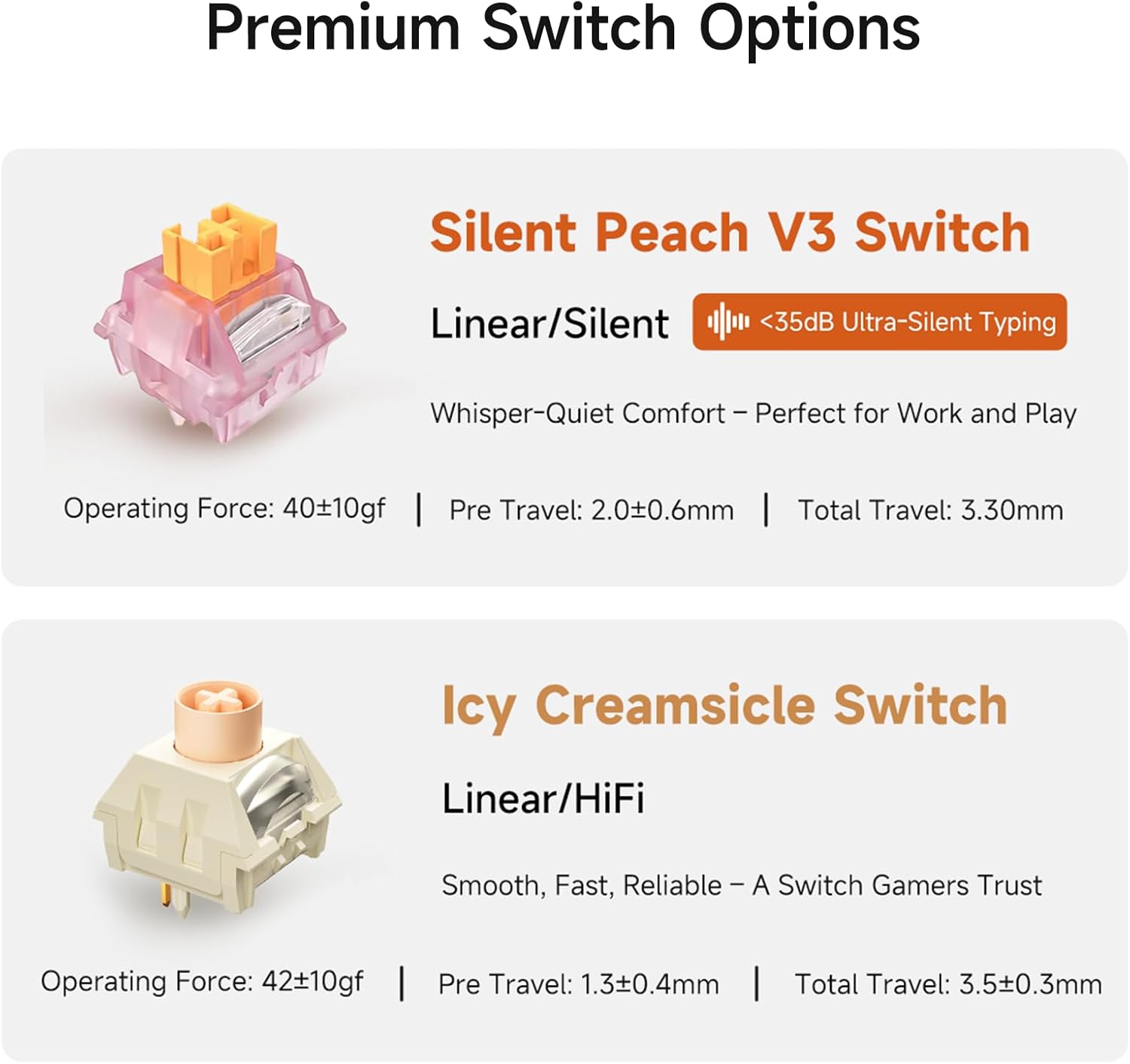
5.3 Switch Options
The UT98 offers premium switch options for different typing preferences:
- Silent Peach V3 Switch: Linear/Silent (<35dB Ultra-Silent Typing). Operating Force: 40±10gf, Pre Travel: 2.0±0.6mm, Total Travel: 3.30mm.
- Icy Creamsicle Switch: Linear/HiFi. Operating Force: 42±10gf, Pre Travel: 1.3±0.4mm, Total Travel: 3.5±0.3mm.
6. Řešení problémů
If you encounter any issues with your MCHOSE UT98 keyboard, please try the following:
- Žádné připojení: Ensure the mode switch is set correctly (2.4GHz, BT, or USB). For 2.4GHz, check if the dongle is properly inserted. For Bluetooth, ensure the keyboard is paired and within range. For wired, check the USB-C cable connection.
- RGB nefunguje: Verify the keyboard is powered on. Use FN key combinations to cycle through lighting modes or adjust brightness. Check MCHOSE HUB software settings.
- Klávesy nereagují: Ensure the keyboard is powered on and connected. If specific keys are not working, try re-seating or replacing the switch using the provided tools.
- Problémy s baterií: Charge the keyboard using the USB-C cable. If battery life is significantly shorter than expected, contact support.
7. Specifikace
| Funkce | Detail |
|---|---|
| Značka | MCHOSE |
| Číslo modelu | UT98 |
| Rozměry produktu | 15 cm D x 5 cm Š x 2 cm V (15 x 5 x 2 cm) |
| Hmotnost položky | 40.7 libry |
| Technologie připojení | Bezdrátové připojení 2.4 GHz, BT5.0, USB-C |
| Popis klávesnice | Mechanické |
| Speciální funkce | Podsvícené, Přizpůsobitelné klávesy displeje, Ergonomické, Vyměnitelné za provozu, Dobíjecí |
| Podpora barev podsvícení klávesnice | RGB |
| Baterie | 1 nestandardní baterie (součástí balení) |
| Kapacita baterie | 8000mAh (up to 500 hours battery life) |
| Kompatibilní zařízení | Herní konzole, notebook, počítač, chytrý telefon, tablet |
| Datum první dostupnosti | 11. září 2025 |
8. Záruka a podpora
Informace o záruce a technickou podporu získáte od oficiálního poskytovatele MCHOSE. website or contact MCHOSE customer service directly. Keep your purchase receipt for warranty claims.
Additional support and resources may be available through the MCHOSE HUB software and online community.


