1. Úvod
This manual provides essential information for the safe and efficient use of your Baseus Picogo 100W USB C Charger. Please read this manual thoroughly before operating the device and retain it for future reference.

Figure 1: Baseus Picogo 100W USB C Charger and included cables.
The Baseus Picogo 100W USB C Charger is a multi-port power adapter designed for fast charging a variety of devices, including laptops, tablets, and smartphones. It features a smart digital display for real-time monitoring and incorporates advanced GaN technology for efficient and safe operation.
2. Vlastnosti produktu
- 100W Ultra-Fast Charging: Delivers up to 100W power from either USB-C port, enabling rapid charging for compatible devices.
- Inteligentní digitální displej: Provides real-time information on charging status, temperature, and individual port output.
- 3-in-1 Multi-Port Design: Equipped with two USB-C ports and one USB-A port for simultaneous charging of up to three devices.
- Kompaktní a skládací: Features a compact design and foldable plug for enhanced portability, making it ideal for travel.
- Advanced GaN Technology with BCT: Utilizes Gallium Nitride (GaN) technology for high efficiency and reduced heat generation, complemented by AI-powered Baseus Cooling Technology (BCT) for continuous temperature monitoring.

Figure 2: The smart digital display provides real-time charging data.
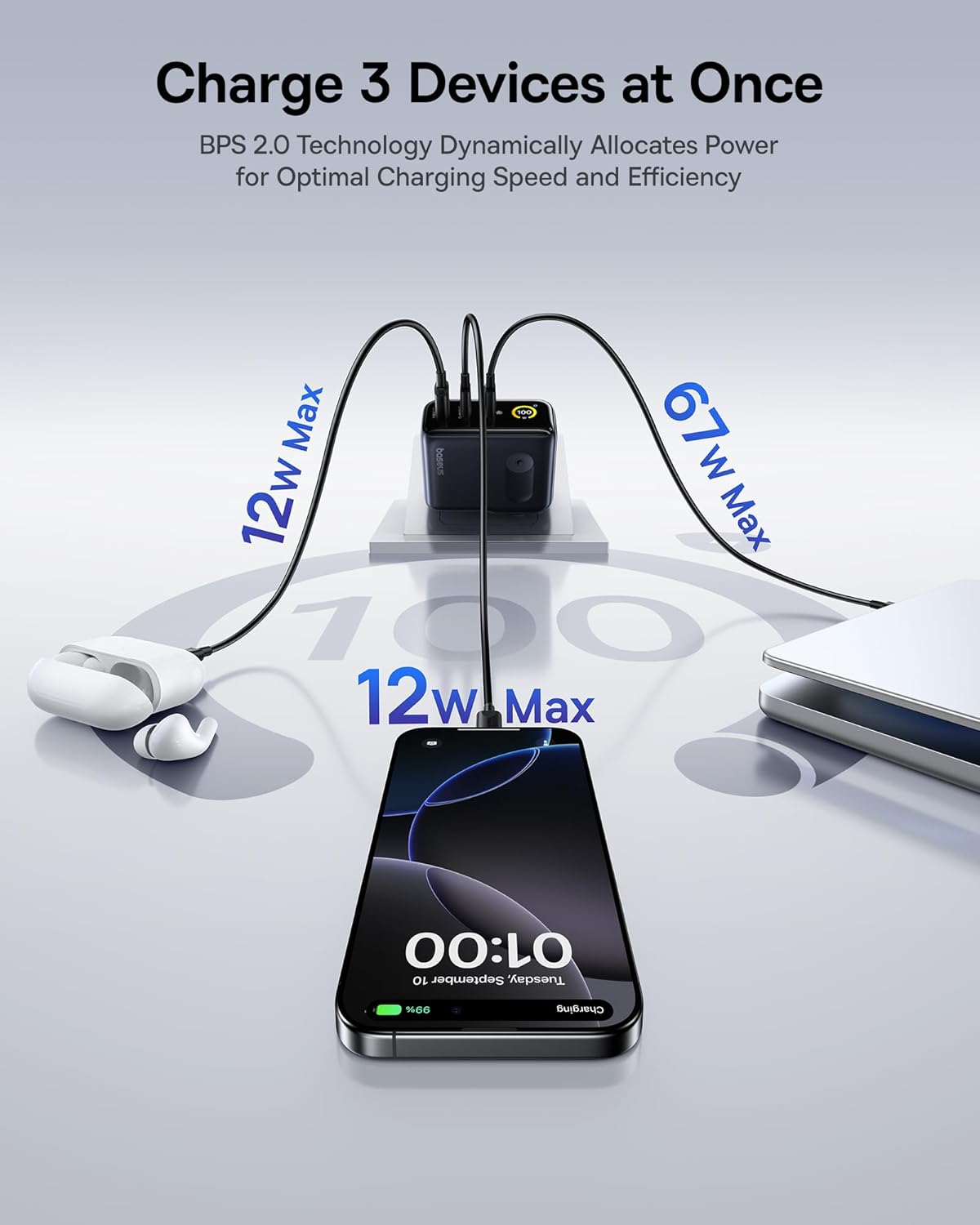
Figure 3: The charger supports simultaneous charging of multiple devices.
3. Nastavení
- Vybalte nabíječku: Carefully remove the Baseus Picogo 100W USB C Charger and the included 100W USB C cable from its packaging.
- Rozložte zástrčku: If the AC prongs are folded, gently unfold them until they lock into place.
- Připojte k elektrické zásuvce: Insert the charger's AC prongs into a standard wall outlet. The smart digital display will illuminate.
- Připojit zařízení: Use appropriate USB-C to USB-C or USB-C to USB-A cables to connect your devices to the available ports on the charger.
Video 1: Demonstrates connecting the Baseus Picogo 100W USB C Charger to a power outlet and observing the smart display.
4. Návod k obsluze
4.1 Nabíjecí zařízení
Once connected to a power outlet, plug your devices into the charger. The charger will automatically detect the connected devices and deliver optimal power. The smart digital display will show the real-time wattage output for each port and the overall charging status.
4.2 Understanding the Smart Digital Display
The display provides key information:
- Total Power Output (W): Zobrazuje kombinovaný wattage je doručováno do všech připojených zařízení.
- Individual Port Output (W): Zobrazuje wattage for each active USB-C (C1, C2) and USB-A (A) port.
- Teplota: Indicates the charger's operating temperature, monitored by BCT.
- Balanced Mode Indicator: A snowflake icon indicates the charger is in balanced cooling mode.
4.3 Ovládání displeje
The charger features a touch-sensitive button on its side for display control:
- Jedno stisknutí: Switches between different display interfaces (e.g., total wattage, individual port details).
- Dvojitým stisknutím tlačítka: Rotates the display 90 degrees for better vieworientace.
- Stiskněte a podržte: Turns the display off completely. Press again to turn it back on.
Video 2: Konecview of the Baseus Picogo AE21 100W Charger Block, including its ports and display functionality.
5. Údržba
- Čištění: Před čištěním odpojte nabíječku ze zásuvky. K otření povrchu použijte měkký, suchý hadřík. Nepoužívejte tekuté čisticí prostředky ani aerosoly.
- Skladování: When not in use, store the charger in a cool, dry place away from direct sunlight and moisture. Ensure the foldable plug is retracted for compact storage.
- Zacházení: Zabraňte pádu nabíječky ani jejímu vystavení silným nárazům. Nepokoušejte se nabíječku rozebírat ani upravovat, mohlo by dojít ke ztrátě záruky a mohlo by dojít k poškození nebo zranění.
6. Řešení problémů
| Problém | Možná příčina | Řešení |
|---|---|---|
| Nabíječka se nezapíná. | Žádné napájení ze zásuvky; uvolněné připojení. | Check if the wall outlet is functional. Ensure the charger is firmly plugged in. |
| Zařízení se nenabíjí nebo se nabíjí pomalu. | Incompatible cable; device not supporting fast charging; multiple high-power devices connected. | Use a certified fast-charging cable. Verify device compatibility. If charging multiple devices, power distribution may adjust; try charging fewer devices or check individual port outputs on the display. |
| Smart display is off. | Display turned off manually. | Press the side button once to reactivate the display. |
| Nabíječka se během provozu zahřívá. | Normal operation; high power output. | This is normal due to GaN technology and high power delivery. The BCT system actively monitors temperature to ensure safe operation. If it becomes excessively hot, disconnect immediately and contact support. |
7. Specifikace
| Funkce | Detail |
|---|---|
| Značka | Baseus |
| Číslo modelu | E0121C |
| Wattage | 100 wattů |
| Celkový počet portů USB | 3 (2x USB Type C, 1x USB Type A) |
| Vstupní objemtage | 240 voltů |
| Hmotnost položky | 9.9 unce |
| Rozměry balení | 5.2 x 3.39 x 2.13 palce |
| Speciální funkce | Fast Charging, Multi Device Charging, Smart Display Screen, Travel-friendly |
| Kompatibilní zařízení | Tablet, Laptop, Cell Phone, Headphone, Smart Watch, Switch, Steam Deck, ROG Ally |
| Zahrnuté komponenty | Baseus Picogo AE21 100W USB C Charger, 100W USB C Cable, User Manual |
8. Záruka a podpora
For warranty information and technical support, please refer to the documentation included with your product or contact Baseus directly.
Kontaktní údaje:
- Global Phone Support: +1 800 220 8056
- Global Email Support: care@baseus.com
Please have your product model number (E0121C) and purchase details ready when contacting support.

Figure 4: Back of product packaging with support details and certifications.


