1. Úvod
The Zoom LiveTrak L6max is a versatile 12-channel portable digital mixer and recorder designed for musicians, podcasters, and content creators. It offers high-quality audio recording with 32-bit float technology, multiple input options, built-in effects, and the convenience of battery-powered operation for on-the-go production. This manual provides essential information for setting up, operating, and maintaining your L6max unit.
2. Konec produktuview
The LiveTrak L6max combines a digital mixer with a multi-track recorder, offering a compact solution for various audio production needs. Key features include:
- Špičková kvalita zvuku: Records audio at 32-bit float/24-bit depth with a 48 kHz sampfrekvence ling.
- Prodloužená životnost baterie: Operates for up to 5 hours using lithium batteries.
- Vylepšená přenosnost: Lightweight design (1.48 lbs / 673g without batteries) for easy transport.
- Flexible Input Options: Features 14 input channels, including 4 XLR/TRS combo jacks and 8 TS phone jacks.
- Ample Kapacita úložiště: Records directly to microSDHC/SDXC memory cards (Class 10 or higher).
- Integrované funkce: Includes MIDI connectivity, built-in effects, sound pads, 3-band EQ, bounce track functionality, and AI noise reduction.
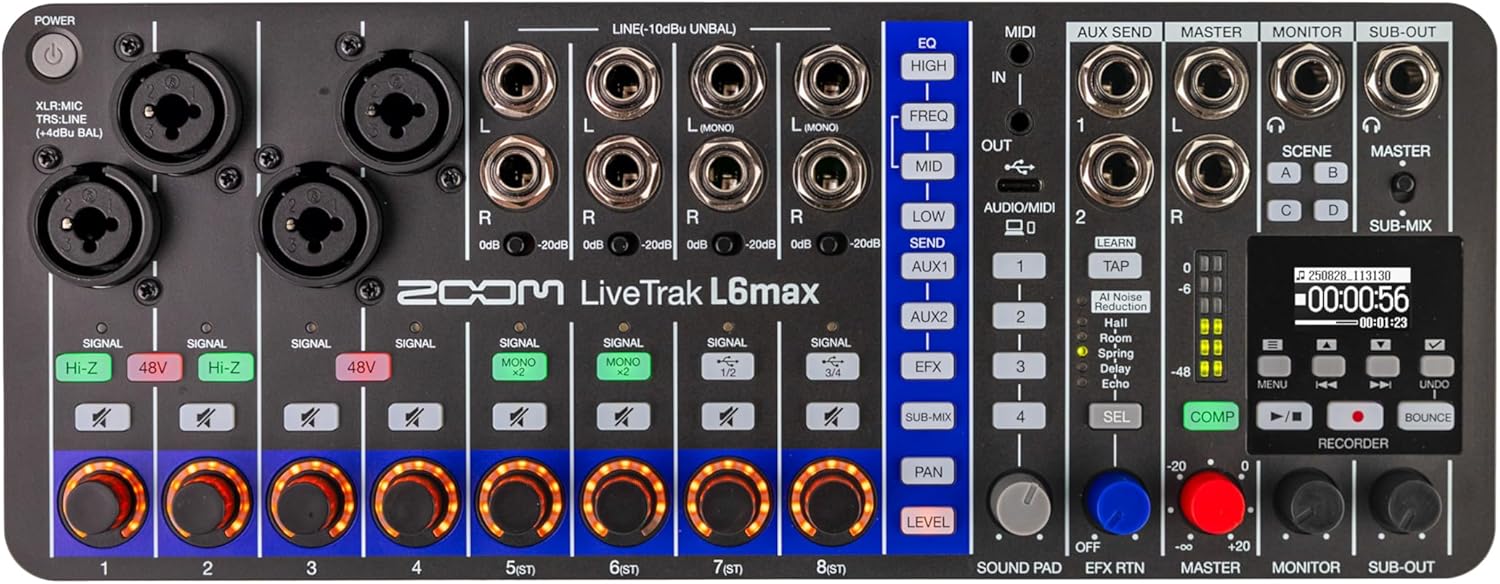
Obrázek 2.1: Shora dolů view of the Zoom LiveTrak L6max, showing all controls and input/output jacks.
Ovládací prvky a konektory
Familiarize yourself with the various controls and connectors on the L6max for optimal use.
- Vstupní kanály (1-4): XLR/TRS combo jacks for microphones and line-level instruments.
- Vstupní kanály (5-12): TS phone jacks for stereo line-level inputs.
- Knoflíky pro nastavení zisku: Upravte vstupní citlivost pro každý kanál.
- Sekce EQ: High, Mid, Low controls for tone shaping on each channel.
- Odeslání efektů: Controls for sending signal to the built-in effects processor.
- Hlavní výstup: Main stereo output for connecting to PA systems or monitors.
- Výstupy monitoru: Dedicated outputs for monitoring.
- Konektory pro sluchátka: Multiple headphone outputs with individual level controls.
- Sekce rekordéru: Transport controls (Play, Record, Stop), menu navigation, and display screen.
- Port USB-C: For power and computer connectivity (audio interface/MIDI).
- Slot pro kartu microSD: For recording and playback of audio files.

Obrázek 2.2: Strana view of the L6max, highlighting the microSD card slot and DC5V USB-C power/data port.
3. Nastavení
3.1 Zapnutí jednotky
The L6max can be powered via a USB-C power adapter (not included) or by four AA batteries.
- Napájení USB-C: Connect a compatible USB-C power adapter to the DC5V port on the side of the unit.
- Napájení baterie: Open the battery compartment on the bottom of the unit and insert four AA batteries, ensuring correct polarity. The L6max supports up to 5 hours of operation with lithium batteries.
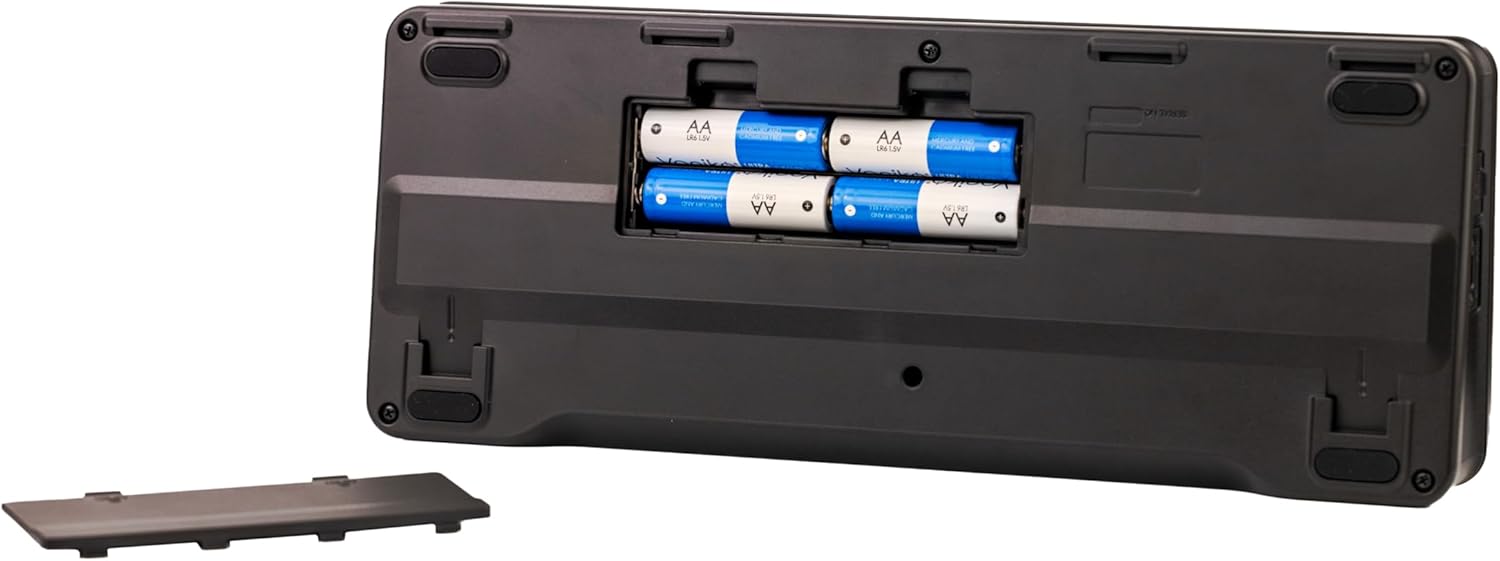
Obrázek 3.1: Spodní část view of the L6max, showing the battery compartment for four AA batteries.
3.2 Vložení karty microSD
For recording, a microSDHC or microSDXC card (Class 10 or higher) is required.
- Ensure the L6max is powered off.
- Vyhledejte slot pro kartu microSD na boku zařízení.
- Vložte kartu microSD kontakty dolů, dokud nezacvakne na místo.
- Chcete-li kartu vyjmout, jemně ji zatlačte, dokud nezaklapne, a poté ji uvolněte.
3.3 Připojení vstupů a výstupů
Connect your microphones, instruments, and other audio sources to the input channels. Connect your monitoring headphones, speakers, or PA system to the output jacks.
- Mikrofony/nástroje: Use XLR cables for microphones or TRS/TS cables for instruments and line-level devices into channels 1-4. Use TS cables for stereo line inputs into channels 5-12.
- Sluchátka: Plug headphones into the dedicated headphone jacks.
- Speakers/PA: Connect the Master Out or Monitor Out to your speakers or PA system using appropriate cables.

Figure 3.2: The L6max connected to a guitar, demonstrating input connectivity.
4. Návod k obsluze
4.1 Základní míchání
Each channel on the L6max features dedicated controls for gain, EQ, and level.
- Úprava zisku: Use the GAIN knob for each channel to set the input level. Aim for a strong signal without clipping (indicated by the SIGNAL/PEAK LED).
- Ekvalizace (EQ): Adjust the HIGH, MID, and LOW knobs to shape the tone of each input.
- Úroveň kanálu: Use the channel faders (or rotary knobs for stereo channels) to set the volume of each input in the main mix.
- Pánev: Adjust the PAN knob to position the sound of each channel in the stereo field.
 Figure 4.1: EQ controls allow for precise tone shaping.
4.2 Effects and Sound Pads
The L6max includes a variety of built-in effects and sound pads for enhancing your audio.
- Efekty (FX): Use the EFX SEND controls on each channel to send signal to the effects processor. Select and adjust effects (reverb, delay, chorus, etc.) using the dedicated FX section controls.
- Zvukové podložky: Trigger pre-loaded or custom sound effects and jingles using the sound pads.
 Figure 4.2: Integrated effects processor for audio enhancement.
4.3 Redukce šumu pomocí umělé inteligence
The L6max features AI noise reduction to help clean up your audio in real-time.
- Activating Noise Reduction: Refer to the L6max menu system for options to enable and adjust the AI noise reduction feature on individual channels or the master output.
 Figure 4.3: AI Noise Reduction helps clarify audio recordings.
5. Nahrávání a přehrávání
5.1 Spuštění nového projektu
Before recording, ensure a formatted microSD card is inserted.
- Stiskněte tlačítko MENU button to access the system menu.
- Přejděte na PROJEKT a vyberte NEW PROJECT.
- Confirm your selection to create a new recording project.

Figure 5.1: The L6max display screen showing project details and recording time.
5.2 Recording Tracks
The L6max allows multi-track recording directly to the microSD card.
- Arm the desired tracks for recording by pressing the REC/PLAY button for each channel. The button will illuminate red.
- Stiskněte hlavní ZÁZNAM button (red circle) to begin recording.
- Stiskněte tlačítko ZASTÁVKA tlačítko pro ukončení nahrávání.
5.3 Přehrávání
To listen to your recorded tracks:
- Ensure all tracks you wish to hear are disarmed (REC/PLAY button not red).
- Stiskněte hlavní HRÁT button (triangle).
- Použijte ZPĚT a RYCHLE VPŘED buttons to navigate through the recording.
5.4 Bounce Track Feature
The Bounce Track feature allows you to combine multiple recorded tracks into a single stereo track, freeing up tracks for further recording.
- Prepare the tracks you wish to bounce by setting their levels and pan positions.
- Stiskněte tlačítko ODSKOČIT tlačítko.
- Follow the on-screen prompts to select the tracks to be bounced and the destination track.

Figure 5.2: The L6max display indicating the Bounce feature is active.
6. Údržba
Proper maintenance ensures the longevity and optimal performance of your LiveTrak L6max.
- Čištění: K čištění vnější strany jednotky používejte měkký, suchý hadřík. Nepoužívejte abrazivní čisticí prostředky ani rozpouštědla.
- Skladování: Store the unit in a cool, dry place away from direct sunlight and extreme temperatures. If storing for an extended period, remove the batteries.
- Aktualizace firmwaru: Periodically check the Zoom webweb s aktualizacemi firmwaru, abyste zajistili, že vaše zařízení má nejnovější funkce a opravy chyb.
- Péče o baterie: Replace batteries when the low battery indicator appears. Use high-quality batteries for best performance.
7. Řešení problémů
This section addresses common issues you might encounter with your L6max.
- Bez napájení:
- Check if the USB-C power adapter is securely connected and functioning.
- Pokud používáte baterie, ujistěte se, že jsou vloženy správně a nejsou vybité.
- Žádný zvukový výstup:
- Verify that input sources are connected correctly and gain levels are set appropriately.
- Check channel faders, master fader, and headphone/monitor levels.
- Ensure output cables are securely connected to speakers/headphones.
- Problémy s nahráváním:
- Confirm a microSDHC/SDXC card (Class 10 or higher) is inserted and properly formatted.
- Check available storage space on the microSD card.
- Ensure tracks are armed for recording.
- Špatná kvalita zvuku (šum/zkreslení):
- Adjust input gain to prevent clipping.
- Check cable connections for any loose or faulty connections.
- Utilize the AI noise reduction feature if ambient noise is present.
- Computer Connectivity Problems:
- Ensure the L6max is connected to your computer via a USB-C cable.
- Verify that the L6max is selected as the audio input/output device in your computer's sound settings or DAW.
8. Specifikace
| Funkce | Specifikace |
|---|---|
| Číslo modelu | L6max |
| Hmotnost položky | 2.23 libry (1.01 kg) |
| Rozměry produktu | 6.3 x 8.27 x 2.17 palce (16 x 21 x 5.5 cm) |
| Počet kanálů | 12 |
| Technologie připojení | USB |
| Zdroj napájení | Battery Powered (AA) / USB-C |
| Frekvence | 48 kHz |
| Bitová hloubka záznamu | 32-bit float / 24-bit |
| Paměťová média | microSDHC/SDXC (Class 10 or higher) |
9. Záruka a podpora
Informace o záruce a technickou podporu naleznete na oficiálních stránkách Zoomu. webnebo se obraťte na místního distributora. Uschovejte si doklad o koupi pro případ reklamace.
- Online zdroje: Navštivte Zoom Store on Amazon pro informace o produktech a odkazy na podporu.
- Registrace výrobku: Register your LiveTrak L6max on the official Zoom webweb pro získávání aktualizací a podpory.


