1. Úvod
Welcome to the user manual for your AWOW Mini PC AMD Ryzen 5 7430U. This guide provides essential information for setting up, operating, and maintaining your new mini PC. Please read this manual thoroughly before using the device to ensure optimal performance and longevity.
2. Konec produktuview
The AWOW Mini PC BA7 is a compact and powerful computing solution designed for various applications, from daily tasks to light gaming and multi-display setups. It features an AMD Ryzen 5 7430U processor, ample memory, and fast storage.
Klíčové vlastnosti:
- Procesor: AMD Ryzen 5 7430U (6 jader, 12 vláken, až 4.3 GHz)
- Grafika: Integrovaná grafika AMD Radeon
- Paměť: 16 GB RAM DDR4 (rozšiřitelná až na 64 GB)
- Skladování: 512GB PCIe 3.0 SSD (expandable up to 2TB M.2 NVMe)
- Operační systém: Windows 11 Pro
- Podpora zobrazení: Triple 4K display output via HDMI 2.0, DisplayPort 1.2, and USB-C
- Konektivita: WiFi 6, Bluetooth 5.2, 1000Mbps RJ45 LAN
- Kompaktní design: Small footprint with efficient cooling.
Podrobnosti o procesoru
The AWOW Mini PC is equipped with an AMD Ryzen 5 7430U processor, offering 6 cores and 12 threads for efficient multitasking and performance. It boasts a turbo frequency of up to 4.3 GHz and includes 16 MB of cache.
Obrázek: Podrobný view of the AMD Ryzen 5 7430U processor, highlighting its 6 cores, 12 threads, 4.3GHz turbo frequency, and 16MB cache.
Rozhraní a porty
The mini PC provides a comprehensive set of ports for various connections, including multiple USB ports, display outputs, and network connectivity.

Obrázek: Přední a zadní views of the AWOW Mini PC, illustrating the location of the Power Button, Type-C Full Function port, USB3.2*2, CLR CMOS, 3.5mm Audio Jack, DC IN, DP1.2, HDMI2.0, USB 2.0*2, and RJ45 LAN 1000 Mbps port.
3. Průvodce nastavením
3.1 Vybalení a obsah balení
Před zahájením se ujistěte, že balení obsahuje všechny komponenty:
- AWOW BA7 Mini PC
- Napájecí adaptér
- Šrouby
- VESA Mount
- HDMI kabel
- Uživatelská příručka (tento dokument)

Image: Contents of the AWOW Mini PC package, including the mini PC unit, power adapter, screws, VESA mount, HDMI cable, and user manual.
3.2 Připojení periferních zařízení
- Připojení displeje: Use the provided HDMI cable or a DisplayPort/USB-C cable to connect your monitor(s) to the corresponding ports on the mini PC.
- Připojení klávesnice a myši: Plug your USB keyboard and mouse into the available USB ports.
- Připojte napájení: Plug the power adapter into the DC IN port on the mini PC, then connect the adapter to a power outlet.
- Síťové připojení (volitelné): For a wired connection, connect an Ethernet cable from your router to the RJ45 LAN port.
3.3 Počáteční spuštění
Press the Power Button on the front of the mini PC. The system will boot up, and you will see the Windows 11 Pro operating system. Follow any on-screen instructions for initial setup.
4. Návod k obsluze
4.1 Zapnutí/vypnutí
- Zapnutí: Stiskněte jednou tlačítko napájení.
- Vypnout: Click the Windows Start button, then select Power > Shut down. Alternatively, press and hold the Power Button for 5 seconds to force a shutdown (use only when necessary).
4.2 Konfigurace displeje
The AWOW Mini PC supports up to three 4K displays simultaneously. Connect your monitors to the HDMI, DisplayPort, and USB-C ports. Windows will automatically detect the displays. You can configure display settings (resolution, orientation, extended/duplicated desktop) via the Windows Display Settings.
4.3 Rozšíření úložiště
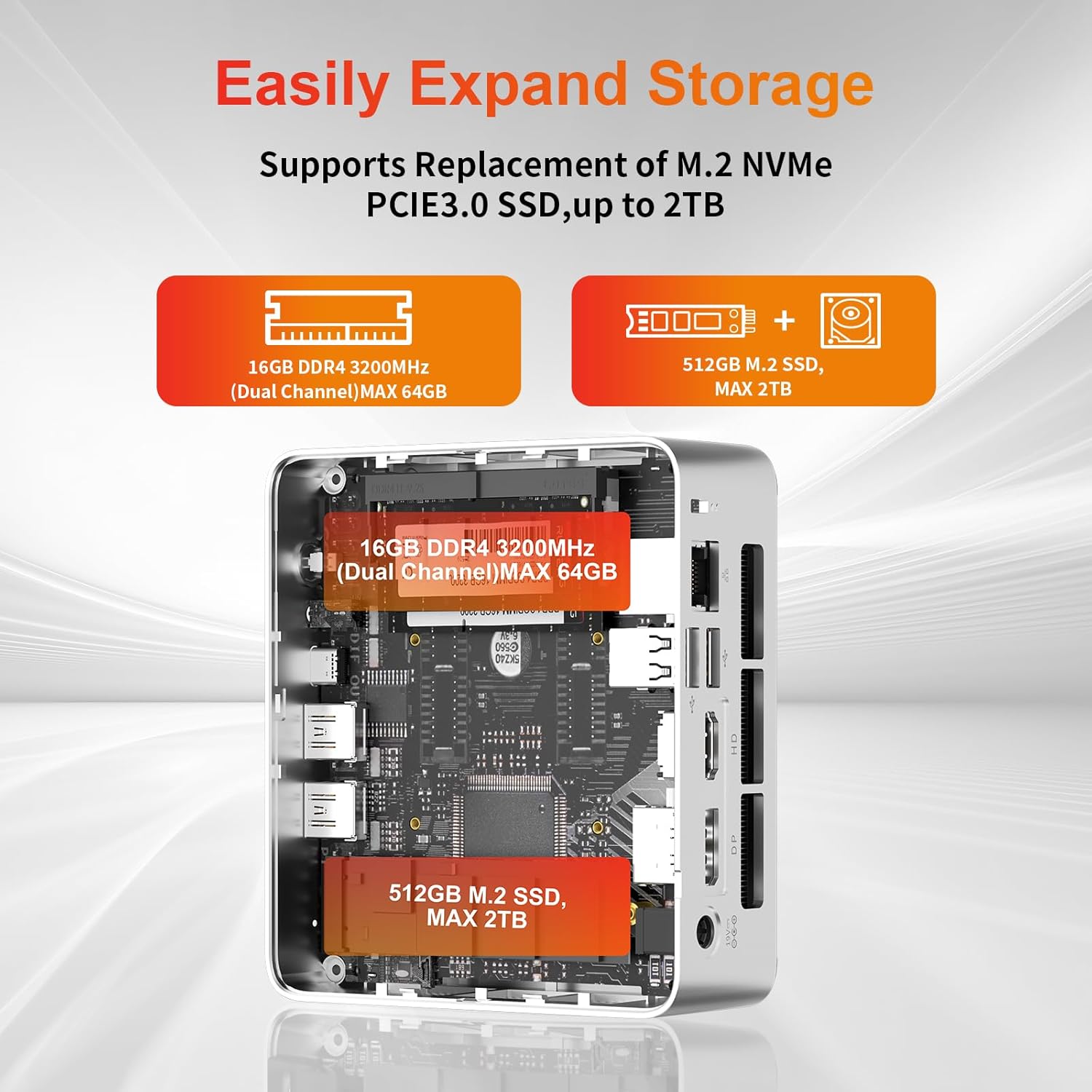
The mini PC allows for easy storage expansion. You can replace the existing M.2 NVMe PCIe 3.0 SSD with a larger one (up to 2TB) or add a 2.5-inch SATA SSD/HDD.

Obrázek: Interní view of the AWOW Mini PC showing the locations for the 16GB DDR4 RAM (expandable to 64GB) and the 512GB M.2 SSD (expandable to 2TB).
4.4 Síťové a bezdrátové připojení
- WiFi 6: Connect to wireless networks via the built-in WiFi 6 module. Access network settings through Windows.
- Bluetooth 5.2: Pair Bluetooth devices such as keyboards, mice, or headphones.
- RJ45 LAN: For a stable wired connection, use the 1000Mbps Ethernet port.
5. Údržba
5.1 Čištění
- Před čištěním se ujistěte, že je zařízení vypnuté a odpojené ze zásuvky.
- K otření vnější strany mini PC použijte měkký, suchý hadřík.
- Keep the ventilation openings clear of dust and debris to maintain optimal airflow.
5.2 Chladicí systém
The AWOW Mini PC features an efficient cooling system with a low-noise fan to dissipate heat effectively, ensuring stable performance.
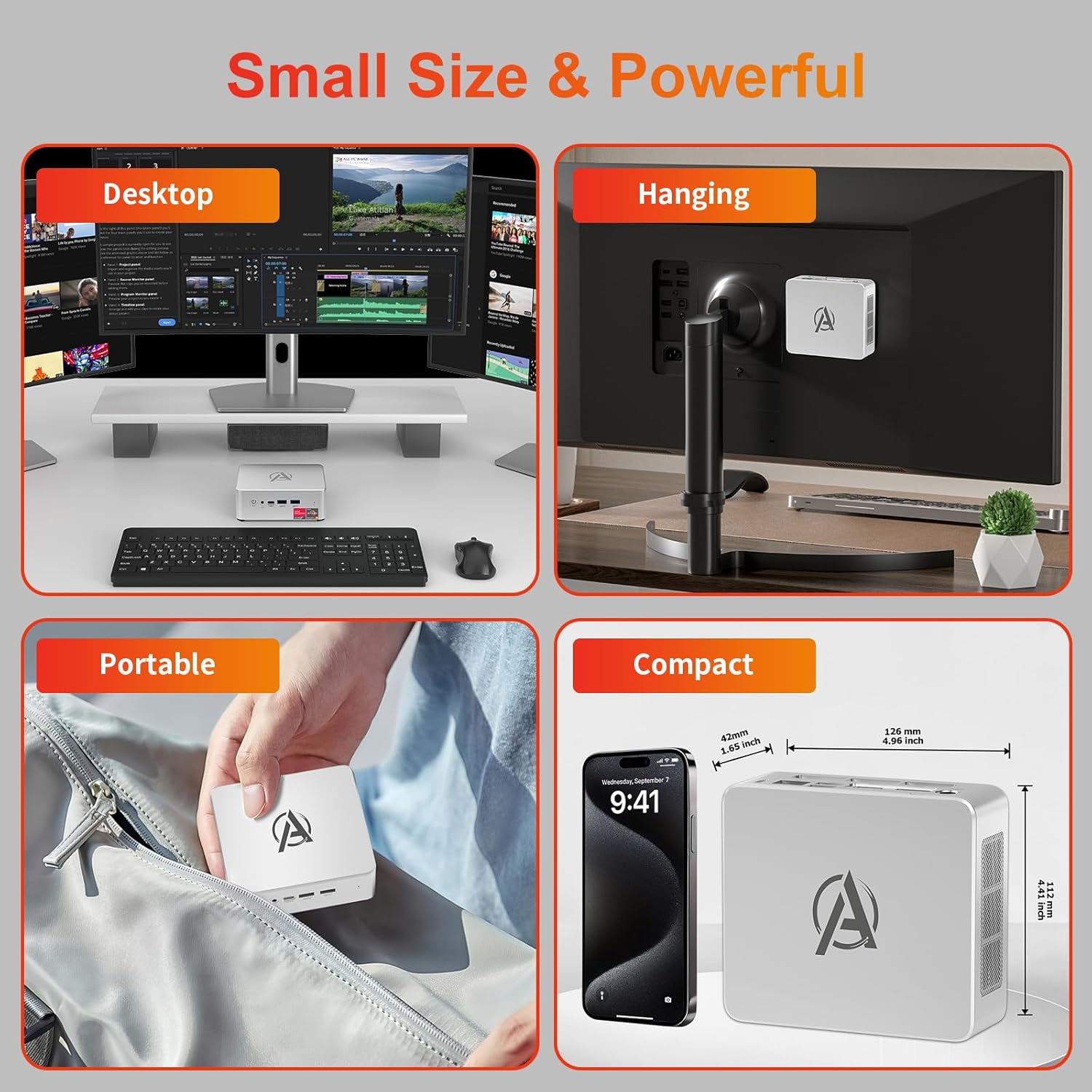
Image: Diagram illustrating the internal cooling system of the AWOW Mini PC, showing the fan and heat sink working to dissipate hot air.
5.3 Aktualizace softwaru
Regularly update your Windows operating system and drivers to ensure security, stability, and performance. Windows Update can be accessed through the Settings menu.
6. Řešení problémů
If you encounter issues with your AWOW Mini PC, refer to the following common troubleshooting steps:
- Bez napájení:
- Ujistěte se, že je napájecí adaptér bezpečně připojen k mini PC i k funkční zásuvce.
- Ověřte funkčnost elektrické zásuvky zapojením jiného zařízení.
- Bez displeje:
- Check that the HDMI, DisplayPort, or USB-C cable is firmly connected to both the mini PC and the monitor.
- Ujistěte se, že je váš monitor nastaven na správný vstupní zdroj (např. HDMI 1, DisplayPort).
- Zkuste se připojit k jinému displeji nebo použít jiný kabel.
- Problémy s připojením k síti:
- For WiFi, check if the WiFi adapter is enabled in Windows settings and ensure you are connected to the correct network.
- For wired LAN, ensure the Ethernet cable is properly connected and your router is functioning.
- Restart your router and the mini PC.
- Pomalý výkon:
- Zavřete nepotřebné aplikace běžící na pozadí.
- Check available storage space on your SSD.
- Ujistěte se, že systém Windows a ovladače jsou aktuální.
- Systém nereaguje:
- Press and hold the Power Button for 5 seconds to force a shutdown, then restart the PC.
7. Specifikace
| Funkce | Specifikace |
|---|---|
| Značka | Ach jo |
| Číslo modelu | BA7 |
| Procesor | AMD Ryzen 5 7430U (6 jader, 12 vláken, až 4.3 GHz) |
| Grafika | Integrovaná grafika AMD Radeon |
| BERAN | 16GB DDR4 (Max 64GB) |
| Skladování | 512GB PCIe 3.0 SSD (Max 2TB M.2 NVMe) |
| Operační systém | Windows 11 Pro |
| Zobrazení výstupu | 3x 4K (HDMI 2.0, DP 1.2, USB-C) |
| Bezdrátové připojení | WiFi 6, Bluetooth 5.2 |
| Kabelová LAN | 1000Mbps RJ45 |
| USB porty | 2x USB 3.2, 2x USB 2.0, 1x Type-C (Full Function) |
| Audio port | 1x 3.5mm audio jack |
| Jiné porty | 1x DC IN, 1x CLR CMOS |
| Rozměry (D x Š x V) | 126 mm x 112 mm x 42 mm (4.96 x 4.41 x 1.65 palce) |
| Hmotnost | 398 g |
8. Záruka a podpora
8.1 Informace o záruce
Please refer to your purchase documentation or contact AWOW customer support for specific warranty details regarding your Mini PC. Warranty terms may vary by region and retailer.
8.2 Zákaznická podpora
For technical assistance, product inquiries, or further support, please visit the official AWOW website or contact their customer service department. Contact information can typically be found on the AWOW webna webu nebo v obalu vašeho produktu.


