Zavedení
This manual provides essential information for the setup, operation, maintenance, and troubleshooting of your AWOW Mini PC, Model BA7. Please read these instructions carefully before using the device.

Obrázek: Overview of the AWOW BA7 Mini PC, highlighting its compact design and key features.
Obsah balení
Ověřte, zda jsou v balení přítomny všechny položky:
- AWOW BA7 Mini PC
- Napájecí adaptér
- Montážní šrouby
- Montážní držák VESA
- HDMI kabel
- Uživatelská příručka (tento dokument)

Image: Illustration of the AWOW BA7 Mini PC and its included accessories: power adapter, screws, VESA mount, HDMI cable, and user manual.
Pokyny pro nastavení
- Připojení periferií: Connect your keyboard, mouse, and monitor(s) to the appropriate ports on the Mini PC.
Obrázek: Přední strana view of the Mini PC showing the Power Button, Type-C port, USB 3.2 ports, and 3.5mm Audio Jack.

Obrázek: Zadní view of the Mini PC showing the DC IN, DP1.2, HDMI2.0, USB 2.0 ports, and RJ45 LAN port.
- Připojení napájení: Connect the power adapter to the DC IN port on the Mini PC, then plug the adapter into a power outlet.
- Zapnutí: Stiskněte tlačítko napájení na přední straně Mini PC. Systém se spustí.
- Počáteční nastavení: Postupujte podle pokynů na obrazovce a dokončete počáteční nastavení systému Windows 11 Pro, včetně jazyka, regionu, síťového připojení a vytvoření uživatelského účtu.
- Internetové připojení:
- Kabelové: Connect an Ethernet cable to the RJ45 LAN port for a stable wired connection.
- Bezdrátový: During Windows setup or via Windows settings, connect to your Wi-Fi network using the built-in WiFi 6.
Návod k obsluze
Základní operace
- Zapnutí/vypnutí: Press the power button to turn on the PC. To shut down, use the Windows Start menu options (Shut down, Restart, Sleep). A short press on the power button can put the PC to sleep. A long press (approx. 5 seconds) will force a shutdown.
- Výstup displeje: The Mini PC supports up to three 4K displays simultaneously via DP, HDMI, and USB-C. Connect your monitors and configure display settings in Windows.

Image: A user working with a triple monitor setup, demonstrating the Mini PC's multi-display capability.
- USB připojení: Utilize the USB 2.0 and USB 3.0 ports for connecting external devices such as external hard drives, USB flash drives, printers, and other peripherals. The Type-C port also supports data transfer and display output.
- Zvuk: Připojte sluchátka nebo reproduktory k 3.5mm audio konektoru.
Pokročilé použití
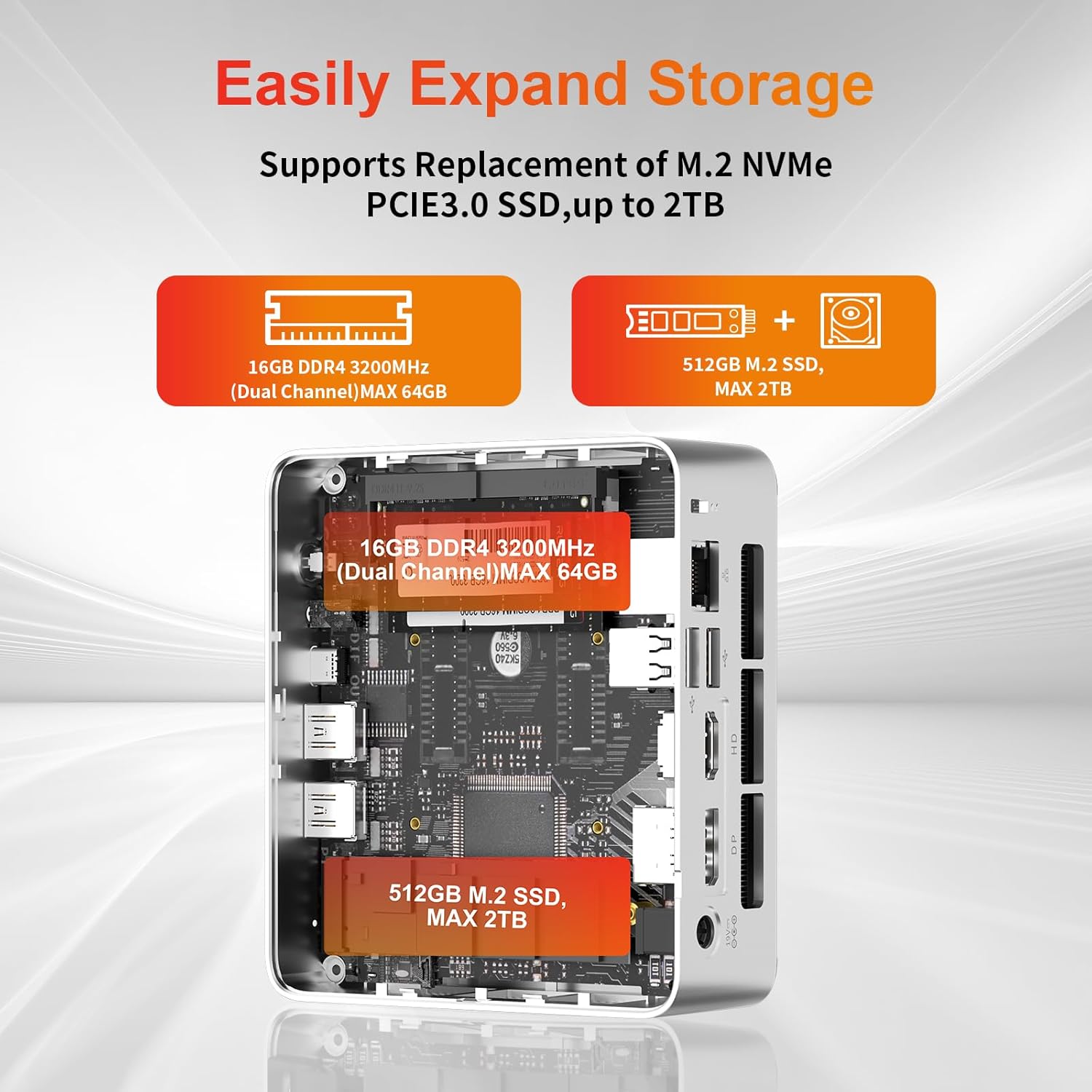
- Rozšíření úložiště: The Mini PC supports replacement of the M.2 NVMe PCIe 3.0 SSD up to 2TB. It also supports memory expansion up to 64GB DDR4.

Image: Diagram illustrating the internal components and options for expanding storage (M.2 SSD up to 2TB) and RAM (DDR4 up to 64GB).
- Montáž VESA: Use the included VESA mount bracket to attach the Mini PC to the back of a compatible monitor or to a wall mount, saving desk space.
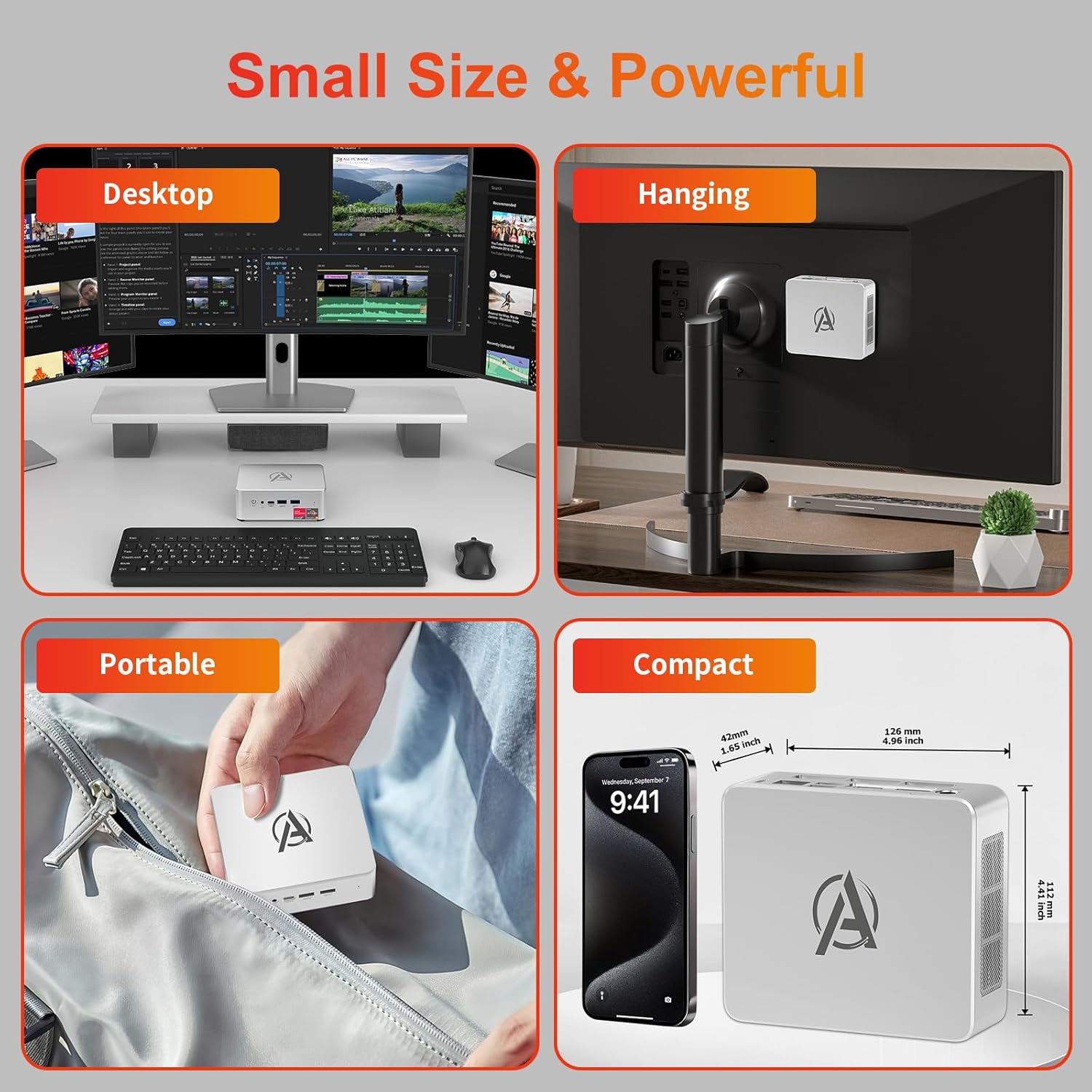
Image: Various usage scenarios for the Mini PC, including desktop, VESA-mounted behind a monitor, portable, and compact size comparison.
Údržba
- Čištění: Use a soft, dry cloth to clean the exterior of the Mini PC. Do not use liquid cleaners or aerosols. Ensure ventilation openings are free from dust.
- Aktualizace softwaru: Pravidelně kontrolujte a instalujte aktualizace systému Windows a aktualizace ovladačů, abyste zajistili optimální výkon a zabezpečení.
- Řízení tepla: Ensure the Mini PC is placed in a well-ventilated area. Avoid blocking the air vents. The intelligent cooling system is designed for low noise and efficient heat dissipation.

Image: Diagram illustrating the internal cooling fan and heat sink, showing airflow for efficient heat dissipation.
- Správa úložiště: Pravidelně uklízejte nepotřebné files and applications to maintain system performance.
Odstraňování problémů
- Bez napájení:
- Zkontrolujte, zda je napájecí adaptér bezpečně připojen k Mini PC i k elektrické zásuvce.
- Ujistěte se, že zásuvka je funkční.
- Zkuste jinou zásuvku.
- Bez displeje:
- Verify that the HDMI/DP/USB-C cable is securely connected to both the Mini PC and the monitor.
- Ujistěte se, že je monitor zapnutý a nastavený na správný vstupní zdroj.
- Zkuste jiný kabel displeje nebo monitor, pokud je k dispozici.
- Pomalý výkon:
- Zavřete nepotřebné aplikace běžící na pozadí.
- Zkontrolujte a nainstalujte všechny čekající aktualizace systému Windows nebo aktualizace ovladačů.
- Ujistěte se, že je na SSD disku dostatek volného místa.
- Monitor CPU and RAM usage in Task Manager to identify resource-intensive processes.
- Problémy s připojením k síti:
- For wired connections, ensure the Ethernet cable is properly connected and the router is working.
- For Wi-Fi, check if the Wi-Fi adapter is enabled and connected to the correct network. Restart your router/modem.
- Zamrznutí/pády systému:
- Restartujte minipočítač.
- Ensure the system is not overheating (check ventilation).
- Run a system diagnostic or check Windows Event Viewer for error messages.
Specifikace
| Model | AWOW BA7 Mini PC |
| Procesor | AMD Ryzen 5 7430U (6 jader, 12 vláken, až 4.3 GHz) |
| Grafika | Integrovaná grafika AMD Radeon |
| BERAN | 16GB DDR4 (rozšiřitelná až na 64GB) |
| Skladování | 512GB PCIe 3.0 M.2 SSD (Expandable up to 2TB) |
| Operační systém | Windows 11 Pro |
| Video výstup | DP1.2 (4K@60Hz), HDMI2.0 (4K@60Hz), USB-C (4K@60Hz) - Supports Triple Display |
| Konektivita | WiFi 6, Bluetooth 5.2, 1000Mbps RJ45 LAN |
| Porty | 2x USB 3.2, 2x USB 2.0, 1x Type-C (Full Function), 1x DP1.2, 1x HDMI2.0, 1x RJ45 LAN, 1x 3.5mm Audio Jack, 1x DC IN |
| Rozměry | 126 mm × 112 mm × 42 mm (přibližně 4.96 × 4.41 × 1.65 palce) |
| Hmotnost | 398 g (pouze zařízení) Image: The Mini PC with its dimensions (126mm x 112mm x 42mm) and weight (398g) labeled. |
Záruka a podpora
AWOW provides comprehensive support for its products.
- Záruka: This product includes a 12-month service period from the date of purchase, covering manufacturing defects.
- Technická podpora: Lifetime technical support is available for all AWOW products.
- Kontakt: For technical assistance, warranty claims, or any product-related inquiries, please visit the official AWOW webnebo kontaktujte jejich zákaznický servis.

Image: AWOW brand message emphasizing fulfillment, lifetime technical support, and 12-month service.


