1. Úvod
The Denon AVC-X2850H is a high-performance 7.2-channel AV Surround Amplifier designed to deliver an immersive home theater experience. It supports the latest video and audio technologies, including 8K Ultra HD, HDR10+, eARC, Dolby Atmos, and DTS:X. This manual provides essential information for setting up, operating, and maintaining your AVC-X2850H to ensure optimal performance and longevity.

Figure 1.1: Denon AVC-X2850H AV Surround Amplifier (Front View) with included remote control and setup microphone.
2. Bezpečnostní pokyny
Před použitím jednotky si pečlivě přečtěte tyto bezpečnostní pokyny. Uschovejte si tento návod pro budoucí použití.
- Zdroj napájení: Zapojte přístroj pouze do síťové zásuvky danéhotage specifikováno na zadním panelu.
- Větrání: Ensure adequate ventilation. Do not block ventilation openings. Avoid placing the unit on carpets or near heat sources.
- vlhkost: Nevystavujte jednotku dešti ani vlhkosti. Nepokládejte na jednotku předměty naplněné tekutinami, například vázy.
- Cizí předměty: Do not insert any metallic objects or flammable materials into the unit's openings.
- Servis: Nepokoušejte se o opravu jednotky sami. Veškerý servis svěřte kvalifikovanému servisnímu personálu.
- Kabely: Handle power cords and other cables carefully to prevent damage.
3. Obsah balení
Ověřte, zda jsou v balení obsaženy všechny položky:
- Denon AVC-X2850H AV Surround Ampdoživotní
- Jednotka dálkového ovládání
- Nastavení mikrofonu (pro kalibraci Audyssey)
- Antény FM/AM
- Napájecí kabel
- Rychlý průvodce
- Bezpečnostní pokyny
4. Nastavení
4.1. Připojení
Before making any connections, ensure the AVC-X2850H and all connected devices are powered off and unplugged from the wall outlet.
4.1.1. Připojení reproduktorů
Connect your speakers to the corresponding terminals on the rear panel. Ensure correct polarity (+ to + and - to -) for each speaker. The AVC-X2850H supports a 7.2 channel configuration.
4.1.2. Připojení HDMI
Connect your video sources (e.g., Blu-ray player, game console, streaming device) to the HDMI IN ports. Connect your TV or projector to one of the HDMI OUT ports. For optimal audio return, use the HDMI OUT (TV1) port which supports eARC/ARC.

Figure 4.1: Rear panel connections of the AVC-X2850H, illustrating HDMI, speaker, and other audio/video ports.
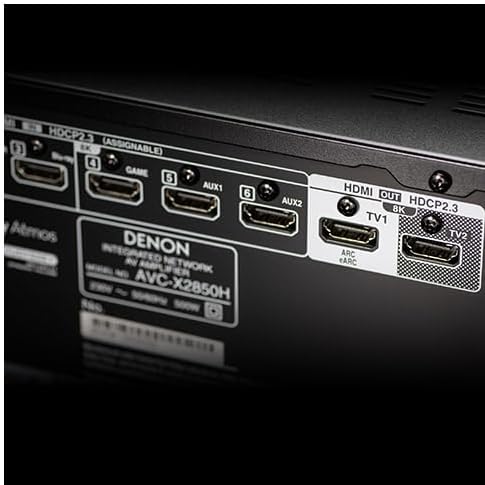
Obrázek 4.2: Detailní view of the HDMI input and output ports, including the eARC/ARC compatible HDMI OUT (TV1) port.
4.1.3. Síťové připojení
For network audio features and firmware updates, connect the unit to your home network via an Ethernet cable to the NETWORK port or wirelessly using the built-in Wi-Fi.
4.1.4. Připojení napájení
After all other connections are made, connect the power cord to the unit and then to a wall outlet.
4.2. Počáteční nastavení a kalibrace reproduktorů
Upon first power-on, the AVC-X2850H will guide you through an on-screen setup assistant. Follow the instructions displayed on your TV screen.
- Audyssey MultEQ XT: Use the included setup microphone and follow the on-screen prompts to perform Audyssey MultEQ XT automatic speaker calibration. This optimizes the sound settings for your specific room acoustics and speaker configuration.
- Nastavení sítě: Configure your network settings (Wi-Fi or wired) to enable streaming services and firmware updates.
5. Návod k obsluze
5.1. Základní obsluha
- Zapnutí/vypnutí: Stiskněte tlačítko POWER na předním panelu nebo dálkovém ovladači.
- Výběr vstupu: Use the INPUT SELECT buttons on the front panel or remote control to switch between connected sources (e.g., Blu-ray, Game, TV Audio).
- Ovládání hlasitosti: Upravte hlavní hlasitost pomocí knoflíku HLASITOST na předním panelu nebo tlačítek HLASITOST +/- na dálkovém ovladači.
5.2. Network Audio Functions (HEOS)
The AVC-X2850H integrates HEOS Built-in technology, allowing access to various music streaming services and network audio playback.
- Aplikace HEOS: Download the free HEOS app to your smartphone or tablet. Use the app to control music playback, manage streaming services (Amazon Music, Spotify, Deezer, etc.), and group HEOS-enabled devices for multi-room audio.
- USB přehrávání: Pro přehrávání zvuku připojte paměťové zařízení USB k přednímu portu USB files.
- Bluetooth: Pair your Bluetooth device with the AVC-X2850H to stream audio wirelessly.

Figure 5.1: The HEOS app interface, used for controlling network audio functions and streaming services.
5.3. Immersive Audio Technologies
Experience multi-dimensional sound with support for object-based audio formats.
- Dolby Atmos: Enjoy sound that moves around you in three-dimensional space, including overhead effects.
- DTS:X: Delivers an immersive audio experience that adapts to your speaker layout.
- MPEG-4 AAC: Supports audio formats used in 4K/8K satellite broadcasts for high-quality sound with ultra-high-resolution video.
6. Údržba
- Čištění: Otřete přístroj měkkým, suchým hadříkem. Nepoužívejte abrazivní čisticí prostředky ani rozpouštědla.
- Aktualizace firmwaru: Periodically check for firmware updates via the network connection to ensure your unit has the latest features and performance enhancements. Access this through the setup menu.
- Větrání: Ujistěte se, že větrací otvory jsou zbavené prachu a nečistot.
7. Řešení problémů
Pokud narazíte na problémy, podívejte se na následující běžné problémy a jejich řešení:
| Problém | Možná příčina / řešení |
|---|---|
| Žádný zvuk |
|
| Žádné video |
|
| Problémy s připojením k síti |
|
| Dálkové ovládání nefunguje |
|
If the problem persists, consult the Denon support webnebo kontaktujte zákaznický servis.
8. Specifikace
The following specifications are for the Denon AVC-X2850H AV Surround Ampživější:
- Model: AVC-X2850H
- kanály: 7.2
- Výkon: 185W per channel (6Ω, 1kHz, THD 10%, 1ch driven)
- Podpora videa: 8K/60Hz, 4K/120Hz, HDR10+, Dolby Vision, HLG, HDCP 2.3
- Zvukové formáty: Dolby Atmos, DTS:X, Dolby TrueHD, DTS-HD Master Audio, MPEG-4 AAC
- HDMI porty: 6 Inputs / 2 Outputs (1 x eARC/ARC compatible)
- Konektivita: Wi-Fi, Bluetooth, Ethernet, USB, RCA, Optical
- Rozměry (Š x H x V): 43.4 cm x 33 cm x 16.7 cm
- Hmotnost: 9.5 kg
- ASIN: B0FPQH4Y17
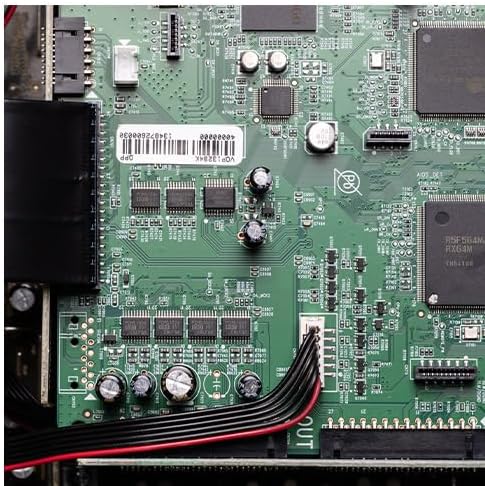
Obrázek 8.1: Vnitřní view of the AVC-X2850H, showcasing its advanced circuitry and discrete power ampdesign lifikátoru.
9. Záruka a podpora
Denon products are manufactured to the highest quality standards. For warranty information, please refer to the warranty card included with your product or visit the official Denon webmísto.
For technical support, FAQs, and additional resources, please visit the Denon support page: