Zavedení
This manual provides comprehensive instructions for the safe and efficient operation of your NIIMBOT D110 Bluetooth Label Maker Machine. Please read this manual thoroughly before using the device to ensure proper setup, usage, and maintenance.
Obsah balení
Po otevření balení ověřte, zda jsou v něm obsaženy všechny následující položky:
- 1 x NIIMBOT D110 Label Maker Machine
- 1 x 12x40mm Thermal Label Roll (pre-installed in printer)
- 1 x USB kabel typu C
- Uživatelská příručka (tento dokument)
- Additional 3 rolls of clear labels (packaged separately)
Nastavení
1. Nabíjení zařízení
Before initial use, fully charge the NIIMBOT D110 label maker.
- Connect the provided Type-C USB cable to the charging port on the label maker.
- Druhý konec kabelu USB připojte ke standardnímu napájecímu adaptéru USB (není součástí balení) nebo k portu USB počítače.
- Kontrolka bude zobrazovat stav nabíjení (např. červená pro nabíjení, zelená pro plné nabití).
2. Instalace štítkové pásky
The device comes with one roll of label tape pre-installed. To replace or install new tape:
- Open the label compartment cover by gently lifting it.
- Remove any empty label roll.
- Insert the new label roll with the printing surface facing upwards, ensuring the label edge extends slightly out of the slot.
- Kryt přihrádky pevně zavřete, dokud nezacvakne na místo.

Image: NIIMBOT D110 Label Maker with a label roll being inserted and a smartphone displaying the NIIMBOT app interface for label creation.
3. Stažení aplikace a připojení Bluetooth
The NIIMBOT D110 operates via a dedicated mobile application.
- Download the "NIIMBOT" app from the App Store (for iOS) or Google Play Store (for Android). You can search for "NIIMBOT" or scan the QR code provided in the quick start guide.
- Ujistěte se, že je na vašem mobilním zařízení povoleno Bluetooth.
- Open the NIIMBOT app.
- Turn on the D110 label maker by pressing and holding the power button.
- Within the app, search for available devices and select "D110" to connect. The indicator light on the printer will confirm a successful connection.
Image: The NIIMBOT D110 Bluetooth Label Maker, highlighting its wireless connectivity and showing icons for downloading the companion app from the App Store and Google Play.
4. Připojení k počítači (volitelné)
For more versatile content editing, the D110 can also be connected to a computer.
- Download and install the necessary drivers from the official NIIMBOT webmísto.
- Connect the D110 to your computer using the provided Type-C USB cable.
- Follow the on-screen instructions in the NIIMBOT PC software to begin creating and printing labels.
Návod k obsluze
1. Creating Labels with the NIIMBOT App
The NIIMBOT app offers various features for designing your labels.
- Zadávání textu: Enter your desired text.
- Symboly a ikony: Access over 1500 symbols to enhance your labels.
- jazyky: Podporuje více než 10 jazyků pro zadávání textu.
- Rámy: Choose from over 100 frames to customize label borders.
- QR Code & Barcode: Generate and print QR codes or barcodes directly from the app.
- Šablony: Utilize various built-in templates for quick label creation.
- Dávkový tisk: Print multiple identical or different labels efficiently.

Image: The NIIMBOT app interface showcasing its powerful functions, including a wide selection of symbols, support for multiple languages, various frames, and the ability to generate QR codes and barcodes.
2. Tisk štítků
After designing your label in the app:
- Review your label design on the app screen.
- Ensure the D110 is connected via Bluetooth and has sufficient battery.
- V aplikaci klepněte na tlačítko „Tisk“.
- The label maker will automatically feed and print the label.
- Odtrhněte vytištěný štítek podél zoubkovaného okraje.
3. Supported Label Sizes
The D110 supports various label widths from 0.47 inches (12mm) to 0.59 inches (15mm). Ensure you use genuine NIIMBOT thermal labels for optimal performance.

Image: The NIIMBOT D110 Label Maker demonstrating its compatibility with various label sizes, including 12x22mm, 12x40mm, 14x40mm, 14x60mm, 15x30mm, and 15x50mm, with exampméně potištěných štítků.
4. Aplikace Přamples
The NIIMBOT D110 is suitable for a wide range of labeling needs, including:
- School supplies (notebooks, binders, pencil cases)
- Food storage and organization
- Reminder labels for medication or tasks
- Gift labeling
- Travel item identification
- Cosmetic organization
- Office filing and organization
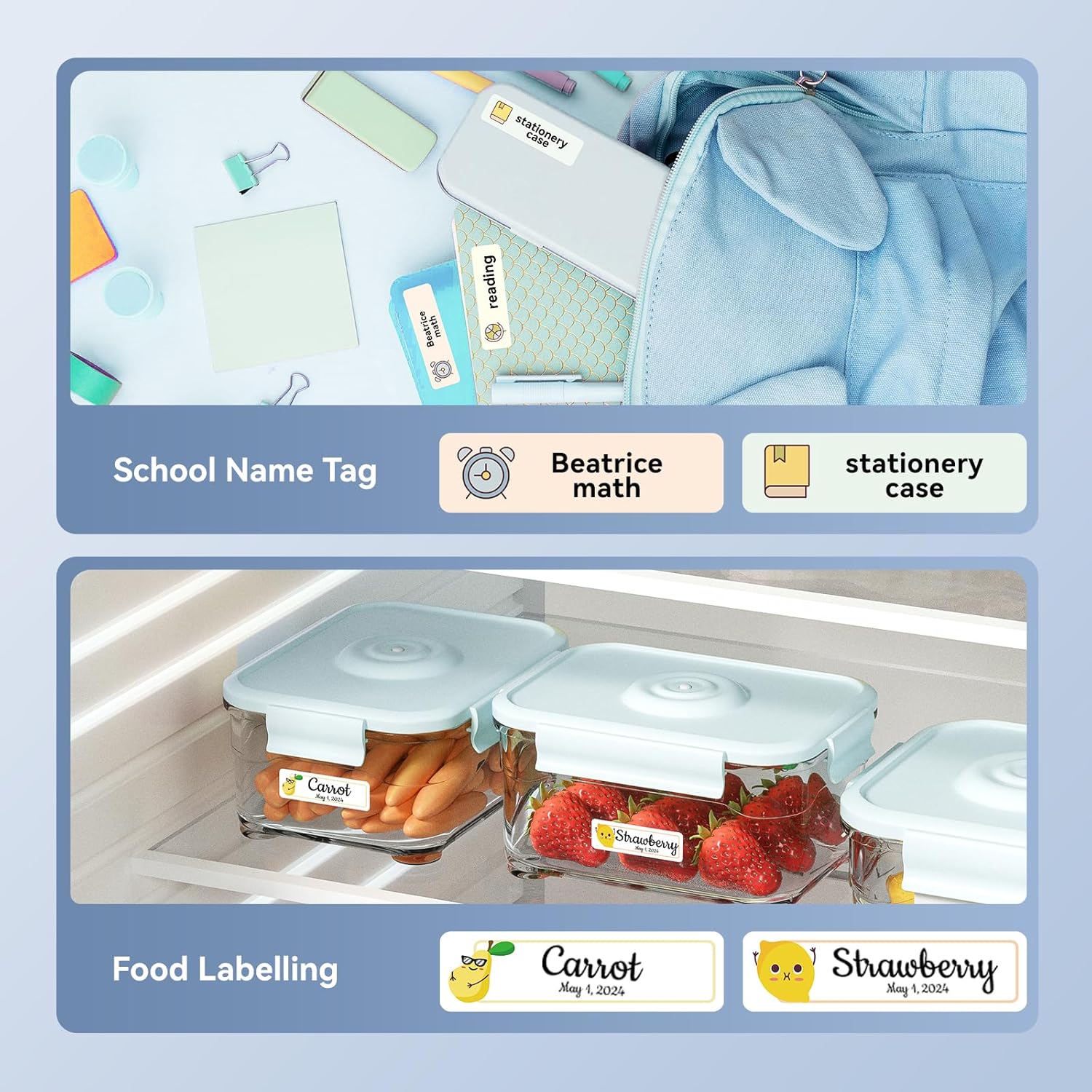
Obrázek: Přamples of labels created with the NIIMBOT D110, demonstrating use for school name tags on backpacks and stationery, as well as for food labeling on storage containers with contents and dates.

Obrázek: Přamples of labels created with the NIIMBOT D110, showing application for medication reminders in a pill organizer and decorative labels for gifts.

Obrázek: Přamples of labels created with the NIIMBOT D110, illustrating use for organizing travel toiletries like shampoo and conditioner, and for identifying makeup products such as eyeliner and eyeshadow.
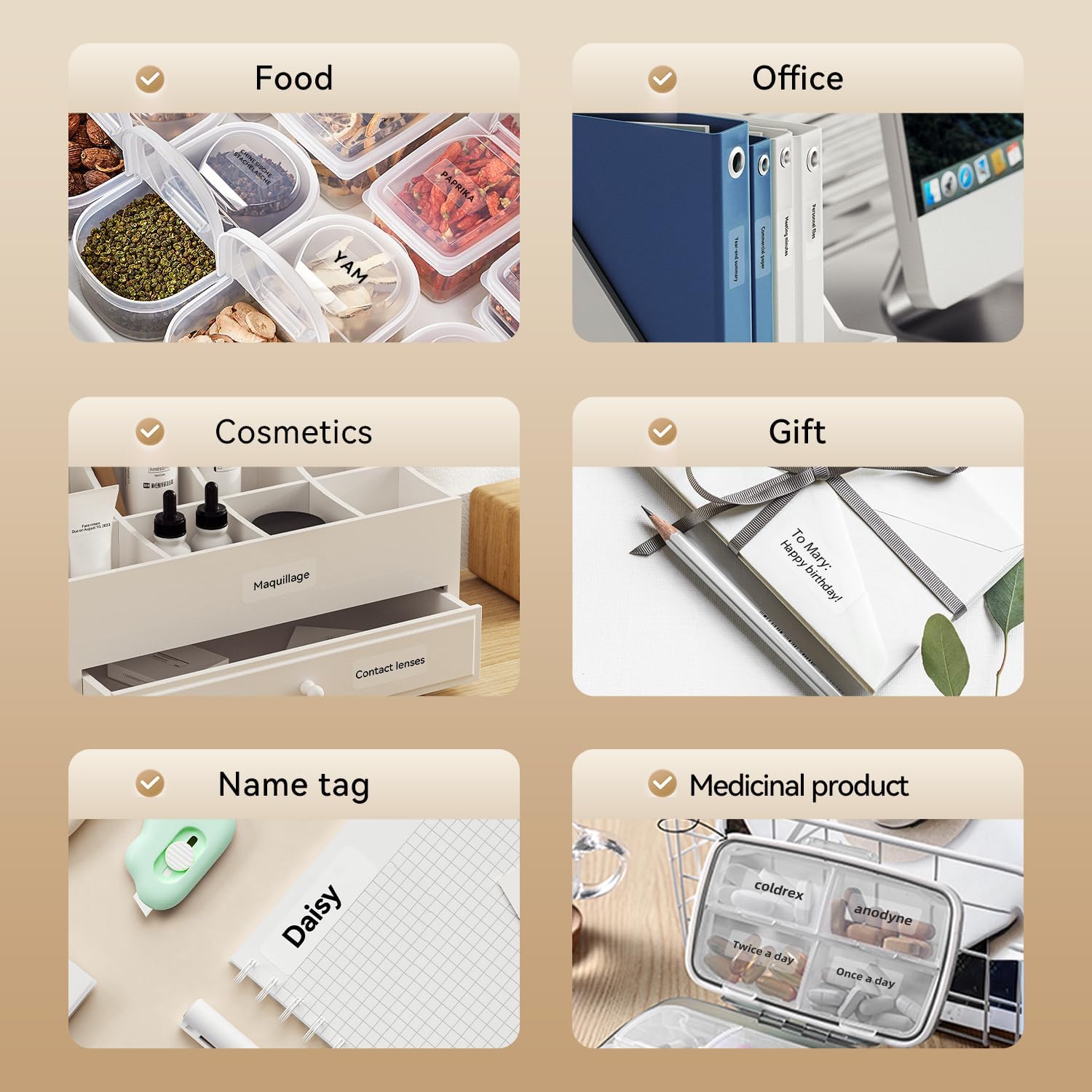
Image: A collage of various application examples for NIIMBOT D110 labels, including organizing food containers, office supplies, cosmetic items, gifts, creating name tags, and labeling medicinal products.
Údržba
1. Čištění tiskové hlavy
To ensure optimal print quality, regularly clean the print head.
- Turn off the label maker and disconnect it from any power source.
- Otevřete kryt přihrádky na štítky.
- Jemně otřete tiskovou hlavu vatovým tamponem, lehceampzakončené isopropylalkoholem.
- Před zavřením krytu a dalším používáním nechte tiskovou hlavu zcela vyschnout.
2. Péče o baterie
Chcete -li prodloužit životnost baterie:
- Vyhněte se častému úplnému vybíjení baterie.
- Zařízení pravidelně nabíjejte, i když jej nepoužíváte neustále.
- Pokud zařízení delší dobu nepoužíváte, skladujte jej na chladném a suchém místě.
3. Skladování
Store the label maker and label rolls in a dry environment, away from direct sunlight and extreme temperatures.
Odstraňování problémů
| Problém | Možná příčina | Řešení |
|---|---|---|
| Zařízení se nezapne | Slabá baterie | Nabijte zařízení pomocí dodaného kabelu USB. |
| Nelze se připojit přes Bluetooth | Bluetooth is off; App not open; Device out of range | Ensure Bluetooth is enabled on your phone, open the NIIMBOT app, and keep the printer within close proximity. Restart both devices if necessary. |
| Špatná kvalita tisku | Znečištěná tisková hlava; Nesprávný typ štítku; Slabá baterie | Clean the print head (refer to Maintenance section). Ensure you are using genuine NIIMBOT thermal labels. Charge the device. |
| Štítky se nepodávají správně | Label roll incorrectly installed; Label jammed | Open the cover and re-install the label roll, ensuring it is properly aligned. Remove any jammed labels carefully. |
| "No ink" message | Thermal printers do not use ink. This message is incorrect or a misunderstanding. | The D110 is a thermal printer and does not require ink. Ensure the label roll is correctly installed and is thermal paper. |
Specifikace
| Funkce | Detail |
|---|---|
| Model | NIIMBOT D110 |
| Způsob tisku | Thermal Printing (No Ink Required) |
| Konektivita | Bluetooth, USB (for PC) |
| Podporovaná šířka štítku | 0.47'' - 0.59'' (12 mm - 15 mm) |
| Hmotnost | 0.2 lb (approximately 90g) |
| Rozměry | 3.8'' x 2.9'' x 1.1'' (approximately 9.65cm x 7.37cm x 2.79cm) |
| Vstup napájení | Typ C USB |

Image: A visual comparison showing the NIIMBOT D110 as significantly smaller and lighter (0.2 lb, 3.8"x2.9"x1.1") compared to a traditional label printer (1.2 lb, 7"x6.3"x2.2").
Záruka a podpora
For warranty information and technical support, please refer to the official NIIMBOT website or contact NIIMBOT customer service directly. Details can typically be found on the product packaging or the manufacturer's webmísto.
Online podpora: Návštěva www.niimbot.com for FAQs, driver downloads, and contact information.


