1. Úvod
This manual provides detailed instructions for the safe and effective operation of your HTVRONT H17 Automatic Vacuum Heat Press Machine and the included Mini Heat Press. These devices are designed for creating custom designs on phone cases, badges, coasters, keychains, and ceramic items using sublimation film technology. Please read this manual thoroughly before initial use.
2. Bezpečnostní informace
- Termolis vždy používejte na stabilním, žáruvzdorném povrchu.
- Keep hands and fingers away from heating elements during operation to prevent burns. Use heat-resistant gloves when handling hot items.
- Ujistěte se, že napájecí kabel není poškozený a je správně zapojený do uzemněné zásuvky.
- Neponořujte stroj do vody nebo jiné kapaliny.
- Odpojte stroj ze zásuvky, když jej nepoužíváte, a před čištěním.
- Uchovávejte mimo dosah dětí a domácích zvířat.
3. Obsah balení
Ověřte, zda jsou v balení přítomny všechny položky:

Image: HTVRONT H17 Heat Press, Mini Heat Press, and various accessories including heat-resistant gloves, tape, and sublimation blanks.
- HTVRONT H17 Automatic Vacuum Heat Press Machine
- HTVRONT Mini Heat Press Machine
- Phone Case Fixture (for H17)
- Lens Pads (various sizes for different phone models)
- Filler Blocks (for H17 fixture)
- Heat-resistant Gloves
- Heat-resistant Tape
- Sublimation Film (A4 size)
- Auxiliary Label Paper
4. Konec produktuview
4.1 HTVRONT H17 Automatic Vacuum Heat Press
The H17 features intelligent temperature control and vacuum heat press technology for full-wrap, bubble-free transfers. It includes a digital display for precise temperature and time settings.

Image: The HTVRONT H17 Heat Press is compatible with a wide range of phone models.
4.2 HTVRONT Mini Heat Press
This compact heat press is ideal for smaller projects and hard-to-reach areas. It offers three heat settings for versatile application.

Image: The HTVRONT Mini Heat Press features a dial for selecting one of three heat settings.
5. Nastavení
5.1 HTVRONT H17 Heat Press Setup
- Place the H17 machine on a flat, stable, and heat-resistant surface.
- Připojte napájecí kabel do uzemněné elektrické zásuvky.
- Open the lid and ensure the heating chamber is clear of any debris.
5.2 HTVRONT Mini Heat Press Setup
- Place the Mini Heat Press on its safety base on a flat, stable, and heat-resistant surface.
- Připojte napájecí kabel do uzemněné elektrické zásuvky.
6. Návod k obsluze
6.1 Using the HTVRONT H17 for Phone Cases
The H17 is designed for 3D full-wrap sublimation transfers on phone cases. Follow these general steps:
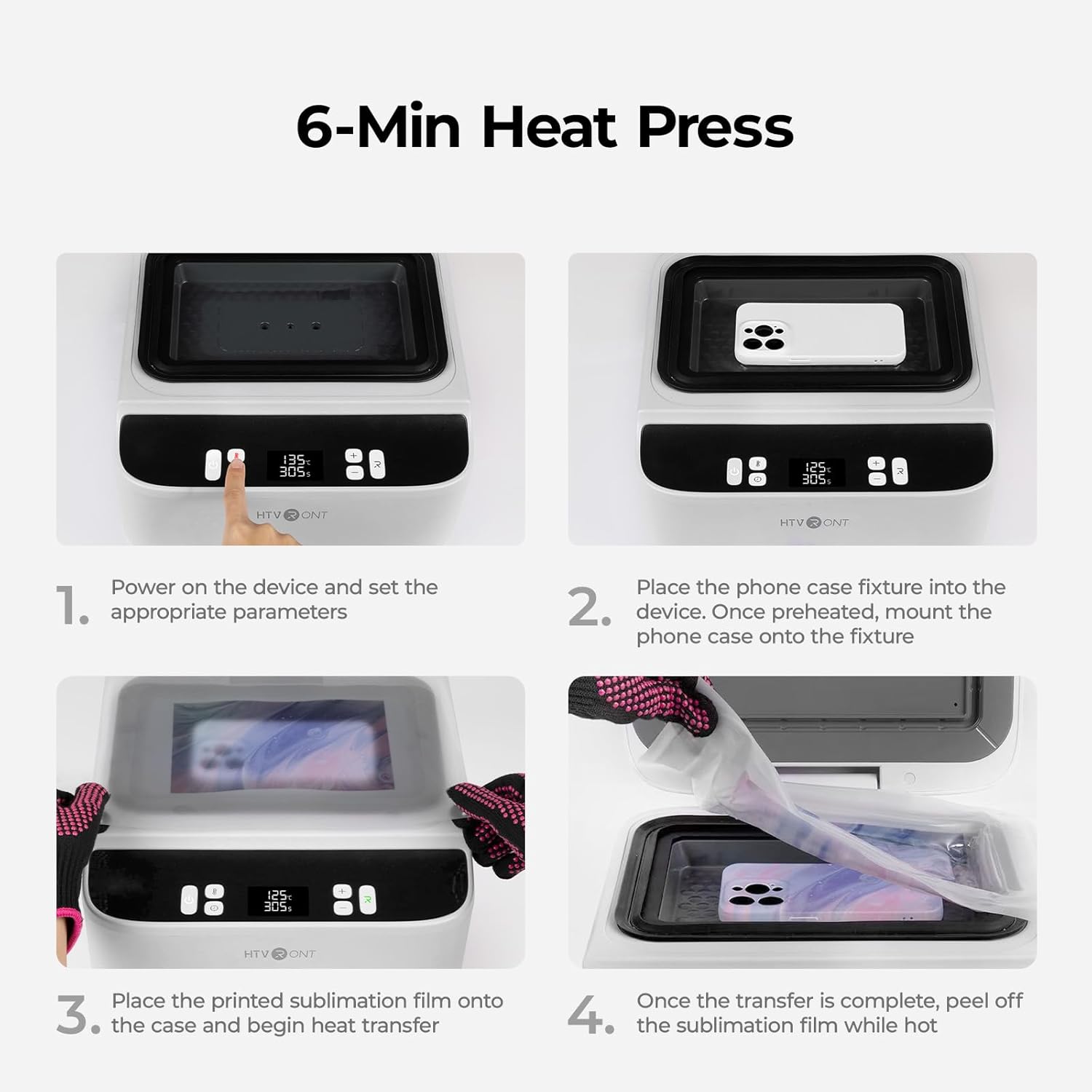
Image: Visual guide for the 6-minute heat press process.
- Příprava návrhu: Use HTVRONT's design software to create or adjust your design. Ensure proper alignment and coverage for your phone case model.
- Print Sublimation Film: Print your design onto the sublimation film using a sublimation printer. Ensure the matte side of the film is the printing side.
- Preheat Machine: Power on the H17 and set the appropriate temperature (100-180°C) and time (1-600s) according to your phone model and sublimation film requirements. Allow the machine to preheat.
- Příprava pouzdra na telefon: Place the correct phone case fixture into the heating chamber. Based on your phone model, select the appropriate lens pad and filler blocks. Secure them inside the phone case using heat-resistant tape, ensuring no vent holes are covered.
- Polohový film: Carefully place the printed sublimation film onto the phone case, aligning the design.
- Přenos tepla: Close the lid and initiate the heat press cycle. The vacuum function will engage automatically.
- Ochladit: Once the cycle is complete, carefully open the lid (wearing heat-resistant gloves) and remove the phone case. Peel off the sublimation film while the case is still hot for best results.
Video: How to Make an iPhone Case
Video Description: This video demonstrates the step-by-step process of using the HTVRONT H17 Heat Press to create a custom iPhone case, including fixture setup and sublimation film application.
Video: How to Make an Android Case
Video Description: This video provides a detailed guide on using the HTVRONT H17 Heat Press to create a custom Android phone case, covering the specific fixture and film placement for Android models.
6.2 Using the HTVRONT H17 for Other Items
The H17 can also be used for flat items such as badges, coasters, keychains, and ceramic pieces. The process is similar to phone cases, but you will use appropriate flat sublimation blanks instead of phone cases and their specific fixtures.
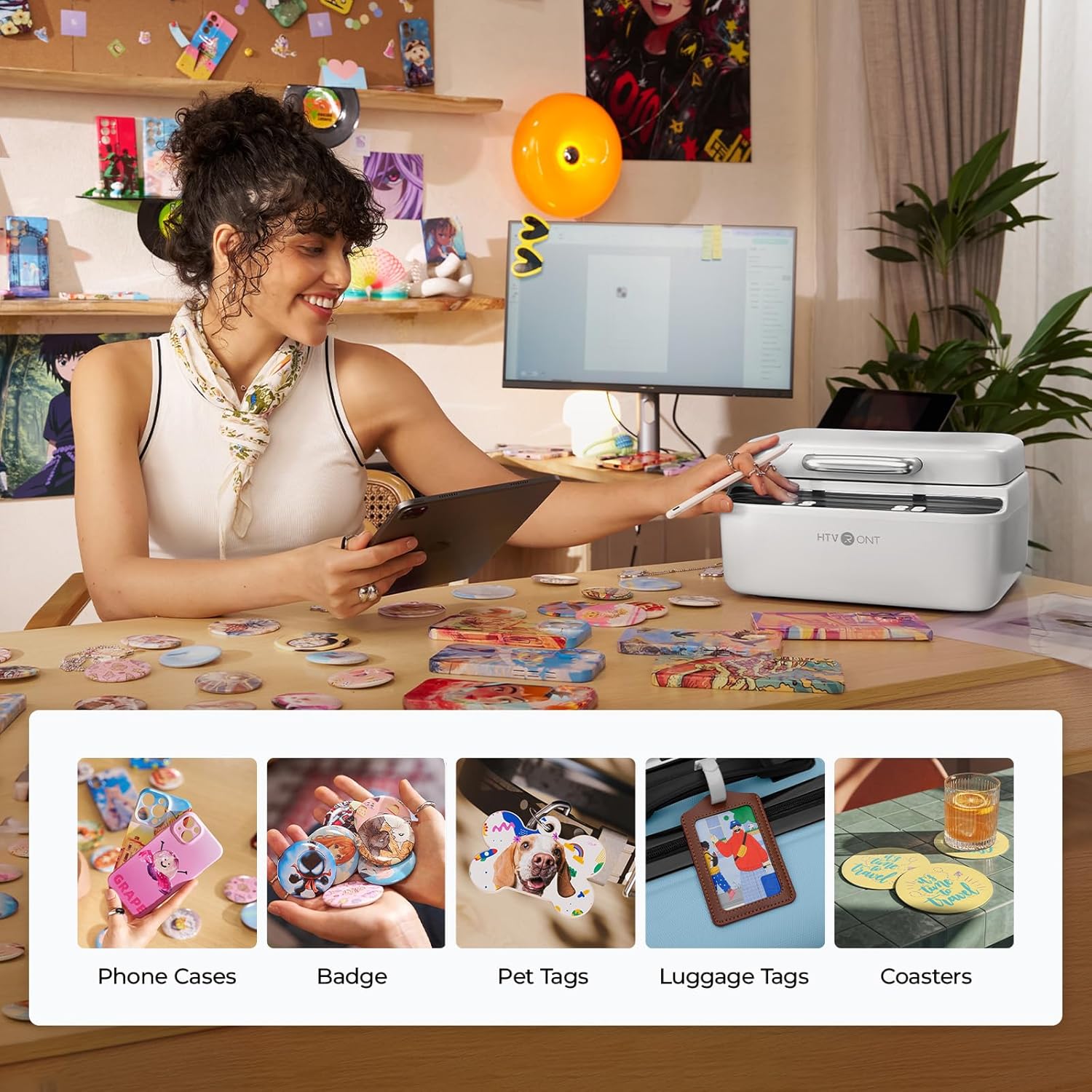
Image: The HTVRONT H17 Heat Press is versatile for customizing various items beyond phone cases.
Video: HTVRONT H17 Phone Case Heat Press Machine Overview
Popis videa: Toto video poskytuje obecný přehledview of the HTVRONT H17 Phone Case Heat Press Machine, showcasing its features and capabilities for various sublimation projects.
6.3 Sublimation Film Printing and Storage Tips
Proper handling of sublimation film is crucial for optimal transfer results.
Video: How to Use Sublimation Film Properly
Video Description: This video offers essential tips for using HTVRONT sublimation film, including how to prevent paper jams during printing and proper storage techniques to maintain film quality.
6.4 Using the HTVRONT Mini Heat Press
The Mini Heat Press is perfect for small, intricate designs or items that are difficult to fit into larger presses.

Image: The Mini Heat Press is suitable for a variety of small applications, including hats and patches.
- Zapnutí: Plug in the Mini Heat Press. The indicator light will turn green.
- Vyberte teplotu: Use the dial to select one of the three heat settings (140°C/284°F, 160°C/320°F, 180°C/356°F). The indicator light will turn red while heating and green when the set temperature is reached.
- Aplikujte teplo: Place your design on the item. Apply the Mini Heat Press with light pressure, moving it continuously over the design for the recommended time (refer to your material's specific instructions).
- Ochladit: Once complete, place the Mini Heat Press back on its safety base and allow the item to cool before handling.
7. Údržba
- Čištění: Ensure both heat presses are unplugged and completely cool before cleaning. Wipe down the exterior with a soft, damp tkanina. Nepoužívejte abrazivní čisticí prostředky.
- Skladování: Store the machines in a dry, cool place away from direct sunlight. Keep sublimation film in its sealed bag to prevent moisture absorption.
- Pravidelná kontrola: Periodically check power cords for any signs of damage.
8. Řešení problémů
- Uneven Transfer: Ensure the item is placed flat and the heat press is applied evenly. For the H17, verify filler blocks and lens pads are correctly positioned.
- Film Jams/Incomplete Prints (Sublimation Film): If the film is transparent, the printer's optical sensor may fail to detect it. Attach a small piece of auxiliary label paper or heat-resistant tape to the bottom edge of the film to improve feeding friction.
- Špatná kvalita barev: Ensure your sublimation printer is functioning correctly and that the sublimation film is stored properly (sealed bag, dry environment).
- Stroj se netopí: Check power connection. If issues persist, contact customer support.
9. Specifikace
| Funkce | Detail |
|---|---|
| Značka | HTVRONT |
| Model | H17 |
| Materiál | Kov |
| Upper Temperature Rating (H17) | 180 stupňů Celsia |
| Doporučená použití | Badge, Ceramic, Coaster, Keychain, Phone Case |
10. Záruka a podpora
HTVRONT products come with a standard manufacturer's warranty. For specific warranty details, product support, or to report any issues, please contact HTVRONT customer service:
- Webmísto: www.htvront.com
- E-mail: podpora@htvront.com


