Zavedení
Thank you for choosing the Lafocuse Digital LCD Alarm Clock. This manual provides detailed instructions for the setup, operation, and maintenance of your new alarm clock. This device features a large 4.7-inch LCD display, multiple alarm settings, a snooze function, backlight, temperature display, and date information. Please read this manual thoroughly before use to ensure proper functionality and to maximize your user experience.
Konec produktuview
The Lafocuse Digital LCD Alarm Clock is designed for ease of use and clear readability. Below is an overview of the clock's components and controls.

Obraz: Horní a zadní view of the Lafocuse Digital Alarm Clock, showing button layout and battery compartment.
- Tlačítko Světlo/Odložení buzení: Located on the top of the clock. Press to activate the backlight or to snooze a sounding alarm.
- Tlačítko '-': Snižuje hodnoty během nastavování.
- '+ (°C/°F) Button: Increases values during setting. Also used to switch between Celsius and Fahrenheit temperature display.
- Tlačítko nastavení budíku: Used to enter and adjust alarm settings.
- Time Set (12/24H) Button: Used to enter and adjust time settings. Also used to switch between 12-hour and 24-hour time formats.
- Přihrádka na baterie: Located on the rear, holds 3 AAA batteries.
Nastavení
- Nainstalujte baterie: Open the battery compartment cover on the back of the clock. Insert 3 new AAA batteries (not included), ensuring correct polarity (+/-). Close the battery compartment cover.
- Počáteční zapnutí: The clock will power on automatically once batteries are installed. The display will show a default time and date.
Návod k obsluze
1. Nastavení času a data
- Stiskněte a podržte Time Set (12/24H) po dobu přibližně 3 sekund pro vstup do režimu nastavení času. Číslice hodin budou blikat.
- Použijte '+' a '-' tlačítka pro nastavení hodiny.
- Stiskněte tlačítko Time Set (12/24H) znovu stiskněte tlačítko pro potvrzení hodin a přechod k nastavení minut. Číslice minut budou blikat.
- Použijte '+' a '-' tlačítka pro nastavení minut.
- Stiskněte tlačítko Time Set (12/24H) button again to confirm the minutes and move to year setting. The year digits will flash.
- Použijte '+' a '-' tlačítka pro úpravu roku.
- Stiskněte tlačítko Time Set (12/24H) button again to confirm the year and move to month setting. The month digits will flash.
- Použijte '+' a '-' tlačítka pro nastavení měsíce.
- Stiskněte tlačítko Time Set (12/24H) button again to confirm the month and move to day setting. The day digits will flash.
- Použijte '+' a '-' tlačítka pro nastavení dne.
- Stiskněte tlačítko Time Set (12/24H) button one last time to exit time and date setting mode.
2. Výběr 12/24hodinového formátu
V normálním režimu zobrazení času stiskněte Time Set (12/24H) button briefly to switch between 12-hour (with AM/PM indicator) and 24-hour formats.
3. Výběr jednotky teploty
V normálním režimu zobrazení času stiskněte '+ (°C/°F) button briefly to switch between Celsius (°C) and Fahrenheit (°F) temperature display.
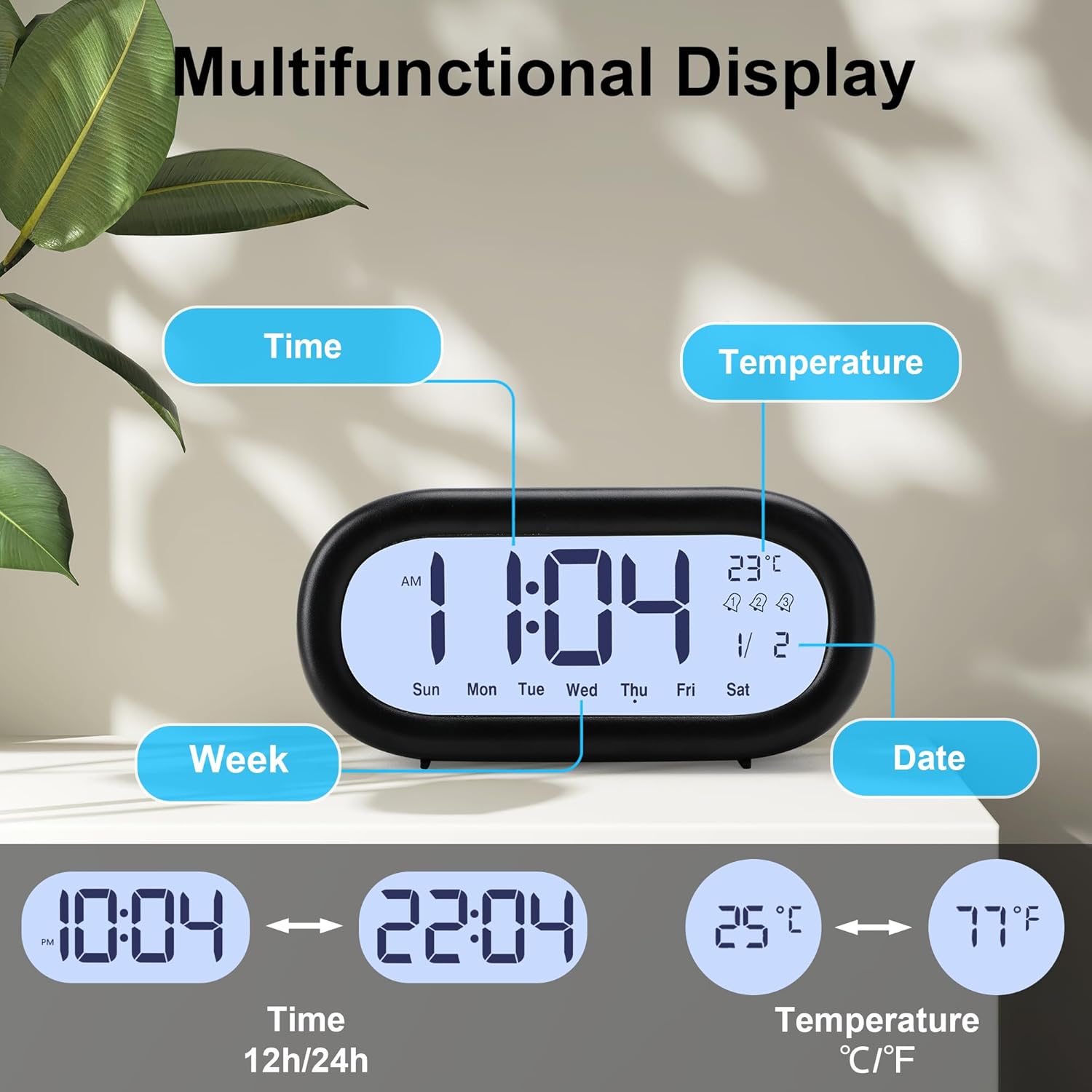
Obraz: Multifunctional display showing time, date, day of week, and temperature, with options for 12/24 hour and °C/°F.
4. Setting Alarms (Alarm 1, Alarm 2, Alarm 3)
The clock supports three independent alarms. Each alarm can be set for different times and working modes (Monday-Friday, Monday-Saturday, or Monday-Sunday).

Obraz: Visual representation of setting three distinct alarms for different schedules.
- Stiskněte tlačítko Alarm set button repeatedly to cycle through Alarm 1, Alarm 2, and Alarm 3 settings. The corresponding alarm icon (1, 2, or 3) will appear on the display.
- Chcete-li nastavit budík, stiskněte a podržte tlačítko Alarm set button for approximately 3 seconds when the desired alarm icon is displayed. The hour digits for that alarm will flash.
- Použijte '+' a '-' tlačítka pro nastavení hodiny budíku.
- Stiskněte tlačítko Alarm set znovu stiskněte tlačítko pro potvrzení hodin a přechod k nastavení minut. Číslice minut budou blikat.
- Použijte '+' a '-' tlačítka pro nastavení minut budíku.
- Stiskněte tlačítko Alarm set button again to confirm the minutes and move to alarm working mode selection. The current mode will flash (e.g., '1-5' for Mon-Fri).
- Použijte '+' a '-' buttons to select the desired working mode:
- 1-5: Budík zvoní od pondělí do pátku.
- 1-6: Budík zní od pondělí do soboty.
- 1-7: Alarm sounds Monday to Sunday.
- Stiskněte tlačítko Alarm set button one last time to exit alarm setting mode. The alarm icon will remain on the display, indicating the alarm is active.
- Chcete-li alarm deaktivovat, stiskněte tlačítko Alarm set button briefly until the alarm icon disappears from the display.
5. Funkce odložení buzení
Když zazní alarm, stiskněte velké Světlo/Odložení tlačítko na horní straně hodin. Budík se na 5 minut pozastaví a poté znovu zazvoní. Toto lze opakovat několikrát.
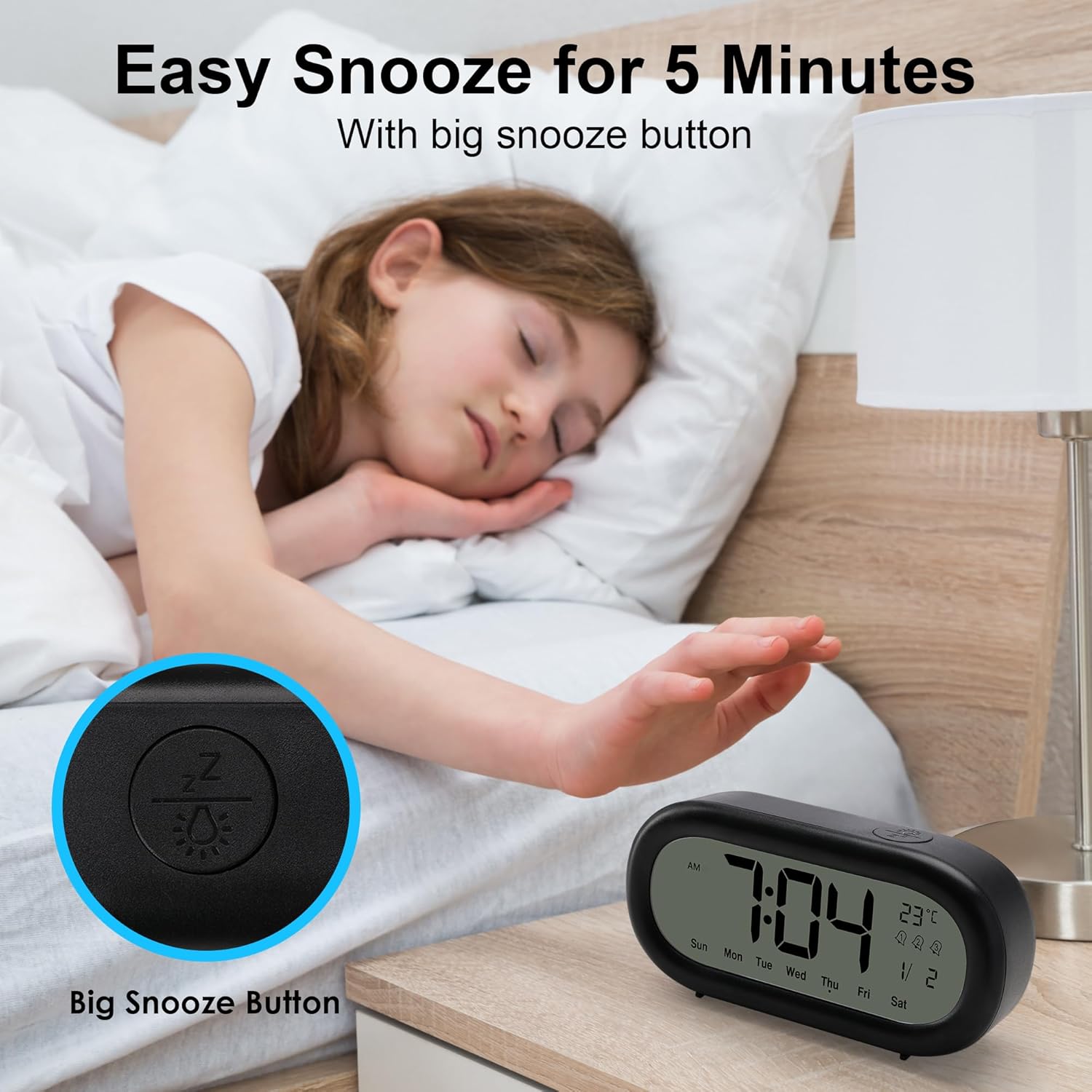
Obraz: Activating the snooze function with the large top button.
To stop the alarm completely when it is sounding (without snoozing), press any button on the back of the clock.
6. Funkce podsvícení
The clock features a soft backlight for viewing the display in low-light conditions. Press the large Světlo/Odložení button on the top of the clock to activate the backlight. The backlight will remain on for approximately 10 seconds and then automatically turn off to conserve battery power.

Obraz: Activating the backlight for night viewIng.
Údržba
- Čištění: Hodiny otřete měkkým, suchým hadříkem. Nepoužívejte abrazivní čisticí prostředky ani rozpouštědla, protože by mohly poškodit displej neboasing.
- Výměna baterie: When the display dims or the clock functions become erratic, replace all three AAA batteries with new ones. Ensure correct polarity.
- Skladování: If the clock will not be used for an extended period, remove the batteries to prevent leakage and damage.
Odstraňování problémů
| Problém | Možná příčina | Řešení |
|---|---|---|
| Displej je tmavý nebo prázdný. | Slabé nebo vybité baterie. | Vyměňte všechny 3 baterie typu AAA za nové. |
| Displej je z určitých úhlů obtížně čitelný. | LCD displays have optimal viewing úhly. | Upravte viewing angle of the clock. The display is typically clearest when viewmírně shora. |
| Alarm se nespustí. | Budík není aktivovaný nebo je nesprávně nastavený. | Ensure the alarm time is set correctly and the alarm icon (1, 2, or 3) is visible on the display. |
| Alarm sounds but does not stop after pressing the top button. | Top button activates snooze, not full stop. | To stop the alarm completely, press any button on the back of the clock. The top button is for snooze only. |
| Čas nebo datum je nesprávné. | Time/date not set or batteries were removed. | Follow the 'Setting Time and Date' instructions to reset the current time and date. |
Specifikace
| Funkce | Detail |
|---|---|
| Číslo modelu | ZH0175A |
| Typ zobrazení | Digitální LCD |
| Velikost obrazovky | 4.7 palců |
| Rozměry (D x Š x V) | 15 x 3.81 x 7 cm (5.9 x 1.5 x 2.8 palce) |
| Hmotnost | 180 gramů (0.4 lb) |
| Materiál | Plast |
| Zdroj napájení | 3 x AAA baterie (nejsou součástí balení) |
| Speciální funkce | Backlight, Snooze, Temperature Display, Date Display, 3 Alarms, 12/24 Hour Format |
| Barva | Černý |
Záruka a podpora
This product is covered by a standard manufacturer's warranty. For specific warranty details, please refer to the documentation provided at the time of purchase or contact your retailer. If you encounter any issues or require technical assistance, please contact Lafocuse customer support through the retailer's platform or the official Lafocuse website. Please have your model number (ZH0175A) and purchase information ready when contacting support.
