Zavedení
This manual provides essential information and instructions for the safe and efficient use of your XIAOMI Redmi 15C 4G LTE smartphone. Please read this manual thoroughly before operating your device to ensure proper functionality and to prevent damage.
The Redmi 15C features a 6.9-inch FHD+ DotDisplay, a 50MP AI dual camera system, a 6000mAh battery with 33W turbo charging, and IP64 dust and water resistance.
Obsah balení
Ověřte, zda váš balíček obsahuje následující položky:
- Chytrý telefon XIAOMI Redmi 15C
- 33W nástěnná nabíječka
- Kabel USB typu C
- Pouzdro na telefon
- Nástroj pro vysunutí SIM karty
Zařízení skončiloview
Below is an image of the XIAOMI Redmi 15C smartphone, highlighting its design and display.
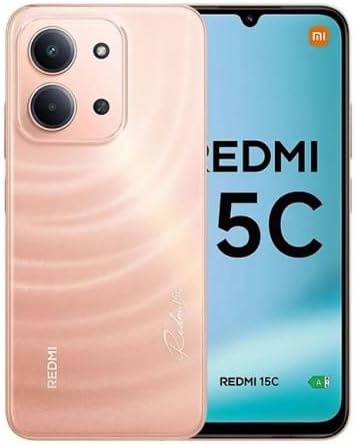
Obrázek: Přední a zadní strana view of the XIAOMI Redmi 15C smartphone in Twilight Orange.
Nastavení
1. Instalace SIM karty a Micro SD karty
- Vyhledejte držák SIM karty na boku zařízení.
- Vložte nástroj pro vysunutí SIM karty do malého otvoru vedle zásobníku a pevně zatlačte, dokud zásobník nevyskočí.
- Place your Nano SIM cards (up to two) and a Micro SD card (if desired) into the designated slots on the tray. Ensure the gold contacts face downwards.
- Opatrně vložte zásobník zpět do telefonu.
Důležitá poznámka ohledně kompatibility sítě: This device supports Dual Nano SIM. For users in the USA, it is compatible with T-Mobile, Mint, and Tello networks. It is also compatible with 4G VoLTE networks globally. Please verify your carrier's compatibility before use. The device is not compatible with Verizon, AT&T, Xfinity, Boost, Virgin, Visible, Cricket, or other CDMA carriers.

Image: Chart indicating compatible (T-Mobile, Mint, Tello, Outside USA) and incompatible (Verizon, AT&T, Xfinity, Boost, Virgin, Visible, Cricket, other CDMA) network carriers.
2. Počáteční nabíjení a zapnutí
- Connect the USB Type-C cable to your phone and the 33W wall charger. Plug the charger into a power outlet.
- Před prvním použitím nechte telefon nabíjet alespoň 30 minut nebo dokud indikátor baterie neukazuje dostatečné nabití.
- To power on, press and hold the Power button (usually on the right side) until the XIAOMI logo appears.
3. Počáteční konfigurace zařízení
Postupujte podle pokynů na obrazovce a dokončete počáteční nastavení, které zahrnuje:
- Výběr jazyka a regionu.
- Připojování k síti Wi-Fi.
- Přihlašování pomocí účtu Google.
- Setting up screen lock methods (PIN, pattern, password).
- Configuring the rear fingerprint sensor and AI face unlock for enhanced security.
Návod k obsluze
1. Zobrazení a navigace
- The 6.9-inch FHD+ DotDisplay offers a resolution of 720x1600.
- The refresh rate can be adjusted up to 120Hz for smoother visuals in supported applications. The touch sampling rate is up to 288Hz for responsive interaction.
- Adjust brightness in Settings > Display. The display features 700 nits (typ) and 850 nits HBM brightness.
- Utilize Reading mode to reduce eye strain, certified by TÜV Rheinland for Low Blue Light, Circadian Friendly, and Flicker Free.
- Navigate the device using the touchscreen interface. Swipe, tap, and pinch gestures are standard.
2. Použití fotoaparátu
Your Redmi 15C is equipped with a 50MP main camera and an 8MP front camera.
- Zadní kamera: The 50MP main camera (f/1.8, 5P lens) captures high-resolution images. It supports 1080p HD video recording at 30 fps and 720p HD video recording at 30 fps.
- Přední kamera: The 8MP front camera (f/2.0) is ideal for selfies and video calls. It supports 1080p HD video recording at 30 fps and 720p HD video recording at 30 fps.
- Režimy fotoaparátu: Access various modes such as filmCamera, HDR mode, Soft-light ring (for front camera), Portrait mode, and Time-lapse through the camera application.
3. Konektivita
- Wi-Fi: Connect to 2.4GHz and 5GHz Wi-Fi networks via Settings > Wi-Fi.
- Bluetooth: Pair with Bluetooth 5.1 devices (e.g., headphones, speakers) via Settings > Bluetooth.
- GPS: Zařízení podporuje GPS, AGPS, GLONASS, Beidou a Galileo pro přesné lokalizační služby.
- Audio jack: A 3.5mm headphone jack is available for wired audio accessories.
Údržba
1. Péče o baterie
- The 6000mAh (typical) battery provides extended usage.
- Use only the provided 33W wall charger and USB Type-C cable for optimal and safe charging.
- Avoid exposing the device to extreme temperatures, as this can degrade battery life.
- For long-term storage, charge the battery to approximately 50% and power off the device.
2. Čištění a ochrana
- Obrazovku a tělo čistěte měkkým hadříkem, který nepouští vlákna. Nepoužívejte abrazivní materiály ani agresivní chemikálie.
- The device features IP64 dust and water resistance, offering protection against dust ingress and splashes of water. It is not designed for submersion.
- Use the included phone case for additional physical protection.
3. Aktualizace softwaru
Your device runs on Xiaomi HyperOS based on Android 15. Regularly check for and install software updates via Settings > About phone > System update to ensure optimal performance, security, and access to new features.
Odstraňování problémů
1. Zařízení se nezapíná
- Ujistěte se, že je baterie nabitá. Připojte nabíječku a před opětovným zapnutím počkejte několik minut.
- Stiskněte a podržte tlačítko napájení po dobu alespoň 10–15 sekund, abyste vynutili restart.
2. Problémy s připojením k síti
- Verify that your SIM card is correctly inserted and activated with a compatible carrier.
- Zkontrolujte, zda je režim Letadlo vypnutý.
- Restartujte zařízení.
- Reset network settings via Settings > Connection & sharing > Reset Wi-Fi, mobile networks, and Bluetooth.
3. Displej nereaguje
- Vynuťte restart zařízení (podržte tlačítko napájení).
- Ensure the screen is clean and free of moisture.
4. Factory Reset (Data Loss Warning)
If persistent issues occur, a factory reset may be necessary. This will erase all data on your device. Back up important data before proceeding.
- Přejděte do Nastavení > O telefonu > Obnovení továrního nastavení.
- Postupujte podle pokynů na obrazovce a potvrďte reset.
Specifikace
Below are the key technical specifications for the XIAOMI Redmi 15C smartphone.
| Funkce | Detail |
|---|---|
| Číslo modelu | Redmi 15C (25078RA3EL) |
| Operační systém | Xiaomi HyperOS založený na Androidu 15 |
| Zobrazit | 6.9-inch FHD+ DotDisplay, 720 x 1600 resolution, up to 120Hz refresh rate, 700 nits (typ) brightness |
| Procesor | Osmijádrový procesor Helio G81 s frekvencí 2.0 GHz, grafická karta Mali-G52 MC2 |
| BERAN | 4 GB |
| Skladování | 256 GB (rozšiřitelná pomocí Micro SD karty) |
| Zadní kamera | 50MP hlavní fotoaparát (f/1.8) + pomocný objektiv |
| Přední kamera | 8MP (f/2.0) |
| Baterie | 6000mAh (typ), 33W turbo charging |
| Konektivita | 4G LTE, Wi-Fi (2.4GHz/5GHz), Bluetooth 5.1, GPS (AGPS, GLONASS, Beidou, Galileo) |
| Porty | USB typu C, 3.5mm konektor pro sluchátka |
| Senzory | Snímač otisků prstů na zadní straně, Odemykání obličejem s umělou inteligencí, Snímač přiblížení, Snímač okolního světla, Akcelerometr |
| Rozměry | 7 x 4 x 2 inches (Package Dimensions, actual device dimensions not provided) |
| Hmotnost | 6 unce (hmotnost položky) |
| Odolnost proti prachu a vodě | IP64 |
For regulatory compliance and certification details, refer to the device's information screen:
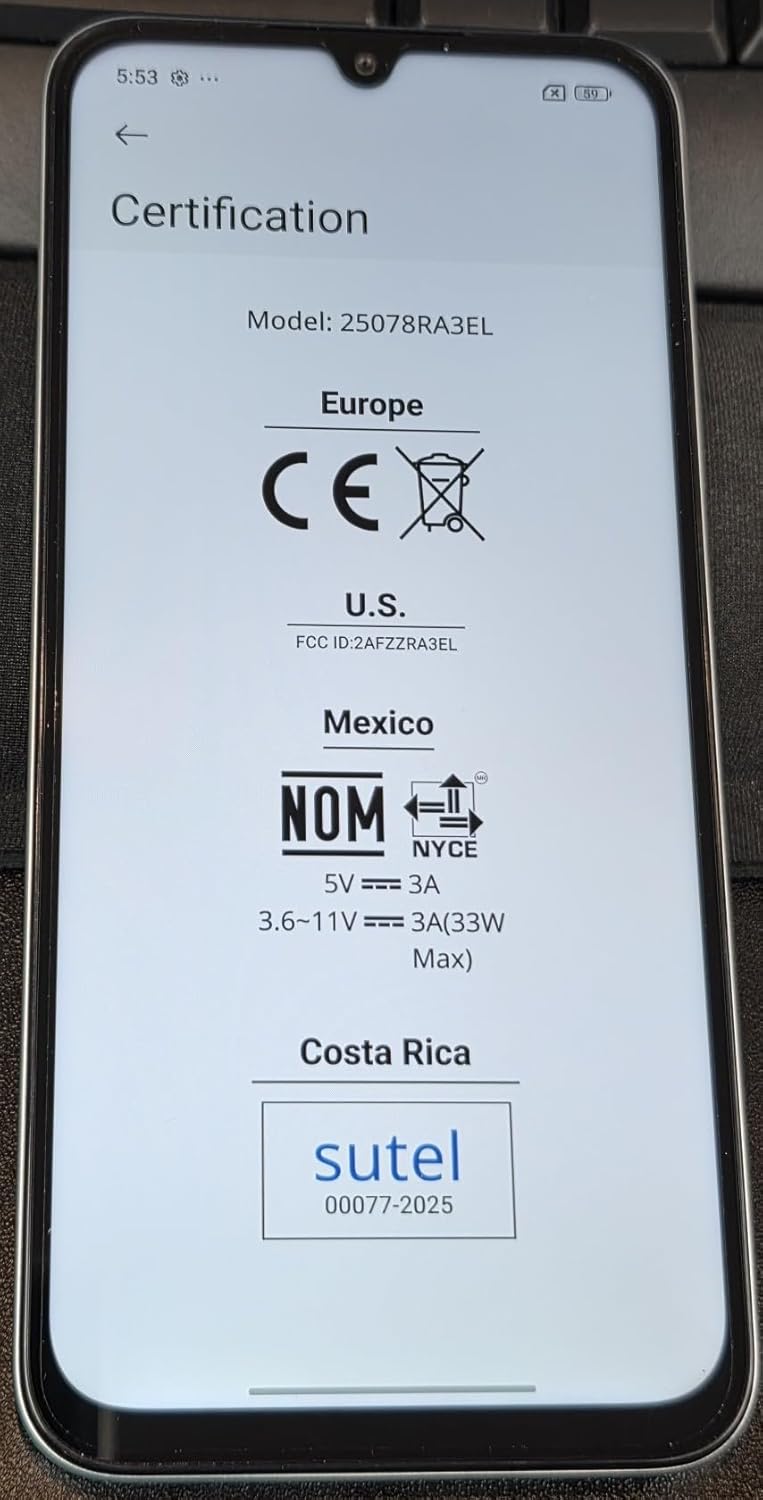
Image: Screen displaying certification information for the XIAOMI Redmi 15C, including Model: 25078RA3EL, CE, FCC ID: 2AFZZRA3EL, NOM, and SUTEL markings.
Záruka a podpora
Your XIAOMI Redmi 15C smartphone is covered by a manufacturer's warranty. For detailed warranty terms, conditions, and duration, please refer to the warranty card included in your product packaging or visit the official XIAOMI support webmísto.
For technical support, service, or further inquiries, please contact XIAOMI customer service or visit their official support channels. Keep your proof of purchase for warranty claims.
Oficiální obchod XIAOMI: Obchod XIAOMI na Amazonu


