Zavedení
This manual provides detailed instructions for the setup, operation, and maintenance of your GUSTARD R30 Fully-Discrete R2R Network Streamer DAC. Please read this manual thoroughly before using the device to ensure optimal performance and longevity.
Seznam obalů
Po otevření balení se prosím ujistěte, že obsahuje všechny následující položky:
- GUSTARD R30 Mainframe
- Napájecí kabel
- USB kabel
- Dálkové ovládání
- Záruční list

Přední panel přesview
The front panel of the GUSTARD R30 features essential controls and a display for real-time status and operations.
- Vypínač: Toggles between standby and active states. The R30 can remain in standby mode when the rear power switch is ON.
- Oblast zobrazení: Shows the current input channel, encoding format, and sampling rate. Displays menu items when in the setup menu.
- Displej hlasitosti: Indicates the current volume level, ranging from -63.5dB to 0dB. 'FIXED' indicates bypass mode. Displays menu options during configuration.
- Tlačítko '-': Normally decreases volume. Cycles through options in the menu.
- Tlačítko ozubeného kola: Short press switches inputs. Long press enters/exits the menu. Short press navigates items in the menu.
- Tlačítko „+“: Normally increases volume. Cycles through options in the menu.

Přes zadní panelview
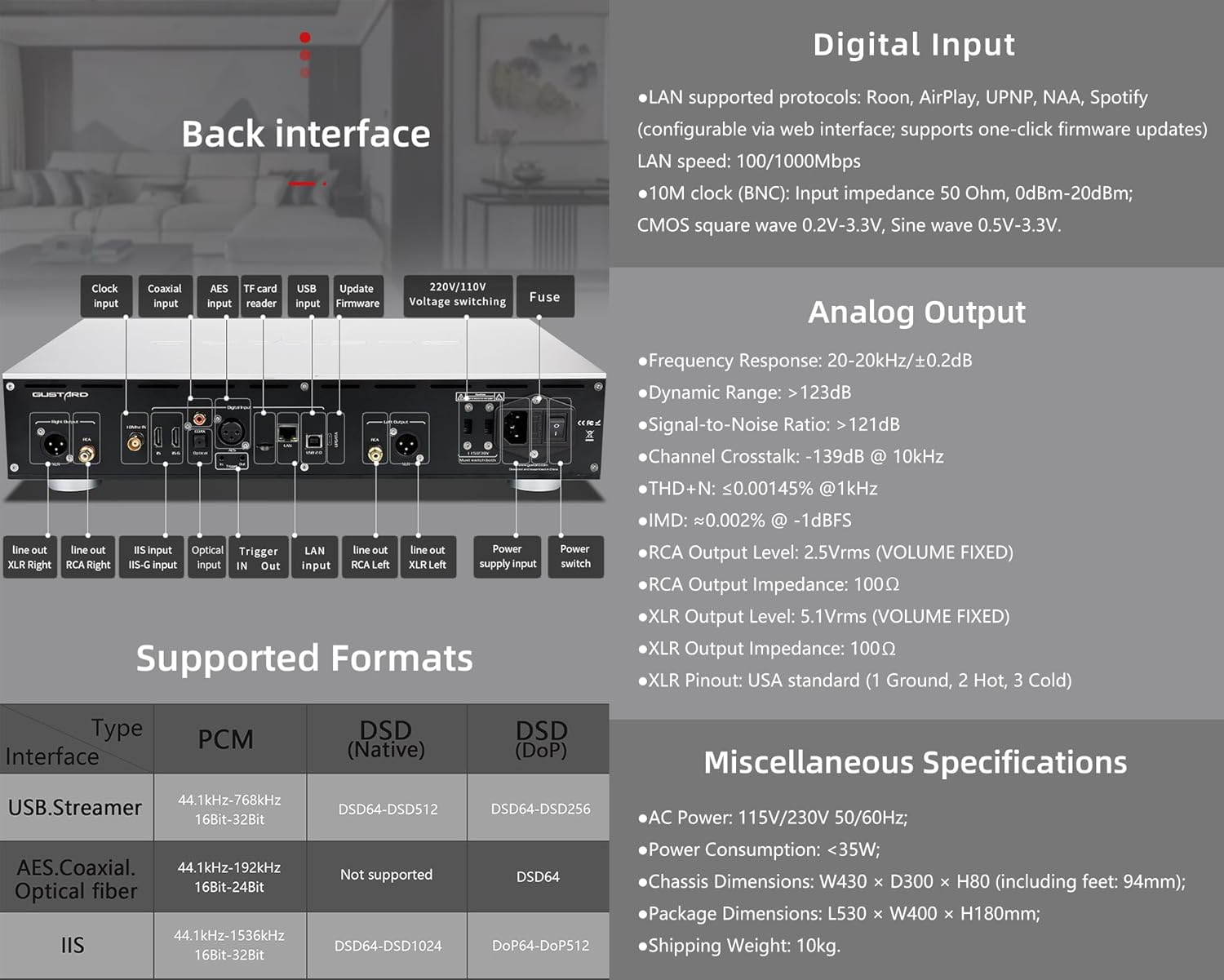
The rear panel provides various input and output connections for the GUSTARD R30.
- Vstup hodin: For external 10MHz clock synchronization.
- Koaxiální vstup: Digitální audio vstup.
- Vstup AES: Digitální audio vstup.
- Vstup USB: Pro připojení k počítači nebo jinému USB audio zdroji.
- Vstup LAN: For network streaming functionality.
- Čtečka karet TF: Pro aktualizace firmwaru.
- Aktualizace firmwaru: USB port pro aktualizace firmwaru.
- 220V/110V Voltage Přepínání: Selector for power voltage.
- pojistka: Napájecí pojistka.
- Line Out XLR Right/Left: Balanced analog audio outputs.
- Line Out RCA Right/Left: Unbalanced analog audio outputs.
- IIS Input (IIS-G): Digital audio input with Gustard pinout.
- Optický vstup: Digitální audio vstup.
- Spouštěcí vstup/výstup: For 12V trigger control.
- Vstup napájení: Připojení k střídavému napájení.
- Vypínač: Hlavní vypínač.
Important: Ensure both voltagPřepínače jsou nastaveny na stejnou hlasitosttagpři provozu s napětím 220 V/110 Vtage switch, otherwise, it may damage the internal transformer upon powering on.
Ovládací prvky displeje a panelu
The R30 utilizes a large OLED display for real-time status monitoring and functional operations. The diagram below illustrates the main interface display states.
1. OLED displej
The display shows the input channel, external clock indication, encoding format, sampling rate, and volume.
2. Input Channel Selection
R30 má 7 vstupních kanálů. Na hlavním rozhraní se při každém stisknutí tlačítka Gear cyklicky přepíná mezi dostupnými kanály v tomto pořadí: COAX → AES → OPT → USB → STREAMER → IIS(G) → IIS(M*).
***Note: IIS(G) is for fixed Gustard pinout configuration and cannot be adjusted. IIS(M*) supports adjustable pinout configuration.
3. Nastavení hlasitosti
- When the main interface is displayed, pressing the "+" or "-" buttons directly adjusts the analog volume attenuation function of the passive preampútlum. Rozsah útlumu je od 0 dB do -63.5 dB (celkový útlum 63.5 dB).
- Pressing "+" at 0dB activates Fixed Output mode (bypassing attenuation circuit), displaying 'FIXED' indicator.
- When 'FIXED' is displayed, pressing "-" first exits bypass mode before controlling the attenuation level.

Nabídka nastavení
On the main screen, long press the Gear Button to enter the settings menu (hereinafter referred to as the menu button). In this state, the menu button can sequentially switch the menu items to be modified. "+" and "-" buttons are used to adjust the currently selected menu options. When the screen is in the settings menu, long press the menu button again to return to the main screen.
Struktura menu:
- PCM FILTR
- DSD FILTR
- REŽIM NOS
- REF CLOCK
- IIS MODE
- FÁZE
- TRIGGER CH.
- TRIGGER VOL.
- ZOBRAZIT

Funkce menu
Do menu se dostanete stisknutím tlačítka Menu v hlavním rozhraní. Každá možnost menu je podrobně popsána níže.
1. PCM FILTER (PCM Digital Filter Adjustment)
R30 využívá vysoce výkonné převodníky PCM vyvinuté vlastním vývojem.ampDigitální filtrační modul Ling se třemi typy filtrů:
- VIVID (Default): Similar to the FAST roll-off type of traditional digital filter, but with better ringing characteristics, very small pre-ringing, and fast convergence post-ringing. It aims for a broad soundstage and sound restoration. Recommended for most music styles.
- GENTLE: Similar to the SLOW roll-off type of traditional digital filter, offering a soft listening experience.
- KOMPOZITNÍ: A hybrid digital filter, balancing characteristics between Vivid and Gentle for a good listening experience.
2. DSD FILTER (DSD Digital Filter Adjustment)
Filtr DSD má 4 vestavěné možnosti šířky pásma: 47K (Default), 50K, 60K, 70K.
3. REŽIM NOS (Žádné overy)ampling Filter Mode)
When enabled, the PCM signal bypasses the oversampling filter entirely, decoded straight through the R-2R decoder module. This preserves micro-details and timing integrity. When enabled, there may be a slight clicking sound when the playback data format switches between PCM and DSD.
- DISABLE (Default)
- UMOŽNIT
4. REF CLOCK (Reference Clock Selection)
The GUSTARD-K2, low-noise clock synthesizer, achieves ultra-low jitter performance. The R30 offers two clock options:
- INTERNAL (Default): Uses the built-in OCXO internal reference.
- EXT. 10MHz: Selects an external 10MHz reference source. It is recommended to connect to GUSTARD C16 or C18 reference 10M master clocks.
If the external clock is lost, powered off, or its frequency deviation is greater than +/-150ppm, "EXT ERR" will be displayed and flash.
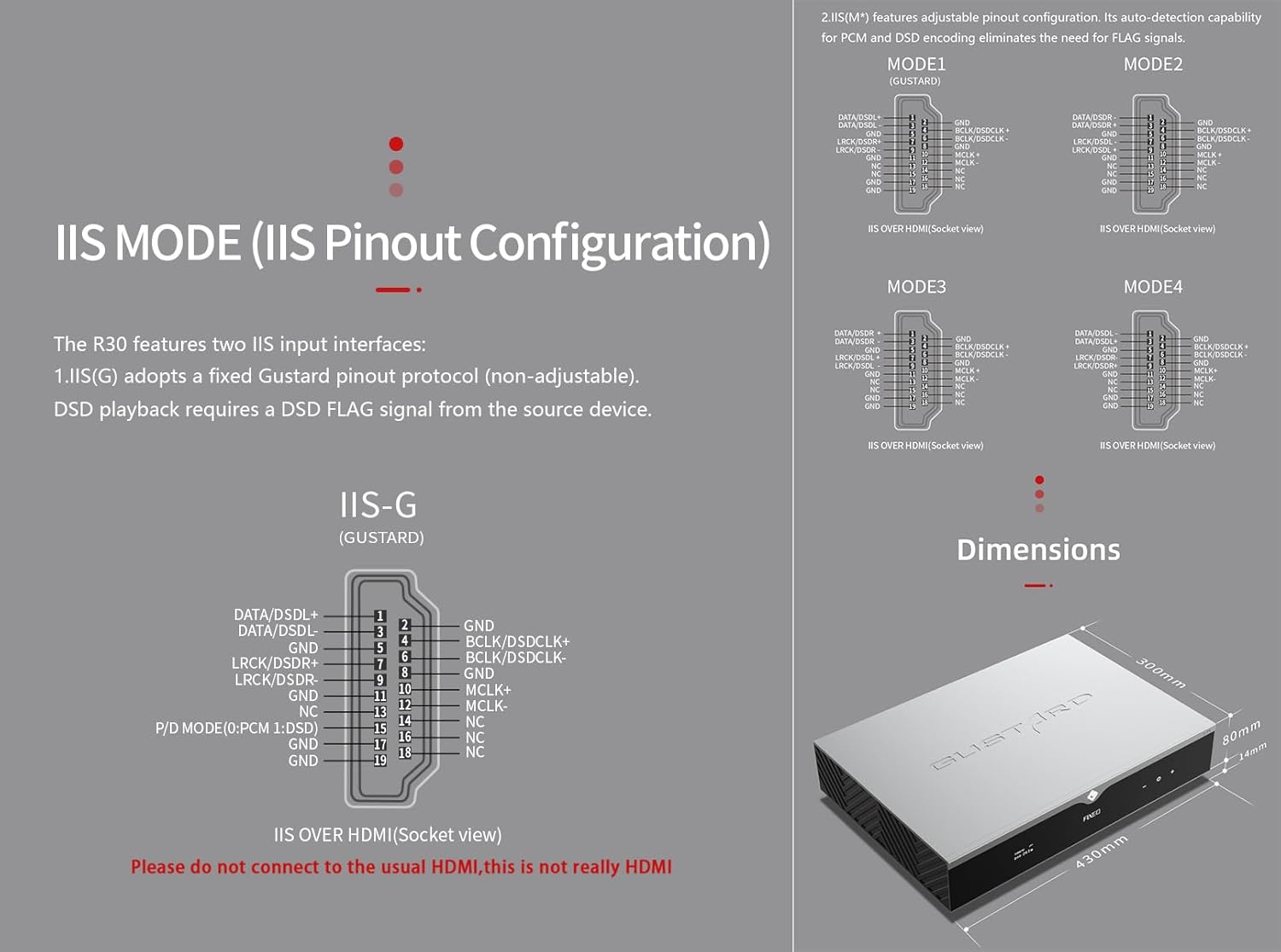
5. IIS MODE (IIS Pinout Mode Selection)
R30 má dvě vstupní rozhraní IIS:
- IIS(G): Fixed Gustard pinout protocol (non-adjustable). DSD playback requires a DSD FLAG signal from the source device.
- IIS(M*): Features adjustable pinout configuration. Its auto-detection capability for PCM and DSD encoding eliminates the need for FLAG signals.
IIS(M*) adjustable Pinout mode IIS input has four Pinouts: MODE1 (Default), MODE2, MODE3, MODE4. MODE1 is compatible with the GUSTARD mode. If you are connecting to a GUSTARD front end such as U12, U16, U18, S16, S26, etc., you can match them with MODE1, which is the former works in the Gustard output mode.
Please do not connect to the usual HDMI, this is not really HDMI.
6. PHASE (Phase Setting)
Tato funkce nabízí dvě možnosti:
- NON-inverted (Default): When non-inverted, the RCA output of R30 is normal phase, and the XLR balanced output is American standard polarity output (1 ground, 2 hot, 3 cold).
- Převrácené: When inverted, only the RCA output is reverse phase, and the XLR balanced output is Japanese/European standard polarity output (1 ground, 2 cold, 3 hot).
7. TRIGGER CH. (Linkage Trigger Start Channel Selection)
The R30 can be triggered by an external 12V linkage signal and automatically turn on from standby mode. When the 12V trigger signal ceases or drops to 0V, automatic standby activation occurs. When the R30 is working, it is switched to the input channel of this setting by the 12V trigger linkage signal.
- LAST (Default): The input channel that was in use before entering standby last time.
- Other options include COAX, AES, OPT, USB, STREAMER, IIS(G), IIS. Selecting any channel activates it upon receiving a 12V trigger signal.
8. TRIGGER VOL. (Link Trigger Boot Volume Selection)
R30 lze zapnout z pohotovostního režimu pomocí externího 12V spouštěcího signálu a automaticky nastavit hlasitost na vybranou úroveň. Alternativně lze během provozu 12V spouštěcí signál přepnout výstup na přednastavenou hlasitost. Tato možnost konfiguruje výstupní hlasitost po aktivaci spouště.
- LAST (Default): The volume used before entering standby.
- OPRAVENO: Fixed full-scale output bypassing attenuation.
- -20dB: Output at a volume attenuated to -20dB.
- -30dB: Output at a volume attenuated to -30dB.
- -40dB: Output at a volume attenuated to -40dB.
9. DISPLAY (Screen Brightness Settings)
Long-term high-brightness use of OLED screens can cause screen burn-in or ghosting. Therefore, the R30 is designed to always select automatic screen off, or manually select automatic screen off, which can also reduce interference.
- AUTO (Default): Automatically reduce brightness.
- AUTOMATICKÉ VYPNUTÍ: Automatically turn off the screen.
Infračervené dálkové ovládání
Při ovládání produktů DAC stiskněte a podržte tlačítko DAC po dobu delší než 3 sekundy pro vstup do režimu ovládání DAC. AMPRežimy /STREAM ovládají další produkty Gustard.
- Pohotovostní: Press once to activate R30 from standby. Press once during operation to enter standby.
- Menu: Press to access R30's setup menu.
- Pás se 4 směrovými klávesami: Up/Down navigates menu items. Left/Right adjusts selected options. Center press activates/deactivates mute.
- Zadní: Returns to main interface.
- Vol-: Decreases output volume on main interface.
- Vol+: Increases output volume on main interface.
Poznámky:
- Operational range varies with angle.
- Obstructions between remote and sensor may cause malfunction.
- Remove batteries if unused for more than 1 month.
- Thoroughly clean battery compartment if leakage occurs.
- May accidentally trigger other IR-controlled devices.

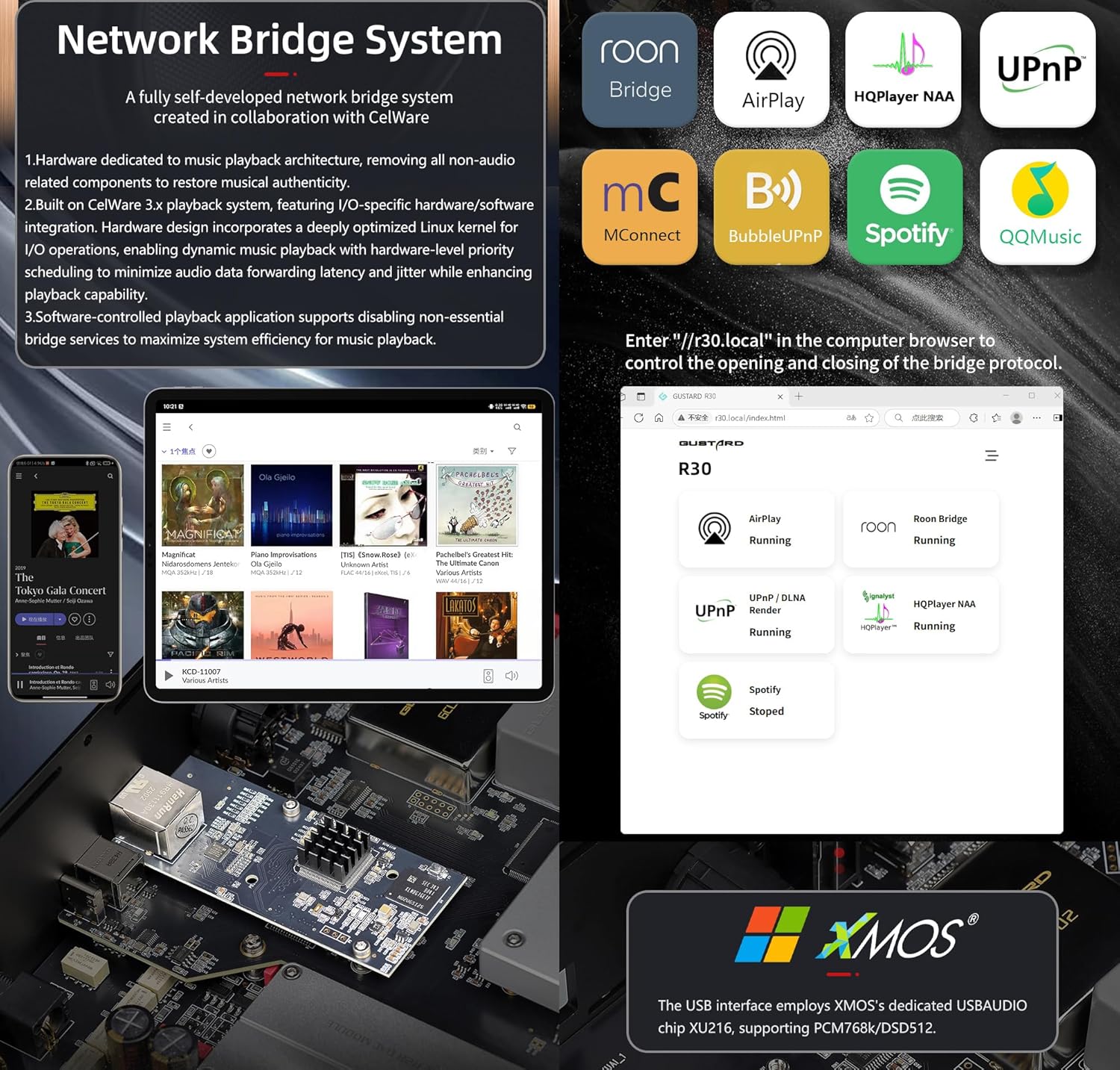
Rychlý start pro Network Bridge Streamer
After connecting R30's RJ45 port to your local network:
- Select the STREAMER channel and await system boot (approximately 1 minute, until "DSD 24.5MHz" appears).
- Access R30's configuration page via: http://R30.local (as shown below). Disable unused streaming protocols on the web rozhraní pro maximalizaci efektivity systému. Zde se také provádějí aktualizace firmwaru.
(Provoz na mobilních zařízeních/tabletech je vyčkán do vydání specializované aplikace)
You can turn off streaming protocols that are not frequently used through the web page to maximize system music playback performance. At the same time, the online upgrade of the Streamer is also operated on the web strana.
(Po spuštění specializované aplikace Streamer lze výše uvedené operace provádět v aplikaci.)
Official Product Video: GUSTARD R30 - User Manual
Specifikace produktu
Digital Input Support Formats:
| Typ | PCM | DSD (nativní) | DSD (DoP) |
|---|---|---|---|
| USB.Streamer | 44.1kHz-768kHz 16Bit-32Bit | DSD64-DSD512 | DSD64-DSD256 |
| AES.Coaxial.Optical fiber | 44.1kHz-192kHz 16Bit-24Bit | Není podporováno | DSD64 |
| IIS | 44.1kHz-1536kHz 16Bit-32Bit | DSD64-DSD1024 | DoP64-DoP512 |
Analogový výstup:
- Frekvenční odezva: 20-20kHz/±0.2dB
- Dynamický rozsah:> 123 dB
- Poměr signálu k šumu:> 121 dB
- Přeslech kanálů: -139 dB při 10 kHz
- THD+N: ≤ 0.00145 % při 1 kHz
- IMD: ≈0.002 % při -1 dBFS
- Výstupní úroveň RCA: 2.5 Vrms (pevná hlasitost)
- Výstupní impedance RCA: 100Ω
- Výstupní úroveň XLR: 5.1 Vrms (pevná hlasitost)
- Výstupní impedance XLR: 100Ω
- XLR konektory: Standard USA (1 zem, 2 aktivní, 3 studené)
Další specifikace:
- AC Power: 115V/230V 50/60Hz
- Spotřeba energie: <35W
- Chassis Dimensions: W430 × D300 × H80 (including feet: 92mm)
- Package Dimensions: L530 × W400 × H180mm
- Shipping Weight: 10kg (with package)
- 10MHz BNC Input: Input impedance 50 Ohm, 0dBm-20dBm; CMOS square wave 0.2V-3.3V, Sine wave 0.5V-3.3V.
- Trigger: IN- 12V Typ. OUT- 12V Typ.
Záruční podmínky
Thank you for choosing GUSTARD HIFI products. To safeguard your rights and interests, please read the following warranty terms carefully. You can promptly obtain comprehensive after-sales service provided by GUSTARD.
Záruka na produkt
You will enjoy a 2-year free warranty and lifetime maintenance after the date of purchasing GUSTARD's HIFI product.
* Výrobce nese pouze náklady z čínské pevniny. Část přepravného a daně generované ze zámoří vyřeší uživatel jednáním s dealerem.
Bezplatný záruční servis
GUSTARD R30 from the purchasindatum v rámci bezplatné záruční doby, uživatel používá produkt normálním způsobem a produkt selže z důvodu problémů s kvalitou součástek nebo s výrobou.
Nad rámec záručního servisu
Belonging to one of the following circumstances, products are no longer provided warranty service:
- Produkty od data nákupu překročily předem stanovenou záruční dobu.
- Model, čárové kódy a datum nákupu neodpovídají skutečnému produktu a záručnímu listu.
- Without GUSTARD technician permission, unauthorized modifications to the circuit, components or self-repaired product.
- Škody způsobené neodolatelnými přírodními silami.
- Nad rámec povoleného použití poškození životního prostředí.
- Poškození v důsledku nesprávného použití nebo nesprávného skladování. Včetně, ale bez omezení na: svtage je příliš vysoké na to, aby spálilo obvody nebo součásti; Nárazy a následné poškození pláště nebo vnitřní části; poškození vlivem vody, oleje, kapaliny a nadměrného prachu; oxidace nebo koroze produktu atd.
- Mimo záruční dobu, jako je poškození jednotlivých komponent, vzhled způsobený lidským poškozením, vedou úpravy firmwaru k neschopnosti pracovat neoprávněnými uživateli. GUSTARD se zavazuje, že bude účtovat přiměřené poplatky za údržbu (kromě velkoplošných součástí nebo desek plošných spojů spálených bez opravy). Náklady na dopravu a údržbu, materiálové náklady musí nést uživatel.
Kontaktní informace
Výrobce: Shenzhen Goshide Technology Co., LTD
Adresa: Room 302, Building 1, No. 28, Huimin 1st Road, Guanlan Sub-district, Longhua District, Shenzhen City, Guangdong Province
tel: +86-18682080102
Webmísto: http://www.gustard.com
E-mail: service@gustard.com


