1. Úvod
This manual provides detailed instructions for the setup, operation, and maintenance of your NexiGo Nova Mini Portable Laser Projector. Please read this manual thoroughly before using the device to ensure proper functionality and safety.

Image 1.1: The NexiGo Nova Mini Portable Laser Projector.
2. Klíčové vlastnosti
- Integrace Google TV: Access a wide range of streaming services and apps directly.
- Rozlišení 1080p Full HD: Poskytuje jasný a zářivý obraz.
- Jas 1200 Lumens: Provides a bright picture for various viewprostředí.
- 15,000:1 Contrast Ratio with Scene Adapt Engine (SAE): Enhances image depth and detail.
- Active 3D Support: Pro pohlcující viewzkušenosti.
- Intelligent Auto Setup: Features Auto Adaptive Brightness, Auto Keystone Correction, Autofocus, Intelligent Obstacle Avoidance, Intelligent Screen Alignment, and Intelligent Eye Protection.
- Přenosný design: Kompaktní a lehký pro snadnou přepravu.
- 8W Dolby Audio Speaker: Integrated sound system for a complete audio experience.
- USB-C PD Power Compatibility: Can be powered by a 100W power bank for on-the-go use.
3. Nastavení
3.1 Počáteční zapnutí
- Connect the projector to a power source using the provided power adapter. For portable use, connect a 100W USB-C PD power bank.
- Stisknutím tlačítka napájení na projektoru nebo na dálkovém ovladači zapněte zařízení.
3.2 Umístění a projekce
Position the projector on a stable surface. The built-in kickstand allows for tilting the projection angle between 7° and 15°.
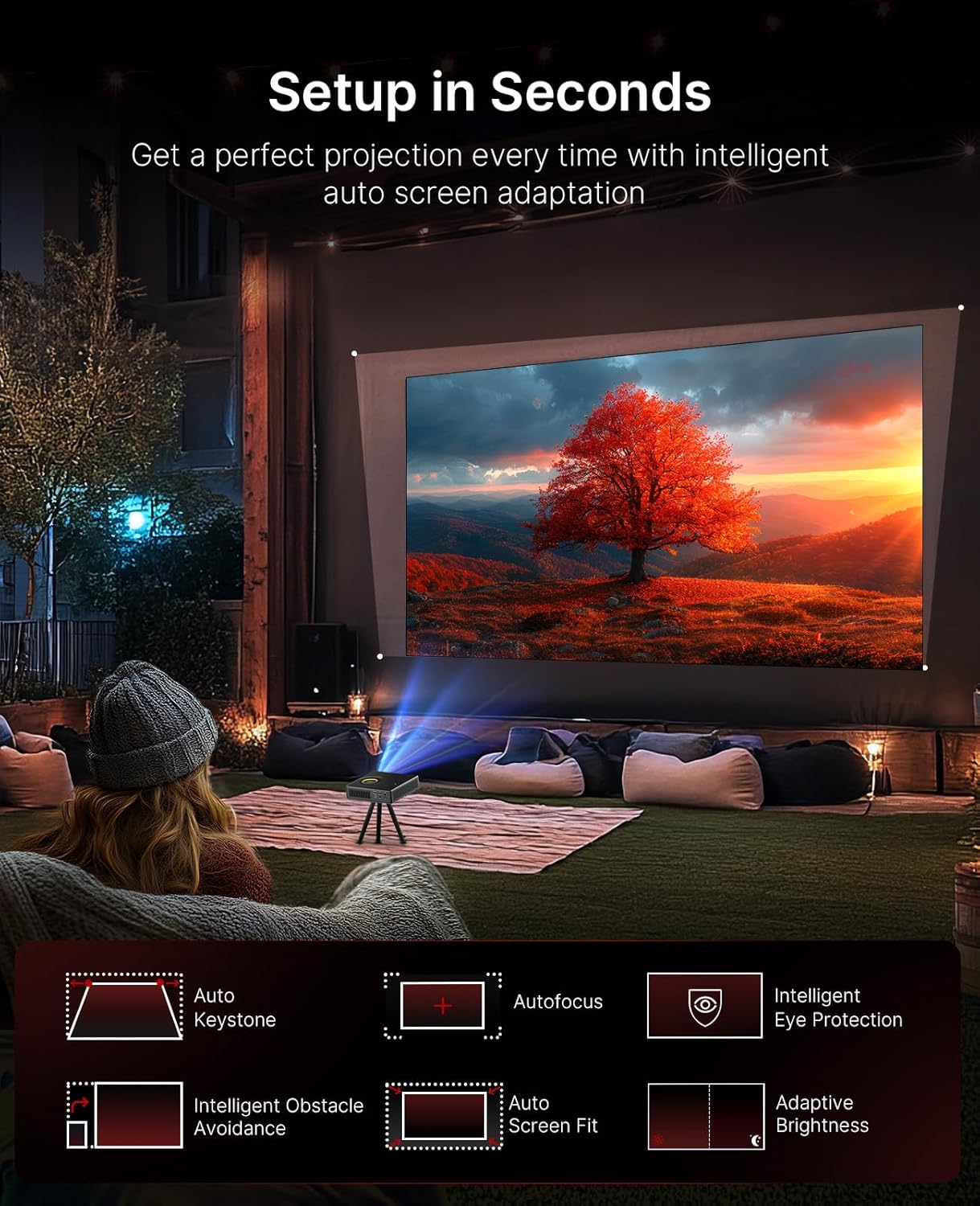
Image 3.1: The projector demonstrating its intelligent auto setup features, including auto keystone, autofocus, and obstacle avoidance.
3.3 Intelligent Screen Adaptation (ISA)
The Nova Mini features Intelligent Screen Adaptation for an effortless setup:
- Auto Adaptive Brightness: Adjusts image brightness based on ambient light conditions.
- Automatická korekce lichoběžníkového zkreslení: Automatically corrects image distortion for a rectangular picture.
- Automatické zaostření: Sharpens the image for clear viewIng.
- Inteligentní vyhýbání se překážkám: Upravuje projekci tak, aby se zabránilo kontaktu s předměty na zdi.
- Inteligentní zarovnání obrazovky: Automaticky přizpůsobí obrázek velikosti obrazovky.
- Inteligentní ochrana očí: Dims the image brightness when someone stands in front of the laser to protect eyes.

Image 3.2: Visual representation of the projector's effortless setup features.
4. Návod k obsluze
4.1 Rozhraní Google TV
The projector integrates Google TV, providing access to over 10,000 apps and 800+ free channels via Google Play. Popular streaming services like Netflix, YouTube, Prime Video, and Disney+ are available.

Image 4.1: The Google TV home screen on the projector.
4.2 Hlasové ovládání
Utilize the intuitive remote with built-in voice control (Hey Google) to navigate content, search for shows, and control playback.

Image 4.2: Using the remote control for voice commands.
4.3 Content Casting
With Google Cast, you can wirelessly stream content from Android, iOS, Mac, or Windows devices to the projector.

Image 4.3: Wireless content casting from a mobile device.
5. Image and Audio Quality
5.1 Laser Projection
The Nova Mini utilizes laser projection technology, offering 1080p resolution and 1200 Lumens brightness. It covers 100% Rec.709 color gamut, enhanced by HDR10 and HLG for accurate colors and contrast.

Obrázek 5.1: Příkladample of lifelike image quality.
5.2 Scene Adapt Engine (SAE)
The Scene Adapt Engine (SAE) improves contrast and detail by adjusting laser brightness in real-time based on content. This results in ultra-deep blacks and brilliant highlights with a contrast ratio over 15,000:1.
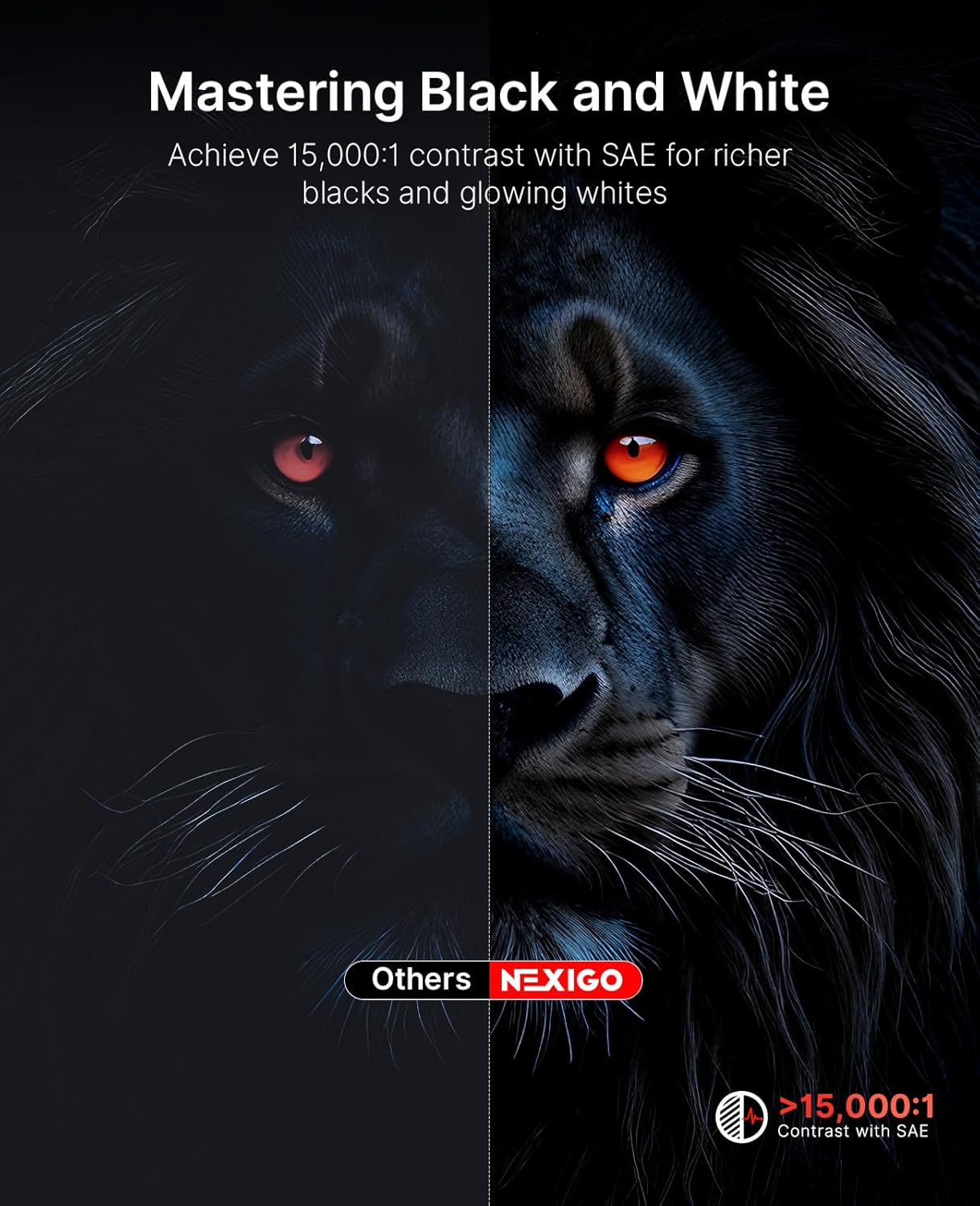
Image 5.2: Contrast enhancement with Scene Adapt Engine.
5.3 3D Support
The Nova Mini supports Active 3D content, providing an immersive home entertainment experience.

Image 5.3: Immersive 3D viewzkušenosti.
5.4 Audio systém
Equipped with an 8W speaker and Dolby Audio, the projector delivers clear and rich sound for an enhanced viewzkušenosti.

Image 5.4: The projector's audio capabilities in an outdoor setting.
6. Přenositelnost
The Nova Mini is designed for portability, measuring under 2 inches thick and weighing only 3 lbs. Its compact size allows for easy transport and setup in various locations, both indoors and outdoors.
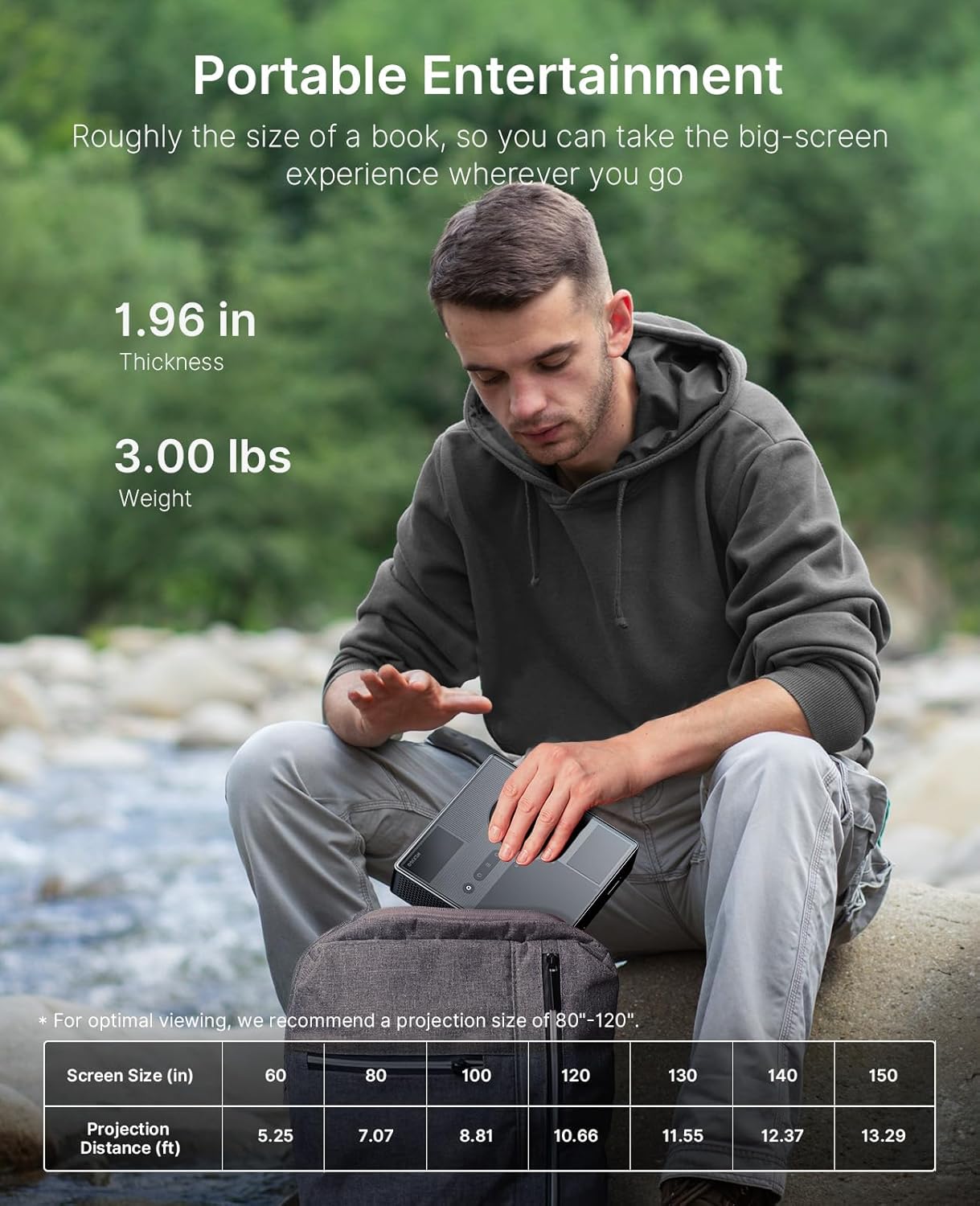
Image 6.1: The projector's compact size for portable entertainment.
| Screen Size (in) | Projekční vzdálenost (ft) |
|---|---|
| 60 | 5.25 |
| 80 | 7.07 |
| 100 | 8.81 |
| 120 | 10.66 |
| 130 | 11.55 |
| 140 | 12.37 |
| 150 | 13.29 |
Table 6.1: Optimal viewing is recommended for projection sizes between 80"-120".

Image 6.2: The projector used for outdoor entertainment.
7. Konektivita
The projector offers various connectivity options for different devices:
- HDMI: Two HDMI ports (HDMI 1 supports ARC) for connecting laptops, game consoles, and other media players.
- USB 2.0: Pro připojení USB disků.
- 3.5mm audio konektor: Pro připojení sluchátek nebo externích reproduktorů.
- LAN: Ethernetový port pro kabelové připojení k síti.
- USB-C: For power delivery (PD) and data transfer.

Obrázek 7.1: Konecview of the projector's connectivity ports.
8. Specifikace
- Číslo modelu: PJ08
- Rozměry produktu: 7.8 x 7.8 x 2.3 palce
- Hmotnost položky: 6.23 libry
- Rezoluce: 1080p FHD
- Jas: 1200 XNUMX lumenů
- Kontrastní poměr: 15,000:1 with SAE
- Barevný rozsah: 100 % Rec. 709
- Podpora HDR: HDR10, HLG
- Podpora 3D: Aktivní 3D
- Operační systém: Google TV
- Zvuk: 8W Dolby Audio Speaker
- Příkon: USB-C PD (requires 100W power source)
- Výrobce: Nextight INC
- Datum první dostupnosti: 15. srpna 2025
9. Údržba
To ensure the longevity and optimal performance of your NexiGo Nova Mini projector, follow these maintenance guidelines:
- Čištění objektivu: Používejte měkký hadřík bez žmolků, speciálně určený pro optické čočky. Vyhněte se abrazivním materiálům nebo agresivním chemikáliím.
- Čištění exteriéru: Vnější povrch projektoru otřete měkkým, suchým hadříkem. Nepoužívejte tekuté čisticí prostředky přímo na zařízení.
- Větrání: Ensure that the projector's ventilation openings are not blocked to prevent overheating. Maintain adequate space around the device for airflow.
- Skladování: Pokud projektor delší dobu nepoužíváte, skladujte jej na chladném a suchém místě, mimo dosah přímého slunečního záření a extrémních teplot.
- Řízení spotřeby: Always power off the projector correctly before unplugging it.
10. Řešení problémů
If you encounter issues with your NexiGo Nova Mini, refer to the following common troubleshooting steps:
- Bez napájení: Ensure the power adapter is securely connected to both the projector and a working power outlet. If using a power bank, confirm it is a 100W USB-C PD compatible model and fully charged.
- Bez obrázku: Check that the lens cap is removed. Verify the input source is correctly selected in the projector's settings. Ensure all cables (HDMI, etc.) are securely connected.
- Rozmazaný obrázek: The projector features autofocus. If the image remains blurry, try moving the projector slightly or manually adjusting focus if an option is available in the settings. Ensure the projection surface is flat.
- Žádný zvuk: Check the volume levels on both the projector and the connected source device. If using external speakers, ensure they are properly connected and powered on.
- Dálkové ovládání nereaguje: Vyměňte baterie v dálkovém ovladači. Ujistěte se, že mezi dálkovým ovladačem a projektorem nejsou žádné překážky.
- Upozornění na přehřátí: Ensure the projector's vents are clear and not obstructed. Allow the projector to cool down in a well-ventilated area.
V případě přetrvávajících problémů se prosím obraťte na zákaznickou podporu.
11. Záruka a podpora
NexiGo products are designed for quality and reliability. For specific warranty details, please refer to the warranty card included with your product or visit the official NexiGo website. For technical assistance, troubleshooting, or customer service inquiries, please contact NexiGo USA support.
NexiGo USA Support:
- 24hodinová zákaznická podpora
- 30 Days Return or Exchange Policy
- Doživotní technická podpora