Zavedení
This manual provides instructions for the Brydge 10.9 MAX+ Wireless Keyboard Case. This product is designed to enhance your iPad experience by providing a physical keyboard with a multi-touch trackpad and a protective case. Please read this manual thoroughly before use to ensure proper operation and care.
Kompatibilita
The Brydge 10.9 MAX+ Wireless Keyboard Case is compatible with the following iPad models:
- iPad 10th Generation (Model Numbers: A2696, A2757, A2777)
- iPad A16 (11th Generation) (Model Numbers: A3354, A3355, A3356)
Důležité: This keyboard case is not designed for use with iPad Air, iPad Pro, iPad 9th Gen, or older iPad models.
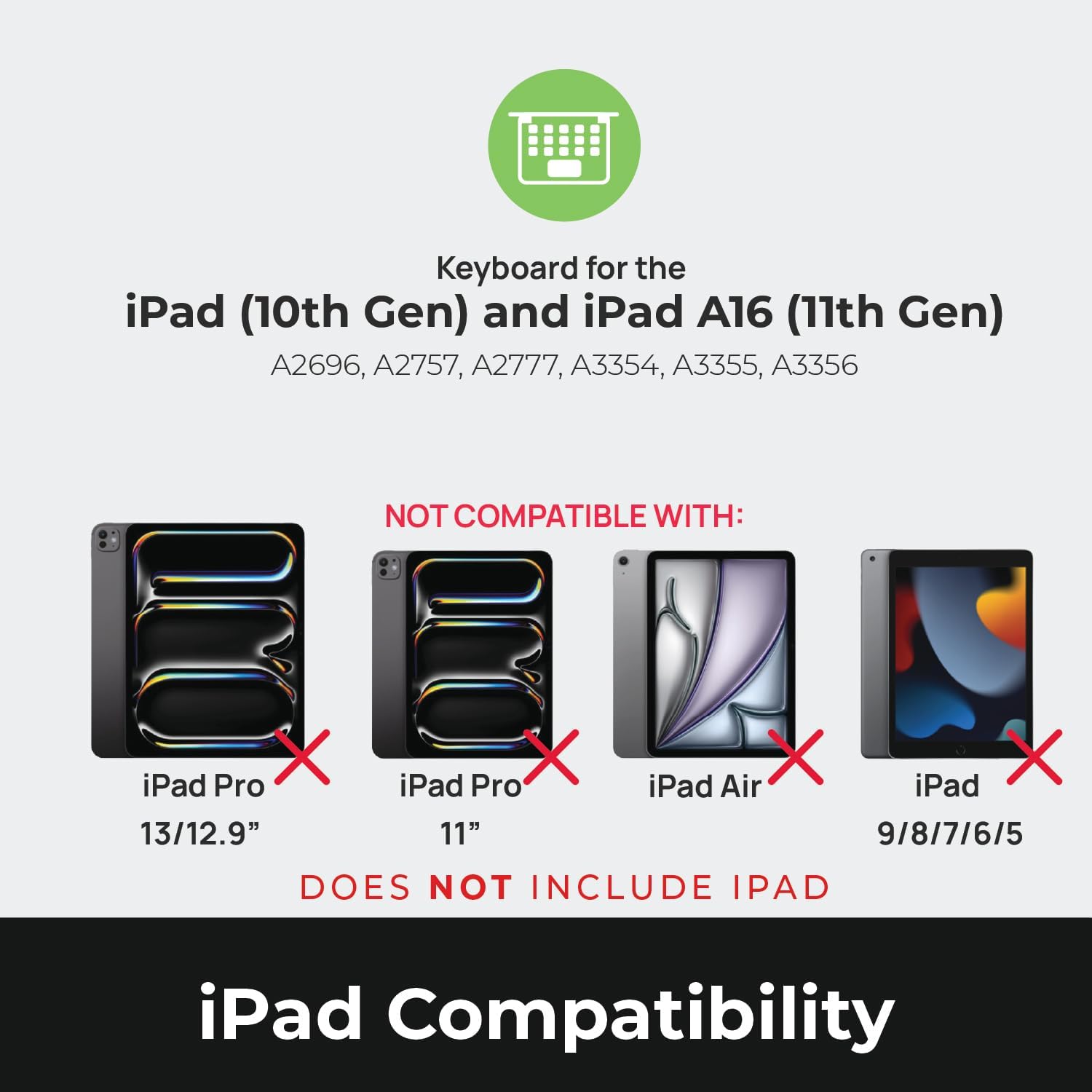
Image: Compatibility chart showing supported iPad models (10th Gen, A16 11th Gen) and incompatible models (iPad Pro 13/12.9", iPad Pro 11", iPad Air, iPad 9/8/7/6/5).
Co je v krabici
Po vybalení se ujistěte, že jsou přítomny všechny položky:
- 1 x Brydge 10.9 MAX+ Wireless Keyboard
- 1 x Odnímatelné magnetické pouzdro SnapFit
- 1 x Uživatelská příručka (tento dokument)
Note: An iPad and USB-C charging cable are not included. The USB-C cable typically comes with your iPad.

Image: Depiction of the box contents, including the keyboard, case, and user manual.
Pokyny pro nastavení
1. Attaching Your iPad to the SnapFit Case
- Carefully align your iPad with the SnapFit Case.
- Gently press the iPad into the case until it is securely seated. The case is designed for a snug fit to provide protection.
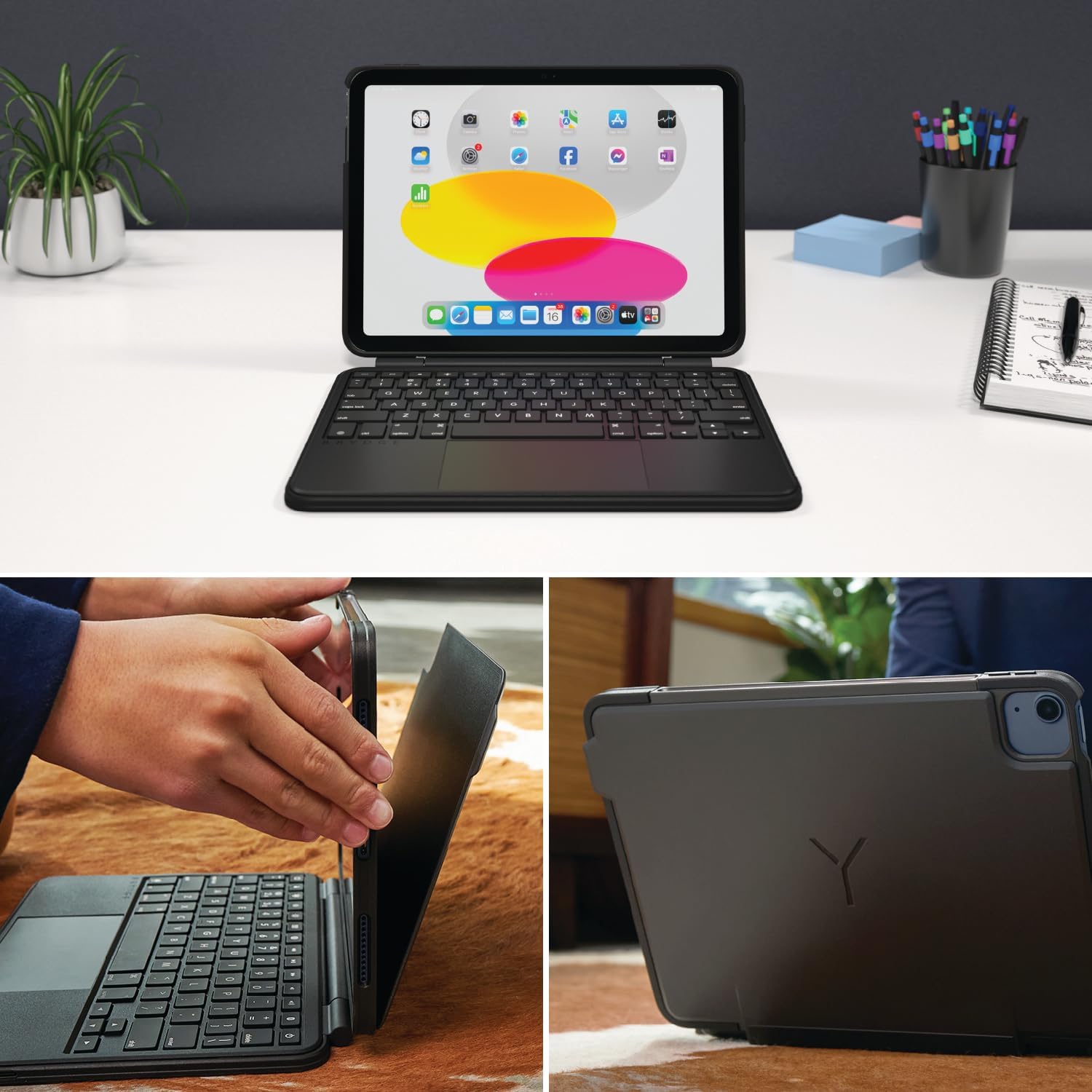
Image: Shows the process of attaching the iPad to the SnapFit case and the case attached to the keyboard.
2. Connecting the Case to the Keyboard
The SnapFit Case features a magnetic back cover that securely attaches to the Brydge keyboard. Simply align the back of the cased iPad with the magnetic area on the keyboard base until it snaps into place.
3. Nabíjení klávesnice
Before first use, it is recommended to fully charge the keyboard. Use a USB-C cable (not included) to connect the keyboard's charging port to a power source. The charging port is typically located on the side or back of the keyboard.
4. Párování Bluetooth
- Ujistěte se, že je klávesnice nabitá a zapnutá.
- Na iPadu přejděte na Nastavení > Bluetooth.
- Zapněte Bluetooth.
- The Brydge keyboard should appear in the "Other Devices" list. Tap on its name to connect.
- If prompted, enter the pairing code displayed on your iPad using the Brydge keyboard, then press Vstupte.
The keyboard features Instant-On™ Connectivity via Bluetooth 5.0, providing a quick and stable connection once paired.

Image: Illustrates the keyboard's Bluetooth 5.0 and Instant-On connectivity features.
Návod k obsluze
Funkce klávesnice
- Podsvícené klávesy: The keyboard features adjustable backlit keys with 3 brightness levels. Use the dedicated function keys (usually located in the top row) to cycle through brightness settings or turn the backlight off.
- Funkční klávesy: The top row of keys provides quick access to iPadOS functions such as Home, Search, Brightness, Media Controls, and Volume.
Multi-Touch Trackpad
The integrated multi-touch trackpad supports various iPadOS gestures for navigation and interaction. Refer to your iPad's settings for a full list of supported gestures.
- kliknutím: Press down on the trackpad to perform a click.
- Posouvání: Pro posouvání nahoru nebo dolů použijte dva prsty.
- Lupa: Přiblížení nebo oddálení provedete roztažením dvou prstů.
- Přepínač aplikací: Swipe up with three fingers to open the App Switcher.
- Domovská obrazovka: Swipe up with one finger from the bottom edge to return to the Home Screen.

Image: Highlights the detachable magnetic SnapFit case and the native multi-touch trackpad.
Seřizování Viewúhly
The keyboard allows for a screen rotation of up to 135 degrees, enabling various viewúhly pro psaní, kreslení nebo konzumaci médií.

Image: Displays key features including up to 3-month battery life, 3 levels of backlit keys, and 0-130° viewing úhly.
Životnost baterie
The keyboard offers up to 3 months of battery life on a single charge, depending on usage and backlight settings. To conserve battery, the keyboard will enter sleep mode after a period of inactivity.
Údržba
- Čištění: Použijte měkký, damp, lint-free cloth to clean the keyboard and case. Avoid abrasive cleaners or solvents.
- Skladování: Pokud klávesnici delší dobu nepoužíváte, ujistěte se, že je plně nabitá a uložena na chladném a suchém místě.
- Péče o baterie: Chcete-li prodloužit životnost baterie, vyhněte se častému úplnému vybíjení klávesnice. Nabíjejte ji, když je indikátor baterie nízký.
Odstraňování problémů
Klávesnice se nepřipojuje přes Bluetooth
- Ujistěte se, že je klávesnice nabitá.
- Ověřte, zda je na vašem iPadu povoleno Bluetooth.
- Zapomeňte na zařízení v nastavení Bluetooth na iPadu a zkuste jej znovu spárovat.
- Restartujte iPad i klávesnici.
Trackpad Not Responding or Moving Erratically
- Ensure the keyboard is fully charged. Low battery can affect trackpad performance.
- Clean the trackpad surface with a soft, dry cloth to remove any debris or smudges.
- Odpojte a znovu připojte připojení Bluetooth.
- Check for any firmware updates for the Brydge keyboard via the Brydge Connect App (if available).
Klávesy nereagují
- Confirm the keyboard is powered on and connected via Bluetooth.
- Zkontrolujte, zda se pod klávesami nenacházejí nějaké fyzické překážky.
- If specific keys are not working, try restarting the keyboard and iPad.
Specifikace
| Číslo modelu | 8042 BRY |
| Rozměry produktu | 10 cm D x 7.65 cm Š x 0.8 cm V (10 x 7.65 x 0.8 cm) |
| Hmotnost položky | 1.85 libry |
| Technologie připojení | Bluetooth 5.0 |
| Popis klávesnice | Bezdrátový |
| Speciální funkce | Backlit, Rechargeable, Multi-Touch Trackpad, Detachable Magnetic SnapFit Case |
| Barva | Černý |
| Materiál | Polykarbonát, termoplastický polyuretan (TPU) |
| Baterie | 1 Nonstandard Battery (included), up to 3 months battery life |
| Viewúhel | Až 135 stupňů |
Záruka a podpora
This product is subject to a standard return policy, typically 30 days from the date of purchase for refunds or replacements. For specific warranty details, please refer to the documentation provided with your purchase or contact Brydge customer support.
For technical assistance, troubleshooting, or warranty claims, please visit the official Brydge support website or contact their customer service department. Contact information can usually be found on the Brydge webna místě nebo v obalových materiálech.
Poznámka: Plány ochrany mohou být k dispozici ke koupi samostatně.


