1. Konec produktuview
The Qanba Sapphire S1 is an officially licensed leverless arcade controller designed for PlayStation 5, PlayStation 4, and PC. It features a button-only layout, customizable RGB lighting, and swappable microswitch buttons for precise control.
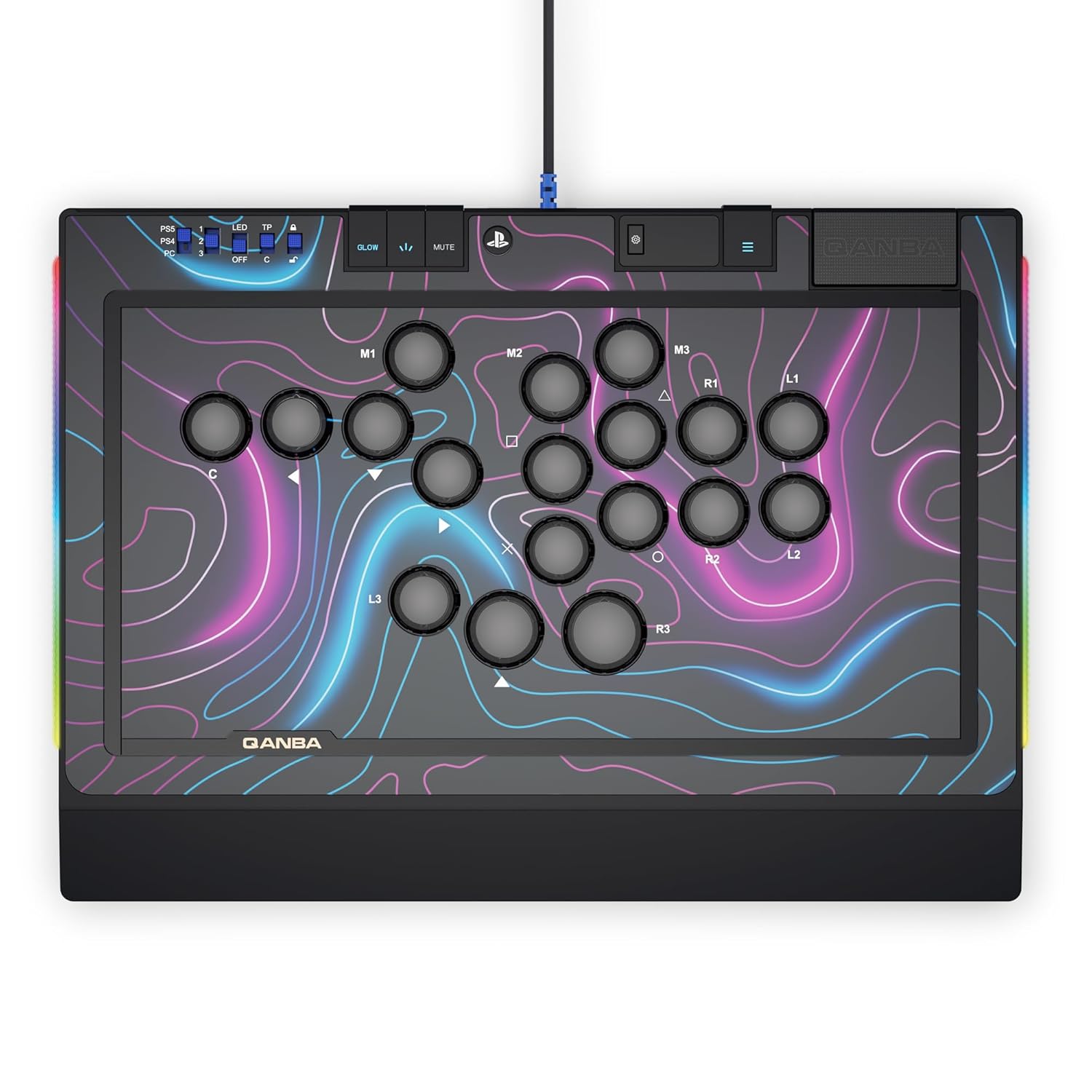
Obrázek 1: Shora dolů view of the Qanba Sapphire S1 Leverless Arcade Controller, showcasing its button layout and vibrant faceplate design.
2. Nastavení a připojení
2.1 Připojení k systému
The Sapphire S1 connects via a detachable Type-C USB cable. Ensure the cable is securely connected to both the controller and your gaming system (PlayStation 5, PlayStation 4, or PC).
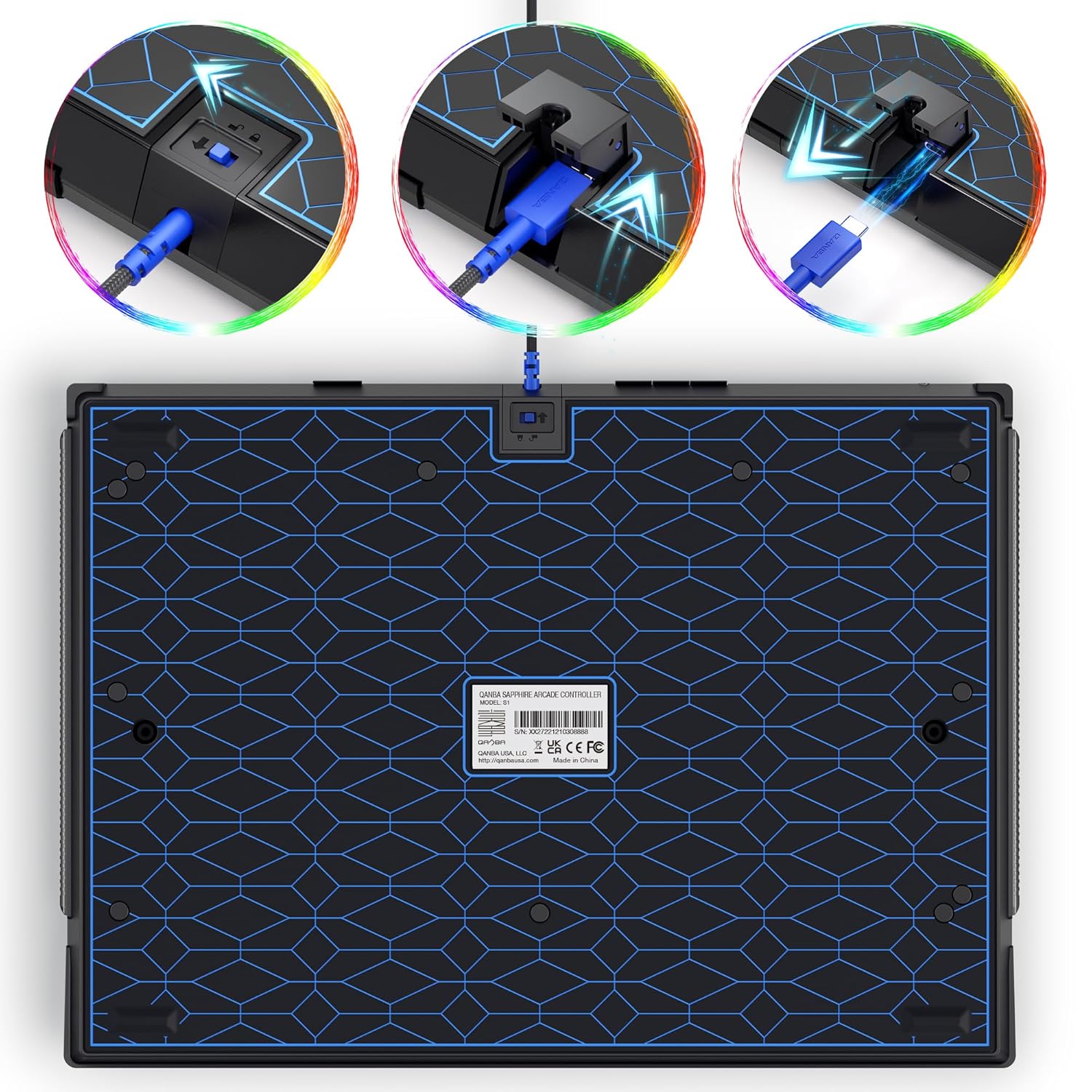
Figure 2: The detachable Type-C USB cable connection point on the rear of the controller, designed for durability and portability.
2.2 Přepínač kompatibility systému
Locate the compatibility switch on the controller. Set it to the appropriate position for your system (PS5, PS4, or PC) to ensure proper functionality.

Obrázek 3: Úhlové view of the controller, highlighting the system selection switches (PS5, PS4, PC) and LED indicators.
3. Návod k obsluze
3.1 Button Layout and Functionality
The Sapphire S1 features 18 fully programmable buttons equipped with Cherry Silver switches for fast and precise inputs. The layout includes standard PlayStation buttons (X, O, Square, Triangle, L1, L2, R1, R2) along with additional programmable buttons (M1, M2, M3, L3, R3, C) and directional inputs.
3.2 Custom Button Layouts
The controller supports up to 3 saved custom button layouts. You can switch between these layouts with a single press, allowing for personalized configurations tailored to different games or playstyles.
3.3 Adjustable-Throw Distance Buttons
Customize the key travel sensitivity of your buttons with the adjustable-throw distance feature. This allows for fine-tuning button responsiveness to your preference.

Figure 4: Illustration of the adjustable-throw distance mechanism, allowing users to modify button travel for optimal response.
3.4 Přizpůsobení RGB osvětlení
The integrated RGB lighting system allows for customizable lighting on the buttons and side panels. Refer to the dedicated lighting control buttons for adjusting effects and colors.

Obrázek 5: Boční profíkfile of the controller demonstrating the customizable RGB lighting along the edges.
3.5 Připojení náhlavní soupravy
A 3.5mm headset jack is included for audio and communication during gameplay.
Video 1: Overview of the Qanba Sapphire S1 Leverless Arcade Controller, showcasing its features including customization, button feedback, preset layouts, adjustable throw distance, swappable microswitches, headset jack, detachable USB-C, and memory foam wrist rest.
4. Údržba
4.1 Čištění
To clean the controller, use a soft, dry cloth. For stubborn marks, a slightly damp cloth with mild soap can be used, ensuring no liquid enters the internal components. Avoid abrasive cleaners or solvents.
4.2 Swapping Microswitches
The 18 buttons are designed with swappable microswitches. To replace a switch, carefully remove the button cap, then gently pull out the microswitch. Insert the new microswitch, ensuring it is properly seated, and reattach the button cap. Two extra micro switches are included for convenience.

Obrázek 6: Detailní view illustrating the process of swapping microswitches within the controller's buttons.
4.3 Customizing Faceplate Art
The faceplate of the Sapphire S1 can be customized. Carefully remove the top panel to access and replace the faceplate art. Ensure all components are securely reassembled after customization.

Figure 7: Exploded diagram showing the various layers of the controller, including the removable top panel and faceplate for customization.
4.4 Opěrka zápěstí
The controller includes a memory foam ergonomic wrist rest for enhanced comfort during long gaming sessions. Attach or detach as needed.

Figure 8: The controller shown with its detachable memory foam ergonomic wrist rest, designed for comfort.
5. Řešení problémů
- Ovladač nereaguje: Ensure the USB-C cable is securely connected to both the controller and your gaming system. Verify the system compatibility switch is set to the correct position (PS5, PS4, or PC). Try connecting to a different USB port.
- Tlačítka se neregistrují: Check if the microswitches are properly seated within the buttons. If a specific button is consistently unresponsive, consider replacing its microswitch with one of the included spares.
- Problémy s RGB osvětlením: Confirm the LED switch is in the 'ON' position. If issues persist, consult the Qanba support webstránky pro další pomoc.
- Audio Issues (Headset Jack): Ensure your headset is fully plugged into the 3.5mm jack. Check your system's audio settings to confirm the controller is selected as the audio output/input device.
6. Specifikace
| Funkce | Detail |
|---|---|
| Číslo modelu | S1 |
| Kompatibilita | PlayStation 5, PlayStation 4, PC |
| Typ tlačítka | Cherry Silver Switches (18 swappable buttons) |
| Konektivita | Odnímatelný kabel USB typu C |
| Zvukový výstup | 3.5mm Jack pro sluchátka |
| Rozměry | 14.41 x 10.24 x 1.18 palce |
| Hmotnost | 3.65 libry |
| Další funkce | RGB Lighting, Memory Foam Wrist Rest, 3 Preset Custom Layouts, 5 Lockable Keycaps |
7. Záruka a podpora
For warranty information and technical support, please visit the official Qanba webnebo se obraťte na jejich zákaznický servis. Konkrétní záruční podmínky se mohou lišit v závislosti na regionu a prodejci.
Official Qanba Store: Qanba Gaming Peripherals Store


