1. Konec produktuview
The Globluum SU3 is an 80GB MP3 player designed for children, featuring a 4-inch touchscreen, Wi-Fi, and Bluetooth connectivity. It operates on a closed Android 14 system with parental controls, ensuring a safe environment for music and story consumption. The device comes pre-loaded with popular applications such as Spotify Kids, Audible, and Kindle, allowing for immediate use without complex setup.
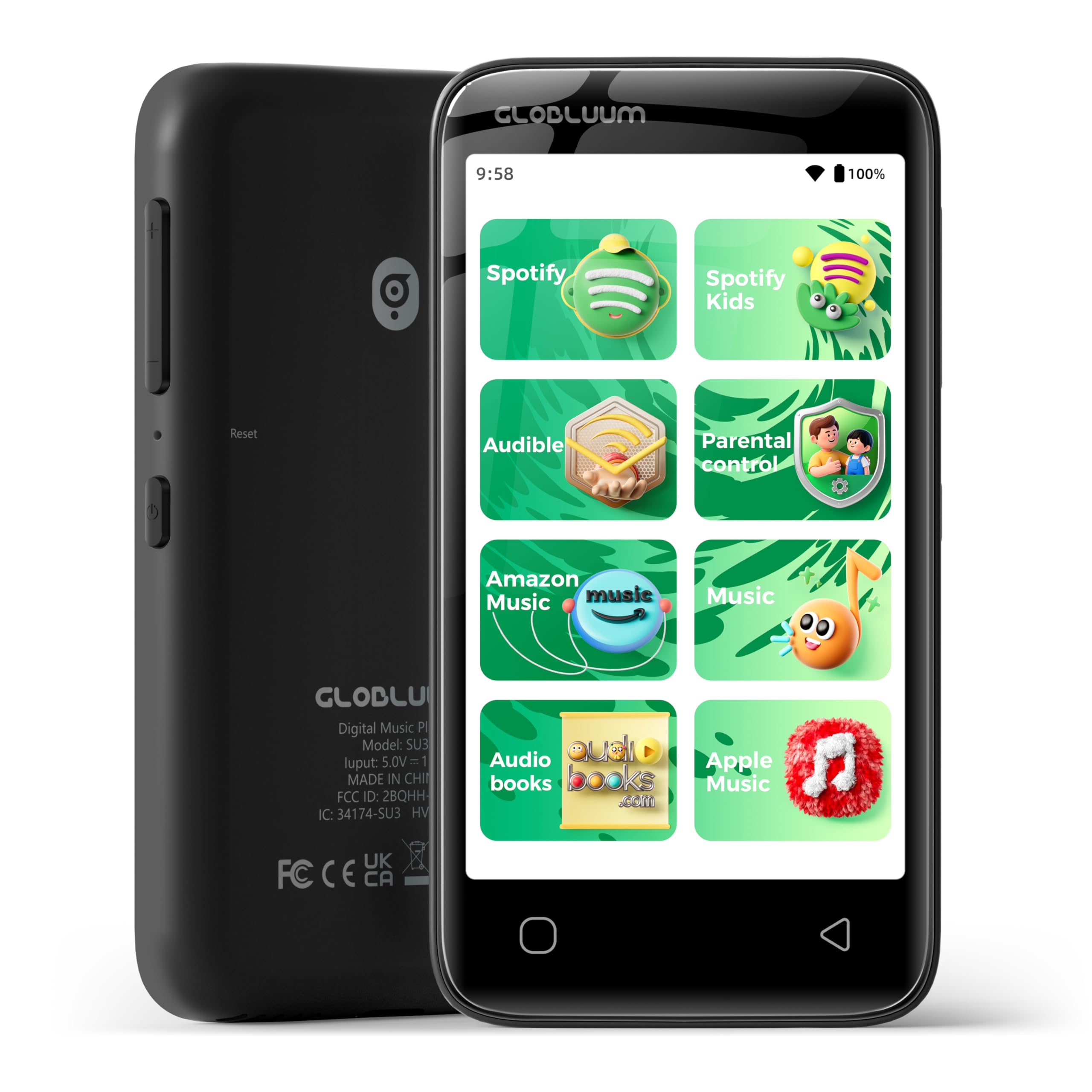
Přední view of the Globluum SU3 MP3 Player, showcasing its 4-inch touchscreen.
Klíčové vlastnosti:
- Safe Listening Environment: Closed Android 14 system with parental controls to prevent unauthorized app installations and browsing.
- Předinstalované aplikace: Includes Spotify Kids, Spotify, Amazon Music, Apple Music, YouTube Music, Audible, Libby, LibriVox, and Kindle for immediate access to content.
- Bedtime Stories: Supports audiobooks from Audible Kids, Libby, LibriVox, and Kindle, with a sleep timer function.
- Uživatelsky přívětivý design: 4-inch touchscreen with large icons for easy navigation by children.
- Přenosný a odolný: Lightweight (3.46 oz) with a sturdy plastic shell and included protective case.
- Ampúložiště: 80GB total storage (16GB built-in + 64GB microSD card).
- Dlouhá výdrž baterie: 1750 mAh battery and 12nm chip for extended usage.
- Konektivita: Bluetooth 5.0 for wireless audio and Wi-Fi for streaming and updates.
- HD Video Support: Plays up to 1080p video files (MP4, AVI, MKV) on an 800x480 display.
2. Co je v krabici
Upon unboxing your Globluum SU3 MP3 Player, please ensure all the following items are present:
- Globluum SU3 MP3 Player (Black)
- Uživatelská příručka x1
- Nabíjecí kabel typu C x 1
- 3.5mm Wired Earphones x1
- 64GB microSDXC card x1 (pre-installed or separate)
- Ochranné pouzdro x1
3. Bezpečnostní informace
Please read and adhere to the following safety guidelines to ensure safe operation and longevity of your device:
- Neponořujte zařízení do vody ani jej nevystavujte nadměrné vlhkosti.
- Strictly prohibit operation or storage in high-temperature environments exceeding 55°C (131°F).
- Zabraňte pádu zařízení nebo jeho vystavení silným nárazům.
- Používejte pouze dodaný nabíjecí kabel a kompatibilní napájecí adaptér.
- Supervise children during use, especially when setting up parental controls or managing applications.
4. Nastavení
4.1 Zapnutí/vypnutí
To power on the device, press and hold the side power button for approximately 3 seconds until the screen illuminates. To power off, press and hold the power button, then select 'Power Off' from the on-screen options.
Strana view zařízení, zvýraznění tlačítek napájení a hlasitosti.
4.2 Nabíjení zařízení
Connect the provided Type-C charging cable to the device's charging port and the other end to a compatible USB power adapter or computer. The battery indicator on the screen will show charging status. A full charge typically takes a few hours.
4.3 Vložení karty MicroSD
The device comes with a 64GB microSDXC card. If it's not pre-installed, locate the microSD card slot on the side of the device. Gently insert the card with the gold contacts facing down until it clicks into place. To remove, push the card in slightly until it springs out.
4.4 Připojení k Wi-Fi
- From the home screen, swipe down from the top to access the quick settings panel.
- Tap the Wi-Fi icon to turn it on.
- Klepnutím a podržením ikony Wi-Fi otevřete nastavení Wi-Fi.
- Vyberte ze seznamu požadovanou síť Wi-Fi a v případě potřeby zadejte heslo.
- Po připojení se ve stavovém řádku zobrazí ikona Wi-Fi.
4.5 Párování Bluetooth
- From the home screen, swipe down from the top to access the quick settings panel.
- Tap the Bluetooth icon to turn it on.
- Tap and hold the Bluetooth icon to open Bluetooth settings.
- Ujistěte se, že vaše Bluetooth sluchátka nebo reproduktor jsou v režimu párování.
- Vyberte zařízení ze seznamu dostupných zařízení, která chcete spárovat.
4.6 Rodičovská kontrola
The Globluum SU3 features a closed Android 14 system with parental controls to manage app access and ensure a safe experience. Google Play is restricted to updates only, preventing new app installations.
- Locate the 'Parental Control' icon on the home screen.
- Follow the on-screen instructions to set up a password.
- Within the parental control settings, you can:
- Lock Apps: Enable or disable access to specific pre-installed applications.
- Změnit heslo: Modify the parental control password.
- Block Factory Resets: Prevent accidental or unauthorized factory resets.

A parent interacting with the parental control settings on the device.
5. Obsluha zařízení
5.1 Základní navigace
The device features a responsive 4-inch touchscreen. Tap icons to open applications, swipe left/right to navigate between screens, and swipe down from the top for quick settings and notifications.

The device screen displaying pre-installed application icons.
5.2 Playing Music and Audiobooks
The Globluum SU3 comes with several pre-installed music and audiobook applications. To play content:
- Tap on the desired application icon (e.g., Spotify Kids, Audible, Amazon Music).
- V případě potřeby se přihlaste ke svému účtu.
- Browse or search for your preferred music or audiobook.
- Tap on the content to begin playback.

Children engaging with the MP3 player, surrounded by icons of supported music applications.
5.3 Using the Sleep Timer
For bedtime stories, you can set a sleep timer to automatically turn off playback:
- While playing an audiobook or music, look for the sleep timer icon within the playback interface of the app.
- Tap the icon and select the desired duration (e.g., 15 minutes, 30 minutes).
- The device will automatically stop playback after the set time.

A child asleep while the MP3 player plays a bedtime story, illustrating the sleep timer function.
5.4 Přehrávání videa
The device supports various video formats (MP4, AVI, MKV) and can play up to 1080p resolution. Videos can be transferred to the device's storage or accessed through supported streaming apps.
5.5 File Převod
K převodu files (music, videos, audiobooks) to your Globluum SU3:
- Connect the device to a computer using the provided Type-C USB cable.
- On the device screen, select 'File Transfer' or 'MTP' mode when prompted.
- Your computer will recognize the device as a removable storage drive.
- Drag and drop files into the appropriate folders (e.g., 'Music', 'Videos') on the device or microSD card.
6. Údržba
6.1 Čištění
To clean the device, gently wipe the screen and body with a soft, dry, lint-free cloth. Do not use abrasive cleaners, solvents, or aerosol sprays, as these can damage the device's finish or internal components.
6.2 Péče o baterii
Pro maximalizaci výdrže a výkonu baterie:
- Vyhněte se častému úplnému vybíjení baterie.
- Nevystavujte zařízení extrémním teplotám.
- Pokud zařízení skladujete delší dobu, nabijte jej před uskladněním přibližně na 50 %.
6.3 Aktualizace softwaru
The device's Android 14 system receives updates for pre-installed applications via Google Play. Ensure the device is connected to Wi-Fi to receive these updates. No new applications can be installed from Google Play, maintaining the closed system environment.
7. Řešení problémů
7.1 Zařízení se nezapíná
- Ensure the battery is charged. Connect the device to a charger for at least 15 minutes before attempting to power on again.
- Stiskněte a podržte tlačítko napájení po dobu 10–15 sekund pro vynucený restart.
7.2 Problémy s připojením k Wi-Fi nebo Bluetooth
- Toggle Wi-Fi or Bluetooth off and on again in the quick settings.
- Ujistěte se, že jste v dosahu sítě Wi-Fi nebo zařízení Bluetooth.
- For Bluetooth, ensure the other device is in pairing mode.
- Restartujte zařízení a zkuste se znovu připojit.
7.3 App Not Working/Updating
- Ujistěte se, že je zařízení připojeno ke stabilní síti Wi-Fi.
- Check for available updates in the Google Play Store (accessible for updates only).
- Clear the app's cache: Go to Settings > Apps > [App Name] > Storage > Clear Cache.
- If an app is disabled via parental controls, re-enable it.
7.4 Pomalý výkon nebo zamrzání
- Zavřete všechny nepoužívané aplikace běžící na pozadí.
- Restartujte zařízení.
- Zajistěte dostatek úložného prostoru. Odstraňte nepotřebné files v případě potřeby.
8. Specifikace
| Funkce | Detail |
|---|---|
| Název modelu | SU3 |
| Rozměry produktu | 0.43 x 2.44 x 4.65 palce |
| Hmotnost položky | 3.46 unce |
| Výrobce | Globluum |
| Operační systém | Closed Android 14 |
| Velikost obrazovky | 4 palce |
| Rozlišení displeje | 800x480 |
| Kapacita paměti | 80 GB (16GB built-in + 64GB microSDXC card) |
| Technologie připojení | Aux, Bluetooth 5.0, USB Type-C, Wi-Fi |
| Baterie | 1750 mAh (nestandardní baterie) |
| Procesor | 12nm chip |
| Podporované video formáty | MP4, AVI, MKV (up to 1080p) |
| Speciální funkce | Built-In Speaker, Parental Controls, Touch Screen |

Visual representation of the device's internal components and connectivity features.
9. Záruka a podpora
9.1 Informace o záruce
For detailed warranty information, please refer to the warranty card included with your product or contact Globluum customer support directly. The warranty typically covers manufacturing defects for a specified period from the date of purchase.
9.2 Zákaznická podpora
If you encounter any issues or have questions not covered in this manual, please contact Globluum customer support. Contact details can usually be found on the product packaging, the official Globluum webwebu nebo prostřednictvím svého prodejce.
10. Produktové video
Official product video from Globluum titled "Safe Listening Healthy Growing", demonstrating key features and benefits of the MP3 player for children.


