1. Úvod
This manual provides comprehensive instructions for the safe and effective use of your Cangaroo Babypone Callisto Baby Monitor. This modern baby monitor offers clear image and sound transmission, convenient two-way communication, soothing lullabies, night vision capabilities, and a room temperature sensor. The camera can be remotely controlled from the parent unit, allowing for upward, downward, left, and right adjustments. The system provides reliable monitoring, flexible camera control, and clear picture and sound quality, day and night.
2. Obsah balení
Pečlivě zkontrolujte obsah balení. Pokud některé položky chybí nebo jsou poškozené, obraťte se na prodejce.
- Parent Unit with 2.8-inch LCD display
- Dětská jednotka (kamera)
- Napájecí adaptér pro rodičovskou jednotku
- Napájecí adaptér pro dětskou jednotku
- USB Power Cables (2x)
- Sada pro montáž na zeď (šrouby a hmoždinky)
- Uživatelská příručka (tento dokument)

Obrázek 2.1: Included accessories: two USB power cables, two power adapters, and a wall mounting kit.
3. Konec produktuview
Familiarize yourself with the components and controls of your Cangaroo Babypone Callisto Baby Monitor.
3.1 Rodičovská jednotka

Obrázek 3.1: Detailní záběr view of the Parent Unit's 2.8-inch LCD screen and control buttons.
- 2.8palcový LCD displej: Shows live video feed from the baby unit.
- Vypínač: Turns the parent unit on/off.
- Tlačítko OK: Potvrzuje výběr.
- Navigační tlačítka (nahoru, dolů, vlevo, vpravo): Navigate menus, control camera pan/tilt.
- Tlačítko nabídky: Přístup k nastavením a funkcím.
- Tlačítko ukolébavky: Activates/deactivates lullabies.
- Mikrofon: Pro obousměrnou audio komunikaci.
- Reproduktor: For audio output from the baby unit and lullabies.
- Nabíjecí port: Pro připojení napájecího adaptéru.
3.2 Dětská jednotka (kamera)

Obrázek 3.2: Přední view of the Baby Unit (camera) with its lens and sensors.
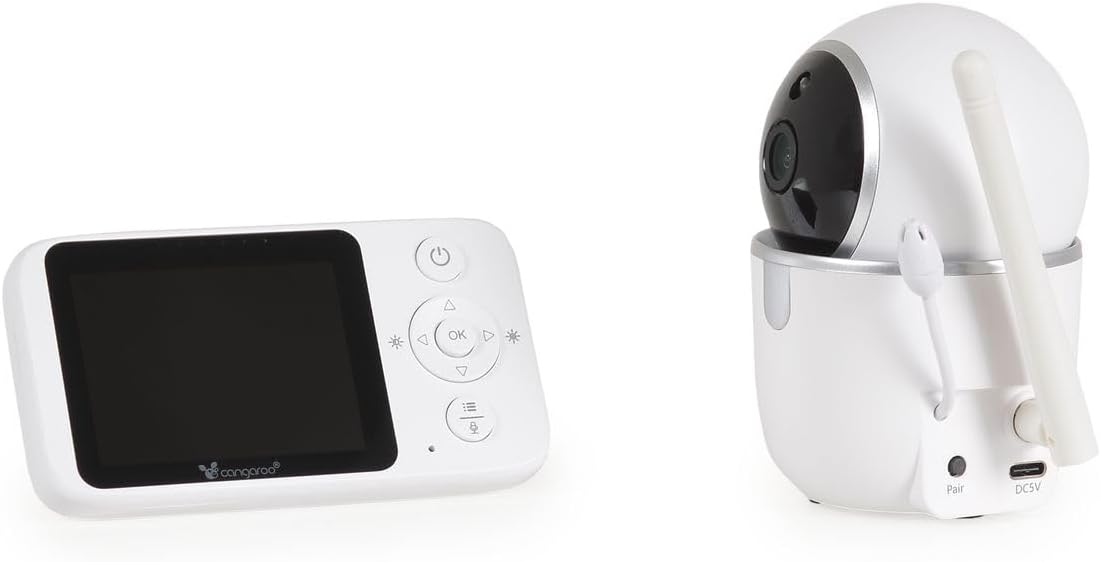
Obrázek 3.3: Zadní view of the Baby Unit, showing the 'Pair' button and DC5V power input.
- Objektiv fotoaparátu: Captures video feed.
- Infračervené LED diody: Pro funkci nočního vidění.
- Mikrofon: Picks up sounds from the baby's room.
- Reproduktor: For two-way audio and lullaby playback.
- Teplotní senzor: Sleduje pokojovou teplotu.
- Tlačítko spárování: Used to pair the baby unit with the parent unit.
- Napájení DC5V: Pro připojení napájecího adaptéru.
- Anténa: Pro bezdrátový přenos signálu.
4. Nastavení
4.1 Zapnutí jednotek
- Connect the power adapter to the Baby Unit's DC5V input and plug it into a power outlet. The baby unit will power on automatically.
- Connect the power adapter to the Parent Unit's charging port and plug it into a power outlet. Press and hold the Power Button on the Parent Unit to turn it on.
- Allow both units a few moments to establish a connection. The parent unit display will show the live video feed once connected.
4.2 Umístění dětské jednotky (kamery)
Umístěte dětskou jednotku na místo, které poskytuje volný view of your baby's crib or sleeping area. Ensure it is at least 1 meter (3 feet) away from the baby to prevent any potential cord hazards. The camera can be placed on a flat surface or mounted to a wall using the included wall mounting kit.
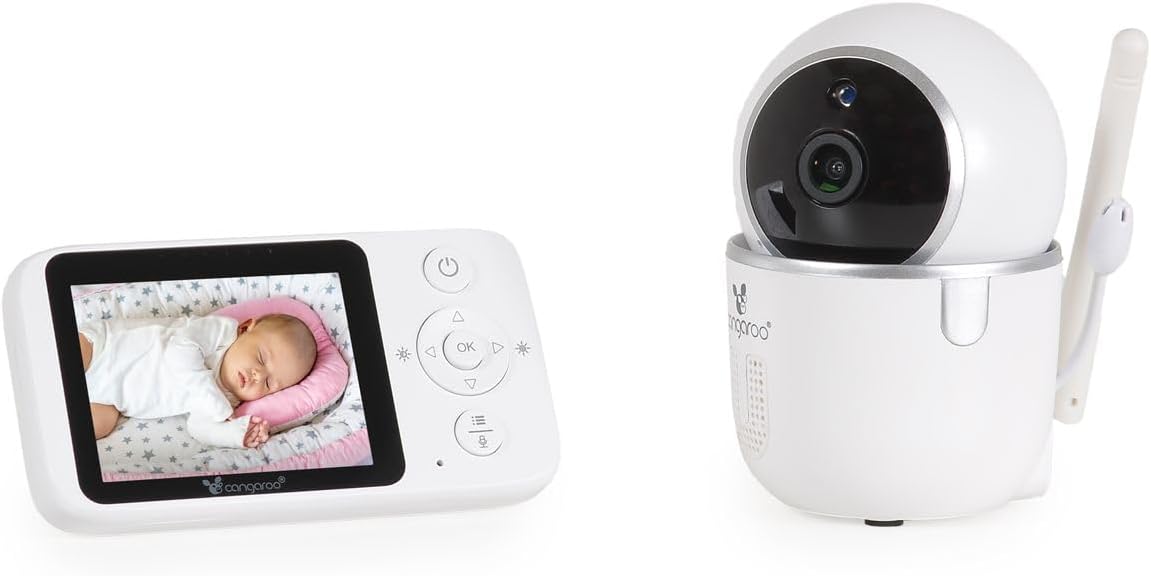
Obrázek 4.1: The Parent Unit displaying a baby, alongside the Baby Unit (camera).
- Optimální umístění: Position the camera to capture the entire crib area.
- Bezpečnost kabelu: Keep all cords out of reach of children.
- Rozsah signálu: The monitor has a radio range of up to 250m outdoors and up to 50m indoors. Obstacles like walls and furniture can reduce this range.
4.3 Párování (pokud je to nutné)
The units are typically pre-paired. If they do not connect automatically, follow these steps:
- Ensure both the Parent Unit and Baby Unit are powered on.
- On the Parent Unit, press the Menu button to access the menu.
- Navigate to the "Pairing" option using the navigation buttons and press OK.
- Within 10 seconds, press the "Pair" button located on the back of the Baby Unit.
- The Parent Unit will display a confirmation message once pairing is successful.
5. Návod k obsluze
5.1 Základní monitorování
- Once powered on and paired, the Parent Unit will automatically display the live video feed and audio from the Baby Unit.
- The screen will show the current room temperature detected by the Baby Unit's sensor.
- Noční vidění: The Baby Unit automatically activates infrared night vision in low-light conditions, providing clear images up to 5 meters.
5.2 Obousměrná zvuková komunikace
To speak to your baby through the Baby Unit's speaker:
- Stiskněte a podržte tlačítko mluvení (často znázorněné ikonou mikrofonu) na rodičovské jednotce.
- Mluvte jasně do mikrofonu na rodičovské jednotce.
- Release the Talk button to hear your baby again.
5.3 Remote Camera Control (Pan/Tilt)
You can remotely adjust the camera's viewing angle from the Parent Unit:
- Use the Up/Down/Left/Right navigation buttons on the Parent Unit to pan (left/right) and tilt (up/down) the Baby Unit's camera. The camera supports 360° rotation.
5.4 ukolébavky
Jak přehrát ukolébavky svému dítěti:
- Press the Lullaby button on the Parent Unit.
- Use the navigation buttons to select one of the 5 built-in lullabies.
- Press OK to start playback. Press the Lullaby button again to stop.
5.5 Alarm Function and Settings
The monitor includes an alarm function and adjustable settings:
- Nastavení hlasitosti: Use the Parent Unit's menu to adjust the alarm volume.
- Nastavení jasu: Adjust the display brightness via the Parent Unit's menu.
- Režim úspory energie: Activate this mode in the menu to conserve battery life. The screen may turn off after a period of inactivity, but audio monitoring continues. The screen will reactivate upon detecting sound or pressing a button.
6. Údržba
- Čištění: Otřete jednotky suchým, měkkým hadříkem. Nepoužívejte abrazivní čisticí prostředky ani rozpouštědla.
- Péče o baterii (rodičovská jednotka): The Parent Unit has a built-in rechargeable ion battery. For optimal battery life, avoid fully discharging the battery frequently. Recharge when the low battery indicator appears.
- Skladování: Pokud budete přístroj skladovat delší dobu, ujistěte se, že je baterie částečně nabitá, a skladujte ji na chladném a suchém místě.
- Podmínky prostředí: Avoid exposing the units to extreme temperatures, direct sunlight, dust, or moisture.
7. Řešení problémů
| Problém | Možná příčina | Řešení |
|---|---|---|
| Na rodičovské jednotce není žádný obraz/zvuk. | Units are not powered on or not paired. Out of range. | Ensure both units are plugged in and powered on. Re-pair the units if necessary (see Section 4.3). Move Parent Unit closer to Baby Unit. |
| Špatná kvalita obrazu/zvuku. | Interference from other devices. Units are too far apart or obstacles are blocking the signal. | Move the units away from other electronic devices (e.g., Wi-Fi routers, microwaves). Reduce the distance between units. |
| Parent Unit battery drains quickly. | Energy Saving Mode is off. Frequent use of features. | Activate Energy Saving Mode in the menu. Reduce screen brightness. Ensure the battery is fully charged before use. |
| Camera not responding to remote control. | Units are out of range or connection issue. | Move Parent Unit closer to Baby Unit. Check connection status. |
| Naměřená teplota se zdá být nepřesná. | Dětská jednotka umístěná v blízkosti zdroje tepla nebo průvanu. | Relocate the Baby Unit to a more central location in the room, away from windows, vents, or direct sunlight. |
8. Specifikace
- Model: Cangaroo Babypone Callisto (Model Number: 112301)
- Displej rodičovské jednotky: 2.8palcový LCD
- Bezdrátová technologie: Digital 2.4 GHz FHSS
- Vnitřní rozsah: Až 50 metrů (přibližně 164 stop)
- Venkovní rozsah: Až 250 metrů (přibližně 820 stop)
- Noční vidění: Infračervený signál, až 5 metrů
- Vlastnosti fotoaparátu: Pan/Tilt (360° rotation), Two-Way Audio, Temperature Sensor, Lullabies (5 built-in)
- Napájení: DC 5V (via included adapters)
- Baterie rodičovské jednotky: Vestavěná dobíjecí Li-ion baterie
- Materiál: Plast
- Parent Unit Dimensions: L 11 x W 3 x H 6 cm
- Baby Unit Dimensions: L 6 x W 8 x H 10.5 cm
- Hmotnost položky: 400 g (total product)
9. Záruka a podpora
Informace o záruce a zákaznické podpoře naleznete v dokumentaci dodané s vaším nákupem nebo se obraťte na svého prodejce. Uschovejte si doklad o koupi pro případné reklamace.


