1. Úvod
This manual provides essential information for the safe and efficient use of your OPPO Reno 14F 5G smartphone. Please read this guide thoroughly before operating the device to ensure proper functionality and to understand its features. Keep this manual for future reference.
2. Obsah balení
Ověřte, zda balení vašeho produktu obsahuje následující položky:
- OPPO Reno 14F 5G Smartphone
- Sluchátka
- Vysunutí zásobníku SIM
- USB kabel (typ C)
If any items are missing or damaged, please contact your retailer or OPPO customer support.
3. Zařízení skončiloview
Familiarize yourself with the physical components of your OPPO Reno 14F 5G.

Obrázek 3.1: Přední strana View. This image displays the front of the OPPO Reno 14F 5G smartphone, highlighting the display screen and the front-facing camera located at the top center.

Obrázek 3.2: Zpět View. This image shows the rear of the OPPO Reno 14F 5G smartphone in Luminous Green, featuring the dual camera module and the OPPO branding.
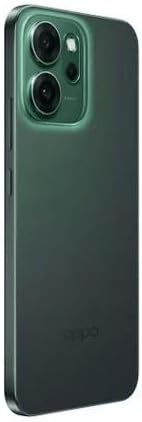
Obrázek 3.3: Strana View. Tento obrázek znázorňuje boční profesionálafile of the OPPO Reno 14F 5G, indicating the location of the volume buttons, power button, and SIM card tray.
3.1. Tlačítka a porty
- Vypínač: Located on the right side. Press and hold to power on/off or restart. Press briefly to lock/unlock the screen.
- Tlačítka hlasitosti: Located on the left side. Press to adjust media volume, call volume, or notification volume.
- Port USB Type-C: Located at the bottom. Used for charging, data transfer, and connecting the included headset.
- Zásuvka na SIM kartu: Located on the side. Use the provided SIM ejector tool to open.
- Kamery: Front-facing camera for selfies and video calls. Rear dual-camera system for high-quality photos and videos.
4. Nastavení
4.1. Nabíjení zařízení
Before first use, fully charge your OPPO Reno 14F 5G. Connect the USB cable to the USB Type-C port on the phone and the other end to a compatible power adapter. Plug the adapter into a power outlet.
4.2. Vložení SIM karty
- Vypněte zařízení.
- Locate the SIM card tray on the side of the phone (refer to Figure 3.3).
- Insert the SIM ejector tool into the small hole on the SIM tray and press gently until the tray pops out.
- Vložte kartu (karty) Nano-SIM do slotu zlatými kontakty směrem dolů. Dbejte na správnou orientaci.
- Opatrně zatlačte zásobník zpět do telefonu, dokud nezacvakne na místo.
4.3. Průvodce počátečním zapnutím a nastavením
Press and hold the Power button until the OPPO logo appears. Follow the on-screen instructions to complete the initial setup, which includes:
- Výběr jazyka
- Připojování k síti Wi-Fi
- Setting up your Google account
- Configuring security features (fingerprint, face unlock, PIN/pattern)
- Transferring data from an old device (optional)
5. Obsluha zařízení
5.1. Základní navigace
Your OPPO Reno 14F 5G runs on Android 14 and supports gesture navigation or traditional navigation buttons. You can configure your preferred navigation method in the Settings menu.
- Přejeďte nahoru: Přejděte na domovskou obrazovku.
- Přejeďte prstem nahoru a podržte: Otevřete nedávné aplikace.
- Přejetím prstem od levého/pravého okraje: Vraťte se.
5.2. Volání a odesílání zpráv
Use the Phone app to make calls and the Messages app to send and receive SMS/MMS messages. Ensure your SIM card is active and has network coverage.
5.3. Použití fotoaparátu
Open the Camera app to capture photos and videos. The rear camera system offers various modes for different scenarios, while the front camera is ideal for selfies and video calls. Tap the shutter button to take a photo or record a video.
5.4. Konektivita
- Wi-Fi: Připojte se k bezdrátovým sítím pro přístup k internetu.
- Bluetooth: Pair with wireless headphones, speakers, or other Bluetooth-enabled devices.
- 5G: Utilize high-speed mobile data networks where available.
- GPS: Pro lokalizační služby a navigaci.
6. Údržba
6.1. Čištění zařízení
Use a soft, lint-free cloth to clean the screen and body of your phone. Avoid using harsh chemicals or abrasive materials, as these can damage the device's finish.
6.2. Péče o baterie
Chcete -li prodloužit životnost baterie:
- Vyhněte se extrémním teplotám.
- Použijte originální nabíječku a kabel.
- Do not leave the phone charging for extended periods after it's full.
6.3. Aktualizace softwaru
Pravidelně kontrolujte a instalujte aktualizace softwaru, abyste zajistili, že vaše zařízení má nejnovější funkce, bezpečnostní záplaty a vylepšení výkonu. Přejděte na Nastavení > O zařízení > Aktualizováno pro kontrolu aktualizací.
6.4. Zálohování dat
Pravidelně zálohujte důležitá data (fotografie, kontakty, dokumenty) do cloudové služby nebo počítače, abyste předešli jejich ztrátě.
7. Řešení problémů
Pokud se se zařízením setkáte s problémy, podívejte se na následující běžná řešení:
| Problém | Řešení |
|---|---|
| Zařízení se nezapíná | Ujistěte se, že je baterie nabitá. Stiskněte a podržte tlačítko napájení po dobu alespoň 10 sekund, abyste vynutili restart. |
| Obrazovka nereaguje | Force restart the device. If the issue persists, contact support. |
| Problémy s připojením k síti | Check if Airplane Mode is off. Restart the device. Reinsert the SIM card. Reset network settings (Settings > System settings > Back up and reset > Reset phone > Reset network settings). |
| Aplikace padá nebo zamrzávají | Clear the app's cache and data (Settings > Apps > App management > [App Name] > Storage usage). Update the app. Uninstall and reinstall the app. |
| Rychlé vybíjení baterie | Check battery usage in Settings to identify power-hungry apps. Reduce screen brightness. Disable unnecessary features like GPS, Bluetooth, or Wi-Fi when not in use. |
| Přehřívání | Close background apps. Avoid using the phone while charging or in direct sunlight. If overheating persists, power off the device and allow it to cool. |
7.1. Obnovení továrního nastavení
As a last resort for persistent software issues, you may perform a factory reset. This will erase all data on your phone. Back up your data before proceeding. Go to Settings > System settings > Back up and reset > Reset phone > Erase all data.
8. Specifikace
Detailed technical specifications for the OPPO Reno 14F 5G smartphone:
| Funkce | Detail |
|---|---|
| Operační systém | Android 14 |
| RAM Memory Installed | 12 GB |
| Kapacita paměti | 256 GB |
| Technologie připojení | 5G |
| Buněčná technologie | 5G |
| Poskytovatel bezdrátových služeb | Odemčeno pro všechny přepravce |
| Výkon baterie | 6000 XNUMX mAh |
| Hmotnost položky | 187 g |
| Rozměry balení | 18.3 x 9.9 x 5.9 cm |
| Audio Jack | USB typ C |
| Barva | Luminous Green |
| Název modelu | Reno 5G |
| Číslo modelu položky | 6932169376945 |
9. Záruka a podpora
Your OPPO Reno 14F 5G smartphone is covered by a limited warranty. For detailed warranty terms and conditions, please refer to the warranty card included in your package or visit the official OPPO website. For technical support, service, or further assistance, please contact OPPO customer service through their official channels.


