Zavedení
This manual provides detailed instructions for the ECHTPower Ergonomic Vertical Mouse, Model CG045. It covers setup, operation, maintenance, and troubleshooting to ensure optimal performance and user comfort. This vertical mouse is designed to promote a natural hand and wrist posture, reducing strain during extended use.

Image: The ECHTPower Ergonomic Vertical Mouse, highlighting its design for natural comfort.
Obsah balení
- ECHTPower Ergonomic Vertical Mouse (Model CG045)
- 2.4GHz USB přijímač
- Nabíjecí kabel USB-C
- Uživatelská příručka
Konec produktuview
Familiarize yourself with the components of your ECHTPower Vertical Mouse.

Obrázek: Pohled shora dolů view of the ECHTPower Ergonomic Vertical Mouse alongside its 2.4GHz USB receiver.
- Levé tlačítko myši: Standardní funkce levého kliknutí.
- Kliknutí pravým tlačítkem: Standardní funkce kliknutí pravým tlačítkem myši.
- Rolovací kolečko: Pro vertikální rolování.
- Tlačítko pro nastavení DPI: Cykluje mezi nastaveními DPI.
- LED displej: Shows connection mode, DPI level, and battery status.
- Tlačítko vpřed: Naviguje vpřed web prohlížeče popř file průzkumníci.
- Tlačítko zpět: Naviguje zpět web prohlížeče popř file průzkumníci.
- Vypínač: Zapne nebo vypne myš.
- Tlačítko pro přepnutí režimu: Switches between 2.4GHz and Bluetooth modes.
- Nabíjecí port USB-C: Pro dobíjení interní baterie.
- 2.4GHz USB Receiver Storage: Compartment for the USB receiver.

Image: A diagram illustrating the quick side buttons (Forward, Back) and the scroll wheel on the mouse.
Nastavení
1. Nabíjení myši
Before first use, fully charge the mouse. Connect the provided USB-C charging cable to the mouse's charging port and the other end to a USB power source (e.g., computer, USB wall adapter). The LED display will indicate charging status.

Image: The ECHTPower mouse displaying its 700mAh battery capacity.
2. Connecting via 2.4GHz USB Receiver
- Locate the 2.4GHz USB receiver stored in the bottom compartment of the mouse.
- Vložte USB přijímač do volného USB portu na vašem počítači.
- Zapněte myš pomocí vypínače umístěného na spodní straně.
- Press the mode switch button until the LED display shows the 2.4GHz connection icon. The mouse should connect automatically.
3. Připojení přes Bluetooth
- Zapněte myš pomocí vypínače.
- Press the mode switch button until the LED display shows the Bluetooth connection icon.
- On your device (PC, Mac, Laptop, Tablet), navigate to Bluetooth settings.
- Hledat new devices and select "ECHTPower Mouse" (or similar) from the list.
- Confirm pairing. The LED display will indicate a successful connection.

Image: The ECHTPower mouse demonstrating multi-device compatibility, connected to a laptop via USB receiver and a tablet via Bluetooth.
Návod k obsluze
Zapnutí/vypnutí
Use the power switch on the bottom of the mouse to turn it on or off. Turning off the mouse when not in use conserves battery life.
Přepínání režimů připojení
Press the mode switch button (usually located on the bottom or top of the mouse) to cycle between 2.4GHz and Bluetooth connection modes. The LED display will show the active mode.
Nastavení DPI
Press the DPI adjustment button (located near the scroll wheel) to cycle through the 7 available DPI levels: 400, 800, 1600, 2400, 3200, 6400, and 8000. The current DPI setting will be shown on the LED display.

Image: The ECHTPower mouse illustrating its 7 adjustable DPI levels, ranging from 400 to 8000.
Indikátory LED displeje
Integrovaný LED displej poskytuje informace v reálném čase:
- Režim připojení: Indicates whether the mouse is in 2.4GHz or Bluetooth mode.
- Úroveň DPI: Shows the currently selected DPI sensitivity.
- Stav baterie: Displays the remaining battery charge and low-battery warnings.

Obrázek: Detailní záběr view of the ECHTPower mouse's LED display, showing the DPI setting and battery level.
Programovatelná tlačítka
The mouse features programmable buttons that can be customized using dedicated software. This allows you to assign specific functions or macros to buttons for enhanced workflow or gaming.
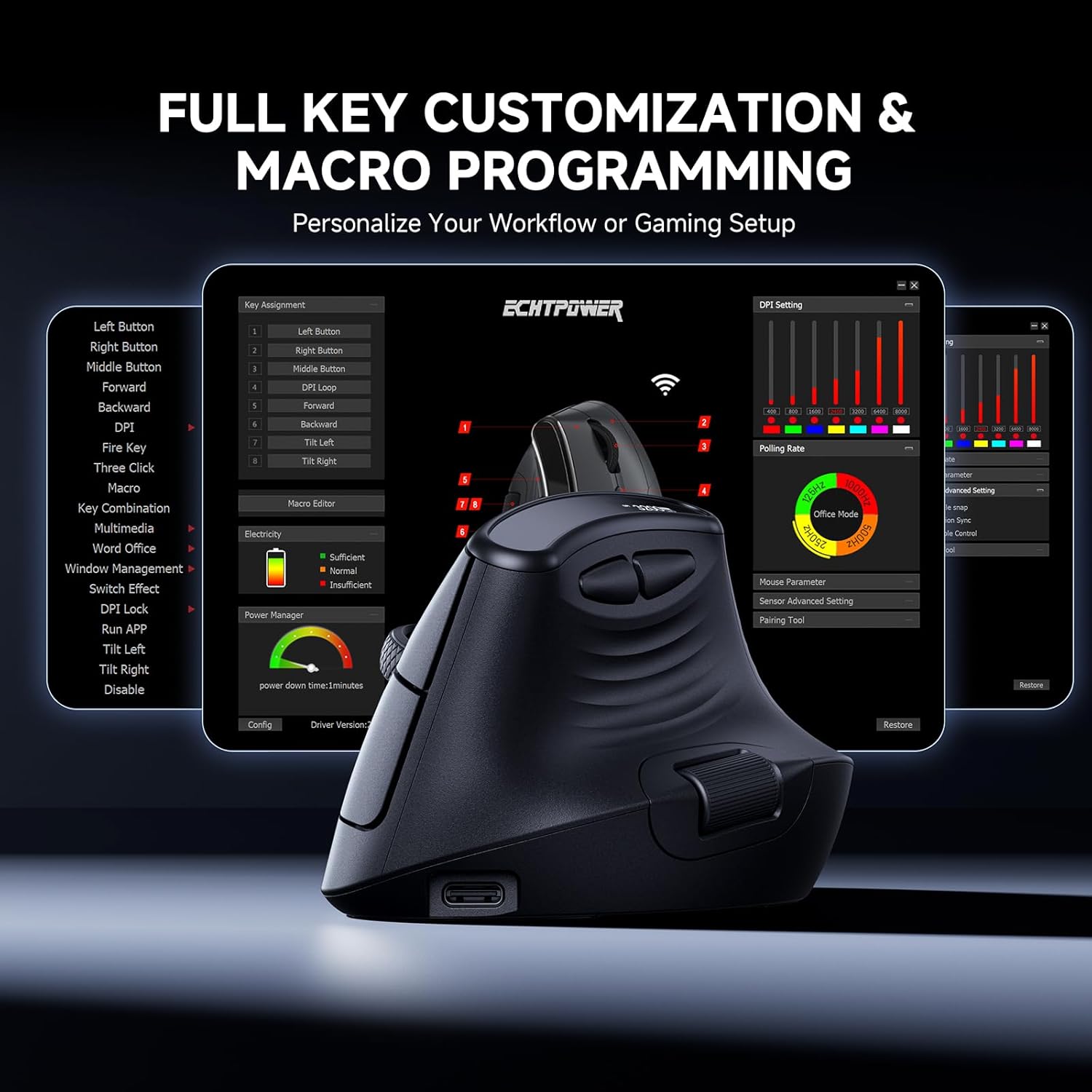
Image: A screenshot of the ECHTPower mouse customization software interface, showing options for key assignment and macro programming.
Režim spánku
The mouse is equipped with an intelligent three-level sleep mode to conserve power. It automatically enters sleep mode after 1 second, 30 seconds, and 60 seconds of inactivity. The mouse will instantly wake up with any movement or click.
Údržba
- Čištění: K čištění myši používejte měkký, suchý hadřík. Nepoužívejte agresivní chemikálie ani abrazivní materiály.
- Péče o baterie: To prolong battery life, avoid fully discharging the mouse frequently. Recharge when the low-battery warning appears.
- Skladování: Pokud myš delší dobu nepoužíváte, skladujte ji na chladném a suchém místě.
Odstraňování problémů
| Problém | Možné řešení |
|---|---|
| Myš neodpovídá |
|
| Pohyb kurzoru je nepravidelný nebo pomalý |
|
| Tlačítka nefungují |
|
Specifikace
| Funkce | Detail |
|---|---|
| Model | CG045 |
| Konektivita | Bezdrátové 2.4 GHz, Bluetooth |
| Úrovně DPI | 400, 800, 1600, 2400, 3200, 6400, 8000 (7 levels) |
| Kapacita baterie | Dobíjecí 700mAh |
| Tlačítka | Programmable (Left, Right, Scroll Wheel, DPI, Forward, Backward) |
| Speciální funkce | Ergonomic Vertical Design, LED Display, Silent Clicks, Multi-Device Connection, Intelligent Sleep Mode |
| Hmotnost | 5.6 unce (přibližně 159 g) |
| Rozměry | 4.45 x 3.07 x 3.03 palců (přibližně 11.3 x 7.8 x 7.7 cm) |
Oficiální video produktu
Watch the official product video for a visual guide to the ECHTPower Ergonomic Vertical Mouse.
Video: Oficiální video s produktemasing the features and design of the ECHTPower Ergonomic Vertical Mouse.
Záruka a podpora
ECHTPower products come with a standard manufacturer's warranty. For specific warranty details, please refer to the warranty card included in your package or visit the official ECHTPower webmísto.
For technical support, troubleshooting assistance, or any inquiries regarding your ECHTPower Ergonomic Vertical Mouse, please contact ECHTPower customer service through their official channels. Contact information can typically be found on the product packaging or the brand's webmísto.


