1. Úvod
Thank you for choosing the ProtoArc XKM01 Foldable Wireless Keyboard and Mouse Combo. This manual provides detailed instructions for setting up, operating, and maintaining your device. Please read this manual thoroughly before use to ensure optimal performance and longevity of your product.
2. Obsah balení
The ProtoArc XKM01 combo includes the following items:
- ProtoArc XKM01 Foldable Wireless Keyboard
- ProtoArc Wireless Mouse
- Carrying Hard Case
- Foldable Stand (for 4-11” devices)
- Nabíjecí kabel USB-C
- USB Receiver (stored in mouse)
- Uživatelská příručka

Figure 1: ProtoArc XKM01 Package Contents

Figure 2: Quality Portable Hard Case for ProtoArc XKM01
3. Konec produktuview
3.1 Funkce klávesnice
- Rozložení v plné velikosti: 105-key design with dedicated function and number pads for comprehensive input.
- Skládací design: Ultratenký profíkfile with a simple fold-and-go mechanism, featuring internal aluminum hinges tested for over 10,000 folds.
- Tiché psaní: Equipped with whisper-quiet scissor switches and low-profile klíče.
- Klávesy multimediálních funkcí: Dedicated keys for various multimedia controls.

Figure 3: Keyboard Durable Hinges
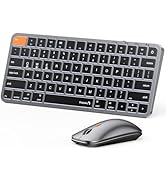
Figure 4: Keyboard Multimedia Function Keys
3.2 Funkce myši
- Ultra tenký design: Portable and compact for easy transport.
- Nastavitelné DPI: 3 modes (1000/1600/2400) for precision control.
- Quiet Clicking: 25dB micro-switches for silent operation.
- Připojení více zařízení: Supports 2.4G wireless, Bluetooth 1, and Bluetooth 2 connections.

Figure 5: Slim and Portable Mouse

Figure 6: Mouse Component Diagram
4. Nastavení a připojení
4.1 Keyboard Setup
- Rozložte klávesnici: Gently unfold the keyboard until it lies flat.
- Zapnutí: Locate the power switch (usually on the side or back) and slide it to the 'ON' position.
- Vyberte režim připojení: The keyboard supports 2.4G wireless and two Bluetooth channels (BT1, BT2).
- Bezdrátové 2.4G: Insert the USB receiver (found in the mouse's battery compartment) into your device's USB port. The keyboard should connect automatically.
- Připojení Bluetooth: Press and hold the 'Fn' key along with 'BT1' or 'BT2' key for 3 seconds until the indicator light flashes, indicating pairing mode. On your device, search for 'ProtoArc XKM01' in Bluetooth settings and connect.
- Spínací zařízení: To switch between connected devices, simply press 'Fn' + 'BT1', 'Fn' + 'BT2', or 'Fn' + '2.4G' (if applicable).
4.2 Mouse Setup
- Zapnutí: Slide the power switch on the bottom of the mouse to the 'ON' position.
- Vyberte režim připojení: The mouse supports 2.4G wireless and two Bluetooth channels (BT1, BT2).
- Bezdrátové 2.4G: Ensure the USB receiver is plugged into your device. The mouse will connect automatically.
- Připojení Bluetooth: Press the mode switch button on the bottom of the mouse to cycle between BT1 and BT2. Hold the desired BT button for 3 seconds until the indicator light flashes. On your device, search for 'ProtoArc Mouse' in Bluetooth settings and connect.
- Spínací zařízení: Press the mode switch button on the bottom of the mouse to switch between connected devices.

Figure 7: Multi-Device Connectivity Overview
5. Návod k obsluze
5.1 Používání klávesnice
- Funkční klávesy: The top row of keys (F1-F12) can be used as standard function keys or multimedia keys. Press Fn + Esc to toggle between these modes.
- Kompatibilita operačního systému: The keyboard is compatible with Windows, macOS, Chrome OS, iPadOS, and Android. Specific key functions may vary slightly depending on the operating system.
5.2 Použití myši
- Nastavení DPI: Press the DPI switch button (usually near the scroll wheel) to cycle through 1000, 1600, and 2400 DPI settings.
- Tichý provoz: The mouse is designed for quiet clicking, suitable for various work environments.

Figure 8: Quiet Operation of Keyboard and Mouse
6. Nabíjení
Both the keyboard and mouse are rechargeable via USB-C.
- Nabíjecí port: Connect the provided USB-C cable to the charging port on the device and to a USB power source.
- Indikátor nabíjení: The indicator light will show charging status. It typically takes 2-3 hours for a full charge.
- Životnost baterie: A full charge provides approximately 150-200 days of standby time.

Figure 9: Type-C Charging for Keyboard and Mouse
7. Údržba
- Čištění: K čištění povrchů klávesnice a myši používejte měkký, suchý hadřík. V případě odolných nečistot použijte lehceamp Lze použít hadřík, který zabrání vniknutí vlhkosti do zařízení.
- Skladování: When not in use, fold the keyboard and store it along with the mouse in the provided hard case to protect it from dust and damage.
- Vyhněte se extrémním podmínkám: Do not expose the devices to extreme temperatures, direct sunlight, or high humidity.
8. Řešení problémů
8.1 Problémy s připojením
- Zařízení se nepřipojuje: Ensure both the keyboard and mouse are powered on and in the correct pairing mode (2.4G or Bluetooth). Check your device's Bluetooth settings to confirm it's discoverable and try re-pairing.
- Přerušované připojení: Ensure there are no obstructions between the devices and your computer. Move closer to your computer. Check battery levels.
8.2 Typing/Clicking Issues
- Klávesy nereagují: Check battery level. Ensure the keyboard is properly connected. Try restarting the keyboard and your device.
- Mouse Cursor Erratic: Clean the mouse sensor. Ensure the mouse is on a suitable surface. Adjust DPI settings if the cursor is too fast or slow.
9. Specifikace
| Číslo modelu | XKM01 |
| Technologie připojení | Bluetooth, 2.4G USB |
| Kompatibilní zařízení | Notebook, Osobní počítač, Chytrý telefon, Tablet |
| Speciální funkce | Lightweight, Portable, Rechargeable, Tri-Fold |
| Hmotnost položky | 1.96 libry (přibližně 0.89 kg) |
| Rozměry balení | 12.99 x 6.42 x 2.13 palců (přibližně 33 x 16.3 x 5.4 cm) |

Obrázek 10: Rozměry produktu
10. Záruka a podpora
ProtoArc products come with a standard manufacturer's warranty. For detailed warranty information, product support, or technical assistance, please visit the official ProtoArc website or contact customer service using the information provided in the product packaging.
Zásady vrácení: This product is eligible for a refund/replacement within 30 days of purchase, as per Amazon's return policy.
11. Konec produktuview Video
Video 1: ProtoArc XKM01 Foldable Keyboard and Mouse Combo Overview. This video demonstrates the product's features, including its foldable design, multi-device connectivity, and portability.


