1. Úvod
This manual provides detailed instructions for the installation, operation, and maintenance of your Hodozzy Carplay Autoradio for Citroen C5 (2008-2017). This 10-inch in-cell Android car stereo features Bluetooth 5.0, Wireless CarPlay, Android Auto, WiFi, GPS, RDS, FM radio, USB connectivity, and DSP for enhanced audio. Please read this manual thoroughly before use to ensure proper functionality and safety.
2. Bezpečnostní informace
- Doporučená profesionální instalace: Vzhledem ke složitosti elektrických systémů automobilu se důrazně doporučuje profesionální instalace, aby se zabránilo poškození jednotky nebo vašeho vozidla.
- Bezpečnost jízdy: Neobsluhujte jednotku způsobem, který by vás rozptyloval od řízení. Vždy upřednostňujte bezpečnost silničního provozu.
- Napájení: Ujistěte se, že je jednotka připojena k 12V stejnosměrnému napájení se záporným uzemněním.
- Vyhněte se vlhkosti: Nevystavujte jednotku vodě ani nadměrné vlhkosti.
- Teplota: Provozujte jednotku v rámci běžných provozních teplot vozidla.
3. Obsah balení
Ověřte, zda jsou v balení obsaženy všechny níže uvedené položky:
- 1 x Hodozzy Carplay Autoradio Unit
- 1 x napájecí kabel
- 1 x Sada instalačního nářadí
- 1 x dekodér CANbus
- 1 x adaptér antény
- 1 x Rádiová anténa
- 1x GPS anténa
- 1 x vstupní kabel zadní kamery
- 1 x RCA kabel
- 1 x USB kabel
- 1 x Uživatelská příručka
- 1 x Backup Camera (if included in your specific package)
- Doplňkové příslušenství
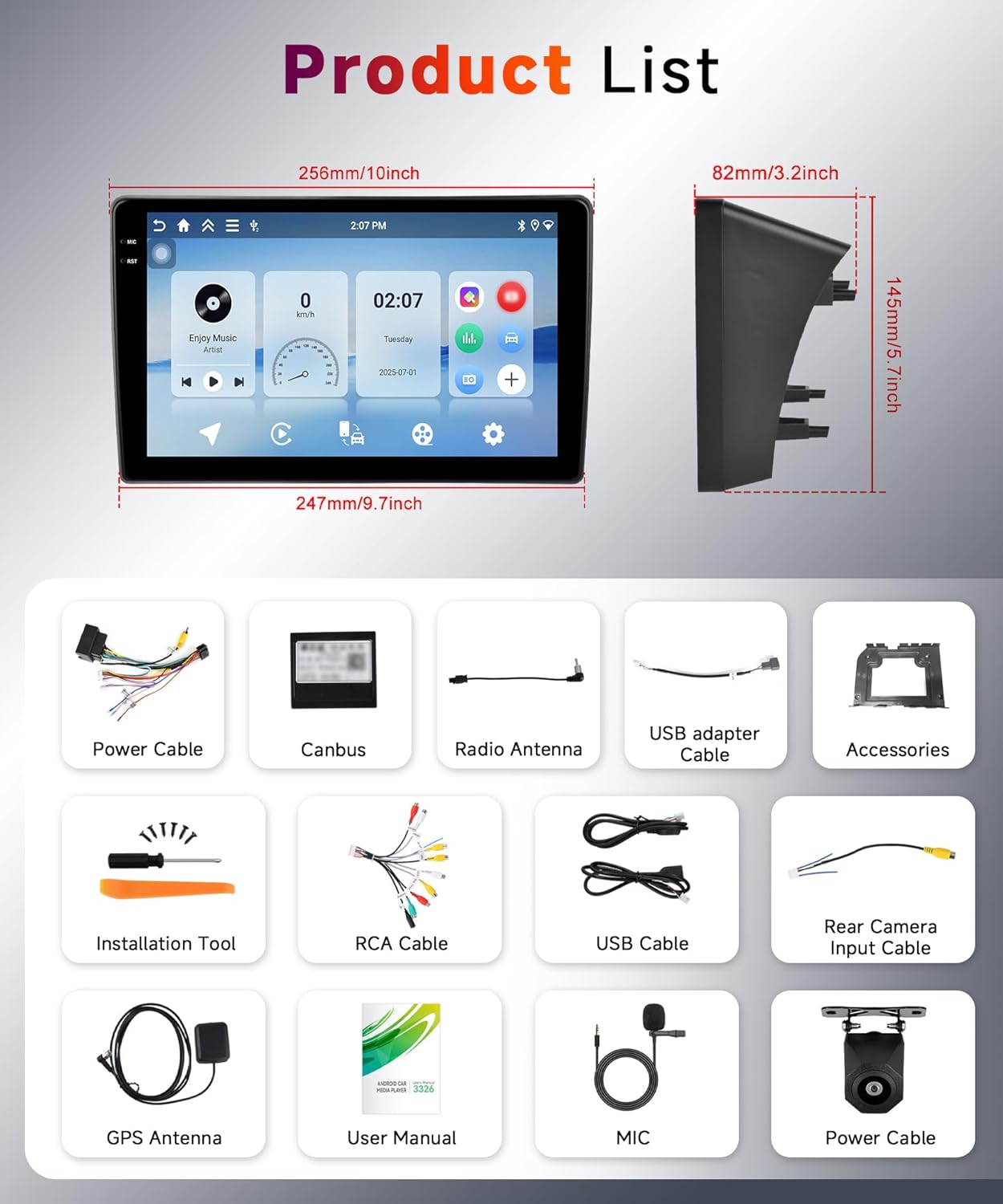
Obrázek: Podrobný view of all components included in the product package, such as the main unit, various cables, antennas, and installation tools.
4. Konec produktuview
The Hodozzy Carplay Autoradio is designed to seamlessly integrate into your Citroen C5 (2008-2017) dashboard, replacing the original radio with an advanced 10-inch in-cell touchscreen display. It offers a modern interface and a wide range of connectivity options.

Image: Comparison of the Citroen C5 dashboard before and after the installation of the Hodozzy Carplay Autoradio, highlighting the integrated 10-inch screen.

Image: Visual representation of the 10-inch HD In-Cell screen technology, emphasizing its thinner profile, better display quality, and more sensitive touch response compared to traditional screens.

Image: Diagram showing the physical dimensions of the autoradio unit, including width (256mm/10inch), height (145mm/5.7inch), and depth (82mm/3.2inch).
5. Instalační průvodce (Nastavení)
This unit is specifically designed for Citroen C5 models manufactured between 2008 and 2017. Ensure your vehicle is compatible before proceeding with installation.
5.1 Obecné kroky instalace
- Odpojit baterii: Před nastartováním odpojte záporný pól baterie vozidla, abyste předešli elektrickému zkratu.
- Odstranění původního rádia: Carefully remove the existing car radio and any trim panels as required by your vehicle's specific model.
- Připojte kabelový svazek: Připojte dodaný napájecí kabel a dekodér Canbus k kabelovému svazku vozidla. Ujistěte se, že jsou všechna připojení bezpečná.
- Připojení antén: Connect the GPS antenna and radio antenna to their respective ports on the new autoradio unit. Position the GPS antenna in a location with a clear view z nebe.
- Připojení zadní kamery (volitelné): If installing a backup camera, connect its input cable to the designated port on the autoradio. Refer to the wiring diagram below.
- Test připojení: Before fully securing the unit, reconnect the car battery and briefly power on the autoradio to ensure basic functions (power, sound, display) are working.
- Zabezpečená jednotka: Mount the Hodozzy autoradio securely into the dashboard opening.
- Znovu sestavit: Znovu nainstalujte všechny odstraněné obložkové panely.
5.2 Zapojení zadní kamery

Image: Technical diagram showing the wiring steps for installing a car reversing camera system, including connections to the car radio, power supply, and reversing light.
Follow the diagram for connecting the reversing camera:
- Kabel 1 a kabel 4: Connect to the positive pole of the power supply of the car's reversing light.
- Kabel 2: Connect to the negative pole of the power supply of the car's reversing light.
- Kabel 3 a kabel 5: Connect together.
6. Návod k obsluze
6.1 Základní obsluha
- Zapnutí/vypnutí: Press and hold the power button (usually located on the front panel or a soft button on the screen) to turn the unit on or off. A short press typically mutes/unmutes audio.
- Ovládání hlasitosti: Adjust the volume using the physical knob (if present) or the on-screen controls.
- Dotyková obrazovka: The 10-inch in-cell capacitive touchscreen responds to touch gestures similar to a smartphone. Tap to select, swipe to navigate.
6.2 Bezdrátové CarPlay a Android Auto
This autoradio supports both Wireless CarPlay for Apple iPhones and Wireless Android Auto for Android smartphones, allowing seamless integration of your phone's features.

Image: Multiple screen views showcasing the user interfaces for Wireless CarPlay and Android Auto, displaying navigation, music, and communication apps.
- Povolit Bluetooth: On your smartphone, ensure Bluetooth is enabled.
- Spárovat zařízení: On the autoradio, go to the Bluetooth settings and search for available devices. Select your phone and pair them.
- Spuštění CarPlay/Android Auto: Once paired, the system should prompt you to start CarPlay or Android Auto. Follow the on-screen instructions.
- Přístup k aplikacím: You can now access compatible apps like navigation, music, calls, and messages directly from the autoradio screen.
Note: The Mirror Link function may not be compatible with all Samsung and Huawei phone models.
6.3 Bluetooth 5.0
The integrated Bluetooth 5.0 module allows for hands-free calling and wireless audio streaming.

Image: Displays the Bluetooth 5.0 interface for hands-free calls and music playback, alongside the FM/RDS radio interface showing station selection and frequency.
- Hands-free volání: Pair your phone via Bluetooth to make and receive calls directly from the autoradio. The unit supports contact synchronization.
- Streamování hudby: Play audio from your phone through the car's speakers wirelessly.
6.4 GPS navigace a Wi-Fi
The unit features a built-in GPS receiver and WiFi connectivity for navigation and online services.

Image: Four panels illustrating key features: GPS navigation with a map, WiFi connectivity with signal strength, Bluetooth 5.0 for phone calls, and DSP for sound equalization.
- GPS navigace: The unit comes with a pre-installed navigation application (e.g., "Here We Go"). You can download offline maps for navigation without an internet connection. Online map applications are also supported.
- WiFi připojení: Connect to a WiFi network or a mobile hotspot to access online features, download apps, and browse the internet.
6.5 FM/RDS rádio
Vychutnejte si své oblíbené rozhlasové stanice díky vestavěnému FM/RDS tuneru.
- Vyhledávání stanic: Use the auto-scan function to find available stations (87.5 MHz-107.5 MHz) or manually tune to a specific frequency.
- Předvolby: Uložte si své oblíbené stanice pro rychlý přístup.
- RDS: Radio Data System displays information such as station name and song title (if broadcasted).
6.6 DSP and Equalizer
Customize your audio experience with the built-in Digital Sound Processor (DSP) and 32-band equalizer.

Image: Displays the graphical user interface for the built-in DSP and 48-band equalizer, showing various sound effect settings and frequency adjustments.
- Nastavení ekvalizéru: Upravte si jednotlivá frekvenční pásma a přizpůsobte si zvuk svým preferencím.
- Zvukové režimy: Select from various preset sound modes (e.g., Pop, Rock, Jazz) or create custom profiles.
6.7 Funkce rozdělené obrazovky
Funkce rozdělené obrazovky umožňuje spouštět na displeji dvě aplikace současně.

Obrázek: Rozdělená obrazovka view on the autoradio display, showing two different applications running side-by-side, such as navigation and music playback.
- Activate Split Screen: Refer to the on-screen instructions or user interface for activating split-screen mode. Typically, this involves long-pressing an app icon or using a dedicated button.
- Select Applications: Choose two compatible applications to display side-by-side.
6.8 Ovládání na volantu
The unit supports integration with your vehicle's existing steering wheel controls for convenient and safe operation.

Obrázek: Rozdělení view showing a car's backup camera display with parking lines, and a separate panel illustrating the interface for programming steering wheel controls, including options to assign functions like volume adjustment and song switching.
- Konfigurace: Access the "Steering Wheel Control" settings in the autoradio's menu.
- Programová tlačítka: Follow the on-screen prompts to assign functions (e.g., volume up/down, track skip, answer call) to your steering wheel buttons.
6.9 Couvací kamera
If a compatible AHD backup camera is installed, the display will automatically switch to the camera view když je vozidlo zařazeno na zpátečku.

Image: Highlights the features of the backup camera (HD image, night vision, waterproof, wide angle) and how the autoradio retains original vehicle functions like steering wheel controls and door open hints.
- Automatické zobrazení: The camera image will appear on the screen when reversing.
- Pokyny pro parkování: Dynamic parking guidelines may be displayed to assist with parking.
7. Údržba
- Čištění obrazovky: Dotykovou obrazovku jemně otřete měkkým hadříkem, který nepouští vlákna. V případě odolných šmouh lehceampOtřete hadřík vodou nebo čisticím prostředkem na obrazovky. Vyhněte se agresivním chemikáliím.
- Aktualizace softwaru: Pravidelně kontrolujte informace od výrobce webwebu nebo v nastavení jednotky, zda nejsou k dispozici aktualizace softwaru, abyste zajistili optimální výkon a přístup k novým funkcím.
- Obecná péče: Keep the unit free from dust and debris. Avoid extreme temperatures.
8. Řešení problémů
If you encounter issues with your Hodozzy Carplay Autoradio, refer to the following common problems and solutions:
| Problém | Možná příčina | Řešení |
|---|---|---|
| Jednotka se nezapne. | Uvolněné připojení napájení, spálená pojistka, problém s autobaterií. | Check all power cable connections. Inspect vehicle fuses. Ensure car battery is charged. |
| Žádný zvuk. | Volume muted, incorrect audio source, loose speaker wires. | Check volume level and mute status. Verify correct audio input. Inspect speaker wiring. |
| Problémy s připojením Bluetooth. | Phone not in pairing mode, interference, incorrect pairing process. | Ujistěte se, že je Bluetooth telefonu zapnutý a viditelný. Smažte předchozí párování a znovu proveďte párování. Přesuňte se blíže k zařízení. |
| GPS signal loss or inaccuracy. | Zakrytá GPS anténa, špatný satelitní příjem. | Ujistěte se, že má anténa GPS volný view oblohy. Zkontrolujte připojení antény. |
| CarPlay/Android Auto se nepřipojuje. | Incorrect phone settings, app issues, incompatible phone model. | Ensure CarPlay/Android Auto is enabled on your phone. Update phone OS and apps. Check for phone compatibility. |
| Dotykový displej nereaguje. | Softwarová chyba, poškození obrazovky. | Restartujte jednotku. Pokud problém přetrvává, kontaktujte podporu. |
9. Specifikace
Technical specifications for the Hodozzy Carplay Autoradio C5:
| Funkce | Detail |
|---|---|
| Značka | hodozzy |
| Název modelu | Carplay Autoradio C5 |
| Kompatibilní typ vozidla | Citroën C5 (2008-2017) |
| Velikost obrazovky | 10 Inches (In-Cell Capacitive Touch Screen) |
| BERAN | 4 GB |
| Interní úložiště (ROM) | 128 GB |
| Technologie připojení | Bluetooth 5.0, USB, Wi-Fi |
| Speciální funkce | RDS, Touchscreen, Wireless CarPlay, Android Auto, GPS, DSP, Split Screen, Mirror Link, Steering Wheel Control Support, AHD Backup Camera Support |
| Typ mapy | Satellite (via GPS) |
| Typ montáže | Držák na palubní desku |
| Nabíjecí baterie | Žádný |
10. Záruka a podpora
10.1 Informace o záruce
Tento produkt je dodáván se zárukou výrobce 2 rokyUschovejte si prosím doklad o koupi pro případ reklamace.
10.2 Zákaznická podpora
For technical assistance, troubleshooting, or warranty inquiries, please contact Hodozzy customer support through the platform where you purchased the product. If purchased on Amazon, follow these steps:
- Click on the 'Hodozzy' seller name on the product page.
- On the seller's page, locate and click the 'Ask a question' button.
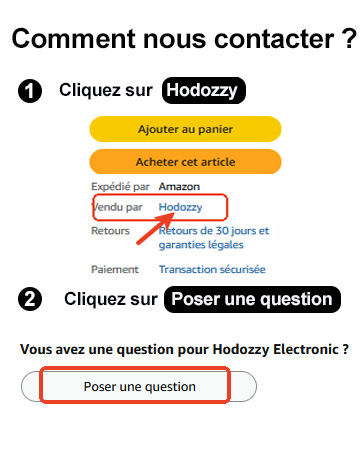
Image: A visual guide demonstrating how to contact Hodozzy customer support on Amazon by clicking the seller name and then the 'Ask a question' button.


