Zavedení
This manual provides instructions for the setup, operation, and maintenance of your HyperX Cloud Alpha 2 Wireless Gaming Headset. Please read this manual thoroughly before using the product to ensure proper functionality and to maximize your user experience.

Image: HyperX Cloud Alpha 2 Wireless Gaming Headset with its RGB Base Station, showcasinkompletní balíček produktů.
Co je v krabici
- Bezdrátový herní headset
- Základní stanice
- Odnímatelný mikrofon
- Kabel USB-C na USB-C
- Adaptér USB-C na USB-A
- 3.5 mm Headset Audio Cable
- Rychlý průvodce
Nastavení
1. Nabíjení náhlavní soupravy
Before initial use, fully charge the headset. Connect the headset to a power source using the provided USB-C to USB-C cable or USB-C to USB-A adapter. A full charge can provide up to 250 hours of battery life in 2.4GHz mode or 125 hours with simultaneous connection.

Image: A visual representation highlighting the headset's battery life capability of up to 250 hours on a single charge.
2. Připojení základní stanice
Connect the RGB Base Station to your PC or console using the appropriate USB cable. The base station acts as a central hub for audio control and connectivity.

Image: A hand interacting with the RGB Base Station, demonstrating its function as an audio control hub.
3. Software Installation (HyperX NGENUITY)
For full customization and optimal performance, download and install the HyperX NGENUITY software from the official HyperX website. This software allows for equalization adjustments, audio controls, and lighting customization for the RGB Base Station.
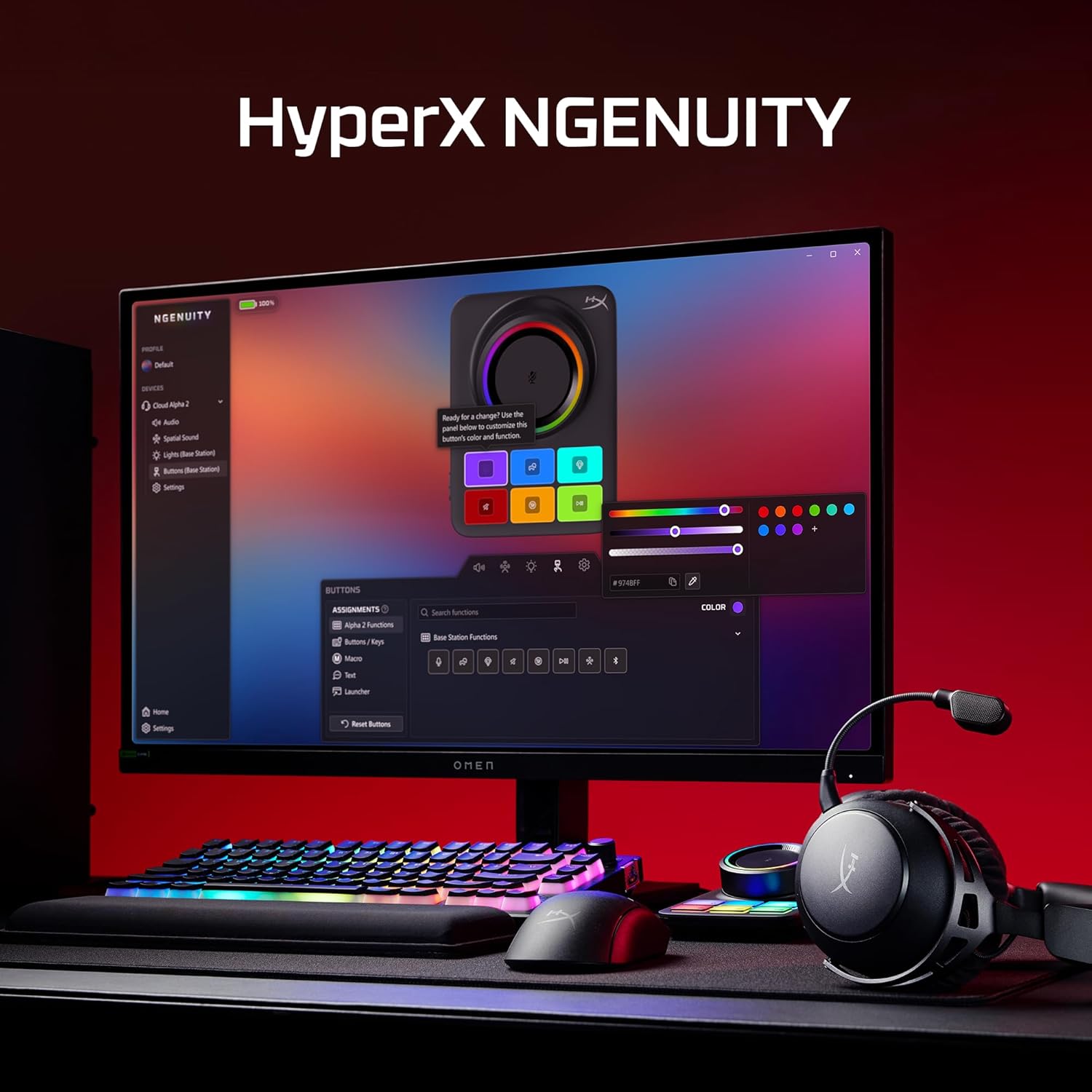
Image: A computer screen displaying the HyperX NGENUITY software, illustrating its interface for customizing headset and base station settings.
4. Připevnění mikrofonu
Insert the detachable boom microphone into the designated port on the headset. Ensure it is securely connected for clear voice communication.

Obrázek: Podrobný view of the detachable 10mm boom microphone, highlighting its position on the headset.
Návod k obsluze
Režimy připojení
- Bezdrátové připojení 2.4 GHz: Connects to PC, PS5, PS4, Nintendo Switch, Mac via the Base Station for low-latency audio.
- Bluetooth: Connects to mobile devices for audio and calls.
- Současné připojení: The headset supports simultaneous 2.4GHz and Bluetooth connections, allowing you to listen to audio from two sources concurrently.
- 3.5mm kabel: Use the included 3.5mm headset audio cable for wired connection to devices like Xbox.

Image: A user demonstrating the headset's ability to maintain simultaneous 2.4GHz and Bluetooth connections.

Image: Icons illustrating the headset's compatibility across multiple platforms including PC, PlayStation, Nintendo Switch, Mac, mobile devices, and Xbox via 3.5mm connection.
Ovládání náhlavní soupravy
- Kolečko hlasitosti: Upravuje úroveň zvukového výstupu.
- Tlačítko ztlumení: Toggles microphone mute. An LED indicator on the boom mic shows mute status.
- Multifunkční tlačítko: Ovládá přehrávání médií a správu hovorů.
- Wireless Mode Switch: Selects between 2.4GHz and Bluetooth modes.

Obrázek: Podrobný view of the headset's onboard controls, including the volume wheel, mute button, multifunction button, and wireless mode switch.
Zvukové funkce
The headset features 53mm dual-chamber drivers designed to provide clear audio with distinct bass and treble frequencies. Spatial audio can be enabled and customized through the HyperX NGENUITY software for an immersive sound experience.

Image: A visual representation of the headset's 53mm dual-chamber drivers in action, emphasizing sound clarity.
Údržba
Čištění
- Use a soft, dry cloth to clean the headset and base station.
- Náušníky jemně otřete lehceamp V případě potřeby osušte hadříkem a před použitím nechte zcela uschnout na vzduchu.
- Vyhněte se používání agresivních chemikálií nebo abrazivních materiálů.
Skladování
Store the headset in a cool, dry place away from direct sunlight and extreme temperatures. When not in use, the headset's 90° rotating earcups allow for flat storage.

Image: The headset positioned to highlight its comfortable design and flexible earcups, suitable for storage.
Péče o baterie
Chcete-li prodloužit životnost baterie, vyvarujte se častého úplného vybíjení sluchátek. Sluchátka pravidelně nabíjejte, i když je nepoužíváte neustále.
Odstraňování problémů
Žádný zvuk / Nízká hlasitost
- Ensure the headset is powered on and connected to the correct source (2.4GHz, Bluetooth, or 3.5mm).
- Check the volume wheel on the headset and the system volume on your device.
- Ověřte, zda je v nastavení zvuku operačního systému vybráno správné výstupní zvukové zařízení.
- For 2.4GHz connection, ensure the Base Station is properly connected and recognized by your system.
Mikrofon nefunguje
- Ensure the detachable boom microphone is securely inserted into the headset.
- Check if the microphone mute button on the headset is disengaged (LED indicator off).
- Ověřte, zda je v nastavení zvuku a komunikačních aplikacích operačního systému vybráno správné vstupní zařízení mikrofonu.
- If using the internal microphone, ensure the boom mic is detached.
Problémy s připojením
- 2.4 GHz: Ensure the Base Station is within range and free from interference. Try reconnecting the headset to the Base Station.
- Bluetooth: Ensure Bluetooth is enabled on your device and the headset is in pairing mode. Remove previous pairings and attempt to pair again.
- Generál: Restartujte sluchátka i připojené zařízení.
Software (NGENUITY) Issues
- Ensure you have the latest version of HyperX NGENUITY installed.
- Check for firmware updates for both the headset and the Base Station within the NGENUITY software.
- If the software is not recognizing the device, try restarting the application or your computer.
Specifikace
| Funkce | Detail |
|---|---|
| Název modelu | HyperX Cloud Alpha 2 - Wireless Gaming Headset |
| Číslo modelu | AJ5C7AA |
| Technologie připojení | 2.4 GHz Wireless, Bluetooth 5.2, 3.5 mm Jack |
| Bezdrátové Dosah | 20 metrů (Bluetooth) |
| Ovladače | 53mm Dual-Chamber |
| Frekvenční odezva | 20 Hz |
| Impedance | 64 Ohmy |
| Životnost baterie | Up to 250 hours (2.4GHz mode) |
| Mikrofon | Detachable 10mm Boom Mic, Internal Mics |
| Materiál | Stainless steel, aluminum forks |
| Hmotnost položky | 345 gramů (12.2 unce) |
| Rozměry (DxŠxV) | 7.24 x 3.6 x 8.11 palce |
| Kompatibilita platformy | PC, PS5, PS4, Nintendo Switch, Mac, Mobile, Xbox (wired) |
Informace o záruce
For detailed warranty information regarding your HyperX Cloud Alpha 2 Wireless Gaming Headset, please refer to the official HyperX webwebu nebo v záručním listu dodaném s vaším produktem. Záruční podmínky se mohou lišit v závislosti na regionu.
Podpora
If you require further assistance or have questions not covered in this manual, please visit the official HyperX support website for FAQs, drivers, and contact information. You can also find additional resources and community forums there.
Official HyperX Webmísto: www.hyperx.com/support


