Zavedení
The Volkano Galena Series Wireless Keyboard is a compact, versatile input device designed for efficiency and portability. It offers multi-device connectivity and seamless switching, making it suitable for various operating systems including Windows, Android, and MacOS. This manual provides essential information for setting up, operating, maintaining, and troubleshooting your keyboard.
Obsah balení
- Volkano Galena Series Wireless Keyboard
- 2 x AAA baterie
- Návod k použití
Nastavení
1. Instalace baterie
The Volkano Galena Series Wireless Keyboard operates on two AAA batteries. These are included in the package.
- Najděte kryt přihrádky na baterie na spodní straně klávesnice.
- Posunutím otevřete kryt.
- Insert the two AAA batteries, ensuring correct polarity (+ and - terminals).
- Bezpečně zavřete kryt bateriového prostoru.
2. Zapnutí/vypnutí
Locate the power switch on the keyboard. Slide it to the 'ON' position to power on the keyboard. Slide it to the 'OFF' position when not in use to conserve battery life. The keyboard features an auto-power saving mode to further extend battery life during periods of inactivity.
3. Párování Bluetooth
The keyboard supports Bluetooth 5.0 for a stable wireless connection. It can be paired with up to two devices simultaneously.

Image: The Volkano Galena Series keyboard, illustrating its compact design and key features such as Bluetooth 5.0 + BT 3.0 connectivity, multi-device switching, anti-slip rubber feet, and compatibility with Windows and Android operating systems.
- Ujistěte se, že je klávesnice zapnutá.
- On your device (Laptop, PC, Smart TV, Tablet), enable Bluetooth and search for available devices.
- Stiskněte a podržte Fn + 1 key combination for the first device, or Fn + 2 for the second device, until the corresponding indicator light (usually above the '1' or '2' key) starts blinking, indicating pairing mode.
- Select "Volkano Galena" or a similar name from the list of available Bluetooth devices on your screen.
- Follow any on-screen prompts to complete the pairing process. The indicator light will stop blinking once successfully paired.
Návod k obsluze
1. Přepínání více zařízení
The keyboard allows for quick switching between two paired devices.

Obrázek: Podrobný view of the Volkano Galena Series keyboard, showcasing its compact form factor and features like Bluetooth device switching, non-slip feet, a dedicated Copilot shortcut key, scissor-structure keycaps, and auto-power saving mode.
- To switch to the first paired device, press Fn + 1.
- To switch to the second paired device, press Fn + 2.
2. Function Keys (Fn)
The keyboard includes multimedia and special function keys accessible by pressing the Fn key in combination with the corresponding F-keys or other designated keys.
- Fn+F1-F12: Access various multimedia controls and system functions (e.g., volume, playback, screen brightness). Refer to the icons on the F-keys for specific functions.
- Fn + Q/W/E: Switch between operating system layouts (e.g., Android, Windows, iOS/MacOS).
- Copilot Shortcut Key: A dedicated key for quick access to AI assistant features on compatible operating systems.
3. Zkušenosti s psaním
The keyboard features quiet keys with a scissor structure, providing a comfortable and responsive typing experience suitable for focused environments.
Údržba
1. Čištění
- Před čištěním se ujistěte, že je klávesnice vypnutá.
- K otření povrchu klávesnice použijte měkký, suchý hadřík, který nepouští vlákna.
- Na odolné nečistoty lehce dampOmyjte hadřík vodou nebo jemným, neabrazivním čisticím prostředkem. Zabraňte nadměrné vlhkosti.
- Nestříkejte čisticí roztoky přímo na klávesnici.
- Use compressed air to remove debris from between the keys.
2. Skladování
- Klávesnici skladujte na chladném a suchém místě mimo dosah přímého slunečního záření a extrémních teplot.
- Pokud skladujete po delší dobu, vyjměte baterie AAA, abyste zabránili vytečení.
Odstraňování problémů
- Klávesnice se nezapíná: Check if the batteries are correctly inserted and fully charged. Replace batteries if necessary. Ensure the power switch is in the 'ON' position.
- Klávesnice se nepřipojuje přes Bluetooth:
- Ujistěte se, že je na vašem zařízení povoleno Bluetooth.
- Make sure the keyboard is in pairing mode (indicator light blinking).
- Smažte předchozí párování v zařízení a zkuste zařízení znovu spárovat.
- Ensure the keyboard is within the 8-10 meter Bluetooth range of your device.
- Zkuste restartovat klávesnici i zařízení.
- Klávesy nereagují: Check battery level. Ensure the keyboard is properly connected to your device. Clean any debris from around the keys.
- Zpožděný nebo zpožděný vstup: Ensure there are no strong interferences (e.g., other wireless devices) nearby. Check battery level.
Specifikace
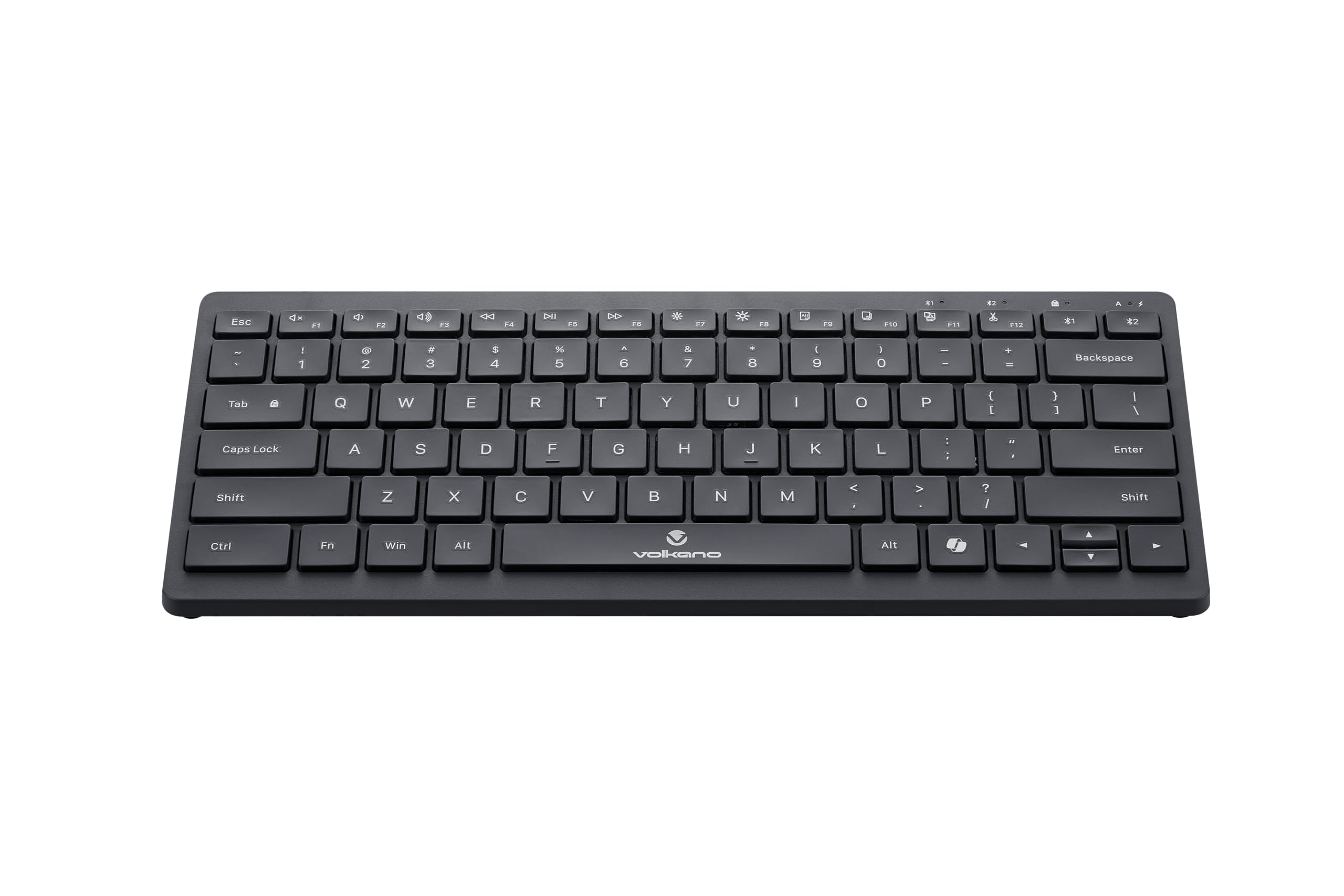
Image: A clear, angled view of the Volkano Galena Series Wireless Keyboard, highlighting its sleek black design and full key layout.
| Funkce | Detail |
|---|---|
| Číslo modelu | VK-20247-BK |
| Konektivita | Bezdrátová technologie Bluetooth |
| Verze Bluetooth | Bluetooth 5.0 + Bluetooth 5.0 (Dual Channel) |
| Bezdrátové Dosah | 8-10 metry |
| Zdroj napájení | 2 x alkalické baterie AAA (součástí balení) |
| Typ klíče | Scissor Structure Keycaps |
| Speciální funkce | Quiet keys, Multi-device pairing, Instant switching, Anti-slip rubber base, Auto-power saving mode, Lightweight, Portable, Copilot Shortcut Key |
| Kompatibilní zařízení | Laptop, PC, Smart TV, Tablet (Windows, Android, MacOS) |
| Rozměry (D x Š x V) | 29.5 d x 12.8 š x 2.2 v centimetrů |
| Materiál | Plast |
| Barva | Černý |
Záruka a podpora
1. Omezená záruka
This Volkano product is covered by a 12-Month Limited Coverage from the date of purchase. You can extend this coverage by an additional 12 months, for a total of 24 months, by registering your product with Volkano.
2. Zákaznická podpora
For any questions, assistance, or support regarding your Volkano Galena Series Wireless Keyboard, please contact Volkano customer service through their official channels. Refer to the Volkano webkontaktní údaje naleznete na webu nebo na obalu produktu.


