Zavedení
This manual provides detailed instructions for the setup, operation, and maintenance of your DAYBETTER Smart Plug (Model FCZ004). This smart plug allows you to control your electronic devices remotely, set schedules, and use voice commands through compatible smart home assistants. Please read this manual thoroughly before use to ensure proper functionality and safety.
Vlastnosti produktu
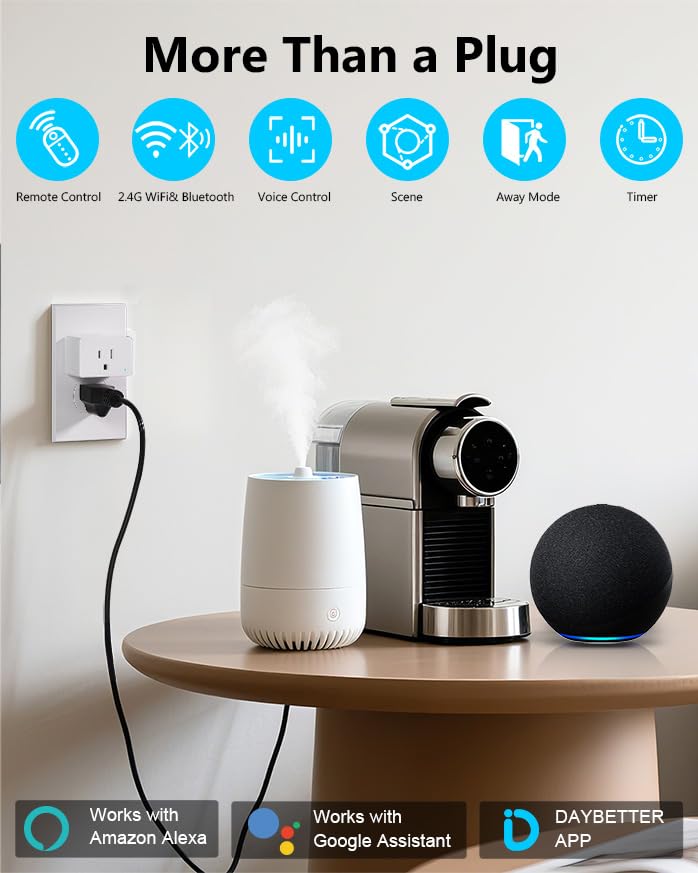
- Hlasové ovládání: Kompatibilní s Amazon Alexa a Google Assistant pro ovládání bez použití rukou.
- Dálkové ovládání: Manage connected devices from anywhere using the DAYBETTER mobile application.
- Scheduling & Timer Functions: Program devices to turn on/off automatically with custom schedules, countdowns, and recurring tasks.
- Snadná instalace: Quick setup process with 2.4GHz WiFi and Bluetooth connectivity.
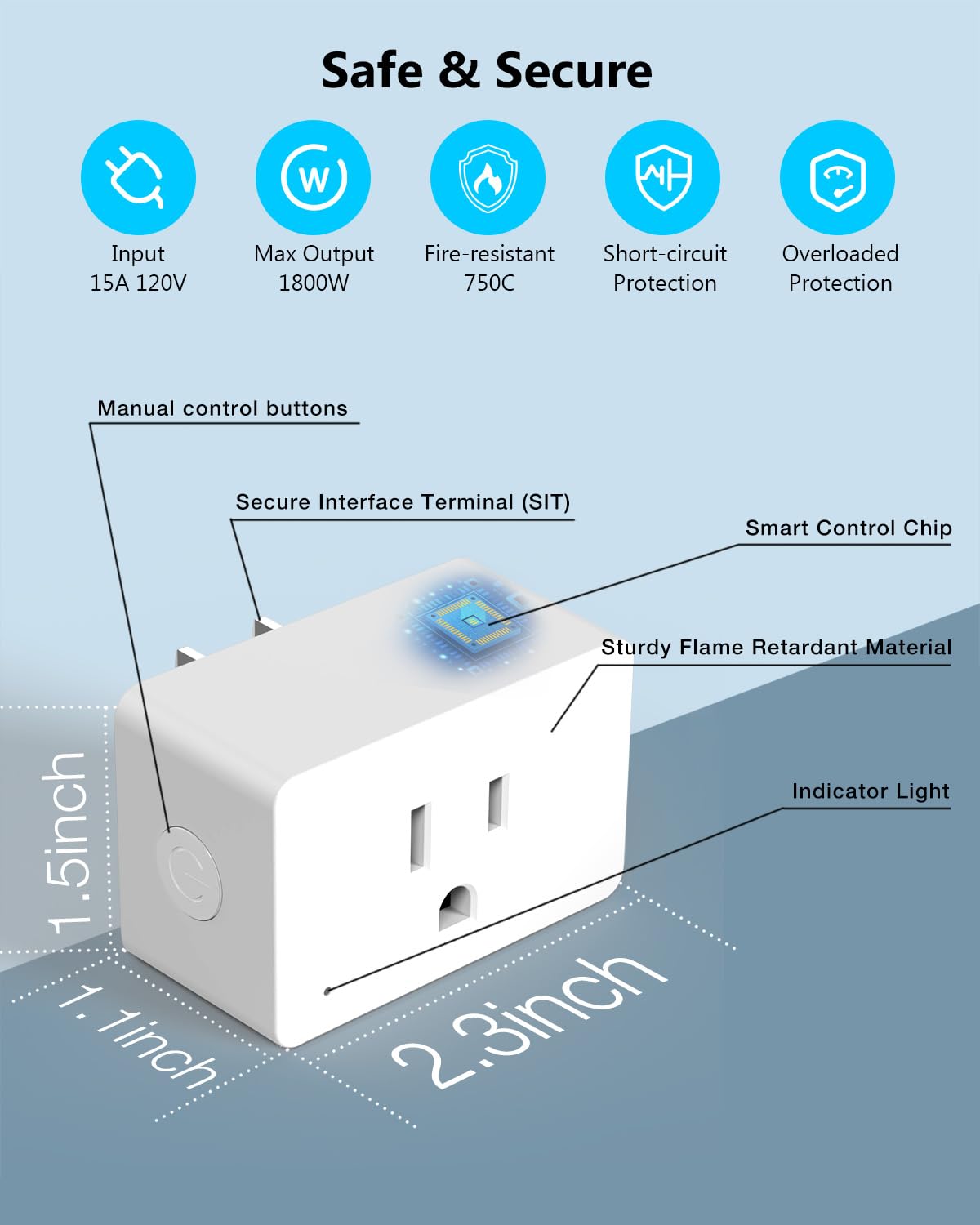
- Kompaktní design: Small form factor (approximately 2.32 x 1.97 x 1.5 inches) designed to avoid blocking adjacent outlets.
- Bezpečnostní certifikace: ETL and FCC certified for reliable and safe operation.
- Výkon: Supports up to 15A / 1800W.
Obsah balení
- DAYBETTER Smart Plug (4 units)
- Uživatelská příručka

Nastavení a instalace
1. Požadavky na síť
- The DAYBETTER Smart Plug requires a 2.4GHz Wi-Fi network for connectivity. It does not support 5GHz Wi-Fi networks.
- Ensure your Wi-Fi router is broadcasting a 2.4GHz signal.
2. Fyzická instalace
- Plug the DAYBETTER Smart Plug into a standard 120V wall outlet.
- Ensure the indicator light on the smart plug begins blinking. If it does not blink, press and hold the manual control button on the side of the plug for 5 seconds until it starts blinking.
- Connect your appliance to the smart plug.
Instalace a párování aplikací
- Download the DAYBETTER App: Hledat "DAYBETTER" in the Apple App Store (for iOS devices) or Google Play Store (for Android devices). Ensure you download the official DAYBETTER App.
- Povolte Wi-Fi a Bluetooth: Na smartphonu se ujistěte, že máte povolené Wi-Fi i Bluetooth.
- Otevřete aplikaci a přidejte zařízení: Open the DAYBETTER App. The app should automatically detect the smart plug if its indicator light is blinking. Follow the on-screen prompts to add the device.
- Připojení k Wi-Fi: Vyberte svou síť Wi-Fi 2.4 GHz a po zobrazení výzvy zadejte heslo.
- Dokončení párování: The smart plug will successfully pair in less than 2 minutes. Once paired, the indicator light will stop blinking and remain solid.

Návod k obsluze
1. Ruční ovládání
Press the manual control button on the side of the smart plug to manually turn the connected appliance on or off.
2. Dálkové ovládání APP
Once paired, open the DAYBETTER App on your smartphone. You can remotely turn your connected appliances on or off from anywhere with an internet connection.
3. Hlasové ovládání (Alexa a Google Home)
Integrate your DAYBETTER Smart Plug with Amazon Alexa or Google Assistant for voice-activated control.
- Ensure your Alexa or Google Home device is set up and connected to the same 2.4GHz Wi-Fi network as your smart plug.
- Otevřete aplikaci Alexa nebo Google Home.
- Hledat and enable the "DAYBETTER" skill/service.
- Follow the app instructions to discover new devices. Your smart plug should appear.
- Assign a name to your smart plug (e.g., "Living Room Lamp," "Fan").
- Používejte hlasové příkazy, jako například:
- „Alexo, zapni [název zařízení].“
- „Hej Google, vypni [název zařízení].“
4. Funkce plánování a časovače
The DAYBETTER App allows you to create various automated tasks for your smart plug.
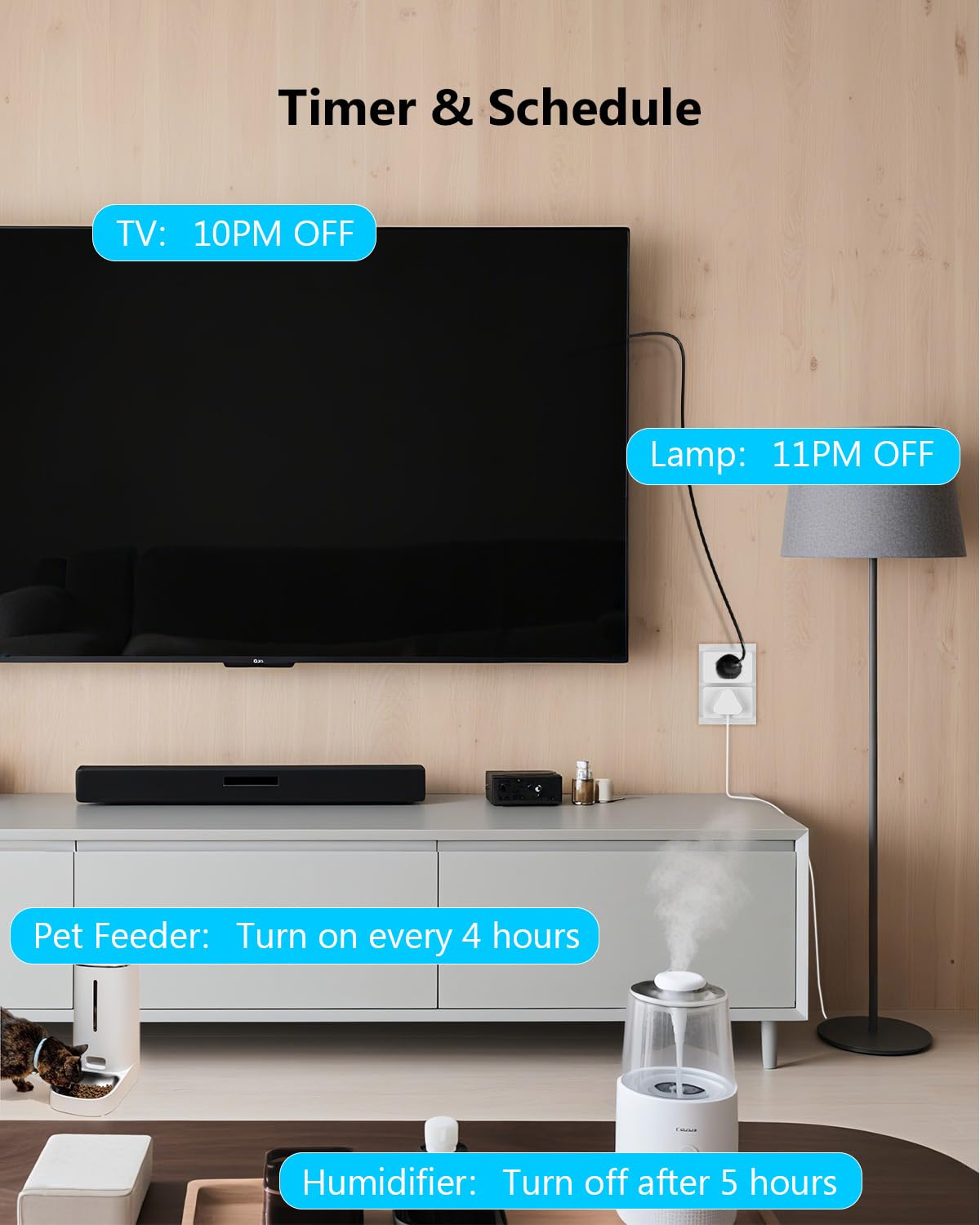
- Naplánované úkoly: Set specific times for your devices to turn on or off daily or on selected days of the week. For example, turn on lights at 8 AM.
- Countdown Tasks: Set a timer for a device to turn off after a specified duration. For example, turn off a humidifier after 5 hours.
- Recurring Tasks (Cyclic Timer): Program devices to cycle on and off at regular intervals. For example, a pet water feeder dispensing water for 10 minutes every 5 hours.


Bezpečnostní informace
The DAYBETTER Smart Plug is designed with multiple safety features. Please adhere to the following guidelines:
- Vstupní objemtage: 15A, 120V. Do not exceed these ratings.
- Maximální výkon: 1800W. Ensure connected appliances do not exceed this wattage.
- Ohnivzdorné: Constructed with fire-resistant materials (up to 750°C).
- Ochranné vlastnosti: Includes short-circuit protection and overloaded protection to prevent damage to the plug and connected devices.
- Chytrou zástrčku nerozebírejte ani neupravujte.
- Avoid using in wet environments or near water.
- Uchovávejte mimo dosah dětí.
Specifikace
| Funkce | Specifikace |
|---|---|
| Rozměry produktu | Cca. 2.32 x 1.97 x 1.5 palce |
| Hmotnost položky | 9.59 unce (pro balení po 4 kusech) |
| Číslo modelu | FCZ004 |
| Výrobce | DAYBETTER |
| Provozní režim | ZAPNUTO VYPNUTO |
| Aktuální hodnocení | 15 Amps |
| Provozní svtage | 120 voltů |
| Maximální výkon | 1800 wattů |
| Typ kontaktu | Normálně zavřeno |
| Typ konektoru | Připojit |
| Terminál | Přes díru |
| Typ obvodu | 2-cestný |
| Kontaktní materiál | Kov |
| Bezdrátové připojení | 2.4 GHz Wi-Fi, Bluetooth |
| Kompatibilita | Amazon Alexa, Google Home |
Odstraňování problémů
- Smart Plug not connecting to Wi-Fi:
- Ujistěte se, že vaše Wi-Fi síť pracuje na frekvenci 2.4 GHz. Chytrá zásuvka nepodporuje Wi-Fi na frekvenci 5 GHz.
- Ověřte, zda je vaše heslo k Wi-Fi správné.
- Make sure the smart plug's indicator light is blinking during pairing. If not, press and hold the manual button for 5 seconds to reset.
- Pro zlepšení signálu přesuňte chytrou zásuvku blíže k Wi-Fi routeru.
- Restart your Wi-Fi router and try pairing again.
- Voice control not working with Alexa/Google Home:
- Confirm the smart plug is successfully paired with the DAYBETTER App and is online.
- Ensure the "DAYBETTER" skill/service is enabled in your Alexa or Google Home app.
- Check that your voice assistant device (e.g., Echo Dot, Google Home speaker) is connected to the same 2.4GHz Wi-Fi network.
- Zkuste znovu objevit zařízení v aplikaci Alexa nebo Google Home.
- Verify the name you are using for the smart plug in your voice command matches the name set in the Alexa/Google Home app.
- Smart Plug frequently loses connection:
- This can occur if the Wi-Fi signal is weak. Try relocating the smart plug closer to your router or consider a Wi-Fi extender.
- Ensure there are no physical obstructions or interference sources (e.g., thick walls, other wireless devices) between the plug and the router.
- Check for any firmware updates for the smart plug within the DAYBETTER App.
- Incompatibility with other smart home platforms:
- The DAYBETTER Smart Plug is not compatible with Tuya, Smartlife, Magic Home, or Home Assistant. Please use the official DAYBETTER App for control.
Údržba
- Keep the smart plug clean and dry. Wipe with a soft, dry cloth if necessary.
- Nepoužívejte drsné chemikálie ani abrazivní čisticí prostředky.
- Ensure the plug is unplugged from the wall outlet before cleaning.
- Regularly check for firmware updates in the DAYBETTER App to ensure optimal performance and security.
Záruka a podpora
For warranty information or technical support, please refer to the official DAYBETTER webwebu nebo se obraťte přímo na jejich zákaznický servis. Kontaktní údaje se obvykle nacházejí na obalu produktu nebo na oficiálním značkovém webmísto.
Výrobce: DAYBETTER


