1. Konec produktuview
The Vormooi V15 is a compact and portable digital voice recorder designed for high-quality audio capture in various environments, including lectures, meetings, and classes. It features a large internal storage capacity and advanced noise reduction technology.
Klíčové vlastnosti:
- Massive 64GB built-in memory: Stores up to 750 hours of voice recordings in WAV and MP3 formats.
- Kompaktní a přenosný design: Ultratenký profíkfile (0.25 x 1.3 x 2.2 inches) and lightweight (0.7 ounces) for maximum portability.
- Dobíjecí baterie s dlouhou výdrží: Provides extended recording sessions.
- Redukce šumu AI: Equipped with an intelligent 2155P AI chip for enhanced noise cancellation and pure recording.
- Hlasově aktivované nahrávání (VAR): Intelligently skips silent passages to save memory and time.
- Jednoduchá obsluha: One-button recording and saving.
- Univerzální kompatibilita: Connects via USB Type-C to Windows and macOS computers.

Image: Key features of the Vormooi V15 recorder, including its recording capacity, memory, and battery life.
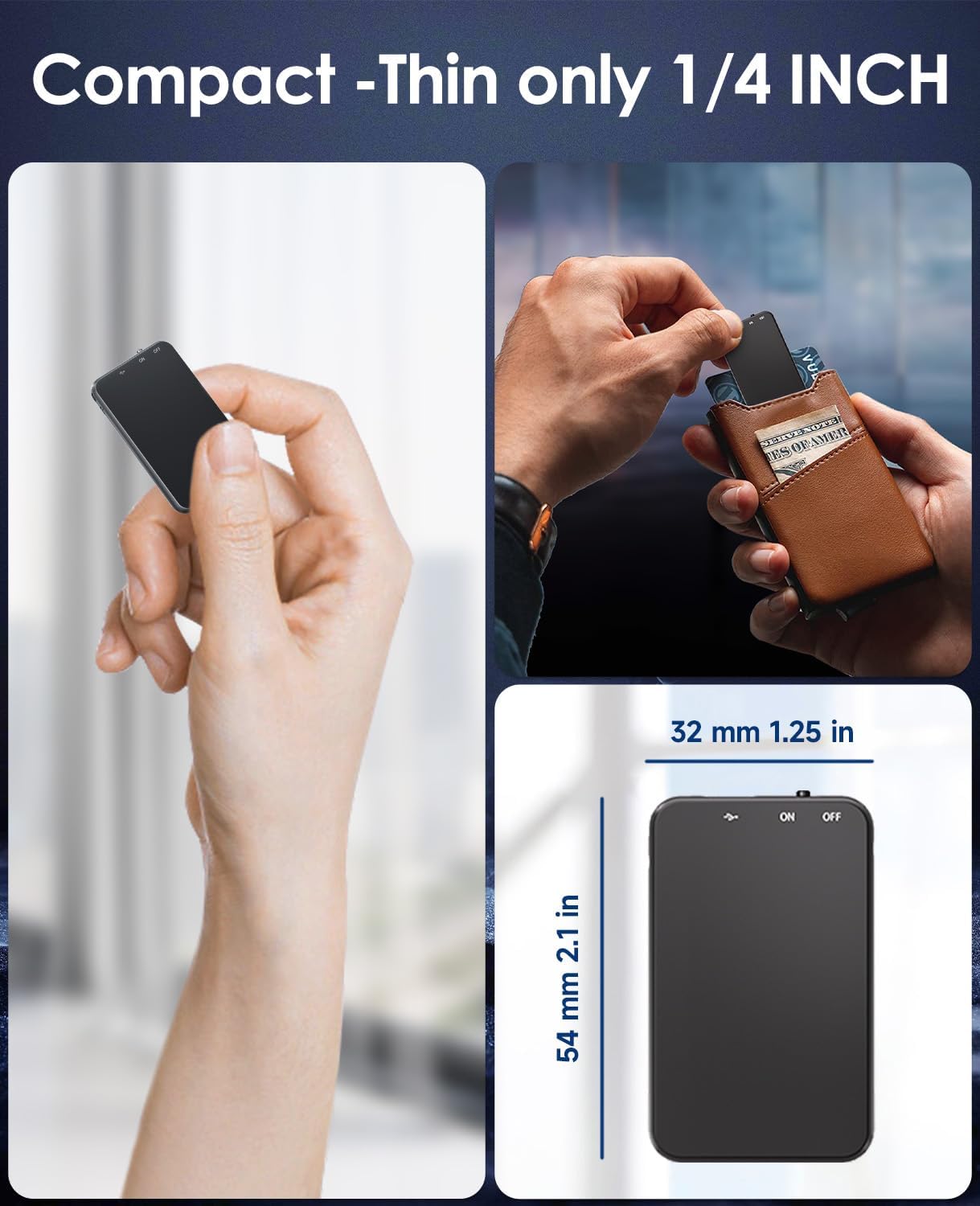
Image: Demonstrates the compact and thin design of the Vormooi V15, showing its small dimensions and portability.

Image: Illustrates the advanced AI noise cancellation technology and supported recording formats (MP3, WAV) of the V15 recorder.
2. Obsah balení
Po otevření balíku se prosím ujistěte, že jsou všechny položky přítomny a v dobrém stavu:
- 1 x Vormooi V15 Digital Voice Recorder
- 1 x kabel USB typu C (pro nabíjení a přenos dat)
- 1 x Uživatelská příručka (tento dokument)
3. Nastavení
3.1 Nabíjení zařízení
Before first use, fully charge the Vormooi V15 recorder. Connect the included USB Type-C cable to the recorder's Type-C port and the other end to a USB power adapter (not included) or a computer's USB port. The indicator light will show charging status.
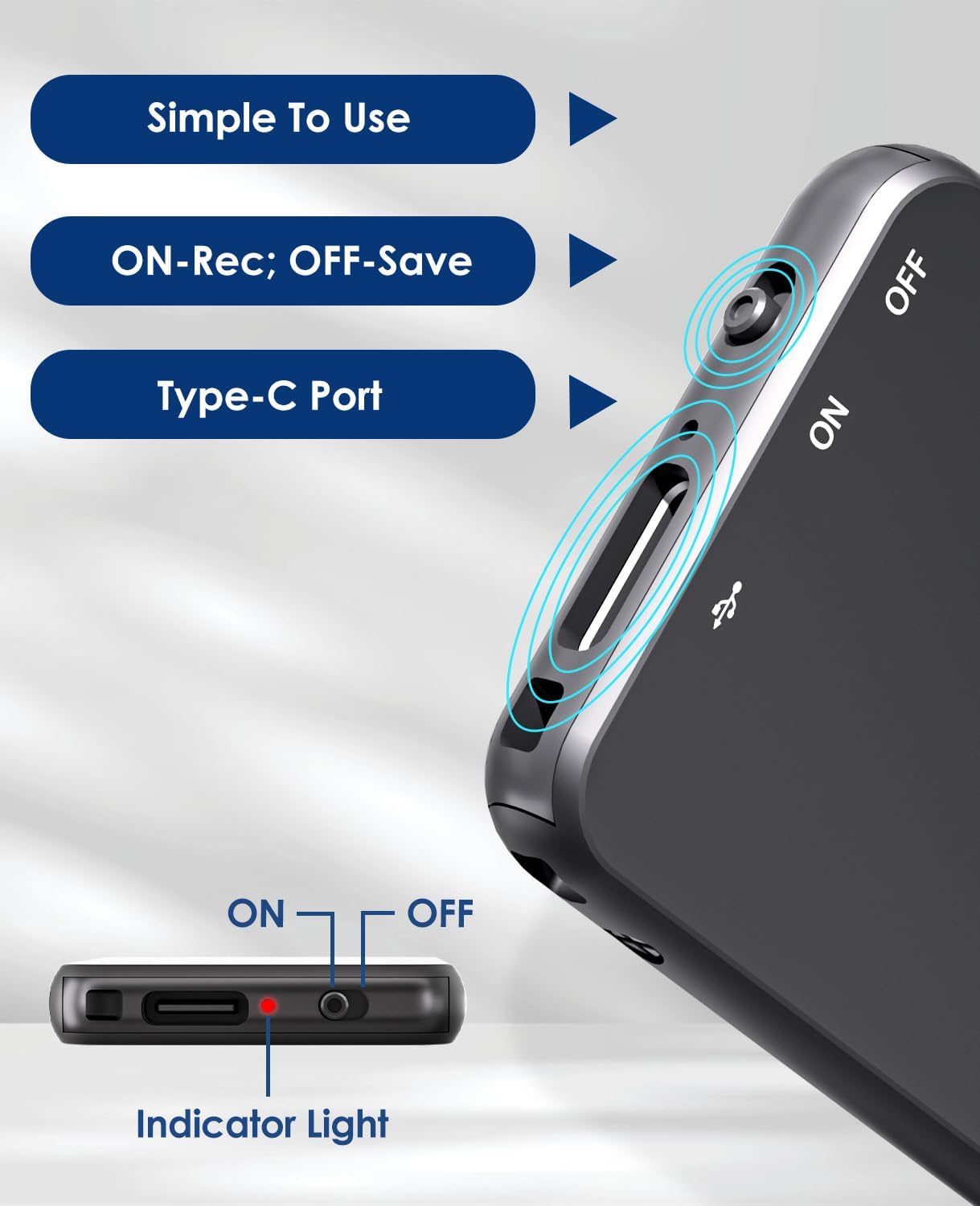
Image: Details of the recorder's side, highlighting the ON/OFF switch, Type-C port, and indicator light for simple operation.
3.2 Zapnutí/vypnutí
To power on the device, slide the ON/OFF switch to the "ON" position. To power off, slide it to the "OFF" position. The indicator light will briefly illuminate.
4. Návod k obsluze
4.1 Záznam zvuku
To start recording, simply slide the ON/OFF switch to the "ON" position. The device will automatically begin recording. The indicator light may flash or change color to indicate recording status. To stop recording and save the file, slide the switch to the "OFF" position.
4.2 Hlasově aktivované nahrávání (VAR)
The V15 features a voice-activated recording function. When enabled, the recorder will automatically pause recording during periods of silence and resume when sound is detected, optimizing memory usage. The sensitivity of the voice activation can be adjusted (though specific instructions for adjustment are not provided in the product images, it's a common feature).

Image: Depicts the Voice-Activated Recording (VAR) feature, illustrating how it saves memory by skipping silent blanks and showing different sensitivity levels.
4.3 Převod Files do počítače
Connect the Vormooi V15 to your computer using the provided USB Type-C cable. The device will appear as a removable storage device (like a USB drive). You can then drag and drop your recorded audio files (MP3 or WAV format) to your computer. The device is compatible with Windows and macOS operating systems.

Image: Shows the Type-C connection and compatibility with Windows, Mac, and Linux operating systems for easy file převod.
4.4 Přehrávání
While the device supports playback, specific controls for direct playback (e.g., built-in speaker, headphone jack) are not detailed in the provided information. Typically, playback is done by connecting headphones to the device's headphone jack (if available) or by transferring files to a computer and playing them there.
Note: The product specifications mention "Headphones Jack: 1", confirming the presence of a jack for direct playback.
5. Údržba
- Čištění: K čištění zařízení používejte měkký, suchý hadřík. Nepoužívejte tekuté čisticí prostředky ani rozpouštědla.
- Skladování: Skladujte diktafon na chladném a suchém místě mimo dosah přímého slunečního záření a extrémních teplot.
- Péče o baterie: Chcete-li prodloužit životnost baterie, vyvarujte se častého úplného vybíjení. Zařízení pravidelně nabíjejte, i když jej delší dobu nepoužíváte.
- Záloha dat: Pravidelně zálohujte důležité nahrávky do počítače, abyste předešli ztrátě dat.
6. Řešení problémů
- Zařízení se nezapne: Ujistěte se, že je baterie nabitá. Připojte ke zdroji napájení a zkuste to znovu.
- Nelze nahrávat: Zkontrolujte, zda není paměť plná. Přenos filedo počítače, abyste uvolnili místo.
- Špatná kvalita nahrávky: Ensure the microphone is not obstructed. Reduce background noise. Check if AI Noise Reduction is functioning.
- Zařízení nebylo počítačem rozpoznáno: Try a different USB port or cable. Ensure the device is powered on. Restart your computer.
- Resetování zařízení: If the device becomes unresponsive, locate the small "RESET" hole (often requiring a pin or paperclip) and gently press it to restart the device.

Obrázek: Přední a zadní strana views of the V15, indicating the location of the reset button and overall dimensions.
7. Specifikace
| Funkce | Detail |
|---|---|
| Číslo modelu | V15 |
| Kapacita úložiště | 64 GB |
| Kapacita záznamu | Až 750 hodin |
| Nahrávací formáty | WAV, MP3 |
| Rozměry produktu | 0.25 x 1.3 x 2.2 palců (0.25"H x 1.3"Š x 2.2"V) |
| Hmotnost položky | 0.705 unce (20 gramů) |
| Typ baterie | Lithium-ion (1 A battery included) |
| Životnost baterie | 40-50 hodin (cca) |
| Nabíjecí port | USB Type-C |
| Mikrofon | Vestavěný |
| Jack pro sluchátka | 1 |
| Kompatibilní zařízení | Windows/macOS Computer |
| Výrobce | Vormooi |
8. Záruka a podpora
For warranty information and technical support, please refer to the documentation included with your purchase or visit the official Vormooi webUschovejte si doklad o koupi pro případ reklamace.
For further assistance, you may contact Vormooi customer service through their official channels. Details are typically found on the product packaging or the brand's official online presence.
9. Zamýšlené použití
The Vormooi V15 Digital Voice Recorder is intended for personal and professional audio recording purposes, including but not limited to:
- Recording lectures and academic presentations.
- Documenting business meetings and conferences.
- Conducting interviews.
- Capturing personal memos and ideas.

Obrázek: Přamples of typical usage scenarios for the V15 recorder, such as in classes, interviews, meetings, and for personal notes.


