1. Úvod
This manual provides essential information for the safe and effective operation of your Huepar SW-T50 3-in-1 Laser Measuring Tool. This versatile device integrates a laser distance meter, a green cross line laser level, and a traditional tape measure into a single compact unit. It is designed for various measurement tasks in construction, home improvement, and DIY projects.
Před použitím zařízení si prosím pečlivě přečtěte tento návod k obsluze a uschovejte si jej pro budoucí použití.

Image 1.1: The Huepar SW-T50 showcasing its three primary functions: laser distance measurement up to 165ft, a 33ft green cross line laser for leveling, and a 6.5ft physical tape measure.
2. Bezpečnostní informace
VAROVÁNÍ: LASEROVÉ ZÁŘENÍ
This product is a Class 2 laser product. Avoid direct eye exposure to the laser beam. Do not stare into the beam. Do not intentionally direct the laser beam at others. Laser radiation can cause eye injury.
- Nepokoušejte se zařízení upravovat ani rozebírat.
- Udržujte zařízení mimo dosah dětí.
- Používejte pouze tak, jak je uvedeno v tomto návodu.
- Nepoužívejte zařízení ve výbušném prostředí nebo v blízkosti hořlavých materiálů.
- Chraňte zařízení před extrémními teplotami, silnými vibracemi a mechanickými nárazy.
3. Konec produktuview
3.1 Obsah balení
The Huepar SW-T50 package includes the following items:
- 1 x Huepar SW-T50 3-in-1 Laser Measuring Tool (165 Feet)
- 1 x Auxiliary Measuring Target Plate
- 1 x přenosná taška
- 1 x řemínek na ruku
- 1 x Type-C Charging Cord
- 1 x Uživatelská příručka
- 1 x Paper Color Box
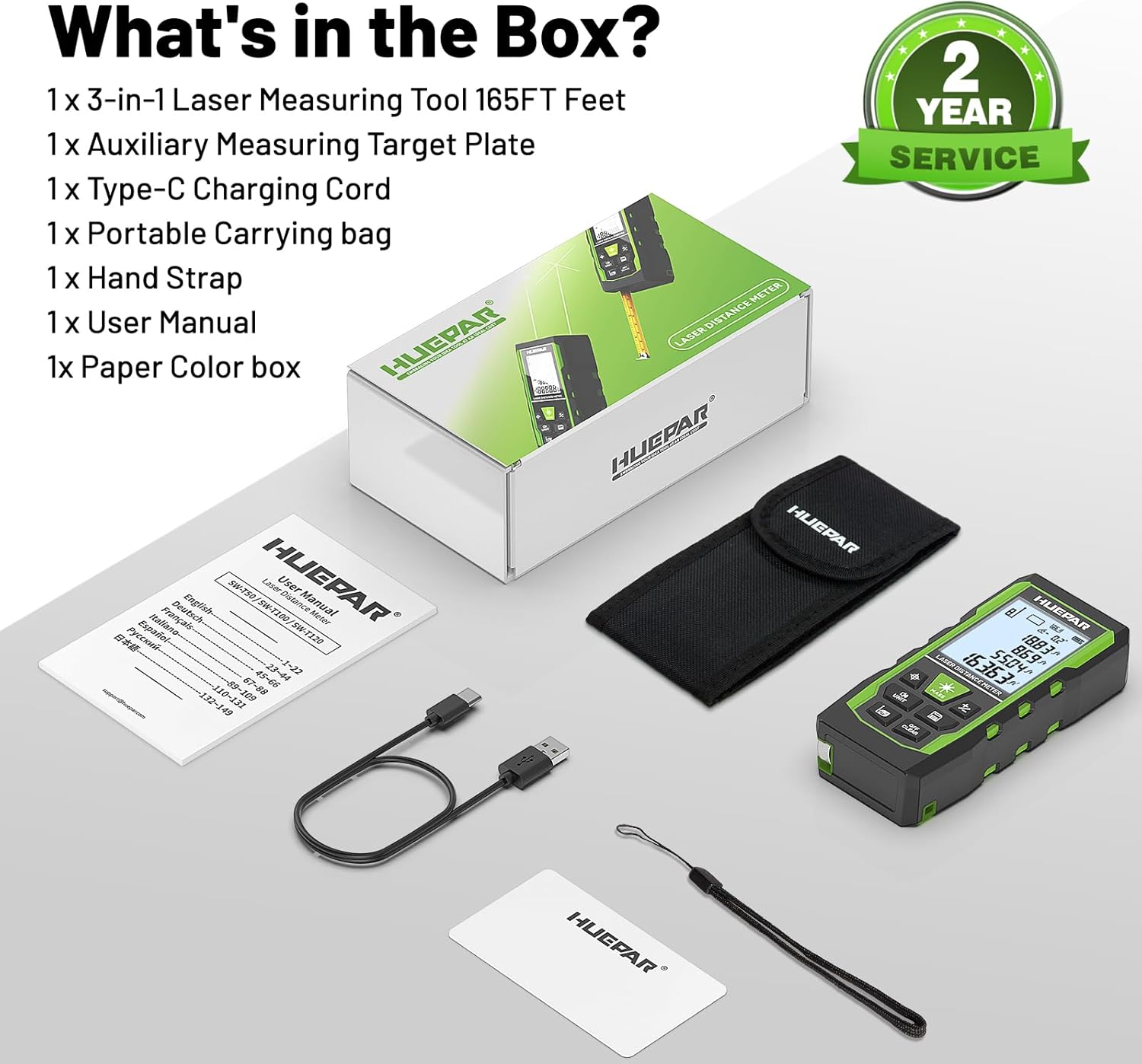
Image 3.1: All items included in the Huepar SW-T50 product package.
3.2 Součásti zařízení

Image 3.2: Detailed diagram of the Huepar SW-T50, highlighting its buttons, display, laser apertures, and ports.
- Power ON / Measure Button: Aktivuje zařízení a zahájí měření.
- Laser Level Mode Button: Switches to and controls the green cross line laser.
- Unit Switch / Sound Button: Changes measurement units and controls voice broadcast.
- Addition / Subtraction Button: Performs calculations with measurements.
- Data Saving Button: Stores measurement data.
- Turn OFF / Clear Button: Powers off the device or clears current readings.
- Benchmark / Mode Switch: Selects measurement reference points and modes.
- Green Cross Line Laser: Emits horizontal and vertical laser lines.
- 1/4" Threaded Mount: For tripod attachment.
- Nabíjecí port typu C: Pro dobíjení interní baterie.
- Hand Strap Slot: For attaching the included hand strap.
- Svinovací metr: Integrated physical tape measure.
3.3 Klíčové vlastnosti
- Funkce 3 v 1: Laser distance measurement (up to 165ft), green cross line laser level (33ft), and 6.5ft tape measure.
- Vysoká přesnost: Laser measure accuracy of ±1/16 inch, laser level accuracy of ±1/9 inch, and angle accuracy of ±1°.
- Hlasové vysílání: Real-time voice feedback for measurements, enhancing readability and efficiency.
- Více režimů měření: Includes distance, area, volume, Pythagorean (indirect height), wall area, and continuous measurement.
- Dobíjecí baterie: Built-in 3.7V / 600mAh battery with Type-C charging.
- Úložiště dat: Stores up to 100 sets of measurement data.
- Robustní design: Durable TPE housing for drop, dust, and light water spray resistance (IP54).
- Držák na stativ: 1/4"-20 threaded mount for stable positioning.
4. Nastavení
4.1 Nabíjení zařízení
Before initial use, fully charge the device using the provided Type-C charging cord. Connect the cord to the Type-C charging port on the device and a compatible USB power source.
4.2 Zapnutí/vypnutí
- Zapnutí: Stiskněte tlačítko Power ON / Measure Button.
- Vypnutí: Stiskněte a podržte Turn OFF / Clear Button for a few seconds. The device will also auto shut-off after 150 seconds of inactivity to conserve energy.
5. Provoz
NIKDY Obecná nastavení
- Změna jednotek: Stiskněte tlačítko Unit Switch / Sound Button to cycle through available measurement units (e.g., inches, feet, meters).
- Hlasové vysílání: Dlouze stiskněte Unit Switch / Sound Button to switch between English voice, Chinese voice, or to turn off the sound. Note: Voice broadcast is not active while charging.

Image 5.1: The voice broadcast feature provides audible measurement readings.
5.2 Laser Distance Measurement
The laser distance meter provides fast and accurate measurements up to 165 feet.
- Provedení měření: Stiskněte tlačítko Power ON / Measure Button once to activate the laser, then press it again to take a measurement.
- Reference Points: The device supports measurements from the front, rear, or screw-hole reference points. Press the Benchmark / Mode Switch to select the desired reference point.

Image 5.2: Illustration of front-based, screw-hole based, and rear-based measurement reference points.
5.3 Režimy měření
The SW-T50 offers various measurement modes for different applications:
- Měření vzdálenosti: Standardní měření bod-bod.
- Měření plochy: Calculates the area of a surface (length x width).
- Měření objemu: Calculates the volume of a space (length x width x height).
- Pythagorean Measurement (Indirect Height): Calculates height indirectly using two or three measurements.
- Měření plochy stěny: Calculates the total area of multiple walls.
- Kontinuální měření (sledování): Provides real-time distance updates as the device is moved.
Stiskněte tlačítko Benchmark / Mode Switch repeatedly to cycle through these measurement modes. Follow the on-screen prompts for each mode.

Image 5.3: Visual representation of the nine different measurement modes.
5.4 Green Cross Line Laser Level
The integrated green cross line laser level is ideal for tasks requiring precise alignment, such as hanging pictures or installing shelves.
- Activating the Laser Level: Stiskněte tlačítko Laser Level Mode Button to activate the green cross line laser.
- Angle Display: The screen displays angles from -90° to +90° horizontally.
- Out-of-Level Indication: If the angle exceeds ±4°, the 'Out' icon will flash on the screen, and the laser line will flash rapidly, indicating the device is not level.

Image 5.4: Using the green cross line laser level mode for precise alignment.
5.5 Tape Measure
The physical tape measure extends up to 6.5 feet (2 meters) for quick, short-distance measurements.
- Simply pull out the tape measure from the side of the device for use.
- Ensure the tape retracts smoothly after use.
5.6 úložiště dat
The device automatically saves valid measurements and can store up to 100 groups of data. The top of the screen indicates the number of stored groups.
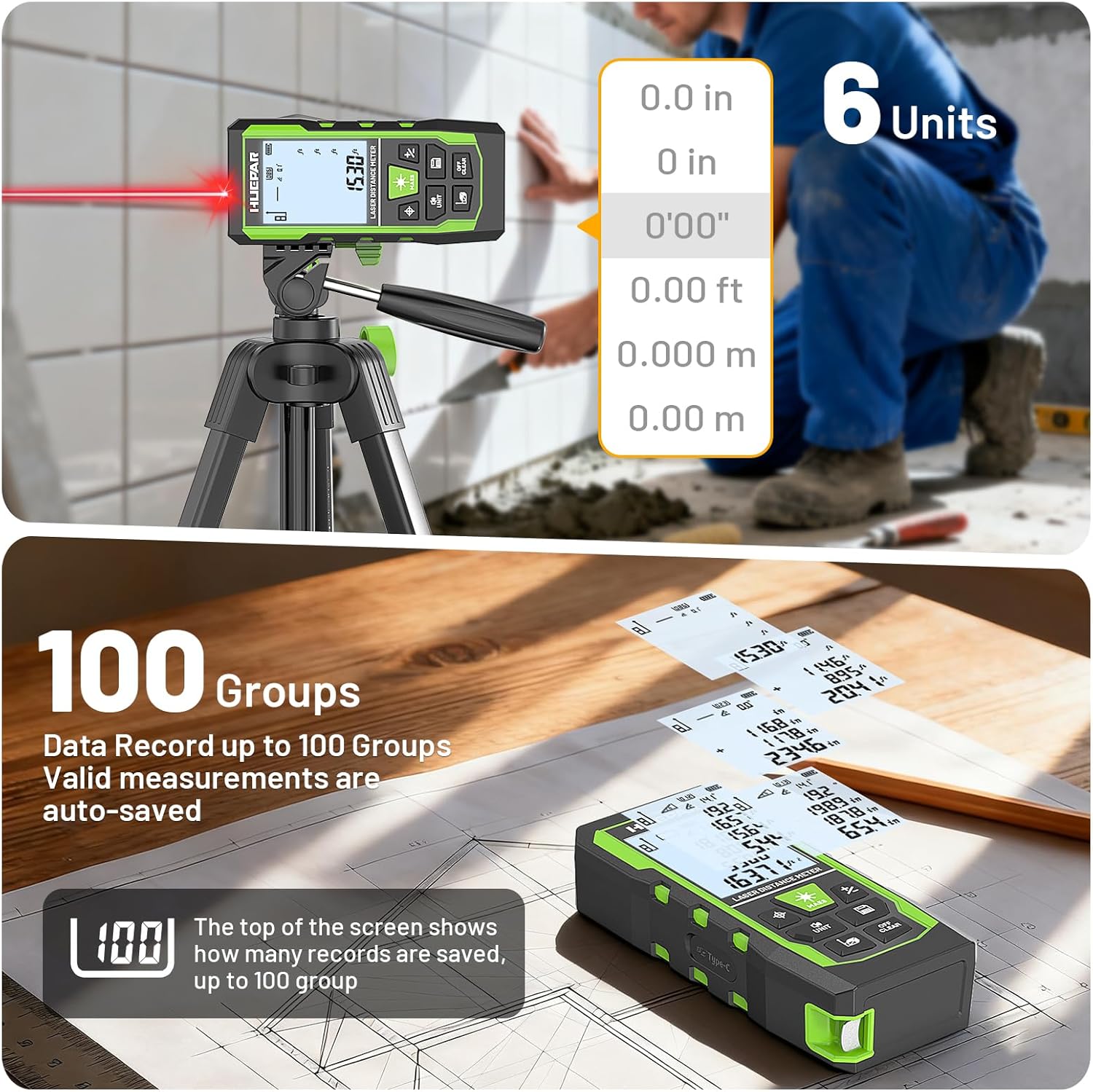
Image 5.5: The device supports multiple units and stores up to 100 measurement records.
5.7 Video s ukázkou produktu
Video 5.6: An official product video demonstrating the various functions and features of the Huepar 3-in-1 Laser Measuring Tape Tool, including laser distance measurement, laser leveling, and tape measure usage.
6. Údržba
- Čištění: Použijte měkký, damp K čištění zařízení použijte hadřík. Nepoužívejte abrazivní čisticí prostředky ani rozpouštědla.
- Skladování: Store the device in its portable carrying bag in a cool, dry place when not in use.
- Péče o baterie: Pravidelně dobíjejte baterii, i když zařízení nepoužíváte často, abyste zachovali její stav.
- Ochrana životního prostředí: The device features IP54 dust and splash resistance, but it is not fully waterproof. Avoid submerging it in water.

Image 6.1: The device is designed for durability with IP54 rating and comes with a portable pouch for protection.
7. Řešení problémů
If you encounter issues with your Huepar SW-T50, refer to the following common problems and solutions:
| Problém | Možná příčina | Řešení |
|---|---|---|
| Zařízení se nezapne. | Slabá baterie. | Charge the device using the Type-C charging cable. |
| Inaccurate laser measurements. | Nesprávně zvolený referenční bod; Překážka v dráze laseru; Nestabilní povrch. | Verify the selected reference point. Ensure a clear laser path. Place the device on a stable surface or use a tripod. |
| Laserový paprsek není viditelný. | Bright ambient light; Long distance measurement. | Use the auxiliary measuring target plate to enhance visibility. Reduce ambient light if possible. |
| Green cross line laser flashes rapidly. | Device is out of level (angle > ±4°). | Adjust the device position until it is within the self-leveling range. |
| Hlasové vysílání nefunguje. | Voice broadcast is turned off; Device is charging. | Long press the Unit Switch / Sound Button to activate voice broadcast. Voice broadcast is disabled during charging. |
8. Specifikace
| Funkce | Specifikace |
|---|---|
| Číslo modelu | SW-T50 |
| Laser Measure Range | 165 stop |
| Přesnost laserového měření | ±1/16 palce |
| Green Cross Line Laser Range | 33 stop |
| Laser Level Accuracy | ±1/9 palce |
| Přesnost úhlu | ±1° |
| Tape Measure Length | 6.5 stop (2 metrů) |
| Laserová třída | Třída 2, <1mW |
| Typ laseru | 490-560nm |
| Baterie | Built-in 3.7V / 600mAh |
| Zobrazit | 2.2" Backlit LCD |
| Ukládání dat | Až 100 skupiny |
| Automatické vypnutí | 150 seconds (laser), 180 seconds (device) |
| Hodnocení IP | IP54 (odolnost proti prachu a stříkající vodě) |
| Hmotnost položky | 9.6 unce |
| Rozměry balení | 6.34 x 3.43 x 2.36 palce |
| Materiál | Acrylonitrile Butadiene Styrene (TPE Housing) |
9. Záruka a podpora
The Huepar SW-T50 Laser Measuring Tool comes with a 2letá záruka kvality. In the event of a product fault, free repair or replacement will be provided.
Huepar is committed to providing excellent customer service. For technical support, warranty claims, or any inquiries, please contact the Huepar service team. They aim to respond within 24 hours and provide a solution within 48 hours. Lifetime technical support and access to worldwide maintenance centers are also available for faster service.
For further assistance, please visit the official Huepar webwebu nebo se přímo obraťte na jejich zákaznickou podporu.


