1. Konec produktuview
The Cordless CL-07 PRO Smart Door Lock is an advanced access control system designed to enhance home security with cutting-edge technology and seamless functionality. It offers multiple secure entry methods and remote monitoring capabilities.
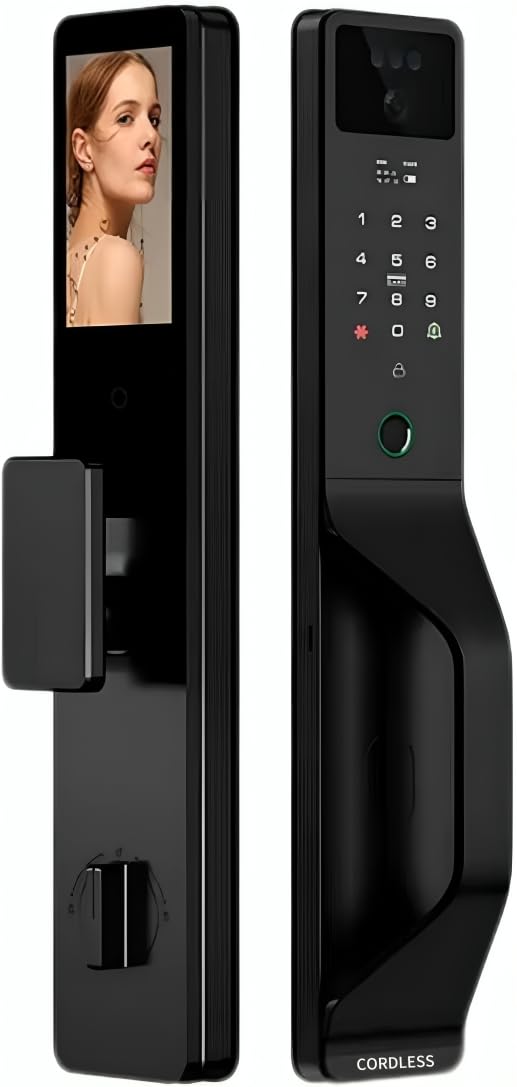
Obrázek 1.1: Přední a zadní strana view of the CL-07 PRO Smart Door Lock. The front panel features a keypad, fingerprint sensor, and camera, while the back panel shows the internal display screen and manual lock mechanism.
Klíčové vlastnosti:
- Více způsobů odblokování: Supports 3D face recognition, fingerprint, password, magnetic card, mechanical key, and Tuya Smart App control.
- Two-Way Video Communication: Integrated smart camera with real-time two-way video call functionality for remote interaction with visitors.
- Vzdálený dohled: Wi-Fi enabled with Tuya Smart App integration for comprehensive access control and visitor management via mobile device.
- Všestranná instalace: Compatible with both wooden and armored doors.
- Internal Display Screen: Provides convenient interface navigation and visitor monitoring from inside.
Zahrnuté komponenty:
- Smart Lock Unit (Front and Back Panels)
- inteligentní kamery
- Video Display Screen
- Mechanical Key(s)
- Instalační hardware
2. Nastavení a instalace
Proper installation is crucial for the optimal performance and security of your CL-07 PRO Smart Door Lock. It is recommended to follow these steps carefully or seek professional assistance.
2.1 Kontrolní seznam před instalací:
- Verify door compatibility (wooden or armored doors).
- Ensure door thickness is within the specified range (refer to specifications).
- Ověřte, zda jsou přítomny všechny dodané komponenty.
- Gather necessary tools (screwdriver, drill, measuring tape, etc.).
2.2 Kroky instalace:
- Připravte dveře: Remove any existing lock hardware. Ensure the door frame and boreholes are clean and properly sized according to the installation template (if provided).
- Instalace zámkového zámku: Vložte zámek do okraje dveří a zajistěte jej šrouby.
- Montáž předního panelu: Route the cables from the front panel through the door. Align the front panel with the mortise lock and secure it.
- Připojit kabely: Connect the cables from the front panel to the back panel, ensuring proper alignment of connectors.
- Instalace zadního panelu: Attach the back panel to the door, securing it with mounting screws. Ensure the lock operates smoothly before tightening fully.
- Nainstalujte baterie: Insert the required batteries (not included) into the battery compartment on the back panel.
- Počáteční nastavení: Follow the on-screen prompts on the internal display to set up the administrator password and connect to your Wi-Fi network via the Tuya Smart App.
3. Návod k obsluze
The CL-07 PRO Smart Door Lock offers various methods for secure access and monitoring.
3.1 metody odemykání:
- 3D rozpoznávání obličeje: Stand directly in front of the lock's camera at the recommended distance. The lock will automatically recognize your registered face and unlock.
- Přístup otisků prstů: Place your registered finger firmly on the fingerprint sensor. The lock will verify your fingerprint and unlock.
- Zadání hesla: Touch the keypad to activate it, then enter your registered password followed by the '#' key.
- Magnetic Card: Present your registered magnetic card to the card reader area on the lock.
- Mechanický klíč: In case of power failure or emergency, insert the mechanical key into the hidden keyhole and turn to unlock.
- Chytrá aplikace Tuya: Open the Tuya Smart App on your smartphone, select the lock, and use the remote unlock function.
3.2 Tuya Smart App Integration:
- Odemykání na dálku: Unlock the door from anywhere using the app.
- Správa přístupu: Add, modify, or delete user fingerprints, faces, passwords, and magnetic cards. Set temporary access codes for guests.
- Záznamy aktivit: View a history of all lock and unlock events, including method used and timestamp.
- Obousměrný videohovor: Receive notifications when someone is at your door. Initiate a two-way video call through the app to communicate with visitors.
- Monitorování v reálném čase: Access the live camera feed from the lock via the app.
4. Údržba
Regular maintenance ensures the longevity and optimal performance of your smart door lock.
- Čištění: Wipe the lock's surface with a soft, dry cloth. Avoid using abrasive cleaners, solvents, or harsh chemicals, as they can damage the finish and electronic components.
- Výměna baterie: Replace batteries promptly when the low battery indicator appears. Use high-quality alkaline batteries.
- Péče o senzor: Keep the fingerprint sensor and camera lens clean and free of dust or smudges for accurate recognition.
- Mechanická klíčová dírka: Ensure the mechanical keyhole is clear of obstructions.
- Aktualizace firmwaru: Check the Tuya Smart App periodically for available firmware updates to ensure your lock has the latest features and security enhancements.
5. Řešení problémů
If you encounter issues with your CL-07 PRO Smart Door Lock, refer to the following common problems and solutions:
| Problém | Možná příčina | Řešení |
|---|---|---|
| Zámek nereaguje / Bez napájení | Vybité baterie; Nesprávná instalace baterií. | Replace batteries with new ones; Ensure batteries are inserted with correct polarity. |
| Fingerprint/Face recognition failure | Dirty sensor/camera; Unregistered fingerprint/face; Improper placement. | Clean sensor/camera; Re-register fingerprint/face; Ensure proper placement and angle. |
| Problémy s připojením Wi-Fi | Nesprávné heslo k Wi-Fi; Router je příliš daleko; Rušení sítě. | Verify Wi-Fi password; Move router closer or use a Wi-Fi extender; Restart router and lock. |
| Zaseknutý mechanismus zámku | Misalignment during installation; Obstruction in door frame. | Check installation alignment; Remove any obstructions. If issue persists, contact support. |
Pokud problém přetrvává i po vyzkoušení těchto řešení, kontaktujte zákaznickou podporu.
6. Specifikace
| Atribut | Detail |
|---|---|
| Číslo modelu | CL-07 PRO |
| Značka | Bezdrátový |
| Rozměry | 10 x 8.5 x 20 cm |
| Hmotnost položky | 850 g |
| Materiál | Hliník, tvrzené sklo |
| Barva | Black And Silver |
| Zdroj napájení | Napájeno bateriemi (baterie nejsou součástí balení) |
| svtage | 12 voltů |
| Konektivita | Wi-Fi povoleno |
| Speciální funkce | 3D Face Recognition, Fingerprint Scanner, Mobile App Control, Two-way Audio |
| Způsob instalace | Držák na dveře |
| Kompatibilní dveře | Wooden and Armored Doors |
| Typ ovladače | Smartphone App, Touch Panel |
7. Záruka a podpora
For warranty information and technical support, please refer to the documentation provided with your purchase or visit the official Cordless webUschovejte si doklad o koupi pro případ reklamace.
Zákaznická podpora: For further assistance, troubleshooting, or inquiries, please contact Cordless customer support through the channels specified in your product packaging or on the official brand webmísto.


