1. Důležité bezpečnostní pokyny
Před použitím tohoto spotřebiče si pečlivě přečtěte všechny pokyny. Uschovejte si tento návod pro budoucí použití.
- Zajistěte zvtagNapětí uvedené na štítku s výkonem odpovídá hlasitosti vaší elektrické sítě.tage.
- Neponořujte ventilátor, zástrčku ani kabel do vody ani jiných kapalin.
- Odpojte ventilátor ze zásuvky, pokud jej nepoužíváte, před čištěním nebo před přemístěním.
- Do not operate the fan with a damaged cord or plug. Contact authorized service personnel for repair.
- Udržujte prsty a jiné předměty v dostatečné vzdálenosti od lopatek a otvorů ventilátoru.
- Do not use the fan near windows, in bathrooms, or in wet environments.
- Tento spotřebič není určen k tomu, aby ho používaly osoby (včetně dětí) se sníženými fyzickými, smyslovými nebo duševními schopnostmi nebo nedostatkem zkušeností a znalostí, pokud na ně nebude dohlíženo nebo na ně nebude dohlížet osoba odpovědná za jejich bezpečnost nebo je poučit o používání spotřebiče. .
- Děti by měly být pod dozorem, aby bylo zajištěno, že si se spotřebičem nebudou hrát.
2. Konec produktuview
The Mistral MFD4389DRW is a 43-inch DC Turbo Tower Fan designed for efficient air circulation. It features a DC brushless motor, 12 speed settings, and multiple operating modes. Control options include a full touch screen, remote control, and Wi-Fi with online voice control capabilities. The fan also offers a unique height conversion feature and 60-degree left-right oscillation.

Obrázek 2.1: Přední strana view of the Mistral MFD4389DRW DC Turbo Tower Fan, showcasing its sleek design and touch control panel.

Obrázek 2.2: Strana view of the Mistral MFD4389DRW DC Turbo Tower Fan, highlighting its slim profile.

Obrázek 2.3: Zpět view of the Mistral MFD4389DRW DC Turbo Tower Fan, showing the air intake grille.
3. Obsah balení
Ověřte, zda jsou v balení přítomny všechny součásti:
- Mistral MFD4389DRW DC Turbo Tower Fan Unit
- Dálkové ovládání
- Uživatelská příručka (tento dokument)
- Base components (if not pre-assembled)
- Height extension component (for convertible height models)
4. Montáž
The Mistral MFD4389DRW fan features simple assembly. Typically, this involves attaching the base to the main fan unit. For models with height conversion, an additional extension piece may need to be secured.
- Opatrně vyjměte všechny součásti z obalu.
- Place the main fan unit upside down on a soft, flat surface to avoid scratching.
- Align the base with the bottom of the fan unit. Ensure the power cord passes through the designated opening in the base.
- Secure the base to the fan unit using the provided screws (if applicable).
- For height conversion, insert the extension component between the base and the main unit, ensuring it clicks securely into place or is fastened as per instructions.
- Place the fan upright on a stable, level surface.
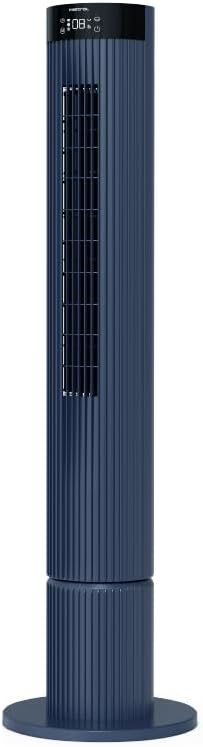
Figure 4.1: The fan demonstrating its convertible height feature, allowing adjustment between two different heights.
5. Nastavení a první použití
After assembly, position the fan in your desired location. Ensure it is on a stable, flat surface and away from curtains or objects that could obstruct airflow.
- Plug the power cord into a suitable electrical outlet (220-240V~, 50-60Hz).
- The fan will enter standby mode. The touch screen display may illuminate briefly.
- To power on, touch the power icon on the control panel or press the power button on the remote control.
6. Návod k obsluze
The fan can be operated via the full touch screen control panel on the unit or the included remote control.
6.1 Funkce ovládacího panelu
The touch screen control panel provides access to all fan functions:
- Vypínač: Zapíná nebo vypíná ventilátor.
- Nastavení rychlosti: Cykluje mezi 12 rychlostmi ventilátoru.
- Výběr režimu: Switches between Turbo, One-key Cycle, and Baby modes.
- Kmitání: Activates or deactivates 60-degree left-right oscillation.
- Časovač: Sets the pre-set On/Off timer for up to 12 hours.
- Indikátor Wi-Fi: Zobrazuje stav připojení k Wi-Fi.
6.2 Dálkové ovládání
The remote control duplicates all functions available on the touch screen panel for convenient operation from a distance.
- Ujistěte se, že dálkové ovládání má funkční baterie.
- Point the remote control towards the fan's control panel for optimal signal reception.
6.3 Provozní režimy
- Turbo režim: Provides maximum airflow for rapid cooling.
- One-key Cycle Mode: Automatically cycles through different fan speeds to simulate natural breeze.
- Dětský režim: Operates at a gentle, quiet speed suitable for nurseries or light sleeping.
7. Wi-Fi and Online Voice Control
The Mistral MFD4389DRW fan can be connected to your home Wi-Fi network for smart control via a mobile application and online voice commands.
7.1 Wi-Fi připojení
- Download the official Mistral smart home application from your device's app store.
- Zaregistrujte se nebo se přihlaste ke svému účtu v aplikaci.
- Ujistěte se, že je vaše mobilní zařízení připojeno k síti Wi-Fi 2.4 GHz.
- Follow the in-app instructions to add a new device. This typically involves putting the fan into pairing mode (refer to the app or fan display for specific instructions, often by holding a Wi-Fi button).
- Once connected, the Wi-Fi indicator on the fan's control panel will illuminate steadily.
7.2 Online Voice Control
After successful Wi-Fi connection, you can link your fan to compatible smart home voice assistants (e.g., Google Assistant, Amazon Alexa) through the Mistral app settings.
- Open the Mistral app and navigate to the 'Integrations' or 'Voice Control' section.
- Select your preferred voice assistant and follow the prompts to link your Mistral account.
- Po propojení můžete používat hlasové příkazy, jako například:
- "Turn on the fan."
- "Set fan speed to 5."
- "Turn off oscillation."
- "Change fan mode to Baby."
8. Údržba
Pravidelné čištění pomáhá udržovat výkon ventilátoru a prodlužuje jeho životnost.
8.1 Čištění
- Před čištěním vždy odpojte ventilátor ze zásuvky.
- Použijte měkký, damp hadříkem otírejte vnější povrchy ventilátoru. Nepoužívejte abrazivní čisticí prostředky ani rozpouštědla.
- K odstranění prachu z mřížek sání a výfuku vzduchu použijte vysavač s kartáčovým nástavcem.
- Před opětovným zapojením a spuštěním ventilátoru se ujistěte, že je zcela suchý.
8.2 Skladování
If storing the fan for an extended period, unplug it, clean it thoroughly, and store it in its original packaging or a dust-free environment.
9. Řešení problémů
Pokud narazíte na problémy s ventilátorem, podívejte se na následující běžné problémy a jejich řešení:
| Problém | Možná příčina | Řešení |
|---|---|---|
| Ventilátor se nezapne. | Žádné napájení. | Zkontrolujte, zda je napájecí kabel bezpečně zapojený do funkční zásuvky. |
| Slabé proudění vzduchu. | Air intake/outlet blocked; Fan speed too low. | Clean grilles to remove dust. Increase fan speed. |
| Ventilátor vydává neobvyklý zvuk. | Překážka; Uvolněné části. | Unplug and check for any foreign objects. Ensure base is securely attached. |
| Dálkové ovládání nefunguje. | Dead batteries; Obstruction. | Replace remote control batteries. Ensure no objects are blocking the signal path. |
| Připojení k Wi-Fi selhalo. | Incorrect Wi-Fi password; Router issues; Fan too far from router. | Verify Wi-Fi password. Ensure fan is within range of a 2.4GHz Wi-Fi network. Restart router and fan. |
Pokud problém přetrvává i po vyzkoušení těchto řešení, kontaktujte zákaznickou podporu.
10. Specifikace
| Funkce | Specifikace |
|---|---|
| Model | MFD4389DRW |
| svtage | 220-240V~, 50-60Hz 1.3A |
| Wattage | 40W |
| Objem vzduchu | 29.54 m³ / min |
| Maximální průtok vzduchu | 4.26 m/s |
| Hladina hluku (nejnižší rychlost) | 33.2 dB |
| Noise Level (Highest Speed) | 68.3 dB |
| Rozměry produktu (D*Š*V) | 168 * 300 * 900 OR 1104 mm |
| Čistá hmotnost | 4.46 kg |
| Bezpečnostní značka | 250467-11 |
| Speciální funkce | Remote Controlled, Timer, Wi-Fi Enabled |
| Počet rychlostí | 12 |
11. Záruka a podpora
This Mistral MFD4389DRW DC Turbo Tower Fan comes with a comprehensive warranty:
- Všeobecná záruka: 1 rok od data nákupu.
- Záruka na motor: An additional 3 Years for the motor only, totaling 4 years for the motor.
For warranty claims, technical support, or service inquiries, please contact your local Mistral authorized service center or refer to the contact information provided on the official Mistral webmísto.


