Zavedení
This manual provides essential information for using your realme Note 70T Smartphone. It covers device setup, operation, maintenance, and troubleshooting to ensure optimal performance and user experience.
Co je v krabici
Upon unboxing your realme Note 70T, verify that the following items are included:
- Chytrý telefon Realme Note 70T
- USB kabel (typ C)
- Rychlý průvodce
- Bezpečnostní informace
Nastavení
- Vložte SIM kartu: Locate the SIM card tray on the side of the device. Use the provided SIM ejector tool to open the tray. Insert your Nano-SIM card(s) and an optional microSD card into the designated slots. Ensure the tray is fully reinserted.
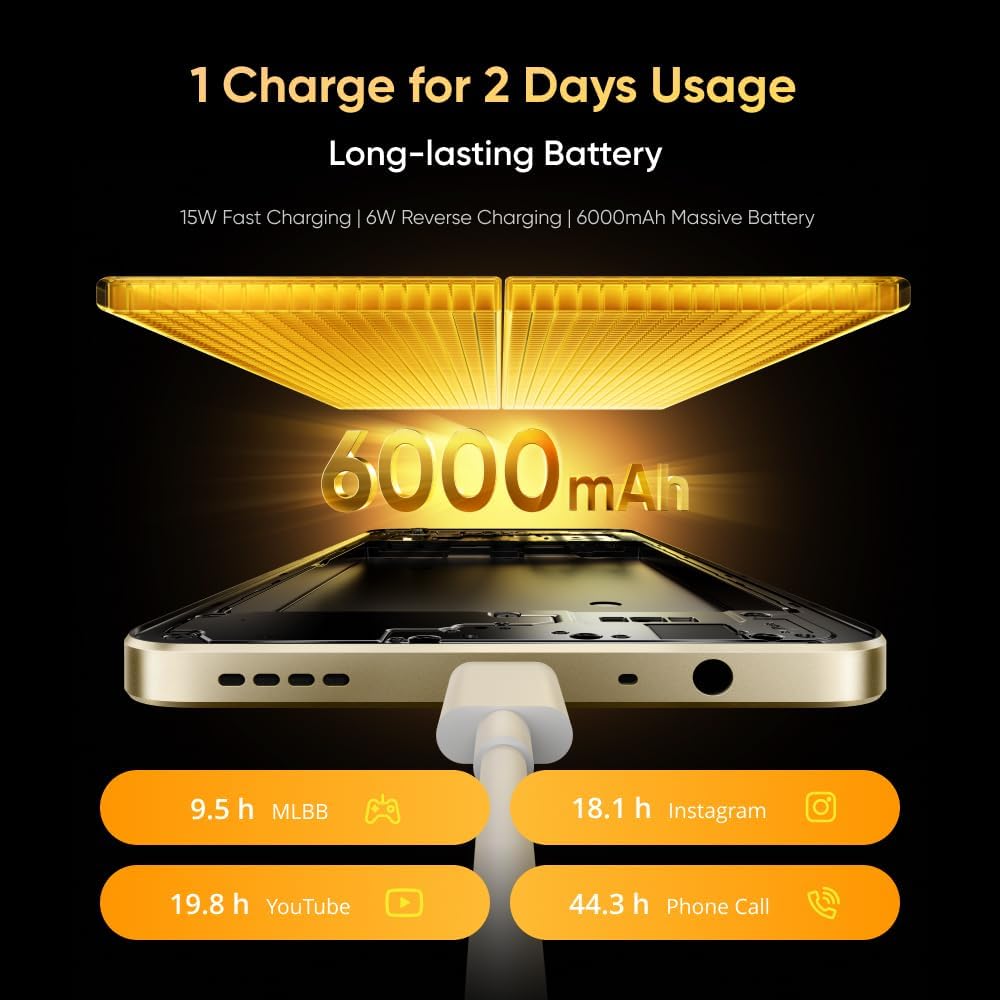
Image: The realme Note 70T smartphone, showing its sleek design and indicating the location for SIM card insertion.
- Zapnutí: Press and hold the Power button located on the side of the device until the realme logo appears.
- Počáteční nastavení: Postupujte podle pokynů na obrazovce a vyberte jazyk, připojte se k síti Wi-Fi a nastavte si účet Google.
Návod k obsluze
Basic Device Functions
- Zapnutí/vypnutí: Stiskněte a podržte tlačítko napájení. V nabídce vyberte možnost „Vypnout“ nebo „Restartovat“.
- Ovládání hlasitosti: Pomocí tlačítek pro zvýšení a snížení hlasitosti na boku můžete upravit hlasitost médií, hovorů a budíku.
- Navigace: Utilize on-screen gestures or navigation buttons (Home, Back, Recent Apps) as configured in settings.
Baterie a nabíjení
The realme Note 70T is equipped with a 6000 mAh battery, designed for extended usage.
- Nabíjení: Connect the provided USB Type-C cable to the phone's charging port and a compatible 15W power adapter.
- Rychlé nabíjení: The device supports 15W fast charging for quicker power replenishment.
- Zpětné nabíjení: Use a compatible OTG cable to utilize your phone as a power bank to charge other devices (6W reverse charging).

Image: Illustration of the realme Note 70T connected to a charger, highlighting its 6000 mAh battery capacity and charging capabilities.
Funkce displeje
Experience smooth visuals on the 90Hz Eye Comfort Display.
- The 6.74-inch display offers a maximum brightness of 563 nits and up to 180Hz touch samprychlost hovoru pro responzivní interakci.
- Pulse Light: The device features a Pulse Light for immediate notifications and signals, with 9 optional colors and 5 brightness modes.

Image: The realme Note 70T display showcasing its 90Hz refresh rate for a smooth visual experience.
Použití fotoaparátu
The realme Note 70T features a 50 MP Main Camera, a 13 MP Ultra Wide Camera, and a 5 MP Front Camera.
- Vylepšení umělé inteligence: Utilize AI features like AI Clear Face for sharpening blurry portraits, AI Image Matting for easy subject extraction, and AI Eraser to remove unwanted elements.
- Noční režim: Capture clear and detailed photos in low-light conditions.

Image: A close-up of the realme Note 70T camera module, highlighting its 13MP AI camera capabilities for capturing detailed moments.
AI and Performance Features
- AI Call Noise Reduction 2.0: Intelligent noise filtering for clear phone calls.
- AI Boost: Optimizes frequently used apps for superior smoothness and performance.
- Octa-core Chipset: Powered by an octa-core processor for efficient performance in gaming, streaming, and daily tasks.

Image: The realme Note 70T screen displaying the AI Boost feature, which optimizes app performance for a smoother user experience.
Trvanlivost a design
- Odolnost proti nárazům vojenské úrovně: The ArmorShellTM Tough Build provides military-grade resistance to impacts, protecting against drops up to 1.8 meters.
- IP54 Odolnost proti prachu a vodě: The device is protected against daily splashes, spills, and dust.
- SonicWave Ejection: The speaker vibrates to expel accumulated water.
- Ultra tenký design: With a thickness of 7.94 mm and a weight of 201g, the phone offers a comfortable grip.

Image: The realme Note 70T smartphone shown in a rugged environment, illustrating its military-grade shock resistance.
Údržba
- Čištění: K čištění obrazovky a těla přístroje používejte měkký hadřík, který nepouští vlákna. Nepoužívejte abrazivní materiály ani agresivní chemikálie.
- Aktualizace softwaru: Pravidelně kontrolujte a instalujte aktualizace softwaru, abyste zajistili optimální výkon a zabezpečení. Přejděte na Nastavení > O telefonu > Aktualizace softwaru.
- Správa úložiště: Pravidelně odstraňujte nepotřebné filea aplikace pro udržení dostatečného úložného prostoru a rychlosti zařízení.
Odstraňování problémů
- Zařízení se nezapíná: Ujistěte se, že je baterie nabitá. Připojte nabíječku a před opětovným zapnutím počkejte několik minut. Pokud zařízení nereaguje, stiskněte a podržte tlačítko napájení po dobu 10–15 sekund.
- Problémy s nabíjením: Verify the charging cable and adapter are securely connected and undamaged. Try a different charger if available.
- Problémy s připojením k síti: Check if Airplane Mode is off. Restart the device. Verify your SIM card is correctly inserted and your mobile data plan is active.
- Zamrzání/pád aplikace: Zavřete aplikaci a znovu ji otevřete. Pokud problém přetrvává, vymažte mezipaměť aplikace (Nastavení > Aplikace > [Název aplikace] > Úložiště > Vymazat mezipaměť) nebo aplikaci znovu nainstalujte.
Specifikace
| Funkce | Detail |
|---|---|
| Značka | realme |
| Model | N70T |
| Operační systém | Android 14 |
| BERAN | 24 GB (Dynamic RAM) |
| Interní úložiště | 256 GB |
| Kapacita baterie | 6000 XNUMX mAh |
| Rychlé nabíjení | 15W |
| Zpětné nabíjení | 6W |
| Typ zobrazení | LCD |
| Velikost displeje | 6.74 palců |
| Obnovovací frekvence | 90 Hz |
| Rozlišení displeje | 1080x2400 |
| Hlavní fotoaparát | 50 MP |
| Ultra Wide Camera | 13 MP |
| Přední kamera | 5 MP |
| Procesor | Osmijádrový |
| Konektivita | 4G |
| Odolnost proti prachu a vodě | IP54 |
| Tloušťka | 7.94 mm |
| Hmotnost | 201 g |
Záruka a podpora
Your realme Note 70T Smartphone comes with a standard manufacturer's warranty. For detailed warranty terms, conditions, and support, please refer to the warranty card included in the product packaging or visit the official realme support webUschovejte si doklad o koupi pro případ reklamace.


