1. Úvod
Welcome to the SOOMFON SC1 Digital Camera user manual. This guide provides essential information for setting up, operating, maintaining, and troubleshooting your new digital camera. Please read this manual thoroughly to ensure optimal performance and longevity of your device.
2. Co je v krabici
Your SOOMFON SC1 Digital Camera package includes the following items:
- Digitální fotoaparát (1)
- Gift Box (1)
- Lanyard/Dust Bag/Charging Cable (1)
- SD Card (Inside the Camera) (1)
- USB Card Reader (1)

Figure 2.1: Included accessories with the SOOMFON SC1 Digital Camera.
3. Nastavení
3.1 Instalace baterie
The camera requires two rechargeable batteries. To install, open the battery compartment cover located on the side of the camera. Insert the battery with the arrow pointing upwards, then close the cover securely. Ensure the battery is fully charged before first use.

Figure 3.1: Steps for battery installation.
Video 3.1: Demonstrating basic camera setup, including battery and SD card installation.
3.2 Instalace SD karty
The camera comes with a pre-installed 32GB microSD card. If you need to replace it, open the battery compartment cover, press the existing card to eject it, and insert a new card until it clicks into place. Ensure the card is formatted via the camera's menu before use.
3.3 Počáteční nabíjení
The battery is pre-charged to approximately 50% at the factory. Fully charge the battery before its first use. Connect the camera to a power source using the provided Type-C data cable.
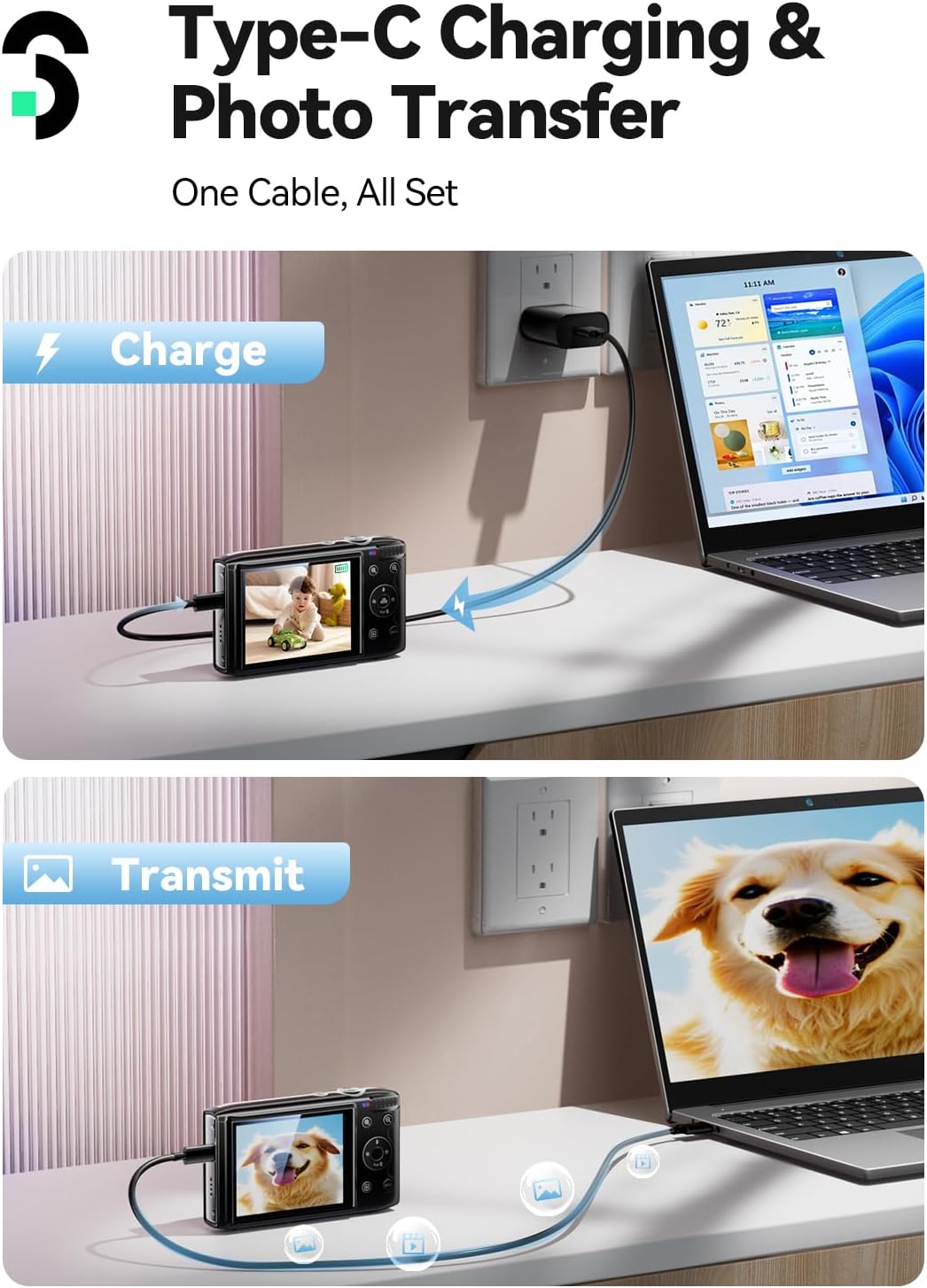
Figure 3.2: Type-C charging and photo transfer.
4. Návod k obsluze
4.1 Konec fotoaparátuview a ovládací prvky
Familiarize yourself with the camera's buttons and layout for easy operation.

Figure 4.1: Camera button layout and functions.
4.2 Photo Modes
The camera supports various photo modes and creative filters to enhance your pictures. Navigate through the menu to select desired filters or adjust settings like image quality and sharpness.

Obrázek 4.2: Přamples of 19 creative filters.

Figure 4.3: Diverse creative filters for unique shots.
4.3 Nahrávání videa
Capture moments in 4K ultra-clear video. The camera records in MP4 format. Ensure sufficient storage space on the SD card for video files.

Figure 4.4: Max 4K Full HD Video capability.
4.4 Funkce zoom
The camera features 16X digital zoom. Use the zoom buttons to get closer to your subject. Note that this is digital zoom, not optical zoom.

Figure 4.5: 16X digital zoom in action.

Figure 4.6: Capturing details with 16X zoom.
4.5 Režimy ostření
The camera supports auto, manual, and fixed focus modes. Select the appropriate mode for your shooting conditions to ensure clear images.

Figure 4.7: Flexible focus modes for flawless shots.
4.6 Speciální funkce
The camera includes features like fill-in light, smile capture, and timer shooting. These can be accessed and configured through the camera's menu settings.

Figure 4.8: Smile capture, fill light, and self-timer features.

Figure 4.9: Built-in fill light to reduce shadows.
4.7 Nastavení nabídky
Access the camera's menu to customize various settings, including pixel inset, smiling face capture, beauty mode, white balance, filters, exposure, metering mode, image quality, sharpness, ISO, time watermark, image rotation, icon display, focus mode, light source frequency, LED indicator, auto screen saver, auto power off, button prompt, startup music, language, time format, time set, date set, format, and device info.
Video 4.1: Demonstrating shooting and function settings during use.
4.8 Viewing a File Převod
After capturing photos or videos, you can view them directly on the camera's 2.8-inch screen. To transfer files to a computer, use the provided USB Type-C cable or the USB card reader with the SD card. The camera can also function as a webcam via USB.
Video 4.2: Demonstrating viewing a file transfer after use.
5. Údržba
To ensure the longevity of your SOOMFON SC1 Digital Camera, follow these maintenance guidelines:
- Keep the camera clean: Use a soft, dry cloth to wipe the camera body. For the lens, use a specialized lens cleaning cloth and solution.
- Protect from impact: Avoid dropping the camera or subjecting it to strong impacts. Use the provided storage bag for protection during transport.
- Avoid extreme conditions: Do not expose the camera to extreme temperatures, humidity, or direct sunlight for extended periods.
- Battery care: Store batteries in a cool, dry place when not in use. Do not expose them to fire or water.
6. Řešení problémů
If you encounter any issues with your camera, refer to the following common problems and solutions:
- Fotoaparát se nezapne: Ujistěte se, že je baterie správně nainstalována a plně nabitá.
- Baterie se nenabíjí: Verify the Type-C cable is securely connected to both the camera and a working power adapter.
- Kamera se zasekne: Remove and reinsert the battery to reset the device.
- TF card cannot be recognized: Reinsert the memory card. If the issue persists, try formatting the card via the camera's menu (this will erase all data).
- Špatná kvalita zvuku: The camera has a built-in microphone with average audio quality and does not support external microphones.
- Rozmazané obrázky: Ensure the camera is held steady during shooting. Adjust focus mode if necessary.
For further assistance, please contact support@soomfon.com.
7. Specifikace
| Značka | SOOMFON |
| Název modelu | SC1-BN1 |
| Efektivní rozlišení | 72 MP (Interpolated) |
| Rozlišení foto snímače | 13 MP (Native) |
| Rozlišení videa | 4K (2160p) |
| Digitální zoom | 16x |
| Velikost obrazovky | 2.8 palce |
| Kapacita paměti | 32 GB (MicroSD card included) |
| Typ zaměření | Auto, Manual, Fixed Focus |
| Speciální funkce | Creative Filters, Timer Shooting, Fill-in Light, Smile Capture |
| Technologie připojení | USB |
| Hmotnost položky | 122 gramů |
| Barva | Černý |
8. Záruka a podpora
The SOOMFON SC1 Digital Camera comes with a 2-year warranty. For any product inquiries, technical support, or warranty claims, please contact our customer service team.
E-mail: podpora@soomfon.com


