1. Úvod
This manual provides detailed instructions for the installation, operation, and maintenance of your ASUS ROG Strix B850-G Gaming WiFi mATX Motherboard. Designed for AMD Ryzen 9000 Series processors and DDR5 memory, this motherboard offers advanced features for high-performance computing. Please read this manual thoroughly before proceeding with installation and usage.

Image: The ASUS ROG Strix B850-G Gaming WiFi mATX Motherboard alongside its retail packaging, showcasing its white aesthetic and key features.
2. Klíčové vlastnosti
The ASUS ROG Strix B850-G Gaming WiFi mATX Motherboard incorporates several advanced technologies and design elements:
- Advanced AI PC Ready: Optimized for future AI computing applications.
- Patice AMD AM5: Supports AMD Ryzen 9000, 8000, and 7000 series desktop processors.
- Inteligentní ovládání: Features ASUS AI Advisor, AI Networking II, and AEMP for simplified setup and enhanced performance.
- Robustní řešení napájení: 14+2+1 mocninytagjmenovitý proud 80 A za sekundutage, with an 8+8-pin ProCool power connector, alloy chokes, and durable capacitors.
- Optimalizovaný tepelný design: Equipped with massive heatsinks bridged to VRMs with high-conductivity thermal pads and an integrated I/O cover.
- Nejnovější podpora M.2: Includes one PCIe 5.0 M.2 slot and two PCIe 4.0 M.2 slots with heatsinks, plus an additional PCIe 4.0 M.2 slot on the underside.
- Bohatá konektivita: Multiple USB 20Gbps Type-C, USB 10Gbps Type-C, and USB 5Gbps Type-A ports, PCIe 5.0 x16 SafeSlot, HDMI, and DisplayPort.
- Vysoce výkonné sítě: On-board WiFi 7 (802.11be) and Intel 2.5Gb Ethernet.
- Design vhodný pro kutily: Features PCIe Slot Q-Release, M.2 Q-Latch, M.2 Q-Release, Q-Antenna, Q-Dashboard, Q-LED, BIOS FlashBack button, Clear CMOS button, and pre-mounted I/O shield.
- Pohlcující zvuk: Realtek ALC1220P codec with Savitech SV3H712 amplifier and Dolby Atmos support.

Image: Diagram illustrating the motherboard's AI Networking II and ASUS AI Advisor features for optimized performance and connectivity.

Image: Visual representation of the motherboard's DDR5, PCIe 5.0, USB 20Gbps Type-C, Dolby Atmos, Intel 2.5Gb Ethernet, and WiFi 7 capabilities.
3. Nastavení
Follow these steps for initial setup of your motherboard:
- Instalace procesoru: Opatrně vložte procesor AMD AM5 do patice CPU. Zajistěte správné zarovnání a zajistěte upevňovací rameno.
- Instalace chladiče CPU: Attach your chosen CPU cooler according to its manufacturer's instructions.
- Instalace paměti (RAM): Insert DDR5 memory modules into the DIMM slots. Ensure they are fully seated until the clips lock into place.
- Instalace disků M.2 SSD: Utilize the M.2 Q-Latch or M.2 Q-Release mechanisms for tool-free installation of M.2 solid-state drives into the available slots. The PCIe 5.0 M.2 slot offers the highest performance.
- Instalace grafické karty: Insert your graphics card into the PCIe 5.0 x16 SafeSlot. The PCIe Slot Q-Release button simplifies removal.
- Připojte napájení: Connect the 24-pin ATX power connector and the 8+8-pin ProCool CPU power connectors from your power supply to the motherboard.
- Připojení periferií: Connect USB devices, display cables (HDMI/DisplayPort), and network cables (2.5G LAN or WiFi Q-Antenna).

Image: Demonstrates the EZ PC DIY features including PCIe Slot Q-Release, M.2 Q-Release, ASUS Q-Antenna, and New M.2 Q-Latch for simplified component installation.
Obrázek: Podrobný view of the motherboard's rear I/O panel, highlighting various USB ports, display outputs, 2.5G LAN, and WiFi 7 antenna connectors.
3.1. WiFi 7 Antenna Installation
To utilize the integrated WiFi 7, connect the included ASUS WiFi Q-Antenna to the designated ports on the rear I/O panel. The Q-Antenna design simplifies this connection process.

Image: The ASUS ROG Strix B850-G Motherboard with the WiFi Q-Antenna connected to the rear I/O ports.
4. Provoz
The motherboard's operation is managed through its UEFI BIOS and supporting software.
4.1. Konfigurace systému BIOS
Access the UEFI BIOS by pressing the DEL or F2 key during system startup. The intuitive UEFI BIOS dashboard allows for configuration of system settings, boot order, and advanced features.
4.2. Funkce umělé inteligence
Leverage ASUS AI Advisor for system optimization and AI Networking II for intelligent network management, ensuring stable and high-speed connectivity. AEMP (ASUS Enhanced Memory Profile) assists in optimizing DDR5 memory performance.
4.3. Synchronizované RGB osvětlení Aura
Customize the integrated RGB lighting and connected addressable Gen 2 headers using ASUS-exclusive Aura Sync software for personalized aesthetics.

Obrázek: Úhlové view of the motherboard showcasing its integrated RGB lighting zones, customizable via Aura Sync.
5. Údržba
Regular maintenance ensures optimal performance and longevity of your motherboard.
- Aktualizace BIOSu: Pravidelně kontrolujte podporu ASUS website for the latest BIOS updates. Use the BIOS FlashBack button for convenient updates, even without a CPU or RAM installed.
- Vymazat CMOS: If you encounter system instability due to incorrect BIOS settings, use the Clear CMOS button on the rear I/O panel to reset BIOS settings to default.
- Odstranění prachu: Keep the motherboard and surrounding components free of dust using compressed air. Ensure the system is powered off and unplugged before cleaning.
- Aktualizace ovladačů: Install the latest drivers for your motherboard components from the ASUS support website to ensure compatibility and performance.
6. Řešení problémů
If you encounter issues, consider the following steps:
- Q-LED Diagnostics: The Q-LED indicators on the motherboard provide visual cues for boot-up issues related to CPU, DRAM, VGA, or Boot Device. Refer to the motherboard manual for specific Q-LED codes.
- Zkontrolujte připojení: Ensure all power cables, data cables, and expansion cards are securely connected.
- Component Reseating: Try reseating RAM modules, the graphics card, and other components to ensure proper contact.
- Reset BIOSu: Use the Clear CMOS button to revert BIOS settings to factory defaults if configuration issues are suspected.
- Kompatibilita operačního systému: Note that for Windows 11, WiFi 7 requires version 24H2 or later for full functionality. Windows 11 21H2/22H2/23H2 only supports WiFi 6E. For Windows 10, only WiFi 6 is supported.
- Kontaktujte podporu: If problems persist, refer to the ASUS support webwebu nebo kontaktujte zákaznický servis pro další pomoc.
7. Specifikace
| Funkce | Specifikace |
|---|---|
| Značka | ASUS |
| Série | ROG STRIX B850-G GAMING WIFI |
| Název modelu | ROG STRIX B850-G GAMING WIFI |
| Zásuvka CPU | Zásuvka AM5 |
| Kompatibilní procesory | AMD Ryzen™ 9000, 8000 & 7000 Series Desktop Processors |
| Typ čipové sady | AMD B850 |
| Technologie paměti RAM | DDR5 |
| Rychlost paměti | 8000 MHz |
| Kapacita paměti | 256 GB (max.) |
| Platforma | Windows 10, Windows 11 |
| Barva | BÍLÝ |
| Hmotnost položky | 2.9 libry |
| Rozměry produktu (DxŠxV) | 9.6 x 9.6 x 1.9 palce |
8. Oficiální video produktu
Video: Úředník u konceview of the ASUS ROG Strix B850-G Gaming Motherboard, highlighting its design and features.
9. Záruka a podpora
This ASUS product comes with a manufacturer's warranty. For detailed warranty information, technical support, driver downloads, and further assistance, please visit the official ASUS support webmísto:
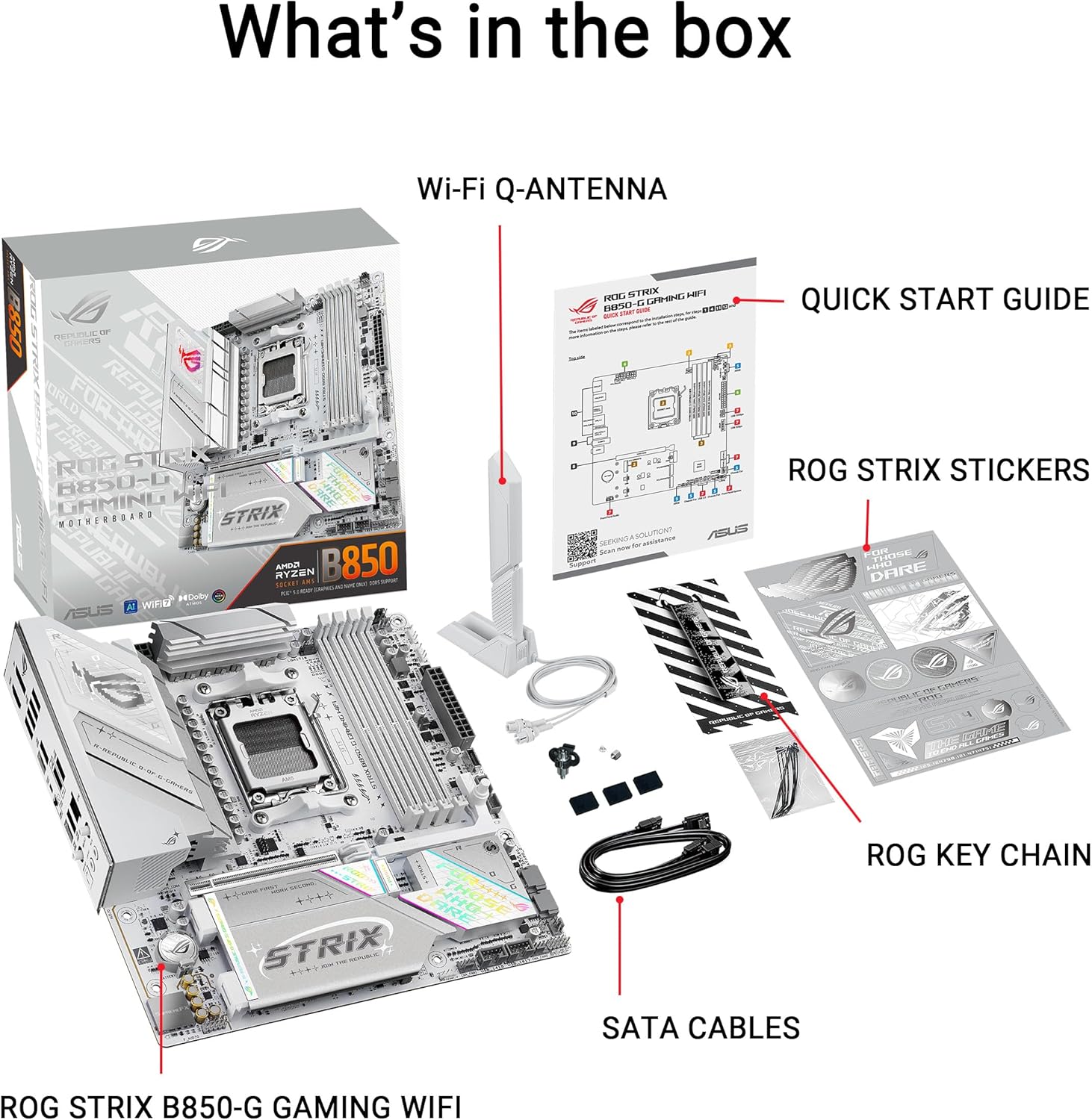
You may also refer to the included Quick Start Guide for initial setup information.

Image: The contents of the motherboard box, including the motherboard, Wi-Fi Q-Antenna, Quick Start Guide, ROG Strix stickers, ROG key chain, and SATA cables.


