Konec produktuview
The EDUP USB WiFi 6 Adapter AX600M is a compact, dual-band wireless network adapter designed to provide high-speed Wi-Fi 6 connectivity for your PC, laptop, or desktop. It supports the latest 802.11ax standard, offering enhanced performance for streaming, gaming, and video conferencing.

Image: The EDUP USB WiFi 6 Adapter AX600M, a compact black dongle with a gold USB connector and a blue Wi-Fi signal icon.
Klíčové vlastnosti:
- WiFi nové generace s 6 rychlostmi: Up to 286Mbps on 5.8GHz and 286Mbps on 2.4GHz for smooth performance.
- Kompaktní design: Built-in antenna, ideal for portable use and tight spaces.
- Plug & Play: Easy driver installation, compatible with Windows 11/10/7.
- Vylepšené zabezpečení: Supports WEP, WPA-PSK, WPA2-PSK, and WPA3-PSK encryption.
- Všestranné režimy: Supports Ad-Hoc and Infrastructure modes.
Obsah balení
Ověřte, zda jsou v balení přítomny všechny položky:
- 1x EDUP WiFi Adapter (AX600M)
Pokud některé položky chybí nebo jsou poškozené, kontaktujte prosím zákaznickou podporu.
Průvodce nastavením
Follow these steps to install and set up your EDUP USB WiFi 6 Adapter AX600M:
- Step 1: Insert the WiFi Adapter
Insert the EDUP USB WiFi adapter into an available USB port on your desktop or laptop computer. Ensure it is fully seated in the port.
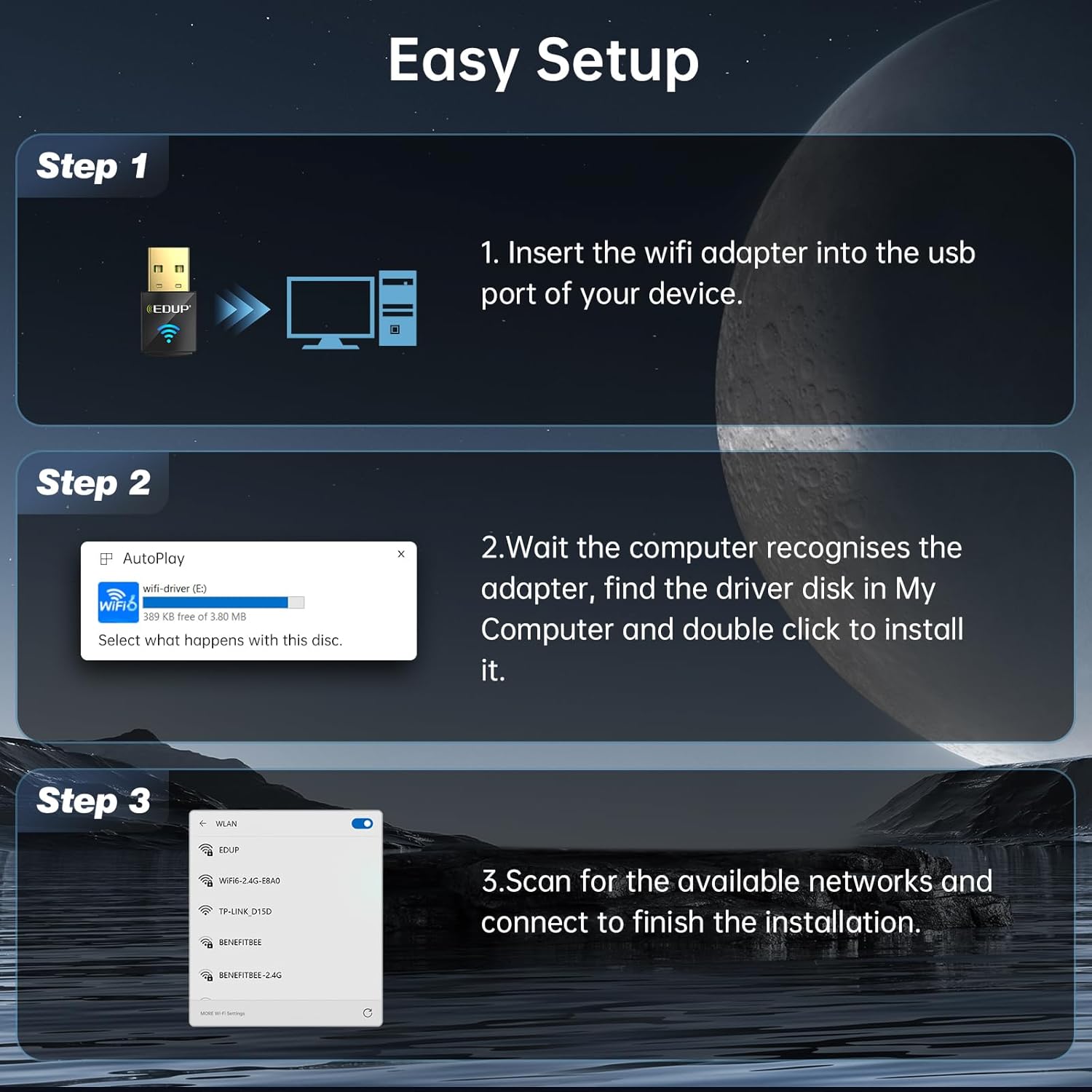
Image: Diagram showing the EDUP USB WiFi adapter being inserted into a computer's USB port.
- Krok 2: Instalace ovladače
Most Windows 11/10/7 systems will automatically detect the adapter and install the necessary drivers. If an auto-play prompt appears, follow the on-screen instructions to install the driver from the adapter's virtual disk. If no prompt appears, navigate to "My Computer" or "This PC", locate the new drive (often labeled "wifi-driver" or similar), and double-click to run the installer.

Image: Screenshot of a Windows auto-play prompt for driver installation, indicating compatibility with Windows 7, 10, and 11.
- Krok 3: Připojte se k síti
Once the driver is installed, your computer will recognize the adapter. Scan for available wireless networks, select your desired network, and enter the password to connect. The adapter supports both 2.4GHz and 5GHz bands.

Image: Graphic illustrating the dual-band capabilities of the adapter, showing 5GHz (286Mbps) and 2.4GHz (286Mbps) coverage.
Návod k obsluze
Wi-Fi Receive Mode
In Wi-Fi Receive Mode, the adapter allows your computer to connect to existing wireless networks, providing internet access and network connectivity. This is the primary mode of operation for most users.
Wi-Fi Hotspot Mode (Soft AP)
The adapter can also function as a Wi-Fi Hotspot (Soft AP), allowing your computer to share its internet connection with other devices. This is useful for creating a personal Wi-Fi network when only a wired connection is available on your computer.
- To enable Hotspot Mode, refer to your operating system's network settings (e.g., Mobile hotspot settings in Windows).
- Ensure your computer has an active internet connection (e.g., Ethernet) to share.

Image: Graphic illustrating the adapter's capability to function in both Wi-Fi Receive Mode (connecting to a network) and Wi-Fi Hotspot Mode (sharing internet).
Technologie MU-MIMO
The EDUP AX600M adapter supports MU-MIMO (Multi-User, Multiple-Input, Multiple-Output) technology. When paired with a MU-MIMO compatible router, this technology allows the router to communicate with multiple devices simultaneously, improving network efficiency and reducing latency, especially in environments with many connected devices.

Image: Diagram comparing MU-MIMO router communication with the EP-AX600 adapter versus a regular adapter, showing improved simultaneous data flow.
Údržba
To ensure optimal performance and longevity of your EDUP USB WiFi 6 Adapter AX600M, follow these simple maintenance guidelines:
- Udržujte v čistotě: Periodically clean the adapter's exterior with a soft, dry cloth. Avoid using liquid cleaners or solvents.
- Správné skladování: Pokud adaptér nepoužíváte, skladujte jej na chladném a suchém místě, mimo dosah přímého slunečního záření a extrémních teplot.
- Vyhněte se fyzickému poškození: Do not drop, bend, or expose the adapter to excessive force.
- Aktualizace ovladačů: Regularly check for updated drivers on the EDUP official webwebu, aby byla zajištěna kompatibilita a vylepšení výkonu.
Odstraňování problémů
If you encounter issues with your EDUP USB WiFi 6 Adapter AX600M, refer to the following common troubleshooting steps:
| Problém | Možné řešení |
|---|---|
| Počítač nedetekoval adaptér. |
|
| Nelze se připojit k síti Wi-Fi. |
|
| Pomalé rychlosti Wi-Fi. |
|
| Instalace ovladače se nezdařila. |
|
If the problem persists, please contact EDUP customer support for further assistance.
Specifikace
| Funkce | Detail |
|---|---|
| Model | AX600M |
| Bezdrátové Standardní | IEEE 802.11ax (Wi-Fi 6) |
| Frekvenční pásmo | Dual Band (2.4 GHz a 5.8 GHz) |
| Rychlost přenosu dat | Až 286 Mb/s (2.4 GHz), až 286 Mb/s (5.8 GHz) |
| Hardwarové rozhraní | USB 2.0 |
| Kompatibilní zařízení | Stolní počítač, notebook |
| Kompatibilita operačního systému | Windows 11/10/7 |
| Bezpečnostní šifrování | WEP, WPA-PSK, WPA2-PSK, WPA3-PSK |
| Rozměry produktu | 0.64 x 0.3 x 1.22 palce (16.26 x 7.62 x 30.99 mm) |
| Hmotnost položky | 0.705 unce (20 gramů) |
| Provozní teplota | 0 °C až 70 °C (32 °F až 158 °F) |
| Skladovací teplota | -40 °C až 70 °C (-40 °F až 158 °F) |
Záruka a zákaznická podpora
EDUP provides a 3-year manufacturer replacement warranty for the USB WiFi 6 Adapter AX600M. Additionally, a 90denní lhůta pro vrácení zboží bez otázek je nabízeno.
For any issues, questions, or support needs, please contact EDUP customer support via Amazon message. Our team is committed to providing prompt assistance and solutions.
You can also visit the official EDUP store on Amazon for more information and products: EDUP Amazon Store


