1. Úvod
This manual provides detailed instructions for the assembly, operation, and maintenance of your Perlegear Rolling TV Stand (PGTVMC06) and Perlegear Floor TV Stand (PGFS21B). Please read this manual thoroughly before installation and retain it for future reference. Ensure all components are present and undamaged before proceeding.

Obrázek 1.1: Konecview of the Perlegear Rolling TV Stand (left) and Floor TV Stand (right).
2. Důležité bezpečnostní informace
Failure to follow these instructions may result in property damage, serious injury, or death. If you do not understand these instructions, or have doubts about the safety of the installation, please contact Perlegear customer support.
- Nosnost: Do not exceed the maximum weight capacity specified for each stand. Overloading can cause instability and potential collapse.
- Velikost televizoru: Ensure your TV's screen size and VESA pattern are compatible with the stand.
- Shromáždění: Assemble the stand strictly according to the instructions. Improper assembly can lead to instability.
- Stabilita: Always ensure the stand is placed on a stable, level surface. For the rolling stand, lock the casters when the stand is in a stationary position.
- Děti: Během montáže držte děti v dostatečné vzdálenosti od stojanu. Nedovolte dětem lézt na stojan nebo namontovaný televizor nebo si s nimi hrát.
- Nástroje: Pro montáž používejte vhodné nářadí. Nepřetahujte šrouby.
3. Vlastnosti a specifikace produktu
3.1 Perlegear Rolling TV Stand (Model: PGTVMC06)
This mobile TV stand is designed for versatility and ease of movement, suitable for various environments.
- Univerzální kompatibilita s televizory: Accommodates most 23” to 60” LED, LCD, and OLED flat or curved TVs.
- Nosnost: Supports a maximum weight of 88 lbs (40 kg).
- Kompatibilita VESA: Supports VESA mounting patterns including 100x100mm, 200x100mm, 200x200mm, 300x200mm, 300x300mm, 400x300mm, and 400x400mm.
- Optimální Viewing Customization: Features tilting capabilities up to 15 degrees and leveling adjustments of +3°/-3°.
- Mobilita: Equipped with rolling casters for easy relocation.

Image 3.1.1: Compatibility details for the Perlegear Rolling TV Stand (PGTVMC06).
3.2 Perlegear Floor TV Stand (Model: PGFS21B)
This floor TV stand offers a modern design with integrated LED ambient lighting for an enhanced viewzkušenosti.
- Univerzální kompatibilita s televizory: Accommodates most 32” to 75” LED, LCD, and OLED flat or curved TVs.
- Nosnost: Supports a maximum weight of 110 lbs (50 kg).
- Kompatibilita VESA: Supports VESA mounting patterns including 100x100mm, 200x100mm, 200x200mm, 200x300mm, 300x200mm, 300x300mm, 400x200mm, 400x300mm, 400x400mm, 600x200mm, and 600x400mm.
- Nastavitelný Viewing: Features swivel up to ±35° and tilt up to 5° and down 10° for customized comfort.
- Integrované LED osvětlení: Modern adjustable RGB LED ambient lighting with 16 million colors, brightness, speed, and mode settings.
- Možnosti ovládání: LED lights can be controlled via mobile app, remote control, or wired in-line switch.
- Synchronizace zvuku: LED lights can sync with sound or rhythm for an immersive experience.
- Funkce časovače: Includes a timer for LED light operation.

Image 3.2.1: Compatibility and load capacity details for the Perlegear Floor TV Stand (PGFS21B).

Image 3.2.2: Control options for the integrated LED lighting system of the PGFS21B.
4. Obsah balení
Before assembly, verify that all parts listed in the assembly guide (typically included in the product box) are present and undamaged. If any parts are missing or defective, do not proceed with assembly and contact Perlegear customer support.
5. Montážní návod
Follow the specific assembly steps provided in the included assembly manual for your model. The general steps below outline the process.
5.1 Perlegear Rolling TV Stand (PGTVMC06) Assembly
- Připevnění koleček k základně: Secure the rolling casters to the base of the stand. Ensure two casters are lockable and positioned correctly.
- Assemble Vertical Pole: Connect the sections of the vertical pole.
- Připevnění tyče k základně: Secure the assembled vertical pole to the base.
- Instalace police pro média: Mount the adjustable media shelf onto the vertical pole at your desired height.
- Připevnění držáků televizoru k televizoru: Secure the TV mounting brackets to the back of your television using the appropriate screws and spacers.
- Upevnění televizoru na stojan: Carefully lift the TV and hook the brackets onto the TV plate on the stand. Secure the TV with safety screws.

Image 5.1.1: The Perlegear Rolling TV Stand (PGTVMC06) fully assembled.
5.2 Perlegear Floor TV Stand (PGFS21B) Assembly
- Sestavte základnu: Secure the base components, ensuring stability.
- Assemble Vertical Pole: Connect the sections of the vertical pole.
- Připevnění tyče k základně: Secure the assembled vertical pole to the base.
- Install Media Shelves: Mount the adjustable media shelves onto the vertical pole at your desired heights.
- Připevnění držáků televizoru k televizoru: Secure the TV mounting brackets to the back of your television using the appropriate screws and spacers.
- Upevnění televizoru na stojan: Carefully lift the TV and hook the brackets onto the TV plate on the stand. Secure the TV with safety screws.
- Připojení LED světel: Install the LED light strips and connect them to the control unit as per the specific instructions for the PGFS21B model.

Image 5.2.1: The Perlegear Floor TV Stand (PGFS21B) fully assembled with LED lights.
6. Návod k obsluze
6.1 Adjusting the Rolling TV Stand (PGTVMC06)
- Mobilita: Unlock the casters by flipping the lever on each wheel to move the stand. Lock the casters when the stand is in its desired position to prevent accidental movement.
- Nastavení sklonu: Loosen the tilt knobs on the TV plate, adjust the TV to the desired angle (up to 15 degrees), and then retighten the knobs securely.
- Nastavení nivelace: Use the leveling screws on the TV brackets to fine-tune the horizontal level of the TV by +3°/-3°.

Image 6.1.1: Illustrates the tilt adjustment feature of the PGTVMC06.
6.2 Operating the Floor TV Stand LED Lights (PGFS21B)
The integrated RGB LED lights offer multiple control methods:
- Ovládání mobilní aplikace: Download the designated mobile application (refer to the specific LED light manual for app name and QR code). Pair your device with the LED lights via Bluetooth. The app allows control over 16 million colors, brightness, dynamic modes, and the timer function.
- Dálkové ovládání: Use the provided remote control to power the lights on/off, change colors, adjust brightness, select modes, and activate sound sync. Ensure the remote has working batteries.
- Wired In-Line Switch: A physical switch on the LED light cable allows for basic control, typically on/off and cycling through basic colors/modes.
- Sound/Rhythm Sync: Activate this feature via the mobile app or remote to synchronize the LED lights with audio playback, creating an immersive effect.
- Swivel and Tilt Adjustment: The PGFS21B allows for swivel up to ±35° and tilt up to 5° and down 10°. Loosen the appropriate adjustment screws/knobs, position the TV, and then retighten securely.
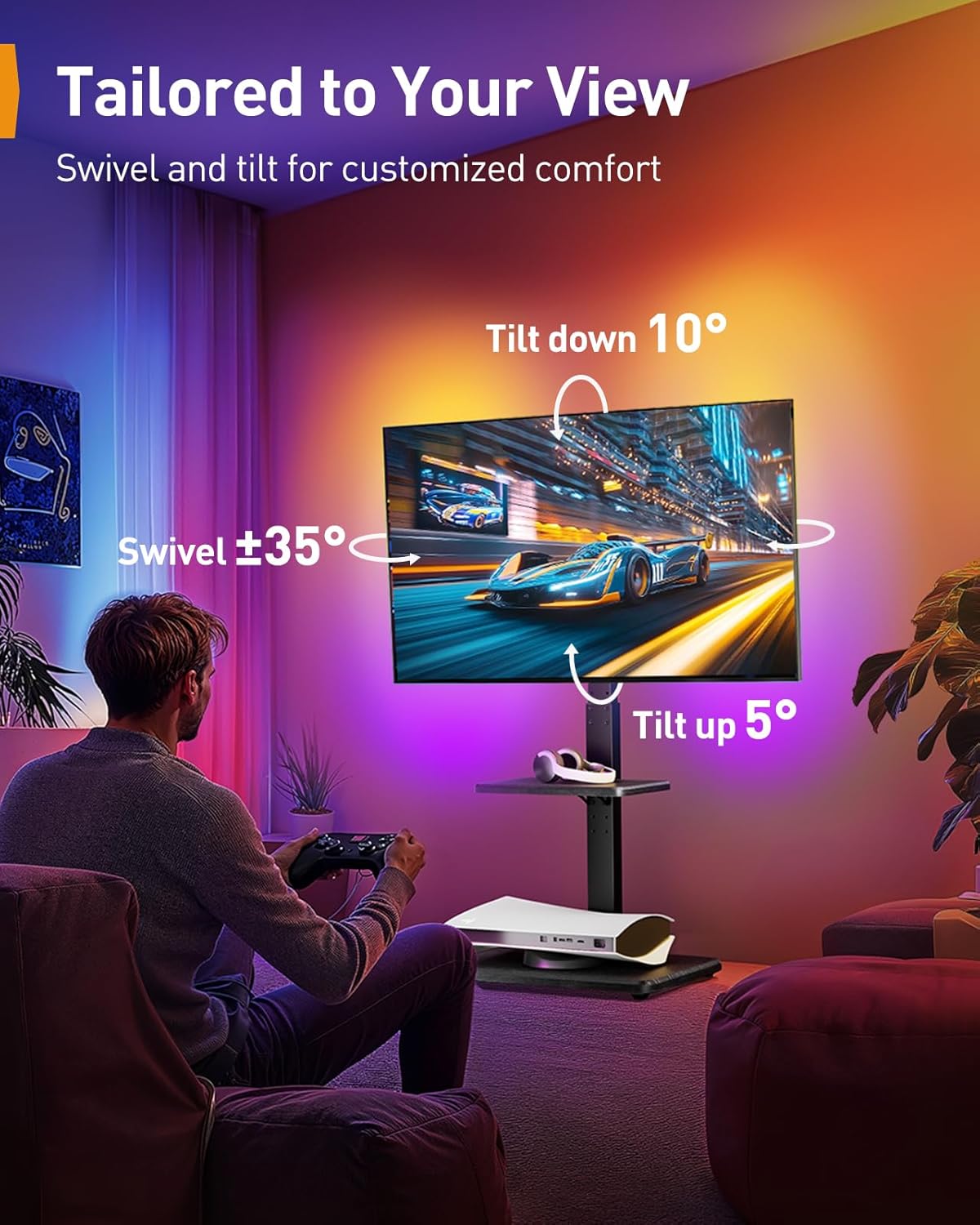
Image 6.2.1: Demonstrates the swivel and tilt capabilities of the PGFS21B.
7. Údržba
- Čištění: Otřete stojan měkkým, suchým hadříkem. Na odolné skvrny použijte lehceamp hadříkem s jemným čisticím prostředkem a poté důkladně osušte. Nepoužívejte abrazivní čisticí prostředky ani rozpouštědla.
- Inspekce: Pravidelně kontrolujte všechny šrouby a spoje, zda jsou pevně utažené. V případě potřeby je dotáhněte.
- Caster Care (PGTVMC06): Pro zajištění plynulého pohybu udržujte kolečka bez nečistot.
- LED Care (PGFS21B): Ensure LED strips are not exposed to excessive moisture or extreme temperatures.
8. Řešení problémů
- Stojan je nestabilní: Ensure all screws are tightened. Verify the stand is on a level surface. For the rolling stand, ensure casters are locked. Check that the TV weight and size are within the stand's specifications.
- TV není vodorovně: Use the leveling adjustment feature on the TV brackets (PGTVMC06) or adjust the tilt/swivel mechanisms (PGFS21B) to correct the angle.
- LED Lights Not Working (PGFS21B): Check power connection. Ensure the remote control batteries are functional. Try controlling via the mobile app or in-line switch.
- Difficulty Moving (PGTVMC06): Ensure casters are unlocked. Check for obstructions or debris in the wheels.
9. Záruka a podpora
Perlegear products are manufactured with quality and durability in mind. For specific warranty information, please refer to the warranty card included with your product or visit the official Perlegear website. For technical assistance, missing parts, or any other inquiries, please contact Perlegear customer support through the contact information provided on the product packaging or webmísto.


