1. Úvod
This manual provides detailed instructions for the safe and effective use of your ZOLAMENTE 4K 80MP Camcorder DV10. Please read this manual thoroughly before operating the device and retain it for future reference. Proper use will ensure optimal performance and longevity of your camcorder.
2. Obsah balení
Ověřte, zda jsou v balení přítomny všechny níže uvedené položky:
- ZOLAMENTE 4K 80MP Camcorder DV10
- Dobíjecí baterie (x2)
- 64GB SD karta
- Dálkový ovladač
- USB kabel
- Uživatelská příručka
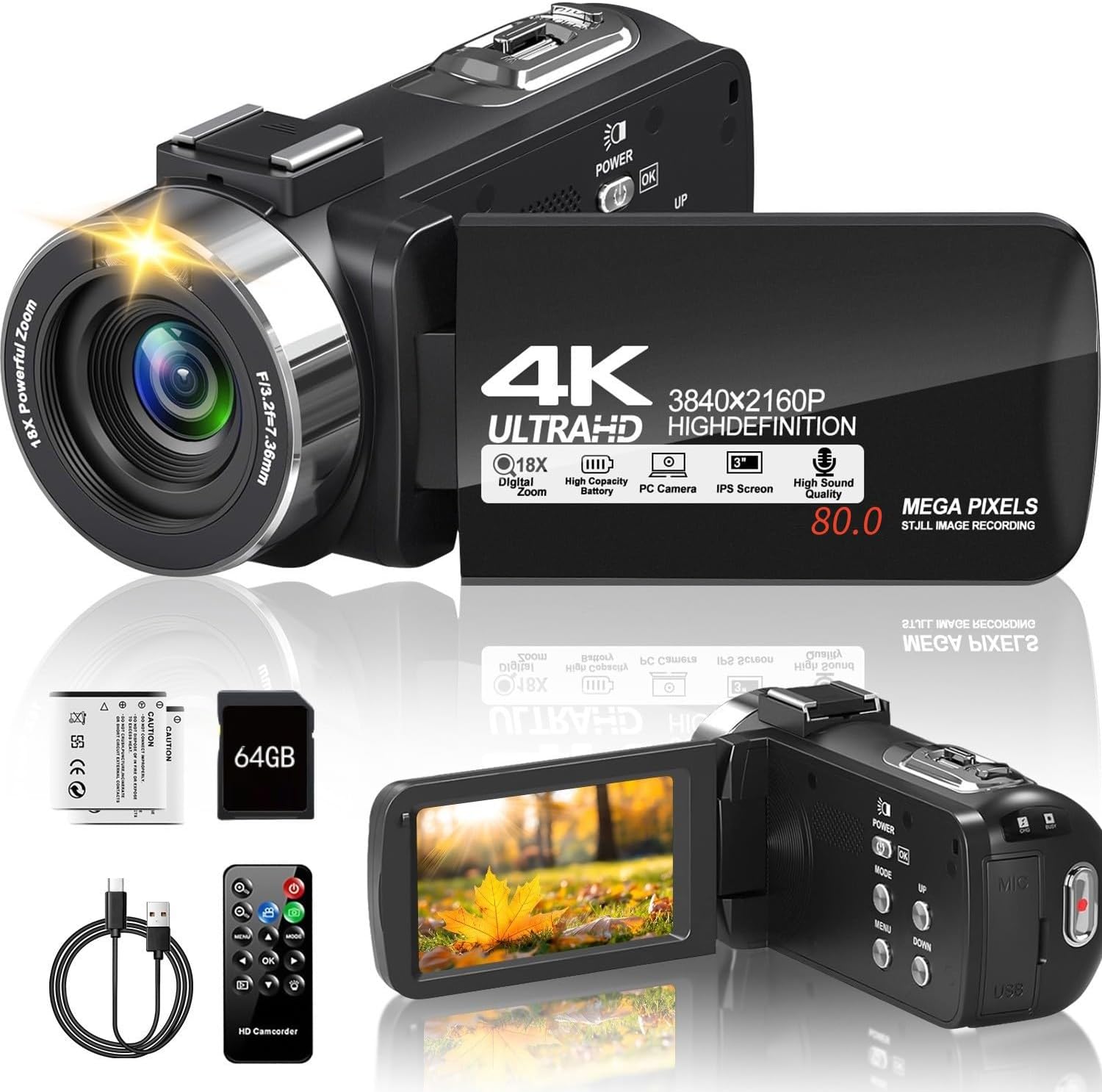
Image 2.1: The ZOLAMENTE 4K 80MP Camcorder DV10 shown with its included accessories, including two batteries, a 64GB SD card, a remote control, and a USB cable.
3. Konec produktuview
Familiarize yourself with the main components of your camcorder.
3.1 Klíčové vlastnosti
- 4K Ultra HD Video Resolution (3840x2160)
- 80 Megapixel Image Resolution
- 18X digitální zoom
- 3.0-inch 270° Rotatable IPS Screen
- Infrared (IR) Night Vision
- WebFunkce vačky
- Support for external microphone (not included)

Image 3.1: The camcorder featuring its 3.0-inch IPS screen, capable of 270-degree rotation for flexible viewing angles during recording or playback.

Image 3.2: Visual representation of the camcorder's 18X digital zoom capability and its ability to capture images at 80 megapixels, highlighting detail capture.
4. Nastavení
4.1 Nabíjení baterie
Before first use, fully charge both included batteries. A full charge may take approximately 2 hours. A fully charged battery provides approximately one hour of recording time.
- Insert a battery into the battery compartment.
- Připojte videokameru ke zdroji napájení pomocí dodaného kabelu USB.
- Rozsvítí se kontrolka nabíjení. Po dokončení nabíjení zhasne nebo změní barvu.
4.2 Vložení SD karty
The camcorder supports SDHC (Class 10) and SDXC (Class 10) memory cards up to 256GB. A 64GB SD card is included.
- Ujistěte se, že je videokamera vypnutá.
- Najděte slot pro SD kartu.
- Gently push the SD card into the slot until it clicks into place. Ensure the card's metal contacts face the correct direction.
- Chcete-li kartu vyjmout, jemně ji znovu zatlačte, dokud nevyskočí.
Důležité: When inserting an SD card for the first time, the camera may prompt you to format it. It is recommended to format the card directly through the camera's menu system (Menu > Mode > Down buttons to navigate). If the camera repeatedly asks to format the card, initially format it using a computer, then re-format it using the camera.
5. Návod k obsluze
5.1 Zapnutí/vypnutí
- Pro zapnutí stiskněte a podržte MOC tlačítko.
- Chcete-li přístroj vypnout, stiskněte a podržte tlačítko MOC znovu tlačítko.
5.2 Základní nahrávání videa
- Zapněte videokameru.
- Ensure the camcorder is in video recording mode (indicated by an icon on the screen).
- Stiskněte tlačítko REC/STOP button to start recording. The recording indicator will flash.
- Stiskněte tlačítko REC/STOP dalším tlačítkem nahrávání zastavíte.
5.3 Fotografování
- Zapněte videokameru.
- Switch to photo mode.
- Komponujte snímek pomocí obrazovky.
- Stiskněte tlačítko FOTOGRAFIE button to capture an image.
5.4 Using Digital Zoom
While recording or in standby mode, use the W/T (Wide/Telephoto) lever to adjust the digital zoom. Push towards T to zoom in and towards W oddálit.
5.5 Otočení obrazovky
The 3.0-inch IPS screen can rotate up to 270 degrees, allowing for various shooting angles and self-recording. Gently pivot the screen to your desired position.
5.6 Přehrávání
- Stiskněte tlačítko MODE tlačítko pro vstup do režimu přehrávání.
- Use the navigation buttons to select the video or photo you wish to view.
- Stiskněte tlačítko OK button to play a video or view fotka.
6. Pokročilé funkce
6.1 Infrared (IR) Night Vision
The camcorder is equipped with IR night vision for recording in low-light or dark environments, capturing black and white footage.
- In video or photo mode, press the IR button to activate night vision.
- Stiskněte tlačítko IR znovu stiskněte tlačítko pro deaktivaci.

Image 6.1: The camcorder's infrared night vision feature shown capturing a clear black and white image in a dimly lit environment, with an 'ON' indicator.
6.2 WebFunkce vačky
Connect your camcorder to a computer to use it as a webkamera pro živé vysílání nebo videohovory.
- Connect the camcorder to your computer using the USB cable.
- Select 'PC Camera' or 'Webcam' option on the camcorder screen (if prompted).
- Váš počítač by měl rozpoznat videokameru jako webcam. Select it in your video conferencing or streaming software.

Image 6.2: The camcorder connected via USB to a laptop, displaying its live feed on the laptop screen, illustrating its webcam functionality for online platforms.
6.3 Obsluha dálkového ovladače
The included remote control allows for convenient operation from a distance, useful for self-recording or group shots.
- Point the remote control directly at the camcorder's IR receiver.
- Use the corresponding buttons on the remote for functions like record, stop, zoom, and menu navigation.
6.4 Nahrávání během nabíjení
The camcorder supports recording while connected to a power source, allowing for extended recording sessions without interruption.

Image 6.3: The camcorder actively recording footage while simultaneously connected to an external power bank via its USB cable, demonstrating the 'record while charging' feature.
6.5 Speciální režimy nahrávání
The camcorder offers various modes to enhance your creative possibilities:
- Časosběrné nahrávání: Captures images at set intervals to create a sped-up video.
- Funkce pauzy: Allows you to pause and resume recording within a single video file.
- Samospoušť: Delays photo capture by 3, 5, or 10 seconds.
- Souvislé fotografování: Pořídí více fotografií v rychlém sledu.
- Detekce pohybu: Starts recording automatically when motion is detected.
- Zpomalený pohyb: Nahrává video s vyšší snímkovou frekvencí pro zpomalené přehrávání.

Image 6.4: A collage illustrating the diverse recording capabilities of the camcorder, including time-lapse, pause function, self-timer, continuous shooting, motion detection, timed photo, and slow motion.
7. Údržba
7.1 Čištění videokamery
- K čištění těla videokamery použijte měkký, suchý hadřík.
- For the lens, use a specialized lens cleaning cloth and solution. Avoid touching the lens with your fingers.
- For the screen, use a soft, lint-free cloth.
7.2 Péče o baterii
- Pokud baterie nepoužíváte, skladujte je na chladném a suchém místě.
- Nevystavujte baterie extrémním teplotám.
- If not using the camcorder for an extended period, remove the batteries.
7.3 Skladování
Store the camcorder in a protective case or bag to prevent dust and scratches. Avoid storing in direct sunlight or areas with high humidity.
8. Řešení problémů
8.1 Běžné problémy a řešení
- Videokamera se nezapne:
Ujistěte se, že je baterie plně nabitá a správně vložená. Zkuste použít druhou baterii. - SD card error / Camera asks to format repeatedly:
Ensure the SD card is correctly inserted and unlocked. Format the SD card using a computer first, then re-format it using the camera's menu. Ensure the SD card is Class 10 or higher. - Špatná kvalita obrazu/videa:
Check that the lens is clean. Ensure adequate lighting for your recording environment. Adjust settings like resolution and exposure in the menu. - Krátká výdrž baterie:
Ensure batteries are fully charged. Battery life can be affected by continuous recording, zoom usage, and IR night vision. Consider recording while charging for extended use. - Dálkové ovládání nefunguje:
Ensure there are no obstructions between the remote and the camcorder's IR receiver. Check the remote's battery.
9. Specifikace
| Značka | ZOLAMENTE |
| Název modelu | DV10 |
| Typ videokamery | Videokamera |
| Rozlišení videa | 4K Ultra HD (3840x2160) |
| Rozlišení obrazu | 80 megapixelů |
| Digitální zoom | 18X |
| Velikost obrazovky | 3.0 Inches IPS, 270° Rotatable |
| Speciální funkce | Noční vidění, WebFunkce vačky |
| Typ paměti Flash | SD (Supports up to 256GB SDXC Class 10) |
| Technologie připojení | USB |
| Hmotnost položky | 1.1 libry |
10. Záruka a podpora
Your ZOLAMENTE Camcorder DV10 comes with a standard manufacturer's warranty. Please refer to the warranty card included in your package for specific terms and conditions.
10.1 Zákaznická podpora
If you encounter any issues or have questions not covered in this manual, please contact our customer service team. For prompt assistance, we recommend the following steps:
- Přejděte do historie objednávek na platformě, kde jste produkt zakoupili.
- Find your order ID for the ZOLAMENTE Camcorder DV10.
- Click on the 'Contact Seller' option.
Our customer service team is dedicated to assisting you within 24 hours.


