1. Úvod
This manual provides essential information for the installation, operation, and maintenance of your GIGABYTE GeForce RTX 5060 WINDFORCE MAX OC 8G Graphics Card. This high-performance graphics card is powered by the NVIDIA Blackwell architecture and DLSS 4, featuring 8GB of 128-bit GDDR7 memory and a PCIe 5.0 interface. It incorporates the WINDFORCE cooling system, a Hawk fan, server-grade thermal conductive gel, and a reinforced structure for optimal performance and durability. Please read this manual thoroughly before installation and use.
2. Bezpečnostní informace
- Před instalací nebo odebráním jakýchkoli hardwarových součástí vždy odpojte napájení od počítače.
- Wear an anti-static wrist strap or frequently touch a grounded metal object to prevent electrostatic discharge (ESD) damage to the graphics card and other components.
- Grafickou kartu držte za hrany, abyste se nedotkli citlivých součástí.
- Zajistěte dostatečné větrání uvnitř skříně počítače, abyste zabránili přehřátí.
- Nepokoušejte se grafickou kartu opravovat sami. Požádejte o pomoc kvalifikovaný servisní personál.
3. Obsah balení
Ověřte, zda jsou v balení přítomny všechny položky:
- GIGABYTE GeForce RTX 5060 WINDFORCE MAX OC 8G Graphics Card
- Návod k použití
Note: Additional accessories may vary by region or retailer.
4. Nastavení (instalace)
4.1 Instalace hardwaru
Before proceeding, ensure your system meets the minimum requirements, including a 450W power supply and a compatible PCI Express graphics slot.
- Připravte si systém: Vypněte počítač a odpojte napájecí kabel ze zásuvky. Otevřete kryt počítače.
- Vyhledejte slot PCI Express: Najděte na základní desce dostupný slot PCI Express 5.0 x8.
- Odstraňte kryty slotů: Remove the metal slot covers from the back of your computer case corresponding to the graphics card's size.
- Instalace grafické karty: Opatrně zarovnejte grafickou kartu se slotem PCI Express a pevně ji zatlačte, dokud nebude bezpečně usazena. Ujistěte se, že pojistná svorka na základní desce zacvakne na místo.
- Secure Graphics Card: Připevněte grafickou kartu k počítači pomocí šroubů.
- Připojte napájení: Connect the required 1x 8-pin PCIe power connector from your power supply to the graphics card.
- Zavřít případ: Zavřete skříň počítače a znovu připojte napájecí kabel.

Obrázek 1: Přední strana view of the GIGABYTE GeForce RTX 5060 WINDFORCE MAX OC 8G Graphics Card.

Obrázek 2: Strana view of the GIGABYTE GeForce RTX 5060 WINDFORCE MAX OC 8G Graphics Card, showing the heatsink and power connector.
4.2 Instalace ovladače
After hardware installation, you need to install the latest drivers for optimal performance.
- Zapnutí: Zapněte počítač.
- Stáhnout ovladače: Navštivte oficiální stránky GIGABYTE webweb (www.gigabyte.com) or NVIDIA webweb (www.nvidia.com) a stáhněte si nejnovější ovladače pro grafickou kartu GeForce RTX 5060.
- Nainstalujte ovladače: Follow the on-screen instructions to install the drivers. Restart your computer if prompted.
4.3 Vizuální overview a rozbalování
Watch this official GIGABYTE video for a visual overview of the RTX 50 Series graphics cards and an unboxing experience.
Video 1: GIGABYTE GeForce RTX 50 Series - Official Trailer. This video provides a general overview of the RTX 50 series, highlighting key features and design elements.
Video 2: Gigabyte RTX 5060 8gb OC unboxing review by 'Remember This Tech'. This video demonstrates the unboxing process and initial impressions of the Gigabyte RTX 5060 graphics card, including its physical appearance and included accessories.
5. Provoz
5.1 Připojení displejů
The GIGABYTE GeForce RTX 5060 graphics card supports multiple display outputs for a versatile setup.
- DisplayPort: Connect up to three DisplayPort 2.1 compatible monitors using DisplayPort cables.
- HDMI: Connect one HDMI 2.1 compatible monitor or TV using an HDMI cable.
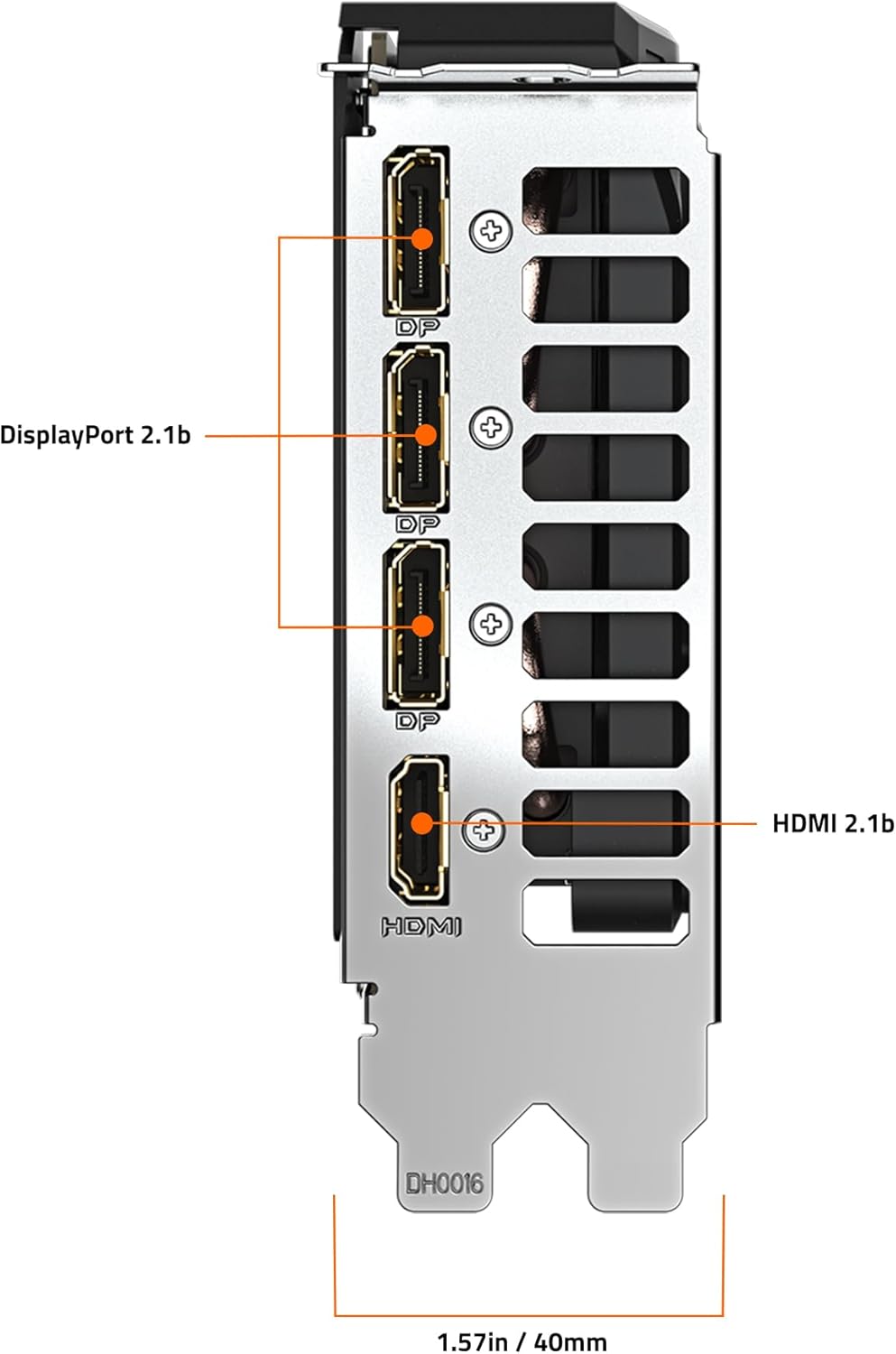
Obrázek 3: Zadní view of the GIGABYTE GeForce RTX 5060 WINDFORCE MAX OC 8G Graphics Card, highlighting the DisplayPort and HDMI output connectors.
5.2 Softwarové nástroje
Utilize GIGABYTE and NVIDIA software for enhanced control and customization:
- Řídicí centrum GIGABYTE: Download from the GIGABYTE website to monitor GPU status, adjust fan speeds, and customize RGB lighting (if applicable).
- Ovládací panel NVIDIA: Access advanced display settings, manage 3D settings, and configure features like DLSS and Ray Tracing.
6. Údržba
6.1 Čištění
Regular cleaning helps maintain optimal performance and extends the lifespan of your graphics card.
- Vypnout: Před čištěním vždy vypněte počítač a odpojte jej od zdroje napájení.
- Odstranění prachu: Use compressed air to gently blow dust from the fans, heatsink fins, and other components. Hold the fans in place to prevent over-spinning.
- Čištění povrchu: Lehce používejte měkký hadřík, který nepouští vlákna dampened with isopropyl alcohol to clean the exterior surfaces of the card. Avoid harsh chemicals.
6.2 Aktualizace ovladačů
Keep your graphics drivers updated to ensure compatibility with the latest games and applications, and to benefit from performance improvements and bug fixes.
- Pravidelně kontrolujte GIGABYTE nebo NVIDIA website for new driver releases.
- Follow the provided instructions for driver installation.
7. Řešení problémů
Pokud narazíte na problémy s grafickou kartou, podívejte se na následující běžné problémy a jejich řešení:
| Problém | Možná příčina | Řešení |
|---|---|---|
| Žádné zobrazení na monitoru | Incorrect cable connection, loose card, power issue, driver problem. | Ensure display cables are securely connected. Re-seat the graphics card. Verify power connectors are attached. Reinstall or update drivers. |
| Nízký výkon ve hrách/aplikacích | Outdated drivers, incorrect settings, insufficient power. | Update graphics drivers. Adjust in-game graphics settings. Ensure adequate power supply. Check for background applications consuming resources. |
| Přehřívání nebo hlasitý hluk ventilátoru | Dust accumulation, poor case airflow, high load. | Clean fans and heatsink. Improve case airflow. Monitor temperatures with GIGABYTE Control Center. Adjust fan curves if necessary. |
| Nestabilita nebo pády systému | Driver conflicts, overheating, faulty hardware. | Perform a clean driver installation. Monitor temperatures. Check other system components. |
8. Specifikace
| Funkce | Detail |
|---|---|
| Jednotka grafického zpracování | NVIDIA GeForce RTX 5060 (Blackwell architecture) |
| Video paměť | 8GB GDDR7 |
| Rozhraní paměti | 128bitový |
| Rychlost paměti | 28000 MHz |
| Rychlost hodin GPU | 2512 MHz (zvýšený takt) |
| PCI Express | PCIe 5.0 x8 |
| Chladicí systém | WINDFORCE cooling system with Hawk fan |
| Video výstupní rozhraní | 3x DisplayPort 2.1, 1x HDMI 2.1 |
| Maximální rozlišení obrazovky | 3840x2160 |
| Napájecí konektor | 1x 8-pin |
| Doporučený PSU | 450 W nebo vyšší |
| Rozměry (DxŠxV) | 7.83 x 4.57 x 1.57 palce (199 x 116 x 40 mm) |
| Hmotnost položky | 1.1 libry |
| Klíčové vlastnosti | DLSS 4, AI Cores, 4th Gen Ray Tracing Cores, Reinforced structure, Server-grade Thermal conductive gel |
9. Záruka a podpora
GIGABYTE products are covered by a limited warranty. For detailed warranty information, technical support, and service inquiries, please visit the official GIGABYTE support webmísto:
Podpora GIGABYTE: https://www.gigabyte.com/Support
Uschovejte si prosím doklad o koupi pro uplatnění záruky.


